
Thrustmaster T-Flight Hotas X USB Flight Sim Stick & Throttle
4.5Editor score
Detachable throttle for flexibility
Fully programmable flight controls
Precision joystick with resistance dial
Discover the top Mac game flight controllers ranked for precision and immersion. This guide compares ten essential simulation tools for Mac pilots today.
Finding the right flight controller for your Mac can transform a simple gaming session into a fully immersive aviation experience. These devices range from basic joysticks to complex yoke systems that mimic real aircraft controls. Choosing the best one depends on your specific sim titles and hardware setup requirements.
We have evaluated ten top-rated products based on build quality, compatibility with macOS, and feature sets. Each entry offers unique advantages whether you prefer military combat sims or civil aviation training. Our analysis focuses on how well these controllers integrate with popular flight simulation software on Apple computers.
Every product in this list showcases detailed specifications and real user feedback to help you decide. Prices fluctuate regularly so checking current listings is essential before purchasing. Use this guide to find the perfect controller that matches your budget and simulation goals for maximum enjoyment.
4.5Editor score

4.4Editor score

4.0Editor score
This table provides a side-by-side overview of the ten best flight controllers available for Mac users. Compare key features like programmable controls, mounting options, and build materials to find the perfect fit for your virtual cockpit setup.






The Honeycomb Alpha Flight Controls Yoke stands out as a premium option for Mac users seeking realism. With a 4.4 rating from users, it delivers professional-grade control through its dual linear ball bearings and smooth self-centering mechanism. This device is ideal for simmers who demand accuracy.
We may earn a commission when you buy through this link, at no additional cost to you.
Its solid steel shaft ensures durability while the included switch panel adds essential cockpit functionality. The left and right handles offer multiple switches and buttons allowing for extensive customization. Pilots and students alike appreciate how closely it mimics real aircraft yokes.
While the price reflects its high-end positioning, the performance justifies the cost for serious enthusiasts. The only minor drawback is the desk space required for clamping or the suction pad solution. However, the robust build means this controller will last through countless flight hours.
If you want a Mac-compatible controller that feels authentic, this is the top recommendation. It balances premium materials with intuitive design. You should choose this if realism and precision are your primary goals over budget constraints.
The dampened self-centering feature ensures the yoke returns to neutral smoothly without dead zones, enhancing control during precise maneuvers.
You can use the included heavy-duty clamps or the large Micro-Suction Pad for a clamp-free setup on thicker tabletops.
We may earn a commission when you buy through this link, at no additional cost to you.
The Thrustmaster T-Flight Hotas X offers incredible value with a high 4.5 user rating. It features a detachable throttle and a fully programmable joystick that adapts well to different simulation needs. Mac users find it works reliably via standard USB connections.
We may earn a commission when you buy through this link, at no additional cost to you.
Its ergonomic design allows for hours of comfortable flying thanks to the wide hand rest and real-size throttle control. The adjustable resistance dial lets you tune the tension to match your preferred stick feel. This flexibility makes it suitable for both beginners and seasoned pilots.
While it lacks dedicated Mac software, the plug and play functionality ensures you can start flying immediately. The weighted base adds stability during intense maneuvers. Some users may prefer more robust materials but the price point makes this a solid entry-level choice.
For those on a budget, this HOTAS setup provides an immersive experience without breaking the bank. It is particularly useful for casual gamers wanting to upgrade from a keyboard and mouse. Prioritize this pick if affordability and ease of use are critical for you.
Separating the throttle from the joystick allows you to create an ideal cockpit configuration or keep it compact for smaller spaces.
You can fine tune stick tension to your liking ensuring pinpoint accuracy whether flying civilian routes or military combat.
We may earn a commission when you buy through this link, at no additional cost to you.
The Logitech G X56 is a powerhouse for Mac pilots who demand maximum customization. With over 189 programmable controls and Hall-effect sensors, it offers military-grade precision for flight sims. RGB backlighting adds a visual touch to your cockpit setup.
We may earn a commission when you buy through this link, at no additional cost to you.
Its adjustable 4-spring system allows you to change the force feel instantly mimicking different aircraft types. The twin throttles and mini analog stick provide intuitive control over pitch roll and weapons systems. This makes it ideal for VR and complex VR environments.
While the price is steep, the performance and flexibility make it a top-tier option for serious enthusiasts. The need for two USB ports and ample desk space might be a constraint for some. However, the accuracy and durability are unmatched in this class.
If you want the ultimate HOTAS experience and have the budget, this controller delivers unparalleled immersion. It is designed for those who fly combat sims or complex civil aviation procedures. Choose this if premium features and precision are your main priorities.
Adjust the stick force to match different aircraft needs ensuring precise control during maneuvers and takeoff sequences.
Control pitch roll and weapons separately with the dedicated mini analog stick for enhanced gameplay control.
We may earn a commission when you buy through this link, at no additional cost to you.
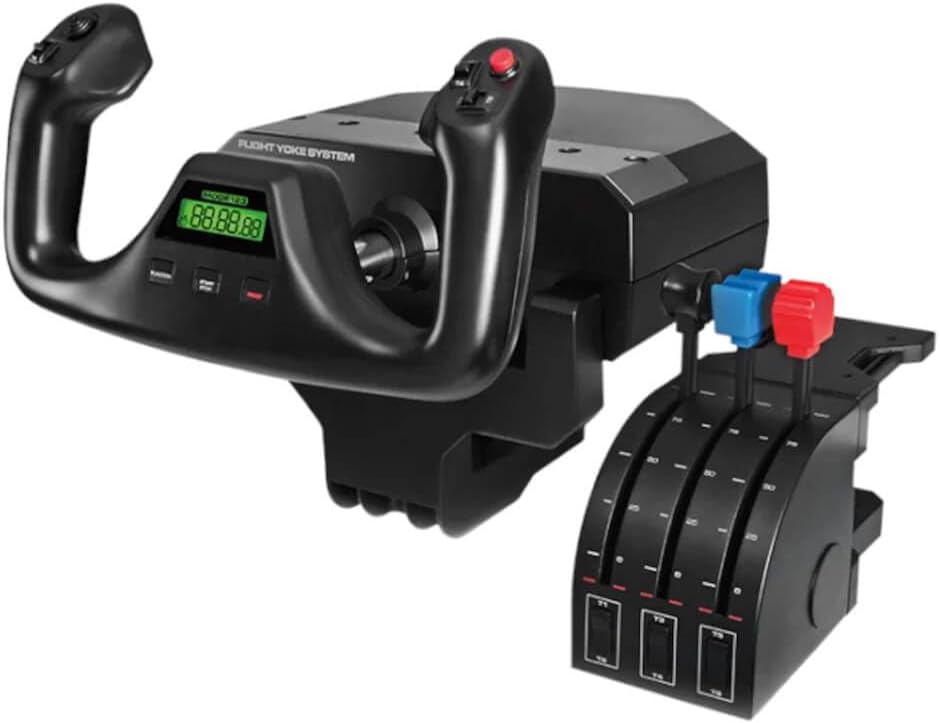
The Logitech G PRO Flight Yoke System is designed for both new and experienced pilots. With 54 programmable controls and a stainless steel shaft, it provides accurate inputs for virtual aircraft. Mac users appreciate the robust clamping force and ergonomic design.
We may earn a commission when you buy through this link, at no additional cost to you.
Its 14 button controls and 3-position mode switch offer versatility for various flight functions. The included throttle quadrant adds necessary depth for realistic flight management. The integrated USB hub helps manage cable clutter on your desk.
Some users note that additional software is required for specific simulator compatibility. The lighting options are minimal compared to other modern controllers. Despite this, the durability and smooth control make it a reliable choice for regular simulation sessions.
This yoke is an excellent middle ground for those wanting professional features without extreme cost. It suits civil aviation enthusiasts particularly well. You should consider it if you value stability and straightforward functionality in your cockpit setup.
The shaft ensures smooth and accurate control inputs enhancing realism during flight simulation maneuvers.
Two desk clamps provide mounting flexibility ensuring your controls stay secure during intense flying sessions.
We may earn a commission when you buy through this link, at no additional cost to you.
The Turtle Beach VelocityOne Flightstick combines precision with a compact form factor ideal for smaller setups. Featuring non-contact main axes and an OLED display, it offers a modern take on flight controls. Mac users benefit from the versatile USB connectivity.
We may earn a commission when you buy through this link, at no additional cost to you.
With 27 programmable buttons and a touchpad, this controller supports both fighters and airliners seamlessly. The ambient lighting enhances immersion while the configurable wheel simplifies flight setup. Its universal design ensures cross-platform usability beyond just PC.
While it excels in portability the throttle may lack the travel of larger units. Without included mounting hardware it rests on the desk surface. This might limit realism for those seeking a full cockpit experience. Still it remains a versatile option.
For users needing a portable yet high-tech controller this stick is a smart choice. It bridges the gap between gaming and simulation well. Choose this if you want a lightweight setup that still offers rich customization options for your flights.
Non-contact main axes ensure high precision and longevity without mechanical wear during frequent use.
View real-time flight data directly on the OLED screen to monitor performance tuning quickly.
We may earn a commission when you buy through this link, at no additional cost to you.
The Logitech G Saitek X52 Pro offers an iconic design with its LCD display for custom information. It features a progressive throttle with resistance adjustment and no-contact technology for smoother axes. Mac users can utilize the smart software for deep programming.
We may earn a commission when you buy through this link, at no additional cost to you.
Its 5-position handle adjustment accommodates various hand sizes ensuring comfort during long sessions. The constant spring force improves control consistency. However the design is older and some users may find it less modern than newer models.
With a lower rating of 3.9, some users report durability concerns over time. The lack of advanced features like RGB lighting may detract from immersion. But for those who value the classic HOTAS feel and LCD utility, it remains a strong contender.
This model fits gamers looking for a traditional stick with functional displays. If you prefer proven layouts over flashy additions, consider this option. Ensure compatibility with your current sim versions before purchasing to avoid software issues.
Customize the LCD to show flight data enhancing gameplay through intuitive visual feedback.
The progressive throttle with resistance and detents allows precise control for afterburner and idle settings.
We may earn a commission when you buy through this link, at no additional cost to you.
This bundle combines the Logitech G PRO Flight Yoke System with Pro Flight Rudder Pedals for full control. With a high 4.6 rating, it offers smooth self-centering rudder pedals and realistic yoke inputs. Mac users gain comprehensive control for realistic simulation.
We may earn a commission when you buy through this link, at no additional cost to you.
The differential toe brakes provide full control during runway operations while the foot rests adjust for various sizes. The yoke provides 54 programmable controls allowing for extensive setup. This bundle is perfect for those upgrading from basic setups.
It requires both desk and floor space which might be a constraint in small rooms. Managing multiple cables can be challenging without proper organization. Despite this the immersion gained is substantial compared to standalone units.
If you want a complete package without buying separately this bundle is ideal. It ensures compatibility and consistent performance across all axes. Choose this if you prioritize realism and have the space for a full setup.
The rudder pedals add another layer of control making your simulation setup more realistic and complete.
Adjustable foot rests accommodate wide size ranges ensuring comfort for all users during long flights.
We may earn a commission when you buy through this link, at no additional cost to you.
The Turtle Beach VelocityOne H.O.T.A.S offers extensive inputs with 73 programmable options and 15 axes. Hall-effect sensors ensure high-resolution control while the full-color display provides real-time flight data. Mac users may find it feature-rich but software dependent.
We may earn a commission when you buy through this link, at no additional cost to you.
Customizable RGB lighting and adjustable resistance allow for tailored immersion. The VelocityOne Flight Hangar app enables deep customization. However the lower rating suggests some reliability concerns in real-world usage. Potential buyers should check compatibility details carefully.
Users have noted issues with software stability and connection consistency. While the hardware is advanced, the experience may vary by system. If you are willing to troubleshoot, the features offer potential for high-end setups.
This controller is best for advanced users who can manage potential configuration hurdles. If you want a high input count and color feedback, it has promise. Consider alternatives if you prioritize plug-and-play simplicity.
The display provides real-time flight data and performance tuning options directly on the controller.
This app enables full customization and personalized settings for your specific flight needs.
We may earn a commission when you buy through this link, at no additional cost to you.
This Logitech G PRO Flight Yoke System offers configurable throttle knobs and a separate axis lever for precision. With 75 programmable controls and a 4.4 rating, it provides a professional experience. Mac users benefit from the integrated USB hub for connectivity.
We may earn a commission when you buy through this link, at no additional cost to you.
The stainless steel shaft ensures durable smooth controls while the 2-position clamp offers stability. The 3-position mode switch adds flexibility for different flight modes. This setup is versatile for civil and military simulation enthusiasts alike.
Initial setup can be complex due to the number of controls and USB requirements. However, once configured it delivers a high-fidelity experience. It is a solid choice for those who want robust features without going premium.
Choose this if you need a detailed throttle quadrant and high programmability. It suits dedicated home cockpits. Ensure your desk has enough ports and space before making this purchase.
Knobs allow precise throttle adjustments adding realism to your engine management controls.
A separate three-axis lever throttle provides more control options for various flight scenarios.
We may earn a commission when you buy through this link, at no additional cost to you.
This renewed Logitech G Saitek PRO Flight Yoke System offers a cost-effective way to get a professional setup. With a 4.2 rating, it provides stainless steel precision and a digital chronograph for IFR procedures. Mac users appreciate the included software.
We may earn a commission when you buy through this link, at no additional cost to you.
The renewed condition makes it accessible for those watching their budget. It includes the SST software for customizability. However buying renewed means checking the return policy carefully before purchase. Ensure all original parts are present upon delivery.
Users note that the build quality remains robust despite being refurbished. The 14 buttons and mode switch ensure flexibility for various flight scenarios. It is a practical option for students or hobbyists wanting realism at a lower price.
If you want to save money without sacrificing core features this renewed set is a smart pick. Just verify the condition and warranty terms. Prioritize this if budget is a key factor in your decision making.
Perfect for brushing up on IFR procedures including holds and instrument approaches accurately.
Saitek's Smart Technology software allows complete customizability of control configuration.
We may earn a commission when you buy through this link, at no additional cost to you.
Selecting the right flight controller for Mac involves evaluating compatibility, build quality, and feature sets. This guide breaks down the key factors to consider before making your purchase.
Ensure the controller supports macOS natively or via driverless USB connections. Some products may require specific software that works best on Windows which can limit functionality on Mac.
Always check system requirements and read user reviews from other Mac users to confirm seamless integration.
Look for controllers with stainless steel shafts or robust plastic housings that withstand regular use. Premium models often use metal components for a realistic feel and long-term durability.
Higher quality builds ensure your controls remain accurate over time without wear and tear.
The number of buttons and axes determines how deeply you can customize your setup. Aim for controllers with at least 10 programmable buttons and multiple axes for full flight management.
More programmable inputs allow you to map complex aircraft systems without relying on on-screen menus.
Comfortable hand rests and adjustable grips reduce fatigue during long simulation sessions. Consider the weight of the controller and how it feels during extended use.
Ergonomic designs ensure a natural hand position so you can focus on flying rather than adjusting your grip.
Decide whether you want a clamped unit or a free-standing model with a weighted base. Clamps offer stability but require a suitable desk edge while bases save table space.
Choose a mounting solution that fits your available space and setup style for optimal realism.
Features like OLED displays RGB lighting, or integrated switches can enhance immersion. Consider if you want these extras or prefer a minimal design for pure functionality.
Extra features often add cost so prioritize them based on your personal flying needs and setup.
Budget-friendly options may lack advanced sensors but still deliver a solid experience. Higher price points usually offer better materials and more precision.
Balance your budget with your desired level of realism to find the best value for your money.
Good software allows for easy mapping and profile management across different games. Check if the manufacturer provides Mac-compatible software or supports third-party tools.
Strong software support makes setup easier and ensures your settings are saved across sessions.
Always connect your controller via USB and allow macOS to recognize it before launching any simulation software. Some models may need drivers or software to map buttons correctly so install those first if required.
Keep your controller clean by dusting the surface regularly with a soft dry cloth. Avoid liquids and store it in a dry place to prevent corrosion on metal parts like shafts and clamps.
Check the clamps or suction pads regularly to ensure they remain tight and secure. Over time these mounting mechanisms may loosen so tighten them as needed to maintain stability during intense maneuvers.
Most of the listed products support macOS via standard USB connections though some may need additional software for full features. Always verify system requirements on the product page before purchasing to ensure compatibility.
Flight simulators like Microsoft Flight Simulator X-Plane, and combat sims benefit most from these controls. They are designed to provide precise input for aircraft systems enhancing realism in aviation games.
These controllers require a computer to run simulation software. They are not standalone devices so you need a PC or Mac with the compatible flight simulation program installed to function.
None of the featured controllers use batteries as they are powered directly through USB connections. This ensures they stay powered during use without needing battery replacements or charging.
Some models offer plug and play functionality on Mac while others recommend optional software for mapping controls. Check the product details to see if extra steps are required for your specific model.
With proper care, a flight controller can last for many years depending on usage frequency. Higher quality models with metal parts often endure longer than budget units made mostly of plastic.
Yes, most models come with clamps or suction pads for desk mounting. Ensure your desk edge is suitable for clamping or use the base options if you prefer not to clamp the unit.
This guide presented ten top flight controllers tailored for Mac users ranging from budget picks to premium setups. Each option offers unique features to match different flying styles and cockpit requirements.
Prioritize build quality, control count, and Mac compatibility to ensure you get the best simulation experience. Consider your desk space and whether you prefer a yoke or HOTAS style.
Remember that prices and availability change frequently so check current listings before making your purchase. With the right controller you can transform your Mac into a powerful virtual cockpit.