
Zalman GigaMax 700W
4.4Editor score
80 Plus Bronze Certified
Active PFC System
Five Year Warranty
This guide compares the top 700W ATX power supplies for efficiency, reliability, and features to help you choose the right PSU for your build.
Finding the right power supply is crucial for system stability. A 700W ATX unit offers enough headroom for mid to high-end gaming rigs without overspending on excess capacity or unnecessary features.
We evaluated ten top-rated models based on efficiency ratings, protection features, build quality, and compatibility with modern standards like ATX 3.1 to ensure you get reliable performance.
Each selection highlights key strengths and trade-offs so you can match the unit to your specific needs. Prices fluctuate often so please check current listings before making your final purchase decision.
4.4Editor score

4.6Editor score

4.6Editor score
The following table provides a side-by-side overview of all ten selected power supplies. Compare their efficiency certifications, warranty terms, and key features to find the unit that best fits your system requirements.

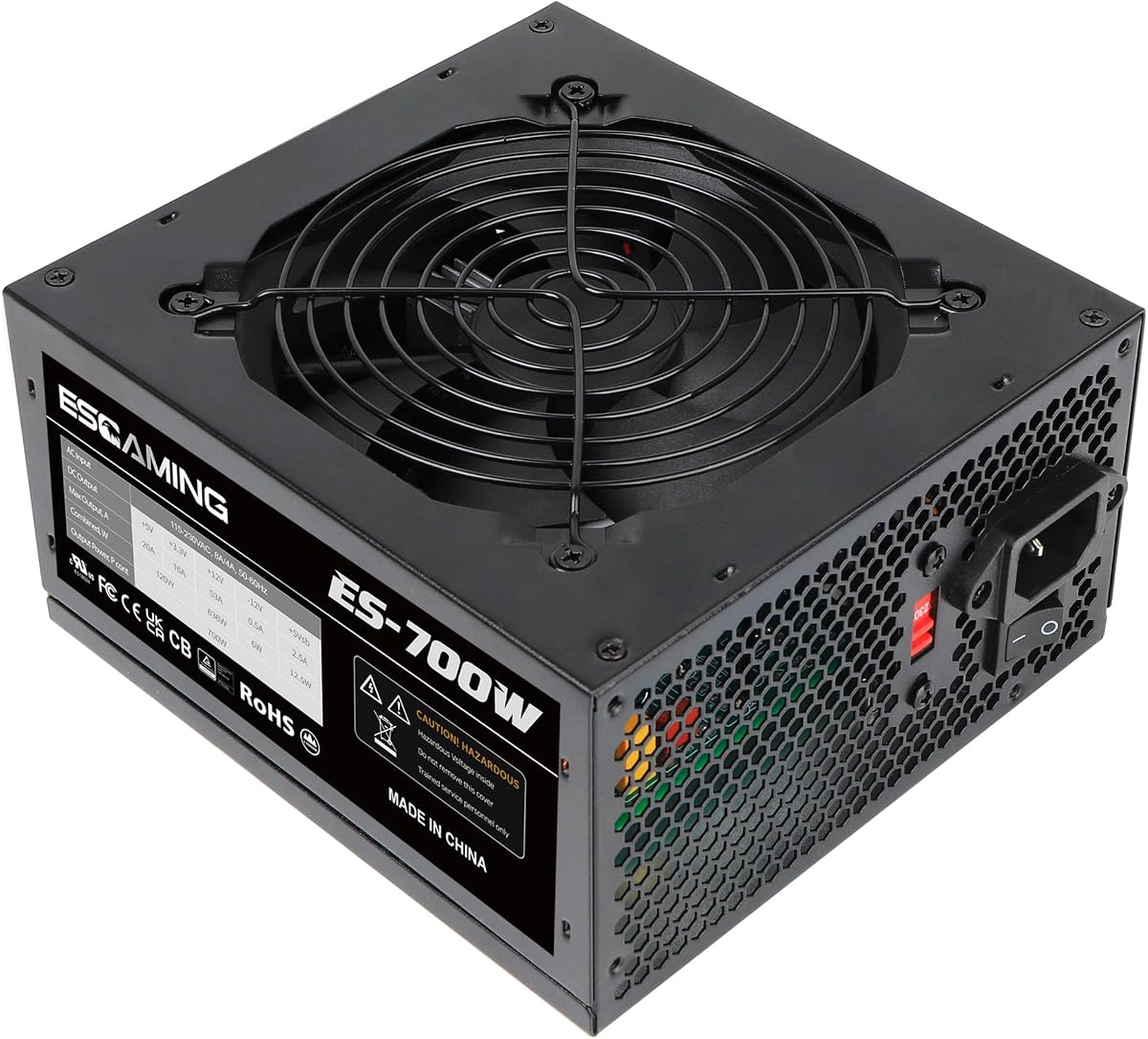


The Zalman GigaMax 700W stands out as a solid entry-level option for budget-conscious builders. It carries an 80 Plus Bronze certification and features an active PFC system for stable energy output.
We may earn a commission when you buy through this link, at no additional cost to you.
Its key strengths include a comprehensive protection suite covering OCP, OVP, and SCP among others. The all black sleeved cables help with cable management even in a non modular design.
Trade-offs include lower efficiency compared to gold units and a lack of modularity which can make airflow management trickier in small cases.
Buy this if you need a reliable power source for a mid-range build without breaking the bank. It offers excellent value for the price.
80 Plus Bronze certification ensures efficient energy use reducing heat output during extended gaming sessions.
Multiple safety layers protect your components from voltage spikes and current overloads ensuring long term reliability.
We may earn a commission when you buy through this link, at no additional cost to you.
The Smart W3 Series offers forward compatibility with the Intel ATX v3.1 specification making it a future proof choice. It delivers stable power through a DC to DC high amperage design.
We may earn a commission when you buy through this link, at no additional cost to you.
Key features include low profile flat black cables that simplify routing inside standard chassis. The unit is backed by industrial grade protection and a five year warranty.
Users might find the brand less familiar than major players and cable management is still non modular which can limit airflow options.
This unit is ideal for builders who want new spec support without paying premium prices. It balances modern requirements with solid construction.
ATX v3.1 spec support ensures compatibility with upcoming CPUs and GPUs requiring updated power standards.
DC to DC design improves voltage stability reducing ripple and noise for better component performance.
We may earn a commission when you buy through this link, at no additional cost to you.
This non modular unit focuses on providing essential power at the lowest possible price point. It includes auto thermally controlled fan technology to reduce noise when loads are light.
We may earn a commission when you buy through this link, at no additional cost to you.
Features include split connectors allowing flexibility for CPU and GPU cabling. A global voltage switch enables use in different regions without needing a transformer.
The main trade off is a shorter warranty period and basic protection features compared to higher tier units. Quality control may vary slightly.
Buy this for basic office builds or secondary systems where budget is the primary constraint. It gets the job done for entry level needs.
The 115 to 220V switch makes this PSU suitable for international users needing flexible power input options.
Split 8 pin connectors allow you to use 4 plus 4 pins for older motherboards saving space in cable bundles.
We may earn a commission when you buy through this link, at no additional cost to you.
The MSI MAG A750GL PCIE5 earns Editor's Choice with its fully modular design and native support for ATX 3.1 standards. It delivers Gold efficiency for better energy conversion and less heat.
We may earn a commission when you buy through this link, at no additional cost to you.
Its native Dual-Color 12V-2×6 cable simplifies GPU connections for modern high end cards. The ten year warranty signals strong manufacturer confidence in durability.
Premium features come at a slightly higher cost compared to Bronze models. The compact size might be tricky for larger cases without proper planning.
This is the perfect choice for gamers building new rigs who want to future proof their power delivery. It balances performance and reliability well.
The native 12V-2×6 cable ensures safe and clean GPU connections without needing bulky adapters or extension cables.
A ten year warranty covers defects and failures giving you peace of mind for years down the line.
We may earn a commission when you buy through this link, at no additional cost to you.
The CORSAIR RM750e focuses on delivering whisper quiet performance with its rifle bearing fan curve and modular design. It meets Intel ATX 3.1 standards ensuring modern power delivery compliance.
We may earn a commission when you buy through this link, at no additional cost to you.
Its 105C rated capacitors ensure steady reliable power even under load. Modern standby compatibility means faster wake from sleep times for daily users.
While it lacks a native 12V-2×6 connector it still supports the standard through adapters. The price is higher than entry level options.
Choose this if you value silent operation and brand reputation. It is an excellent pick for media rooms and quiet office PCs.
The specially calculated fan curve keeps noise down even during full load gaming sessions.
High temperature capacitors deliver consistent electrical performance and better longevity over time.
We may earn a commission when you buy through this link, at no additional cost to you.
The ASRock PRO 750G offers 90 percent efficiency and ATX 3.1 compliance at a competitive price point. Its native 12V-2×6 connector supports next generation GPUs directly.
We may earn a commission when you buy through this link, at no additional cost to you.
Key benefits include a low noise fan for quieter operation and standard ATX form factor compatibility with most cases. It handles mid to high end system configurations well.
The main drawback is a shorter three year warranty compared to competitors offering ten years. Support might be more limited depending on region.
Buy this if you want Gold efficiency and future ready connectors without overspending. It is great for balanced gaming builds.
90 percent efficiency reduces wasted energy and lowers electricity bills over the long term.
ATX 3.1 compliance ensures you can use new graphics cards without needing extra adapters.
We may earn a commission when you buy through this link, at no additional cost to you.
The Thermaltake Toughpower GX1 delivers consistent power through a single +12V rail designed for GPU heavy loads. It features Gold efficiency and an ultra quiet fan for silent operation.
We may earn a commission when you buy through this link, at no additional cost to you.
Strengths include support for SLI and Crossfire setups along with comprehensive industry grade protections. The DC to DC design helps maintain stable voltage under dynamic loads.
It is a non modular unit which means cable management will be more cluttered than modular options. Also it lacks ATX 3.1 support.
Choose this if you already have compatible hardware and want reliable single rail power. It remains a strong option for existing builds.
Single rail design provides consistent power to all components ideal for high draw GPU configurations.
Gold certification and silent fan ensure low noise and efficient energy use.
We may earn a commission when you buy through this link, at no additional cost to you.
The be quiet! Pure Power 13 M represents premium quality with semi passive cooling and up to 94.3 percent efficiency. Its modular design makes it easy to install and manage.
We may earn a commission when you buy through this link, at no additional cost to you.
Key features include native 12V-2×6 connector and massive 12V rail for stable delivery even during GPU power excursions. The fan turns off completely under low load.
Premium pricing may deter budget builders. The zero RPM mode can cause dust accumulation if the case isn't clean.
This is the ultimate choice for those who want the quietest and most efficient system possible. It is perfect for professional workstations.
The fan stops spinning at low loads allowing truly silent operation during light tasks.
LLC topology provides best in class voltage regulation for stable and safe power delivery.
We may earn a commission when you buy through this link, at no additional cost to you.
The Rosewill VMG 750W offers full modularity and ATX 3.1 compatibility with Japanese electrolytic capacitors for reliability. It includes a dedicated PCIe 5.1 cable for new GPUs.
We may earn a commission when you buy through this link, at no additional cost to you.
Its compact chassis saves space in small form factor builds. The six protection suite ensures complete system security against electrical faults.
Performance is solid but acoustic tuning is average compared to top tier premium models. Brand awareness is lower than major competitors.
Buy this if you need full modularity on a budget. It is a great option for compact gaming PC builds.
100 percent Japanese electrolytic capacitors provide stable voltage and better longevity.
Smaller chassis enables flexible integration into SFF cases without sacrificing power.
We may earn a commission when you buy through this link, at no additional cost to you.
The Thermaltake Toughpower GT features fully modular design with Smart Zero fan technology adjusting speed based on load. It supports ATX 3.1 with native connectors for modern GPUs.
We may earn a commission when you buy through this link, at no additional cost to you.
Its high amperage single +12V rail ensures reliable delivery for high end gaming and workstations. Efficiency reaches 90 percent reducing heat output.
Pricing is mid range which may feel steep for budget builders. Warranty is five years which is standard but not best in class.
This unit is ideal for gamers needing a balance of modularity and future compatibility. It handles modern components with ease.
Smart Zero fan technology reduces noise during light loads keeping your system quiet.
Fully modular cables improve airflow and make cable management much easier for clean builds.
We may earn a commission when you buy through this link, at no additional cost to you.
Selecting the right PSU involves more than just matching wattage. Consider efficiency, modularity, and future compatibility to ensure your system runs smoothly.
Efficiency ratings like 80 Plus Bronze Gold or Platinum indicate how well the PSU converts wall power to usable DC power. Higher efficiency means less heat and energy waste.
Look for at least Bronze certification for cost effective builds and Gold for long term savings and quieter operation.
Modular PSUs allow you to connect only the cables you need. Non modular units come with all cables attached which can clutter your case.
Choose fully modular for better airflow and easier cable management especially in smaller chassis.
Ensure the PSU has the right connectors for your GPU and motherboard. Newer ATX 3.1 units offer native 12V-2×6 connectors for modern graphics cards.
Verify the CPU and GPU pin counts match your components to avoid needing adapters.
Quality PSUs include protections like OCP OVP and SCP to safeguard components from electrical faults and surges.
Always select a unit that offers a full suite of protections for system safety.
Warranty length often reflects build quality and manufacturer confidence. Premium units often offer ten year coverage while budget units may offer three.
Prioritize brands with strong track records and longer warranties for peace of mind.
The fan size and bearing type determine how quiet your PSU runs. Larger fans can move more air at lower speeds reducing noise.
Look for FDB bearings or semi passive cooling for silent operation.
Single +12V rails provide consistent power to all components while multiple rails offer more granular safety limits.
Single rail is generally preferred for high end GPUs needing large amounts of power.
Standard ATX PSUs fit most cases but compact builds may require smaller SFX models. Check your case specifications for clearance.
Measure your case depth to ensure the PSU fits without blocking other cables or components.
Install the PSU with the fan facing down if your case has intake grills at the bottom. This helps draw cool air directly from the floor.
Route all cables neatly using zip ties to improve airflow and reduce dust accumulation. Avoid bending connectors sharply which can damage internal wiring.
Clean dust from the PSU fan regularly using compressed air. Keeping the intake vents clear ensures optimal cooling and prevents overheating.
Yes 700W is generally sufficient for most mid to high-end gaming configurations. It supports single GPU setups easily and can handle some dual GPU or CPU upgrades without needing a replacement.
The main difference is efficiency. Bronze units convert about 85 percent of power while Gold units reach around 90 percent. This results in less heat and lower electricity costs for Gold units.
Modular PSUs are not strictly necessary but they offer better cable management. If you want a cleaner look and better airflow in your case modular is a highly recommended feature.
Check the product description for ATX 3.1 certification. Compatible units will mention native 12V-2×6 or PCIe 5.1 connectors explicitly in their specs or marketing material.
Many modern PSUs have semi passive cooling that stops the fan during low load to reduce noise. It will start spinning again when demand increases or during high load tasks.
It is generally recommended to match or exceed the manufacturer's requirements. Using a lower wattage unit may cause instability or throttling under peak loads so a higher wattage PSU is safer.
We explored ten powerful options ranging from budget-friendly entry units to premium fully modular builds. The MSI MAG A750GL PCIE5 and be quiet! Pure Power 13 M lead the pack for modern features and efficiency.
Prioritize efficiency and protection features to ensure longevity and safety. If you plan on upgrading later look for ATX 3.1 support to future proof your investment.
Prices change frequently so check current listings before you buy. With the right PSU your system will run stable and efficient for years to come.