
Acer Gadget Auto Face Tracking Tripod
4.6Editor score
No app required for tracking
Detachable ring light included
Quadpod design for stability
This guide compares the top AI gimbals with tripods for 2026, highlighting stabilization, tracking, and battery life for creators.
Finding the right support system for your smartphone can transform your content creation journey significantly. Modern devices now integrate advanced artificial intelligence to track subjects automatically while maintaining perfect stability during motion. These tools are essential for vloggers, streamers, and anyone looking to produce professional-quality video without heavy equipment.
We have evaluated the leading models available in the market based on stabilization performance, tracking accuracy, and ease of use. Our analysis focuses on how well each unit handles movement, integrates with popular apps, and offers versatile mounting options like built-in tripods. This ensures you get a device that grows with your creative needs.
Each selection below showcases unique strengths tailored to different shooting scenarios and budget considerations. You will see detailed breakdowns of features, pros, and cons to help you make an informed decision. Please note that availability and specific offers may change, so checking current listings is always recommended before purchasing.
4.6Editor score

4.4Editor score

4.2Editor score
Below is a side-by-side comparison of all ten selected models to help you quickly identify key specifications and differences.




The Insta360 Flow 2 Pro AI Tracker Bundle White stands out as a top-tier solution for creators who demand precision and versatility. Rated highly for its unique capabilities, this gimbal introduces industry-first features that push the boundaries of what smartphone stabilization can achieve.
We may earn a commission when you buy through this link, at no additional cost to you.
Its standout quality is the integration of Apple DockKit, allowing seamless tracking across over 200 iOS apps. This means your subject stays in frame whether you are on a video call or recording a vlog. The active zoom tracking allows you to follow fast-moving subjects even at 15x magnification, which is rare in this category.
While the performance is exceptional, the trade-off lies in the cost and compatibility constraints for the zoom feature. It works best with Pro and Pro Max models of iPhone 12 through 16. However, for serious creators, the ability to track multi-person groups and animals ensures you never miss a moment.
If you are looking for a comprehensive tool that combines stabilization, tracking, and lighting in one package, this is the ideal choice. It is perfect for those who want professional-grade results without carrying extra gear. We recommend it for anyone serious about mobile filmmaking.
This feature allows precise tracking of fast movement even at up to 15x zoom, making it perfect for sports and performances.
As the first gimbal series with Apple DockKit, it offers unparalleled tracking functionality across 200+ compatible iOS apps.
We may earn a commission when you buy through this link, at no additional cost to you.
The AOCHUAN Smart V3 is designed for those who need flexibility and range in their shooting setup. With a powerful AI tracking module and an impressive extension rod, it caters to outdoor enthusiasts and vloggers who need to capture wide angles effortlessly.
We may earn a commission when you buy through this link, at no additional cost to you.
Its key strength lies in the detachable remote controller that allows you to control the gimbal from a distance. This is excellent for group shots or when you want to frame yourself without holding the device. The built-in fill light ensures your subject is well-lit even in dim environments.
One trade-off is the weight due to the extension rod and remote components. It might be less portable than ultra-compact units. However, the stability provided by the 8.0 Intelligent Image Stabilization makes it worth the extra heft for dynamic videos.
If you need a solution that can handle both handheld and fixed shooting modes with ease, this is a strong contender. It is particularly useful for live streaming and outdoor sports where distance and light matter. It offers great value for its feature set.
Stand the gimbal on the ground and control selfies and videos from up to 32.81 feet away for flexible shooting.
The magnetic design includes an AI tracker and fill light for steady tracking and sharp images in any lighting.
We may earn a commission when you buy through this link, at no additional cost to you.
The Insta360 Flow 2 Pro Grey is a versatile choice for creators using either Android or iPhone devices. It offers universal compatibility that ensures smooth tracking across a wide range of platforms and apps without needing specific hardware locks.
We may earn a commission when you buy through this link, at no additional cost to you.
Its standout feature is the integrated professional lighting system which upgrades mobile filmmaking by ensuring your content is perfectly lit. This is crucial for live streams or videos in low-light conditions where natural light is insufficient. The 360 infinite pan tracking allows for immersive and dynamic scene capture.
While the performance is top-notch, the higher price point might be a consideration for budget-conscious buyers. Additionally, the variety of features like teleprompter and selfie mirror can take time to master. However, the all-in-one kit approach reduces the need for extra accessories.
For those seeking a portable stabilizer that enhances mobile filmmaking for all devices, this is an excellent investment. It is ideal for content creators who value flexibility and professional lighting. We recommend checking the compatibility with your specific phone model before purchase.
Experience unparalleled tracking across 200+ third-party apps for stable and smart tracking on Instagram and YouTube.
Upgrade your mobile filmmaking with the built-in fill light for pro-looking content even in challenging environments.
We may earn a commission when you buy through this link, at no additional cost to you.
The DJI Osmo Mobile 8 is a robust choice for those seeking reliable stabilization with advanced tracking capabilities. It combines tracking, audio reception, and lighting features into one compact unit to enhance your shooting experience significantly.
We may earn a commission when you buy through this link, at no additional cost to you.
Its key strength is the native tracking with audio reception which allows for sharper focus and better sound quality during recording. The built-in extension rod and tripod add flexibility without requiring extra gear, making it great for group selfies or wide travel shots.
One trade-off is the platform compatibility issues regarding the DJI Mimo app availability on Google Play. Users may need to visit the official website to get the latest version. Despite this, the ease of setup and one-tap editing make it a favorite for many creators.
If you are looking for a gimbal that balances comfort, portability, and professional features, this is a strong option. It is perfect for daily recording or vlogging. We recommend downloading the app directly from the DJI website for the best experience.
Combine tracking, audio reception, and lighting to stay sharply in focus, well-lit, and crystal clear.
Capture group selfies or wide travel shots with this DJI gimbal without needing extra gear or adapters.
We may earn a commission when you buy through this link, at no additional cost to you.
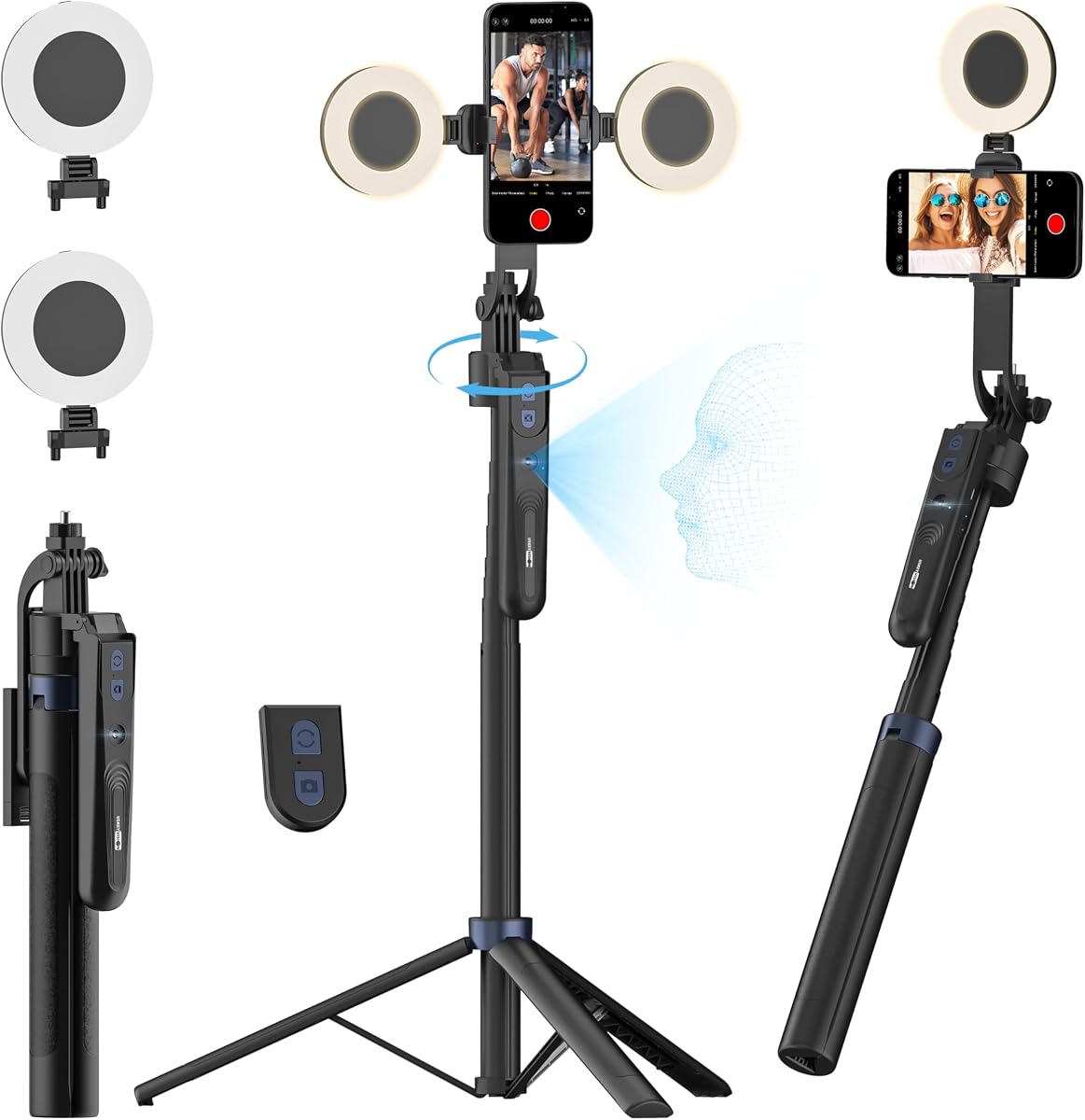
The Acer Gadget Auto Face Tracking Tripod is an exceptional budget-friendly option for creators who need reliable tracking without complex setup. It works without an app, making it incredibly easy to use right out of the box.
We may earn a commission when you buy through this link, at no additional cost to you.
Its key strength is the advanced gesture recognition that lets you start and pause recording with simple hand signals. The detachable mini ring light provides necessary lighting in dim settings, ensuring your content looks clear. The quad-foot design offers superior stability compared to traditional tripods.
While it lacks the advanced stabilization features of pricier gimbals, it is perfect for static or slow-moving shots. The working distance is optimized for close-up content which fits many use cases. It is a great tool for vloggers on a budget.
If you want a portable and easy-to-use tripod that keeps you centered, this is a great pick. It is highly portable and versatile for desktop or floor use. We recommend it for those who need simple and effective face tracking.
No app needed as the auto-tracking tripod instantly recognizes and follows your face or body perfectly.
Features advanced gesture recognition allowing one-click shooting for hands-free remote photography.
We may earn a commission when you buy through this link, at no additional cost to you.
The DJI Osmo Mobile 7P is designed for quick setup and seamless stability. Its magnetic design allows you to pair your phone and start filming instantly without complicated calibration steps.
We may earn a commission when you buy through this link, at no additional cost to you.
Its key strength is the Dual-Lens Enhanced Tracking which provides smarter and steadier tracking for close-up action. The multifunctional module packs intelligent tracking, microphone reception, and lighting into one unit. This makes it a versatile tool for creators on the go.
One trade-off is that the module adds to the bulk and cost. Also, app availability issues on Google Play might require downloading directly from the DJI website. Despite this, the 10-hour operating time ensures you can shoot for extended periods.
If you need a gimbal that offers cinema-quality stability with minimal effort, this is a strong choice. It is ideal for vloggers who value speed and ease of use. We recommend it for quick shoots and creative bursts.
Packs intelligent tracking, DJI Mic 2/DJI Mic Mini reception, and lighting features into one compact unit.
The two lenses on your phone team up for smarter, steadier tracking keeping fast action in focus.
We may earn a commission when you buy through this link, at no additional cost to you.
The USKEYVISION 70.9 Auto Face Tracking Tripod is a versatile tool for live streaming and photography. Its 3-in-1 design allows it to function as a desktop tripod, selfie stick, or floor stand.
We may earn a commission when you buy through this link, at no additional cost to you.
Its key strength is the AI camera technology that follows your face and body movements automatically. The dual detachable ring lights provide adjustable brightness and color temperature which is vital for indoor or low-light settings. This ensures your video is always clear and professional.
One trade-off is the weight when fully extended to 70.9 inches. It might be less convenient to carry compared to smaller models. However, the stability provided by the aluminum alloy design ensures rock-solid shots.
If you need a portable floor stand that also works as a desktop tripod for YouTube or TikTok, this is a great option. We recommend it for streamers who need flexible angles. Check compatibility with your phone width before purchasing.
Portables and flexible for photography with desktop tripod selfie stick and adjustable floor holder modes.
Adjustable face tracking works with most smartphones with widths from 2.56 to 3.86 inches.
We may earn a commission when you buy through this link, at no additional cost to you.
The DJI Osmo Mobile 8 with Mic Mini Transmitter bundle is perfect for creators who prioritize audio quality alongside video stability. It combines tracking, audio reception, and lighting into one compact unit.
We may earn a commission when you buy through this link, at no additional cost to you.
Its key strength is the integration of the Mic Mini Transmitter which ensures crystal clear audio during recording. The native tracking keeps your subject in focus and well-lit. The built-in extension rod and tripod add flexibility for various shots.
One trade-off is the higher price due to the included audio gear. Also, app availability issues on Google Play may require direct downloads. However, the long battery life and easy setup make it a worthwhile investment.
If you need a comprehensive tool for live streaming or vlogging with high-quality sound, this is a top choice. It is perfect for daily recording and events. We recommend it for those who want all-in-one convenience.
Level up your shots with a DJI gimbal that combines tracking, audio reception, and lighting.
The bundle includes the gimbal, Mic Mini Transmitter, and Multifunctional Module for complete setup.
We may earn a commission when you buy through this link, at no additional cost to you.
The Insta360 Flow 2 Plus is a smart phone gimbal that offers second-screen control for easier framing and shooting. It turns any phone into a remote, making it easier to preview and shoot.
We may earn a commission when you buy through this link, at no additional cost to you.
Its key strength is the unique capability to track animals and pets precisely. This is a huge plus for creators who want to document their pets' playful leaps. The built-in teleprompter helps with scripting and delivery during filming.
One trade-off is that active zoom tracking is limited to specific iPhone models. Also, the unit might be slightly bulkier than minimalistic models. However, the AI-powered editing tools in the app add value.
If you are a pet owner or a solo traveler looking for a complete content creation tool, this is a great pick. It is ideal for capturing lively stories. We recommend it for creators who want extra features.
Turn any phone into your remote with second-screen control to preview and shoot with ease.
Let the camera follow your pets wherever they go with AI tracking for dogs cats and even horses.
We may earn a commission when you buy through this link, at no additional cost to you.
The Insta360 Flow 2 Grey is a portable AI gimbal designed for travelers who need reliable stabilization. Its foldable design makes it easy to pack and carry everywhere you go.
We may earn a commission when you buy through this link, at no additional cost to you.
Its key strength is the gesture control that allows you to start or stop recording with a simple hand raise. This keeps your hands free and ensures smooth operation. The 10-hour battery life ensures you can film all day on a single charge.
One trade-off is that the standard bundle lacks some accessories like a teleprompter which is available in other versions. Also, the zoom tracking is limited to iPhone Pro models. However, the overall stability and ease of use are strong.
If you need a lightweight stabilizer that offers all day power, this is a smart choice. It is ideal for travelers who want seamless video capture. We recommend it for vloggers on the move.
No need to go back and forth to press the shutter button. Simply raise your hand to start or stop.
All essential tools in one AI phone gimbal with built-in tripod and selfie stick.
We may earn a commission when you buy through this link, at no additional cost to you.
Choosing the right AI gimbal with tripod requires considering key factors to ensure you get a device that meets your creative needs.
Stabilization is the core function of any gimbal. Look for 3-axis stabilization which eliminates shakes and ensures smooth footage even during movement. This is essential for professional-looking video quality.
Prioritize models with advanced stabilization algorithms that handle fast motion effectively.
AI tracking allows the gimbal to follow subjects automatically without manual input. Check if it supports multi-person or animal tracking depending on your use case. This feature is crucial for solo creators.
Ensure the tracking works across multiple apps for versatility in your workflow.
Long battery life ensures you can shoot for extended periods without interruption. Most high-end models offer around 10 hours of operation. This is vital for travel or event coverage.
Choose a model with quick charging or power bank support for continuous use.
A built-in tripod adds versatility by allowing hands-free shots. Check if it can extend to various heights for low or high angle shots. This reduces the need for extra gear.
Look for units that convert easily to selfie sticks for group photos.
Not all gimbals work with every phone. Check if the device supports your iPhone or Android model. Some models have specific requirements for active zoom or docking features.
Verify the weight limits to ensure your phone fits securely on the clamp.
Integrated lighting or ring lights can improve video quality in low-light conditions. Look for models with adjustable brightness or color temperatures. This adds value for vloggers and streamers.
Consider units that offer teleprompters or remote controls for easier operation.
Start by calibrating the gimbal to ensure balanced movement. Most models do this automatically when powered on, but following the manual steps helps prevent drift.
Use the built-in tripod for static shots like tutorials or interviews. Place it on a stable surface and adjust the height to match your eye level.
Store the gimbal in a protective case when not in use to prevent damage to the motors. Keep it away from moisture and extreme temperatures to maintain longevity.
Most AI gimbals have basic stabilization that works without an app, but advanced tracking features like face detection usually require installing the companion app. However, some models like the Acer Gadget offer app-free tracking for convenience.
Yes, many modern AI gimbals support both iPhone and Android devices. Models like the Insta360 Flow 2 Pro Grey offer universal compatibility. Always check the specs to ensure your phone fits within the weight and width limits.
Most high-quality gimbals offer around 10 hours of battery life on a single charge. This allows for all-day shooting sessions. Look for models that also support pass-through charging to power your phone while recording.
Yes, many of these models are designed for live streaming with features like native tracking and long battery life. They ensure your subject stays in frame while you move around. Look for ones with dedicated streaming app support.
To clean the gimbal motors, use a soft brush or compressed air to remove dust and debris. Avoid using liquids directly on the device. Regular cleaning helps maintain smooth operation and prevents wear and tear.
Some premium bundles include mic receivers or transmitters like the DJI Osmo Mobile 8 Mic Bundle. This allows for high-quality audio capture without extra gear. If audio is a priority, look for packages with audio modules.
We have explored ten top-tier options that balance stabilization, tracking, and versatility. Whether you choose the Insta360 Flow 2 Pro for its Apple DockKit support or the Acer Gadget for budget-friendly tracking, each has unique strengths.
When making your decision, prioritize features that align with your content style. If you need professional lighting and tracking, go for the premium options. For casual vlogging, a budget-friendly model with basic tracking might suffice.
Remember to check current availability and offers before purchasing since listings may change. Ensure you have the right accessories like memory cards and chargers to get the most out of your new tool.