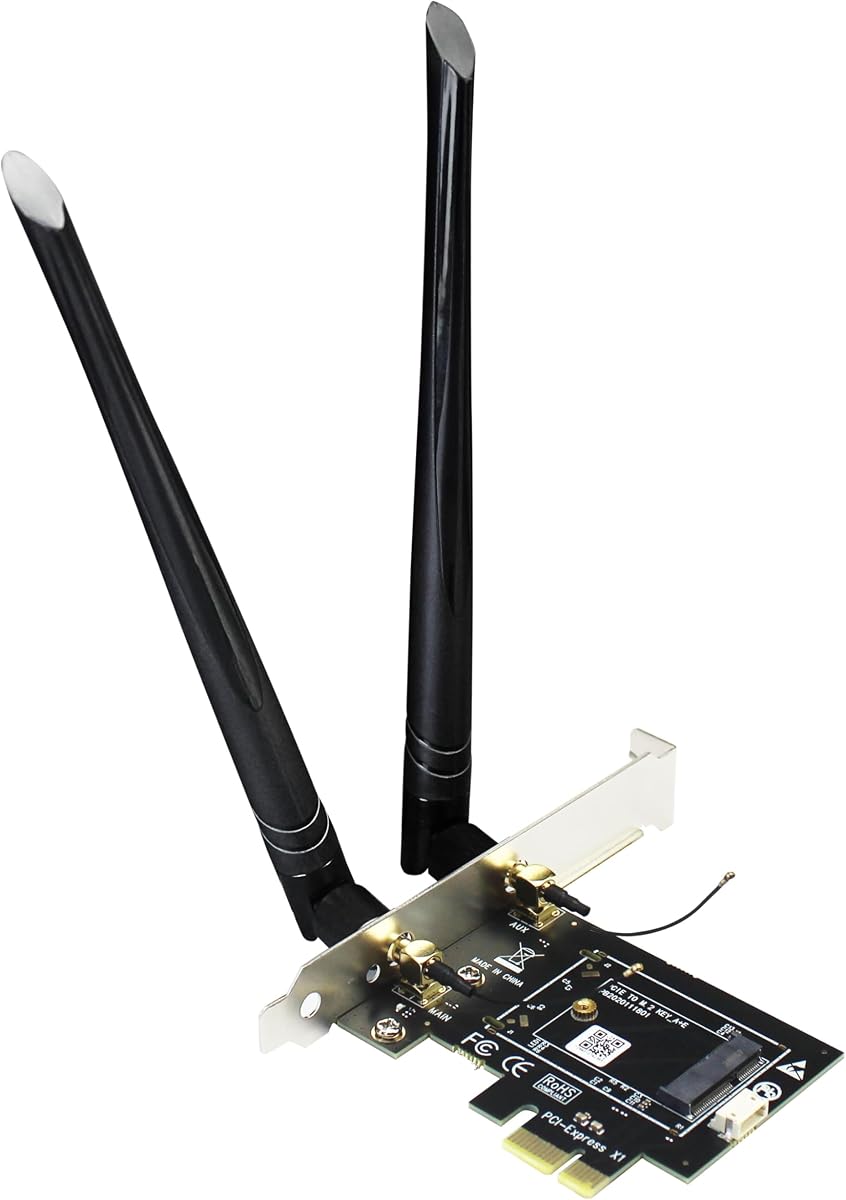
GLOTRENDS WA01 Adapter
4.1Editor score
PCIe X1 to M.2 Bridge
Supports Multiple Module Types
Affordable Adapter Solution
This guide compares the top M2 Key E WiFi cards for laptops and desktops, evaluating performance, compatibility, and features to help you choose the right
Finding the right wireless connectivity is crucial for modern computing needs. M2 Key E WiFi cards offer a reliable upgrade path for laptops and desktops lacking built-in high-speed internet capabilities. These modules support the latest Wi-Fi standards ensuring fast data transfer and stable connections.
We evaluated ten top-rated products based on their chipset performance, Bluetooth capabilities, and overall compatibility with various motherboard slots. Our analysis focuses on real-world usability, driver support, and the ability to handle demanding tasks like gaming or streaming without lag or dropped signals.
Each pick in this list highlights specific strengths such as budget-friendly options or premium Wi-Fi 7 support. Please note that pricing and availability can change frequently so verify current details before purchasing. We aim to provide clear insights to streamline your selection process effectively.
4.1Editor score

4.5Editor score

4.1Editor score
The following table provides a side-by-side comparison of all ten products analyzed in this guide. It highlights key specifications and compatibility details to help you quickly identify which card fits your specific hardware requirements best.

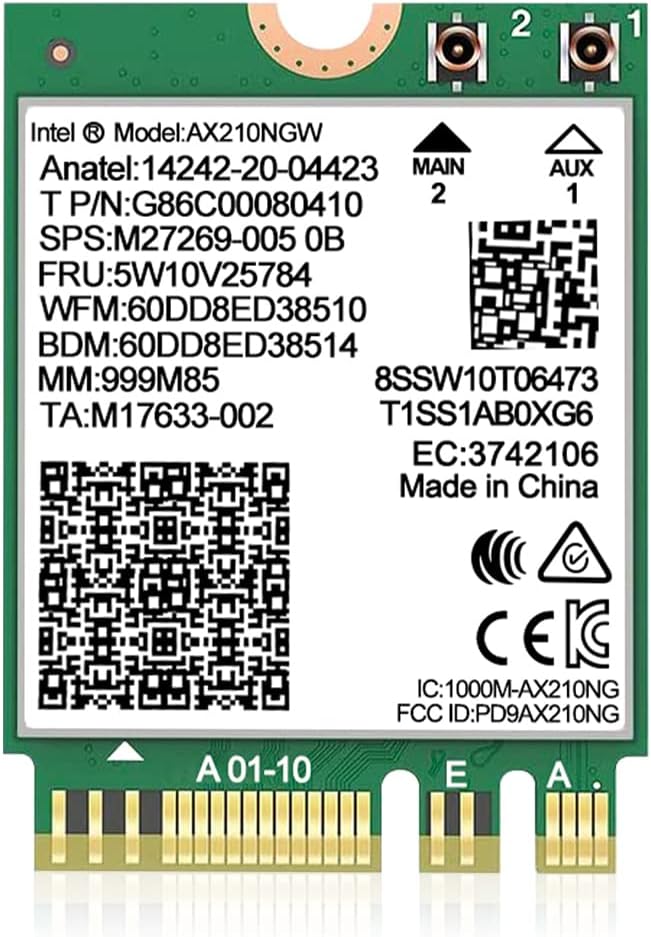
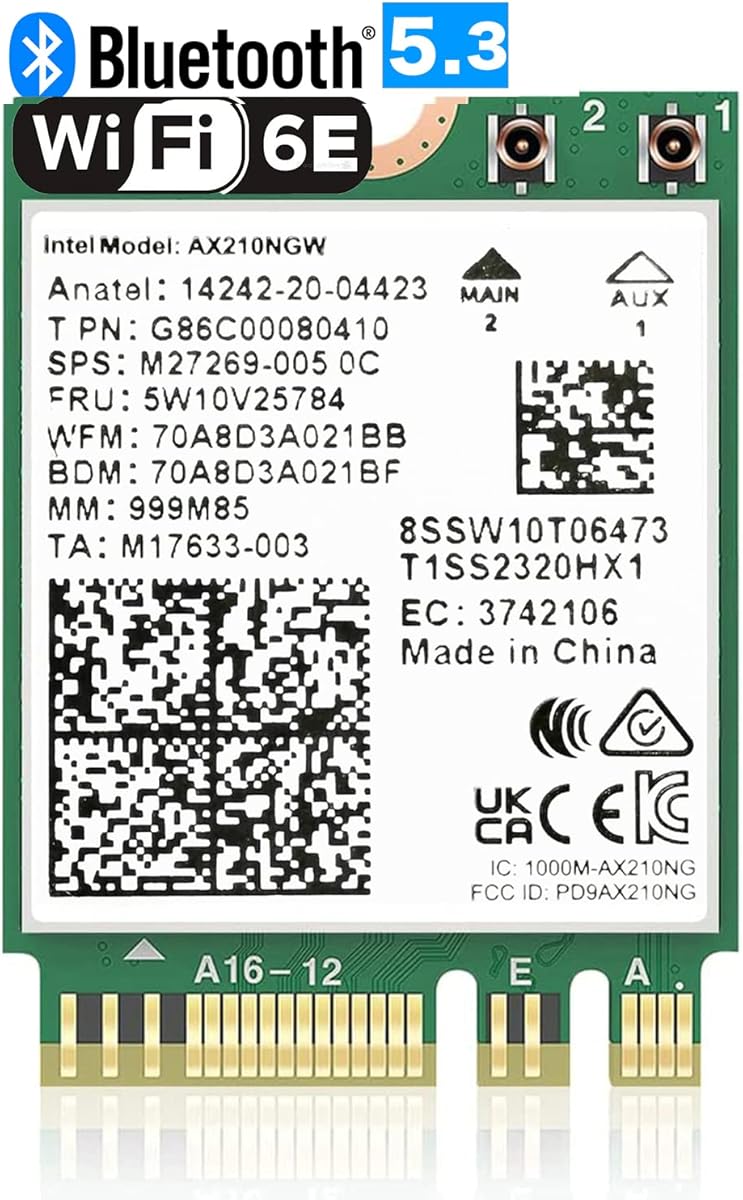



This kit stands out as a comprehensive solution for upgrading to Wi-Fi 6E. It includes the Intel AX210 module along with necessary cables and brackets making installation straightforward for most users. The inclusion of external antennas ensures better signal reach compared to internal laptop modules.
We may earn a commission when you buy through this link, at no additional cost to you.
The AX210 chipset provides excellent performance across three bands including the new 6GHz spectrum. This reduces congestion significantly in crowded areas allowing for faster downloads and stable gaming sessions. Bluetooth 5.3 adds low latency connectivity for peripherals like headphones and keyboards.
While the card requires a manual driver download from Intel its website the process is simple and well documented. Some users might find the included cables slightly short for specific desktop layouts but they are generally adequate for standard setups.
This product is ideal for anyone looking to future-proof their desktop or laptop with modern Wi-Fi standards. The combination of speed reliability and included accessories makes it a top recommendation for general upgrades.
Accessing the 6GHz band provides interference free speeds ideal for streaming and gaming.
Everything needed for installation including antennas and brackets is provided in the box.
We may earn a commission when you buy through this link, at no additional cost to you.
For users who already own a compatible M.2 card this adapter offers a cheap way to add connectivity to a desktop. It bridges the gap between the internal M.2 slot and the PCIe bus allowing for external antenna usage. The price point makes it accessible for budget conscious builds.
We may earn a commission when you buy through this link, at no additional cost to you.
Compatibility is a strong point as it works with many older and newer module types. The included SMA antennas provide solid signal strength which is often better than what laptops achieve internally. Users can install almost any standard Key E card they might have lying around.
The Bluetooth signal travels through a separate USB cable which means you must have an available USB header on your motherboard. This can be a minor inconvenience for some cases but it ensures the Bluetooth module works independently without hogging the PCIe lane.
This adapter is perfect for repurposing existing M.2 cards or building a custom wireless setup without spending much. It is a practical choice for hobbyists or those needing a quick fix for desktop connectivity.
Supports modules from WiFi 4 to the latest Wi-Fi 7 standards offering great flexibility.
Allows you to use external antennas with internal cards at a very low cost.
We may earn a commission when you buy through this link, at no additional cost to you.
This adapter is designed specifically for desktop users who need to add wireless capabilities to a motherboard lacking an M.2 slot. It provides a stable connection through the PCIe bus and includes a full height bracket for standard cases. The build quality ensures longevity under normal usage conditions.
We may earn a commission when you buy through this link, at no additional cost to you.
It supports a wide range of popular modules like AX210 and AX200 which are known for reliability. The antennas are dual-band supporting both 2.4GHz and 5GHz frequencies for flexible connectivity options. You get the hardware to connect both WiFi and Bluetooth simultaneously.
Bluetooth functionality depends on connecting the included cable to a USB header on your motherboard which might not exist on very old boards. Users should verify their motherboard specs before purchase to ensure compatibility with this requirement.
If you need a reliable way to turn a standard PCIe slot into an M.2 wireless hub this is a strong candidate. It is well suited for home office computers or media centers needing better connectivity.
Comes with a full height bracket ensuring it fits in standard desktop towers securely.
Works with most common NGFF M.2 cards making it versatile for existing hardware.
We may earn a commission when you buy through this link, at no additional cost to you.
This card represents the forefront of wireless technology offering the highest potential speeds available for laptops today. It leverages the new Wi-Fi 7 standard to deliver up to 5.8Gbps throughput under ideal conditions. Users with compatible routers will see immediate benefits in bandwidth heavy tasks.
We may earn a commission when you buy through this link, at no additional cost to you.
Multi-Link Operation allows the card to use multiple bands simultaneously reducing latency significantly. This is a game changer for competitive gaming where every millisecond counts. The Bluetooth 5.3 module also ensures your peripherals stay connected without lag.
The requirement for Windows 11 24H2 or newer limits usability on older operating systems. Additionally to get the advertised speeds you must pair it with a Wi-Fi 7 router which is still a premium investment. Backward compatibility exists but max speeds drop on older networks.
For enthusiasts and professionals who need the absolute fastest connection possible this card is a premium investment. It is best suited for those building a high end gaming or creative workstation with future proofing in mind.
Theoretical peak speeds reach up to 5.8Gbps with proper channel bandwidth configuration.
MLO technology combines bands for better throughput and stability in real time.
We may earn a commission when you buy through this link, at no additional cost to you.
This module is a straightforward replacement for older wireless cards offering a significant upgrade to 6GHz connectivity. It is widely recognized for its stability and broad software support across various operating systems. Users report excellent performance when paired with compatible routers.
We may earn a commission when you buy through this link, at no additional cost to you.
The AX210 chip ensures that you can take advantage of the latest Wi-Fi 6E features like OFDMA and MU-MIMO. These technologies help in managing network traffic efficiently which is beneficial in homes with many connected devices. The high rating suggests reliable performance over time.
One consideration is that it is a card only so you will need your own antenna setup if you are using it in a desktop adapter. Driver support is good but requires you to download the specific Intel packages to get full functionality.
It is an excellent choice for anyone needing a standard high performance card that works well out of the box. Whether for a laptop upgrade or a custom build this module delivers consistent results.
Works with both Windows 10 and 11 making it versatile for different system ages.
Accessing 6GHz provides the speed and low latency needed for modern applications.
We may earn a commission when you buy through this link, at no additional cost to you.
This module shares the same core technology as other AX210 units but offers a direct upgrade path for users moving from older chips. It includes support for WPA3 security which is essential for keeping your network safe from modern threats. Performance is on par with other top tier modules.
We may earn a commission when you buy through this link, at no additional cost to you.
The upgrade from AX200 brings noticeable improvements in efficiency and speed especially in congested networks. MU-MIMO and OFDMA support ensure that your connection remains stable even when multiple devices are active. The Bluetooth 5.3 integration also brings better battery life for peripherals.
Users should note that like most cards this does not come with external antennas or cables. You will need to connect the appropriate coaxial cables if installing this in a desktop setup via an adapter. It is primarily designed for laptop replacements.
For those seeking a proven reliable replacement for their laptop WiFi module this is a solid choice. It provides all the essential modern features without unnecessary extras keeping the focus on performance and security.
Support for WPA3 ensures your network connection is secure against modern attacks.
Advanced power management helps maintain better battery life on laptop devices.
We may earn a commission when you buy through this link, at no additional cost to you.
This package offers a distinct advantage by including high gain antennas which can significantly improve signal range. For desktop builds where external antennas are necessary this saves you from buying them separately. The 8dBi gain helps overcome physical obstructions better than standard kits.
We may earn a commission when you buy through this link, at no additional cost to you.
The AX210 chip ensures that you get the latest Tri-Band performance including the 6GHz spectrum. Included cables and brackets make the physical installation process easier for those less experienced with hardware assembly. It is a well thought out bundle for immediate deployment.
The size of the 8dBi antennas means they are bulkier than standard ones so you need to consider your desk or case setup. If space is tight these might be cumbersome but the signal improvement is often worth the trade-off.
This bundle is perfect for users who want a complete solution without hunting for individual components. It is ideal for home office setups where signal strength and range are top priorities over compact aesthetics.
8dBi antennas provide superior range compared to standard low gain options.
All necessary cables and mounting hardware are included for easy setup.
We may earn a commission when you buy through this link, at no additional cost to you.
Another variation of the Wi-Fi 7 card this model emphasizes throughput and low latency for demanding applications. The MLO support allows for simultaneous use of bands which is critical for reducing lag in online games. It is designed to pair with high end routers for maximum benefit.
We may earn a commission when you buy through this link, at no additional cost to you.
Bluetooth 5.3 ensures that your wireless accessories benefit from improved stability and battery life. The card integrates seamlessly into Windows 11 systems where drivers are optimized for the latest networking protocols. Users can expect a smooth setup process if requirements are met.
Operating system requirements are strict here so users with older Windows versions will not be able to utilize this hardware fully. This limits the user base to those who have upgraded to the latest operating systems already. It is not a universal upgrade for all PCs.
For power users who want the latest performance features this card delivers on its promises. It is best suited for gaming rigs or workstations where maximizing bandwidth is essential for productivity.
MLO technology minimizes latency making it ideal for competitive online play.
Optimized drivers ensure peak performance on current Windows 11 installations.
We may earn a commission when you buy through this link, at no additional cost to you.
This card offers a solid entry into Wi-Fi 6 without the premium price of newer standards. It delivers consistent speeds on both 2.4GHz and 5GHz bands which covers most home and office needs. The build is compact making it suitable for small form factor laptops.
We may earn a commission when you buy through this link, at no additional cost to you.
A unique advantage is its support for newer Linux kernels which is often overlooked by other vendors. This makes it a strong candidate for developers or tinkerers using open source operating systems. Bluetooth 5.2 provides a good range for connecting standard peripherals.
It lacks the 6GHz band which means it might not be future proof against very crowded 5GHz networks. However for general use the dual band performance is usually sufficient for streaming and browsing tasks without issues.
This product is an excellent choice for those who value software support across different operating systems. It provides reliable connectivity without the complexity of managing the newest Wi-Fi standards.
Support for Linux kernel 6.5 or higher offers great flexibility for open OS users.
1800Mbps total throughput ensures smooth streaming and browsing in most environments.
We may earn a commission when you buy through this link, at no additional cost to you.
This card is engineered specifically for gaming performance on Intel platforms offering the latest in wireless technology. The Killer branding emphasizes low latency which is critical for competitive players. It supports the newest Wi-Fi 7 standard for maximum speed potential.
We may earn a commission when you buy through this link, at no additional cost to you.
Bluetooth 5.4 provides the latest connectivity features ensuring your peripherals stay connected with minimal power drain. The card is highly rated for its reliability and performance in real world gaming scenarios. It is a premium component designed for serious users.
The limitation to Intel processors means it is not compatible with AMD based systems which is a significant constraint. Users must verify their CPU architecture before purchasing to avoid compatibility issues. It is a specialized tool rather than a universal solution.
If you are on an Intel platform and need the best possible gaming connectivity this card is a top contender. It delivers on speed and stability making it a strong investment for dedicated gaming setups.
Designed with ultra low latency features to give competitive gamers an edge.
Optimized for Intel processors ensuring peak performance on supported hardware.
We may earn a commission when you buy through this link, at no additional cost to you.
Selecting the right M2 Key E WiFi card requires understanding your hardware constraints and performance needs. This section covers the critical factors you should evaluate before making a purchase.
Ensure the card supports the Wi-Fi standard that matches your router and usage needs. Wi-Fi 6E offers access to the 6GHz band for less congestion while Wi-Fi 7 provides the highest speeds available. Older standards like Wi-Fi 6 are still robust for general use and may cost less.
Always verify that your router supports the same standard to realize the full benefits of the new card.
Check if the card is compatible with your processor type as some models are limited to Intel systems. For example certain premium Wi-Fi 7 cards may not work with AMD motherboards. Universal cards typically support both Intel and AMD platforms providing more flexibility.
Review the product specifications to confirm processor support before buying to avoid incompatibility issues.
Modern cards often require specific versions of Windows to function correctly. Some Wi-Fi 7 models mandate Windows 11 with recent updates while others support Windows 10 as well. Linux users should check for kernel compatibility as support can vary between models.
Confirm that your operating system meets the minimum requirements to ensure driver availability and functionality.
Look for cards that include the latest Bluetooth version such as 5.3 or 5.4 for better peripheral performance. Newer Bluetooth versions offer lower latency and improved battery life for wireless headphones and controllers. Compatibility with your existing devices is key to a seamless experience.
Prioritize newer Bluetooth versions if you rely heavily on wireless accessories alongside your network connection.
Desktop upgrades often require external antennas which may not come with the card itself. Some kits include antennas and brackets to simplify installation while others are card only. If you need to improve range ensure you have the necessary components or are ready to buy them separately.
Check the package contents to see if antennas and brackets are included for your specific setup needs.
Verify that your laptop or motherboard has an M.2 slot with Key E support for the specific card. Most cards use the 2230 form factor but some boards may have restrictions on slot types. Ensure the dimensions fit within your device to prevent physical installation issues.
Consult your device manual to confirm the exact slot type and physical constraints before purchasing.
Ensure that drivers are available for your system as some cards require manual downloads from the manufacturer. Intel chipsets usually have broad driver support but third party vendors may vary in update frequency. A reliable source for drivers ensures long term stability and security updates.
Check the manufacturer website for driver availability to ensure you can get the card working after installation.
Balance your budget against the performance features you need since prices vary significantly between models. Basic cards offer sufficient speed for browsing while premium cards deliver high throughput for gaming and streaming. Identify which features are essential to avoid overspending on unused capabilities.
Select a model that fits your budget while meeting your core performance and connectivity requirements.
Install the card into the M.2 slot and secure it with a screw ensuring it is flat. Connect the antenna cables to the correct ports and attach any brackets to the case for stability. This ensures a secure physical connection that reduces the risk of accidental disconnection during use.
After installation download the necessary drivers from the manufacturer or Intel website to enable full functionality. Use the network manager in your operating system to connect to your preferred Wi-Fi network. Ensure the settings are configured to prefer the 5GHz or 6GHz band if available for better performance.
Keep your drivers updated regularly to maintain security and performance improvements. Avoid excessive movement of the device while connected to ensure the physical contacts remain secure. If you experience connectivity issues try rebooting your router and device to refresh the network session.
Yes most of these cards are designed for laptops that have an M.2 Key E slot. However you must verify that your laptop does not whitelist specific manufacturers which might prevent third party cards from working. Most standard laptops allow these upgrades without issue.
You do not need to change your router to use the card but you will need a Wi-Fi 6E or 7 router to access the faster 6GHz bands. Older routers will still work with the card but speeds will be limited to the older standards supported by the router.
Installation is generally straightforward if your device is open to access the motherboard. Most users find that sliding the card into the slot and screwing it in is simple. However if your laptop requires disassembly you should be comfortable with that process or seek help.
Some adapters require a separate USB cable to connect Bluetooth to the motherboard. If your Bluetooth signal is missing check that the USB cable is connected to the correct header on your motherboard. Ensure you have installed the correct drivers for the Bluetooth module.
Many of the Intel based cards work well with Linux systems especially with recent kernel versions. However third party vendors may have limited support so you should check community forums for your specific card model. Linux support varies by manufacturer and driver availability.
The main benefit is access to the 6GHz band which is less congested than older bands. This means faster speeds and lower latency especially in crowded areas like apartment buildings. It provides a more stable connection for high bandwidth activities.
We have explored ten top options ranging from budget adapters to premium Wi-Fi 7 modules. Each product offers unique strengths whether you need maximum speed or a cost effective solution. Choosing the right one depends on your specific hardware and performance requirements.
Prioritize compatibility with your processor and operating system to ensure a smooth upgrade experience. Features like external antennas and driver support can significantly impact your overall satisfaction with the product.
Remember to check current availability and pricing as these details can change frequently. We hope this guide helps you make an informed decision for your wireless upgrade needs.