
Auto Clicker for Smart Phone
4.0Editor score
108-speed adjustable gears
LED digital display screen
Silent spatial mapping technology
Discover the top auto clicker for phones and tablets to automate tasks efficiently. Compare features, speed, and compatibility across ten leading models today.
Finding the right auto clicker for phones and tablets can save you countless hours on repetitive tasks. Whether you are gaming, managing social media engagement, or handling routine app interactions, a reliable device ensures consistent performance without physical strain on your fingers.
We evaluated ten top-rated models based on speed adjustability, battery life, compatibility, and ease of use. Our analysis focuses on physical tappers that bypass software detection while offering flexible mounting options for various screen sizes and orientations during extended usage sessions.
Each product listing highlights key specifications, pros, cons, and real-world application scenarios to help you choose wisely. Prices and availability fluctuate frequently, so please verify current details on the retailer site before making your final purchasing decision for these automation tools.
4.0Editor score

4.3Editor score

4.2Editor score
This side-by-side comparison outlines the core specifications of each model to highlight differences in power source, speed range, and physical design. Use this table to quickly identify which device aligns with your specific automation needs and device compatibility requirements.


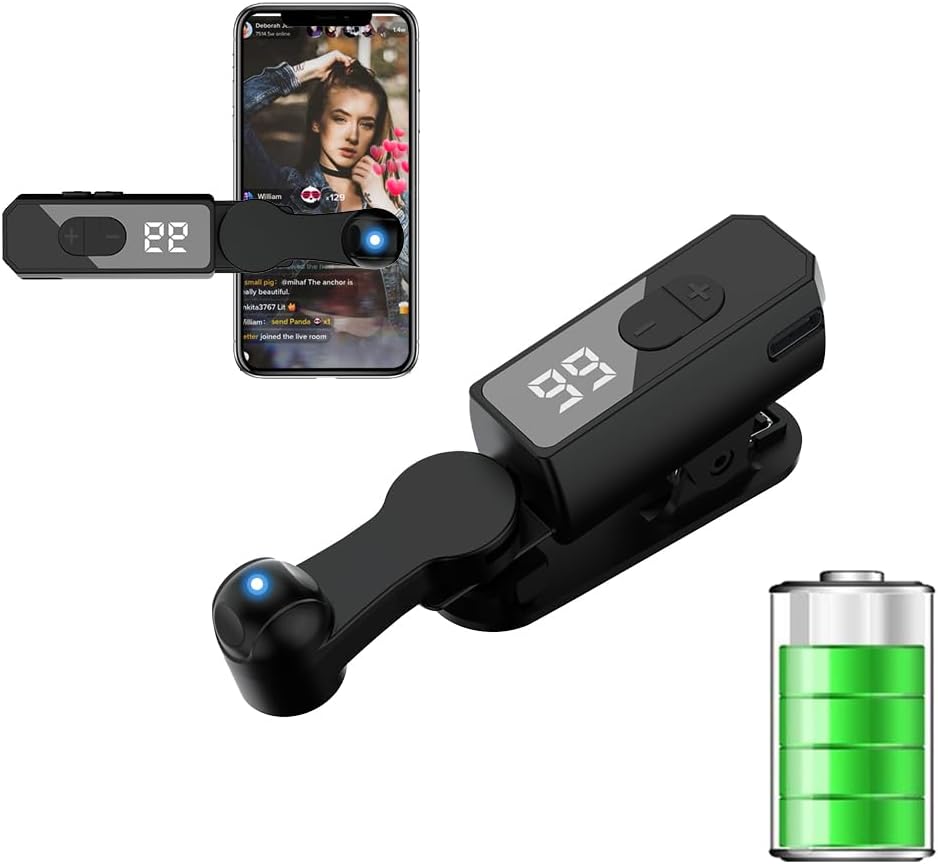
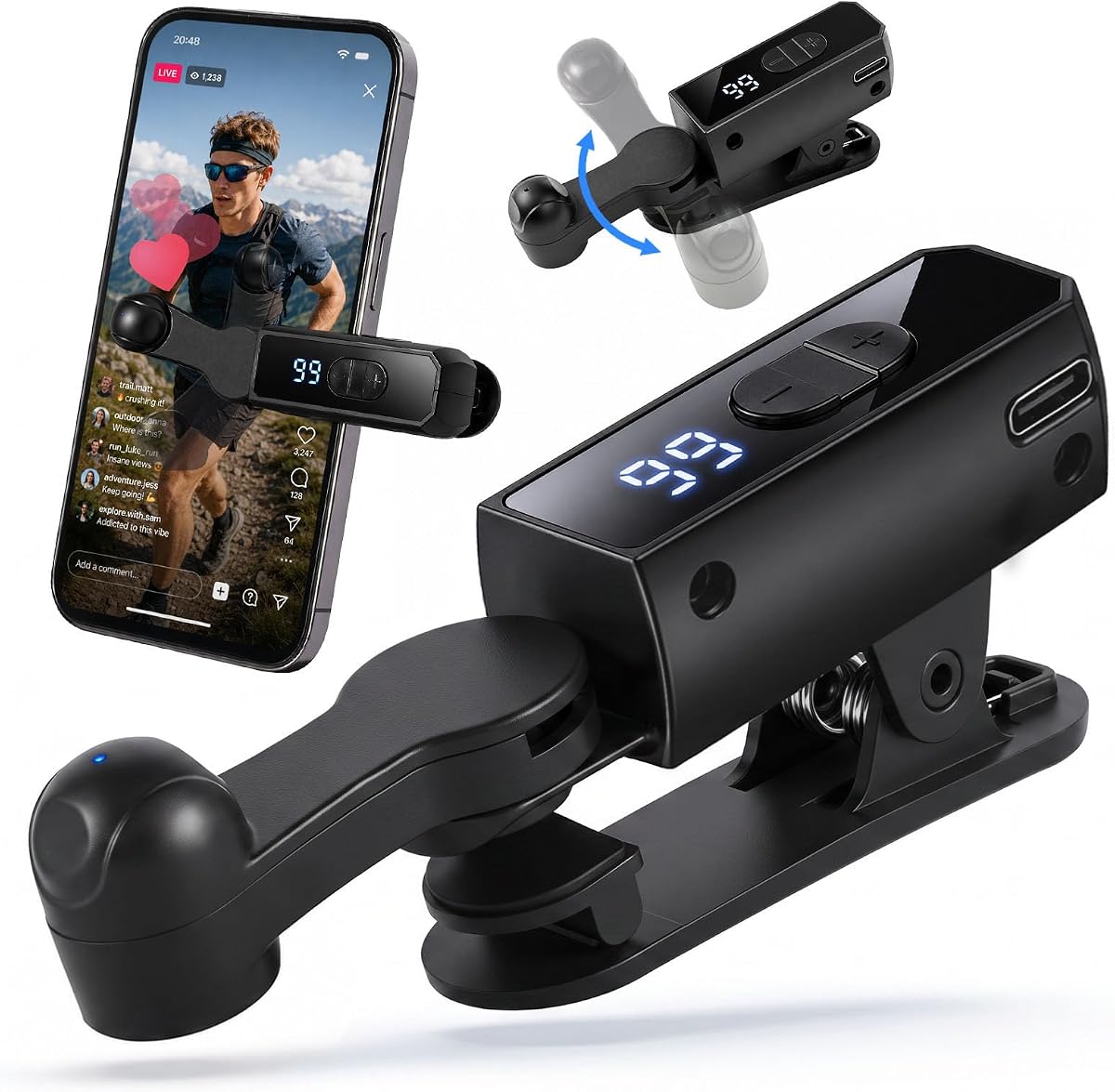


This physical auto clicker stands out as a robust solution for users needing reliable automation without software risks. With a rating of 4.3 stars, it is praised for its ability to simulate human finger pressure accurately while offering significant speed advantages over manual tapping.
We may earn a commission when you buy through this link, at no additional cost to you.
The core strength lies in its anti-cheat prevention capabilities. By using hardware-based clicking instead of software scripts, it evades detection by online games and apps that flag automated inputs. The 31-speed gear system allows precise control from 1 click every 60 seconds to 33 clicks per second.
Users should note the dependence on a USB power source, which limits mobility unless paired with a power bank. However, the included Type-C cable and adhesive options provide flexibility for desktop or stationary setups where portability is less critical than consistent performance.
Ideal for streamers managing live broadcast likes or gamers farming resources, this device offers a balance of speed and safety. Its memory function ensures your preferred settings are saved, making it a top recommendation for anyone seeking a trustworthy physical tapper.
Physical clicking mechanisms bypass software detection systems that often flag automated apps, ensuring safer usage in competitive online environments.
The 31-speed gear system provides granular control, allowing you to tailor click frequency to specific task requirements without manual adjustment.
We may earn a commission when you buy through this link, at no additional cost to you.
This premium option distinguishes itself with true cordless functionality, eliminating the need for constant USB tethering. The robust 120mAh battery supports up to 8 hours of continuous use, making it ideal for extended streaming or gaming sessions where mobility is paramount.
We may earn a commission when you buy through this link, at no additional cost to you.
The inclusion of 107 adjustable clicking speeds offers unparalleled precision for diverse tasks. From rapid-fire actions to slow, deliberate taps, the HD digital display ensures you can monitor and adjust settings instantly without interrupting your workflow or losing focus.
While the price is higher than wired alternatives, the convenience of a folding design and built-in power source justifies the investment for frequent users. It supports space mapping technology to prevent screen damage, ensuring safe operation across iPhones, iPads, and Android devices.
Perfect for travel or desk setups without easy power access, this 2-pack allows you to automate multiple devices simultaneously. Its balance of portability, battery life, and speed range makes it a top contender for premium seekers.
No Bluetooth pairing or cables are needed; simply charge and use for up to eight hours of uninterrupted automation anywhere.
The enlarged HD screen displays current speed clearly, allowing intuitive adjustments across 107 gears for any specific task requirement.
We may earn a commission when you buy through this link, at no additional cost to you.
For those seeking affordability without sacrificing performance, this model offers exceptional value with 108-speed gears at a budget-friendly price. It uses spatial mapping technology to ensure silent operation and protects screens from mechanical damage during prolonged usage.
We may earn a commission when you buy through this link, at no additional cost to you.
The LED digital display provides clear visibility of speed settings, allowing users to tailor tapping from 99 clicks per second to 1 click every 9 seconds. This range covers most gaming and social media needs efficiently without requiring complex setup procedures.
While it requires a USB power source and has a simpler build than premium models, it remains a practical choice for casual users. The easy-to-use boot and start buttons streamline operation, making it accessible even for first-time buyers.
Ideal for students or casual gamers needing a reliable tapper without breaking the bank, this device delivers consistent results. Its simplicity and cost-effectiveness make it a standout option for budget-conscious automation seekers.
With 108 gears, you can adjust from lightning fast to slow deliberate clicks to match the rhythm of any application.
Replaces traditional mechanical methods with technology that reduces noise and prevents screen wear during continuous operation.
We may earn a commission when you buy through this link, at no additional cost to you.
The A2 variant offers a robust alternative for users prioritizing click speed and anti-cheat reliability. With a peak performance of 33 clicks per second, it handles intense gaming loops or rapid social media engagement with ease.
We may earn a commission when you buy through this link, at no additional cost to you.
Similar to other hardware clickers, it bypasses software detection by simulating physical pressure. This ensures stability in competitive environments where app-based scripts are frequently banned or patched out by developers.
The device remembers your last gear parameter after power-off, saving time on reconfiguration. However, like many wired models, it requires a consistent power source, which may limit its use during travel without a portable battery.
Best suited for stationary setups like home gaming rigs or streaming desks, it provides high performance and reliability. The included accessories ensure secure mounting on various screen sizes, making it a dependable tool for daily tasks.
Reaches 33 clicks per second, significantly faster than human capability to automate repetitive tasks quickly and efficiently.
Automatically saves your last speed setting, ensuring consistent operation without needing to reconfigure after every restart.
We may earn a commission when you buy through this link, at no additional cost to you.
This model provides a reliable solution for users needing constant power and physical click precision. Its 31-speed gear system covers a broad range of automation needs, from slow reward collection to fast-paced gaming interactions.
We may earn a commission when you buy through this link, at no additional cost to you.
The hardware-based approach ensures that online games with anti-cheat systems cannot detect your automation. By simulating real finger pressure, it offers a safer alternative to software scripts that risk account bans or device warnings.
The package includes both adhesive stickers and a screen clip for versatile mounting. This flexibility allows you to secure the device on different screen sizes and orientations, though the wired design keeps it anchored near a power outlet.
Ideal for long-term tasks where charging interruptions are unacceptable, this device ensures uninterrupted operation. Its compatibility with both Android and iOS makes it a versatile choice for multi-device households or businesses.
Includes adhesive stickers and a screen clip for secure attachment to various screen sizes and orientations.
Seamlessly works with both Android and iOS systems, broadening its utility for users with multiple device types.
We may earn a commission when you buy through this link, at no additional cost to you.
This tapper is designed for continuous use with a battery supporting 5 to 10 hours of operation. Its silent motor and soft silicone contacts ensure a quiet and safe experience that prevents screen damage during prolonged tapping sessions.
We may earn a commission when you buy through this link, at no additional cost to you.
The adjustable speed range allows customization from 1 tap every 10 seconds to 100 taps per second. A clear LED display helps monitor current settings, ensuring you can maintain optimal speeds without guessing or constant checking.
The 180-degree rotating stand provides flexible positioning, allowing you to adjust angles for vertical or horizontal setups. This adaptability makes it suitable for TikTok live interactions, gaming, or automated app testing across different environments.
For users needing a blend of portability and quiet performance, this model is a strong contender. Its easy-to-use buttons and long battery life make it a practical choice for both casual and professional automation tasks.
Built-in high-capacity battery powers continuous tapping for 5 to 10 hours, ideal for long streaming or gaming sessions.
Soft silicone contacts and a silent motor protect your screen while ensuring a quiet operation that doesn't disturb others.
We may earn a commission when you buy through this link, at no additional cost to you.
This wireless tapper offers portability and convenience, running on a built-in battery for 4 to 8 hours. It simulates human finger pressure and angle, avoiding detection by automated systems that flag mechanical clicks.
We may earn a commission when you buy through this link, at no additional cost to you.
Speed settings range from once every 9 seconds to 99 times per second, allowing precise control. The simple one-button control makes it easy for beginners to start using it quickly, while the clear display keeps you informed of current settings.
The 180-degree rotating stand and soft rubber contacts protect your screen from scratches and ensure stable positioning. This makes it a practical choice for travel or mobile setups where a wired connection is not feasible.
For anyone needing a lightweight and reliable solution for TikTok liking or game assistance, this device delivers. Its balance of battery life and usability makes it a strong contender for on-the-go automation.
Simulates real finger pressure and angle to avoid detection by anti-bot systems and ensure consistent engagement.
Simple controls allow anyone to power on, pause, and adjust speed quickly without complex configuration steps.
We may earn a commission when you buy through this link, at no additional cost to you.
This rechargeable tapper solves the cable dependency issue with a built-in battery and portable design. It features 108-speed gears and spatial mapping technology, ensuring silent operation and high precision for various automation tasks.
We may earn a commission when you buy through this link, at no additional cost to you.
The LED display allows you to see click counts and speed settings clearly, making adjustments easy and precise. Its mute design prevents mechanical noise, providing a clean and focused experience for live streaming or gaming.
Setup involves pressing the BOOT button to set frequency and then starting the click state. This straightforward process ensures that even new users can adapt the device to their needs quickly without technical hassle.
For travelers or those who prefer minimal clutter, this device offers the freedom of wireless operation with the control of a wired tapper. Its compatibility with both iPhone and iPad apps makes it a versatile addition to any toolkit.
Eliminates the need for constant USB power by allowing use via a built-in battery for several hours.
The digital display provides real-time visual feedback on speed and click counts for easy monitoring.
We may earn a commission when you buy through this link, at no additional cost to you.
This 2-pack offers excellent value for users needing to automate multiple devices or share with others. Each unit runs for 4 to 8 hours on a single charge and features silent motors that protect your device screens from damage.
We may earn a commission when you buy through this link, at no additional cost to you.
With speed adjustable from once every 9 seconds to 99 clicks per second, you can customize for different apps or games. The 180-degree rotating stand allows flexible positioning whether you need vertical or horizontal orientations for your tasks.
The simple controls include a clear digital display and side buttons for power and speed adjustment. This ease of use ensures that you can manage your clicks efficiently without complex menus or confusing setup procedures.
Perfect for households or teams where multiple devices require automation, this pack allows independent use. Its combination of battery life, silent performance, and flexible mounting makes it a reliable choice for daily automation tasks.
Includes two separate units allowing you to manage multiple phones or tablets simultaneously without interference.
The stand rotates 180 degrees to adapt to different viewing angles and device orientations easily.
We may earn a commission when you buy through this link, at no additional cost to you.
This 2-pack wired tapper stands out with the highest rating of 4.7 stars, reflecting its reliability and user satisfaction. The USB powered design ensures consistent tapping without worrying about battery levels, ideal for long desktop sessions.
We may earn a commission when you buy through this link, at no additional cost to you.
Soft contact tips and quiet operation protect your device screens and prevent disturbances. The clip-on body allows flexible angle adjustments, ensuring the clicker stays securely in place across different phones and tablets.
A clear digital display makes checking current tap speed quick and easy, helping you adjust settings without stopping your work. This simplicity and stability make it a top choice for those prioritizing function and durability over portability.
Whether you need to run multiple devices or keep one at home and one in your travel kit, this 2-pack is ideal. Its silent, stable design ensures consistent performance for automated tasks without mechanical wear or noise.
USB powered design provides consistent tapping without interruptions from battery drain, perfect for long desktop setups.
Soft silicone tips reduce noise and protect your screen coating, ensuring gentle and quiet operation.
We may earn a commission when you buy through this link, at no additional cost to you.
Selecting the right auto clicker involves evaluating several critical factors to ensure compatibility and performance. This guide breaks down key aspects you should consider before making a purchase.
Decide between wired USB models and rechargeable wireless options based on your usage environment. Wired clickers provide consistent power for long sessions without interruption, while wireless models offer portability and freedom from cables.
For stationary desk setups, USB-powered devices are ideal. For travel or mobile use, choose a model with long battery life and easy charging.
Look for devices offering adjustable gears to match specific task requirements. Models with 100+ speed adjustments allow precise control from slow taps to rapid-fire clicks, ensuring compatibility with different apps and games.
Ensure the device allows you to save preferred settings to avoid repeated adjustments every time you use it.
Hardware-based clickers that simulate physical finger pressure bypass software detection better than apps. This is critical for users participating in online games where automated inputs can lead to account bans.
Physical clickers offer a safer alternative for long-term automation in competitive environments.
Check if the tapper comes with adhesive stickers, screen clips, or adjustable stands. Versatile mounting ensures the device stays secure on various screen sizes and orientations without slipping during use.
Choose models with rotating stands if you frequently switch between portrait and landscape modes.
If opting for wireless models, prioritize those with at least 6 to 8 hours of battery life to handle extended tasks. Rechargeable batteries should support standard charging cables for easy maintenance.
Avoid models with short battery runs that interrupt long automation sessions.
Ensure the auto clicker supports both Android and iOS systems if you use multiple phone types. Cross-platform compatibility increases the device's value and flexibility across different ecosystems.
Verify that the screen size range matches your devices to prevent fit issues.
Models with LED digital displays make it easier to monitor speed and settings without guessing. Simple buttons for start, stop, and speed adjustment reduce learning curves and improve overall user experience.
Look for intuitive interfaces that allow quick changes without complex menus.
Check materials and customer feedback regarding wear over time. Devices with soft silicone contacts and robust frames are more likely to survive drops and extended use without breaking.
Invest in well-reviewed models to ensure a longer lifespan and better return on investment.
Begin by securely attaching the clicker to your device screen using adhesive pads or clips. Ensure the click head is positioned precisely over the area you want to automate to avoid missed taps.
Turn on the device and use the speed controls to set your desired tapping frequency. For most social media tasks, speeds under 25 taps per second reduce the risk of detection by automated systems.
After use, turn off the power to conserve battery if wireless. Keep the device in a dry, dust-free environment and avoid dropping it to maintain longevity and consistent performance over time.
Yes, physical auto clickers are generally safe as they do not install software or modify your device settings. They simulate human finger pressure without damaging screens or voiding warranties when used properly.
You can use them, but be cautious as some games detect repetitive patterns. Using hardware clickers with irregular speed settings helps reduce the risk of bans compared to software bots.
Most high-quality models support up to 99 or 100 taps per second. However, keeping speeds below 25 taps per second is recommended to avoid detection by platforms with strict security measures.
Yes, many models are designed to fit both phones and tablets. Check the product specifications to ensure the clip or adhesive can securely hold the clicker on larger screens.
Wireless models typically offer 4 to 8 hours of continuous use on a single charge. Usage time may vary depending on speed settings and the frequency of tapping tasks you perform.
Ensure the click head is properly aligned with the target area and that the device screen is clean. Adjusting the pressure or changing the adhesive position can also improve accuracy during operation.
Selecting the right auto clicker depends on balancing portability, power source, and speed flexibility. The top picks in this guide cover a range of budgets and needs, ensuring you find a reliable partner for your automation tasks.
Prioritize hardware models if you play games where anti-cheat protection is critical. For daily productivity, models with flexible mounting and clear displays enhance ease of use significantly.
Remember that prices and stock levels change frequently. Always check current listings and reviews before purchasing to ensure you get the best value and latest features for your specific device setup.