
Logitech MX Keys S Wireless Keyboard
4.4Editor score
Low-profile fluid typing
Smart backlight illumination
Multi-device Bluetooth pairing
This guide compares the top keyboard for developers options based on features, comfort, and performance to help you choose the perfect typing solution for your
Finding the right keyboard for developers is crucial for long coding sessions. You need comfort, precision, and reliability to maintain productivity throughout the day without experiencing hand fatigue or typing errors.
We evaluated ten top models based on build quality, customization options, and connectivity. Each product was analyzed for its suitability across different operating systems and workflows to ensure versatile performance.
Each pick highlights key strengths and trade-offs to help you decide. Note that prices and availability may change over time, so verify current details before making your final purchasing decision today.
4.4Editor score

4.6Editor score

4.4Editor score
The following table provides a side-by-side comparison of all ten selected models. Use this overview to quickly assess key specifications and features before diving into detailed reviews.






The Keychron V5 Max stands out as a top contender for developers seeking a customizable wireless experience. It offers a compact 96% layout that balances space efficiency with functionality. Its high rating reflects the quality of its build and the flexibility it provides for personalization.
We may earn a commission when you buy through this link, at no additional cost to you.
Developers will appreciate the QMK support which allows complete key remapping through a web app. The hot-swappable PCB means you can change switches without soldering to suit your typing preference. The gasket mount design and foam layer ensure a stable and acoustic typing experience.
While it lacks a dedicated numeric pad which some data entry tasks require, the 96% layout includes arrow keys. The need for a cable to access full QMK features might inconvenience some but it ensures stable connectivity during configuration changes.
This keyboard is ideal for developers who value customization and wireless freedom. If you need a board that adapts to your workflow across macOS Windows or Linux this model delivers exceptional value and performance.
Choose the V5 Max if you want a professional wireless keyboard that supports extensive customization. Its robust features make it a reliable tool for daily coding tasks without compromising on comfort or connectivity.
The V5 Max offers excellent battery life and reliable dual mode wireless connectivity. It supports up to three devices simultaneously allowing seamless switching between work and personal machines.
PBT keycaps provide durability and resistance to shine over time. The included system toggle and extra keycaps simplify transitions between different operating systems efficiently.
Use the Keychron Launcher web app to remap keys and create macros without installing software locally.
Switch between 2.4 GHz wireless and Bluetooth 5.1 for stable connections across multiple devices.
We may earn a commission when you buy through this link, at no additional cost to you.
The Logitech MX Keys S offers a premium typing experience tailored for productivity. Its low-profile design mimics a laptop keyboard but with greater precision. The smart backlighting and multi-device support make it a strong choice for professionals.
We may earn a commission when you buy through this link, at no additional cost to you.
Developers who type for long hours will find the spherically-dished keys reduce finger strain. The Logi Options+ app enables Smart Actions to automate repetitive tasks. The keyboard connects via Bluetooth or Logi Bolt ensuring stable performance.
The lack of mechanical switches means it may not satisfy those seeking tactile feedback. The price is higher than average but the build quality and features justify the investment for daily use.
This model suits developers who prefer a quiet and sleek setup. If you work across multiple systems and need reliable connectivity this keyboard provides a polished and efficient solution.
The MX Keys S integrates well with Logitech mice for a unified workflow. Its USB-C charging port ensures you can keep working even when the battery runs low quickly.
Recycled plastic parts show a commitment to sustainability. The backlighting adjusts automatically to ambient light conditions enhancing visibility without manual input.
Battery life extends up to ten days with backlight on. You can also turn off backlighting for extended usage periods without frequent recharging.
Create custom shortcuts in Logi Options+ to execute multiple commands with a single keystroke.
Pair with up to three devices and switch between them effortlessly using Easy-Switch keys.
We may earn a commission when you buy through this link, at no additional cost to you.
The RK ROYAL KLUDGE S98 brings unique features to the budget mechanical keyboard market. Its smart display adds a touch of flair and utility. It offers tri-mode connectivity and a hot-swap PCB making it versatile for developers on a budget.
We may earn a commission when you buy through this link, at no additional cost to you.
The small screen can show GIFs battery status and connection modes which helps monitor usage. The physical knob allows quick control of volume or brightness. Sound absorbing foams reduce hollow noise for a cleaner typing experience.
While the build is solid the software ecosystem is not as polished as premium brands. The display may distract some users but can be turned off if preferred. The value for money is excellent given the feature set.
This keyboard is ideal for developers wanting customization without high costs. If you enjoy tinkering with switches and keys this model offers a fun and functional platform for experimentation.
The double-shot PBT keycaps ensure durability and longevity. The top-mount design provides consistent tactile feedback across the board.
Bluetooth 5.0 ensures stable wireless performance for daily work. The USB-C wired mode offers zero latency when needed for precision tasks.
You can easily swap switches to change the feel of the board. The included tools simplify the process of removing and installing new components.
View battery status connection mode and custom images on the integrated small screen.
Multiple layers of foam reduce cavity noise for a smoother acoustic profile.
We may earn a commission when you buy through this link, at no additional cost to you.
The Keychron V6 is a powerful wired keyboard designed for heavy typists. Its full-size layout includes a numeric pad which aids in data entry. The QMK/VIA support provides endless customization possibilities for any workflow.
We may earn a commission when you buy through this link, at no additional cost to you.
Developers who prefer wired stability will find this model reliable. The included volume knob adds convenience for media control. The pre-lubed switches ensure smooth keystrokes out of the box.
The lack of wireless connectivity limits portability for some users. The large footprint requires significant desk space. However the customization options compensate for these constraints effectively.
This keyboard is best for stationary workstations where reliability is key. If you need a full numeric layout and deep customization this is a top choice.
The PCB-mounted stabilizers reduce wobble on larger keys. The acoustic silicone pad enhances the typing sound and feel.
South-facing RGB allows compatibility with various keycap profiles. The OSA profile keycaps offer a comfortable typing angle.
System toggle keys simplify switching between macOS and Windows. You can save two layouts on the board for quick access.
Use open-source firmware to remap keys and create macros easily.
Includes a dedicated numeric pad for efficient data entry tasks.
We may earn a commission when you buy through this link, at no additional cost to you.
The Logitech MX Mechanical combines tactile feedback with low-profile comfort. It delivers precise keystrokes without the height of traditional mechanical boards. The smart illumination ensures visibility in varying lighting conditions.
We may earn a commission when you buy through this link, at no additional cost to you.
Developers who want mechanical feel without bulk will appreciate this design. The Flow feature allows seamless file transfer between computers. The USB-C charging ensures quick power top.
The price is significant compared to standard keyboards. The backlight can reduce battery life but it is manageable with careful usage. The tactile bump provides satisfying feedback.
This model is ideal for professionals needing ergonomic efficiency. If you value a quiet yet tactile typing experience this is a strong option.
The keyboard supports up to three devices via Bluetooth or Logi Bolt. You can switch between systems instantly without re-pairing.
Post-consumer recycled plastic shows environmental consideration. The low-profile design reduces wrist strain over time.
Quick charge capability provides immediate power when needed. The included receiver ensures stable connectivity without Bluetooth pairing issues.
Enjoy mechanical tactile feedback in a slim ergonomic form factor.
Seamlessly work across multiple computers with cross-control integration.
We may earn a commission when you buy through this link, at no additional cost to you.
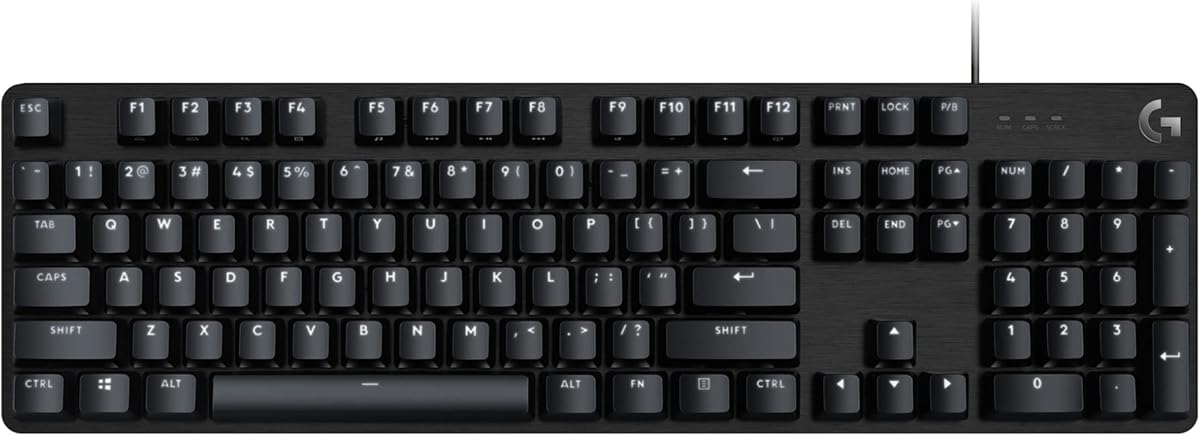
The Logitech G413 SE is a robust wired keyboard known for durability. Its PBT keycaps resist wear and tear over time. The aluminum-magnesium alloy top case provides a solid build.
We may earn a commission when you buy through this link, at no additional cost to you.
Developers working in demanding environments will value its reliability. The tactile switches offer clear feedback. The simple media keys are accessible via function layer.
It lacks wireless options and advanced customization software. The lighting is basic but effective. The build quality ensures long-term use.
This model suits those prioritizing stability and durability. If you need a reliable keyboard for daily tasks without wireless features this is a sound choice.
The 6-key rollover prevents missed inputs during intense typing. The anti-ghosting technology ensures accurate key registration.
White LED lighting provides clear visibility. The brushed finish adds a premium look to your setup.
Media keys allow control over volume and playback. The compact design fits well on most desks.
PBT keycaps and aluminum top case ensure long-lasting performance.
6-key rollover ensures multiple keys register simultaneously.
We may earn a commission when you buy through this link, at no additional cost to you.
The AULA F75 Pro offers a compact design without sacrificing key functions. The 75% layout retains arrow keys. Its tri-mode connectivity ensures flexibility across devices. A large battery supports long use periods.
We may earn a commission when you buy through this link, at no additional cost to you.
Developers needing desk space will appreciate its small footprint. The knob handles volume and brightness easily. The pre-lubed switches ensure smooth operation.
The software may have learning curve for customization. The RGB lighting is extensive but can be turned off. The build quality is solid for the price.
This keyboard is ideal for mobile developers. If you want a versatile compact board with reliable wireless this model fits well.
The side-printed PBT keycaps are durable and stylish. The gasket structure enhances typing comfort.
You can connect up to five devices simultaneously. The large battery ensures fewer charging interruptions.
Macros can be programmed for efficiency. The RGB effects add visual appeal to your workspace.
The 75% design saves desk space while keeping essential keys.
Switch between Bluetooth 2.4GHz and wired modes effortlessly.
We may earn a commission when you buy through this link, at no additional cost to you.
The Keychron K10 HE introduces Hall Effect technology to developers. Magnetic switches offer adjustable actuation points for speed. The rapid trigger feature prevents accidental inputs. It is wireless compatible with multiple systems.
We may earn a commission when you buy through this link, at no additional cost to you.
Developers needing precision input will find this unique. The web configurator allows deep customization. The wood sidings add a premium aesthetic.
The tech is new and configuration may be complex for some. The price reflects the advanced features. The wireless performance is stable.
This model suits tech enthusiasts and gamers. If you want adjustable actuation and wireless freedom this is a great option.
The switches reduce wear via magnetic sensing. The OSA profile keycaps enhance comfort.
You can connect via Bluetooth 2.4GHz or cable. The battery supports long wireless sessions.
Rapid trigger ensures responsive gaming performance. The wood accents provide a refined look.
Magnetic sensors detect keypresses allowing adjustable actuation points.
Prevents accidental inputs for faster and cleaner keystrokes.
We may earn a commission when you buy through this link, at no additional cost to you.
The AULA F99 fits a full numeric layout into a compact body. Its large battery ensures long wireless usage. The gasket structure provides comfortable typing. It supports tri-mode connectivity.
We may earn a commission when you buy through this link, at no additional cost to you.
Developers needing arrow keys and number pads will appreciate this. The hot-swap PCB allows customization. The RGB effects are vibrant.
The software interface may need refinement. The battery is heavy but lasts long. The build quality is solid.
This model suits users wanting compactness with full features. If you need number pad in small space this fits well.
The double-shot PBT keycaps are durable. The silicone pad enhances sound.
You can connect five devices at once. The large battery reduces charging frequency.
Macro customization aids productivity. The N-key rollover ensures accurate input.
The 96% design keeps number pad while saving space.
8000mAh capacity ensures extended wireless usage.
We may earn a commission when you buy through this link, at no additional cost to you.
The Keychron K3 V2 is a slim wireless keyboard ideal for portability. Its low-profile mechanical keys offer comfort. The QMK firmware allows deep customization. It features a Mac optimized layout.
We may earn a commission when you buy through this link, at no additional cost to you.
Developers on the go will appreciate its light weight. The Bluetooth connects to three devices. The floating keycap design is unique.
The slim design may reduce typing volume. The price is higher than standard boards. The battery life is decent but not best.
This model suits mobile professionals. If you need a sleek portable keyboard this fits well.
The aluminum body adds durability. The white backlight is modern.
You can use AI assistant for setup. The firmware updates are straightforward.
System toggle simplifies switching. The Mac keycaps are included.
Ultra-slim wireless profile for easy transport.
Remap keys and create macros with open-source firmware.
We may earn a commission when you buy through this link, at no additional cost to you.
Choosing the right keyboard requires considering layout, connectivity, and customization. Use these factors to narrow down options.
Consider how much desk space you have. Full-size models offer numeric pads but occupy more area. Compact 75% or 60% layouts save space but may omit number keys.
Pick a size that balances workspace needs with typing requirements.
Mechanical switches provide tactile feedback. Low-profile switches offer laptop-like comfort. Magnetic Hall Effect switches allow adjustable actuation.
Choose switch types that match your preference for feel and noise.
Wireless offers freedom but may introduce latency. Wired ensures stability. Tri-mode keyboards allow switching between Bluetooth 2.4GHz and USB-C.
Select connectivity based on your workflow and device setup.
QMK/VIA support allows deep remapping. Hot-swap PCBs let you change switches easily. Macros automate repetitive tasks.
Prioritize customization features if you need tailored shortcuts.
Wireless keyboards require recharging. Look for models with long battery life or quick charging capabilities.
Ensure battery endurance matches your daily usage needs.
Materials like aluminum or PBT keycaps enhance durability. Gasket mounts improve typing comfort.
Choose robust materials for long-term reliability.
Ensure support for your operating system. macOS and Windows often require different keycaps.
Check system toggle or included extras for seamless use.
Low-profile designs reduce wrist strain. Consider split or angled boards if needed.
Prioritize comfort for long coding sessions.
Clean your keyboard regularly with compressed air to remove dust. Use a soft cloth for surface cleaning to maintain keycap clarity.
Update firmware to access new features or stability fixes. Check manufacturer websites for latest versions and instructions.
Store your keyboard in a cool dry place. Avoid exposing wireless models to extreme temperatures or moisture.
The best layout depends on your workflow. 75% offers a balance of space and functionality. Full-size is ideal if you use a numeric pad regularly.
Mechanical keyboards offer tactile feedback and durability. They can improve typing speed and comfort. Low-profile options provide similar benefits with less height.
Yes modern wireless keyboards offer stable connections. 2.4GHz dongles reduce latency. Bluetooth is convenient for multi-device setups.
Yes QMK/VIA allows key remapping via web browser. Hot-swap keyboards let you change switches without tools. No local software is required for basic customization.
Look for models lasting at least a week with backlighting. Larger batteries reduce charging frequency. Quick charge features are helpful for busy schedules.
Compact keyboards may take adjustment for muscle memory. However they save desk space and improve ergonomics. Practice typing to adapt quickly.
Use compressed air to remove debris. Remove keycaps to wash with mild soap. Dry thoroughly before reattaching. Avoid harsh chemicals.
If you work with data often a full-size keyboard is better. Otherwise compact layouts reduce desk clutter. External pads can be added if needed.
We highlighted the Keychron V5 Max Logitech MX Keys S and RK ROYAL KLUDGE S98 as top picks for different needs. Each offers distinct features for customization comfort and value.
Prioritize what matters most to your workflow. If customization is key look at QMK/VIA options. For comfort consider ergonomic low-profile designs.
Check current prices and availability before purchasing. Features may change so verify specs for the latest models.