
Cooler Master Q300L V3 Micro-ATX PC Case
4.6Editor score
High airflow cooling system
Supports up to 366mm GPUs
Movable I/O panel design
This guide compares the top compact E ATX cases for high performance and small footprints to help you choose the right chassis for your build.
Finding the right compact E ATX case means balancing size with performance. You need enough room for powerful parts while keeping your desk tidy. This guide highlights top models that deliver airflow and support for modern hardware.
We evaluated each case on cooling, build quality, and flexibility. Our list covers options ranging from sleek designs to rugged portable builds. We compared airflow designs and motherboard support to ensure every pick fits your needs.
Each pick shows key specs like dimensions and clearance details. We focus on real features that matter for builders today. Note that prices and availability change often so verify details before you buy your next PC chassis.
4.6Editor score

4.7Editor score

3.9Editor score
The following comparison table details the key specifications of each model so you can quickly see differences in size and support.



The Cooler Master QUBE 540 leads our list with its flexible orientation design and strong cooling potential. It earns a solid 4.4 rating for balancing a compact footprint with support for large boards and powerful graphics cards.
We may earn a commission when you buy through this link, at no additional cost to you.
Its flexible orientation design lets you mount it vertically or horizontally with a reversible I/O panel. Full front mesh maximizes airflow while the included SickleFlow 120mm fan boosts performance without extra cost.
While it handles E-ATX boards up to 11 inches wide, vertical setups increase height significantly. You may need to adjust desk space for tall configurations but the airflow benefits are worth it.
Buy this if you want a versatile case that fits modern GPUs like the RTX 5090. It is ideal for builders needing E-ATX support in a space-saving form factor.
Engineered to work seamlessly in horizontal and vertical positions with reversible I/O for custom layouts.
Offers up to 415 mm GPU clearance without the front fan for full-size graphics cards.
We may earn a commission when you buy through this link, at no additional cost to you.
The Lian Li O11D Mini V2 is a favorite among enthusiasts for its refined design and optimized airflow. It holds a 4.7 rating reflecting its premium build and strong support for modern motherboard layouts.
We may earn a commission when you buy through this link, at no additional cost to you.
Its slanted bottom design enhances direct cold air intake and improves GPU cooling performance. The protruded mesh side panel fits full-sized ATX power supplies while keeping a compact footprint.
Fans are not included which adds to the total cost of ownership. However the robust anti-sag brackets and clean tempered glass panels justify the investment for high-end builds.
Buy this if you prioritize aesthetics and thermal performance in a smaller chassis. It is perfect for builders who want premium materials and excellent cooling potential.
The 10° slanted bottom design enhances direct cold air intake and improves GPU cooling.
Pillar-less tempered glass front and side panels provide an unobstructed view.
We may earn a commission when you buy through this link, at no additional cost to you.
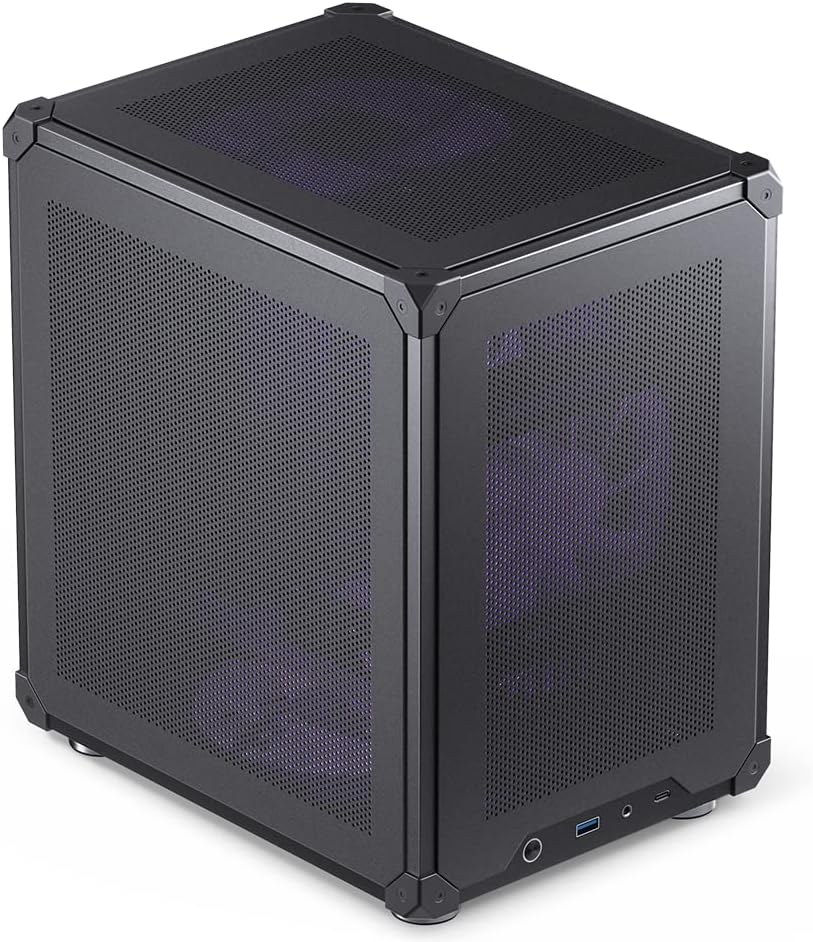
The Cooler Master Q300L V3 offers exceptional value for builders on a budget who still want strong airflow. It earns a 4.6 rating for its builder-friendly design and support for high-performance GPUs.
We may earn a commission when you buy through this link, at no additional cost to you.
This Micro-ATX case supports graphics cards up to 366mm and fits 240mm AIO radiators. The movable I/O panel and magnetic dust filters add convenience without raising the cost significantly.
It only supports Micro-ATX motherboards which limits expansion compared to full ATX cases. However its compact size and high airflow make it ideal for gaming rigs with space constraints.
Buy this if you need an affordable case with excellent cooling and GPU clearance. It is perfect for budget gamers who want reliable performance without paying premium prices.
Fit 6x 120mm or 140mm fans and 240mm AIO radiators for flexible cooling.
Supports ATX power supplies up to 200mm with a movable I/O panel.
We may earn a commission when you buy through this link, at no additional cost to you.
The Mechanic Master C34Pro stands out as a portable option for LAN parties and mobile builds. It rates 3.9 and offers unique features like a built-in handle and modular PCIe slot adjustments.
We may earn a commission when you buy through this link, at no additional cost to you.
Its robust build includes a 2mm aluminum shell and magnetic screwdriver kit for easy assembly. The modular flexibility allows you to adjust PCIe slots for MATX expansion within the chassis.
While it supports 360mm radiators, fan mounts are limited compared to larger cases. The price is higher than average but the portability and unique design justify the cost for some users.
Buy this if you need a transportable PC that supports large components. It is ideal for gamers who move their setup frequently between locations.
Integrated carry handle allows for easy transportation and mobility of your desktop PC setup.
Supports ATX E-ATX motherboards and MATX expansion via PCIe slot adjustments.
We may earn a commission when you buy through this link, at no additional cost to you.
The Cooler Master Q300L V1 is an excellent entry point for small form factor builds. It rates 4.5 for its simple design and ability to hold full-size GPUs in a compact chassis.
We may earn a commission when you buy through this link, at no additional cost to you.
Its modular I/O panel lets you move it to the front top or bottom. The perforated design on all sides promotes optimal airflow and heat dissipation for stable performance.
While it only supports Micro-ATX boards, the clearance for GPUs up to 360mm is impressive. This makes it great for budget builds that still want gaming performance.
Buy this if you need a cheap case that handles large GPUs well. It is perfect for entry-level builders who want transparency and airflow without paying much.
You have the flexibility to adjust its position at the front top or bottom.
The perforated design on all sides promotes optimal airflow and heat dissipation.
We may earn a commission when you buy through this link, at no additional cost to you.
The Mechanic Master C34 Ultra delivers a small form factor without sacrificing compatibility. It rates 4.6 for balancing portability with standard ATX motherboard support and modern I/O.
We may earn a commission when you buy through this link, at no additional cost to you.
It includes a built-in carry handle for easy transportation to events. The internal layout simplifies installation while supporting high-performance builds with air or liquid cooling.
For the cleanest cable management, using an SFX power supply is recommended. While liquid cooling is supported, the 240mm limit may restrict options for some custom loops.
Buy this if you want a compact case that fits standard parts and is easy to move. It is ideal for LAN gamers and portable desktop users.
The integrated handle makes it easy to transport your powerful desktop PC.
The internal layout is designed to simplify the installation process.
We may earn a commission when you buy through this link, at no additional cost to you.
The ASUS Prime AP201 is known for its mesh design and thermal performance. It rates 4.7 for its efficiency in cooling high-performance hardware in a small 33L footprint.
We may earn a commission when you buy through this link, at no additional cost to you.
Quasi-Filter Mesh Panels increase airflow while providing a compelling view of your build. Tool-free side panels make swapping components easy without needing extra tools or hardware.
It supports up to six fans and large radiators which is impressive for its size. However, the Micro-ATX limit means larger boards won't fit inside the chassis.
Buy this if you need strong cooling in a compact Micro-ATX case. It is perfect for builders who prioritize airflow and tool-free access.
A mesh design comprised of over 57,000 precision-machined holes increases airflow.
A simple yet secure clip mechanism allows chassis side panels to be easily removed.
We may earn a commission when you buy through this link, at no additional cost to you.
The Zalman CUBIX is one of the smallest cases that still supports standard ATX PSUs. It rates 4.5 for its robust construction and minimal yet mighty design in a 17.1L volume.
We may earn a commission when you buy through this link, at no additional cost to you.
It supports GPUs up to 260mm and CPU coolers up to 137mm. The perforated front panel and pre-installed 80mm fan ensure some airflow in such a small chassis.
Its size restricts larger components but it works well for basic office builds. The 0.8T steel construction ensures durability despite its charming appearance.
Buy this if you need a tiny case for basic office use. It is perfect for small spaces where desk real estate is limited.
Sleek design with sturdy 0.8T steel construction and a 17.1-liter total volume.
Perforated front panel and pre-installed 80mm fan for optimal cooling.
We may earn a commission when you buy through this link, at no additional cost to you.
The JONSBO C6 offers a simple and effective design for Micro-ATX builds. It rates 4.6 for its tool-free assembly and comprehensive mesh design for cooling.
We may earn a commission when you buy through this link, at no additional cost to you.
Its upper cover and side panel open without tools for easy access. The mesh chassis supports ATX PSUs up to 185mm and multiple fan positions for better thermal performance.
GPU clearance is limited to 255mm which restricts high-end options. However, the tool-free design and compact dimensions make it convenient for general use.
Buy this if you need a simple and cheap case with good airflow. It is perfect for users who prioritize access and cooling over top-end GPU support.
Upper Cover/Side Panel Tool-free Open makes building easier and more convenient.
Heat free design with all sides in mesh for superior airflow.
We may earn a commission when you buy through this link, at no additional cost to you.
The NZXT H5 Flow focuses on high-performance airflow with its ultra-fine mesh design. It rates 4.6 for its out-of-the-box performance and support for large liquid cooling radiators.
We may earn a commission when you buy through this link, at no additional cost to you.
It comes with two 120mm Quiet Airflow fans and a perforated PSU shroud for optimal intake. This setup ensures solid cooling without needing to buy additional fans immediately.
While the cable management is seamless, the case lacks customization options compared to others. Its straightforward design prioritizes function over flashy aesthetics or unique features.
Buy this if you want a reliable case with great airflow out of the box. It is perfect for users who value performance and simplicity in their build.
Ultra-fine mesh on the top front and side panels creates maximum airflow.
Equipped with two 120mm Quiet Airflow fans for solid out-of-the-box performance.
We may earn a commission when you buy through this link, at no additional cost to you.
Selecting the right compact E ATX case requires balancing performance with physical size.
Ensure the case supports your motherboard form factor. E-ATX is wider so check internal width clearance before buying.
Look for cases that explicitly list E-ATX support to avoid assembly issues.
Measure your graphics card length and compare it to the case specs. Many compact cases limit GPU size significantly.
Prioritize models with at least 330mm clearance for modern high-end cards.
Tower coolers often clash with side panels. Check the maximum cooler height listed in the specs.
Choose low-profile coolers or ensure the case allows for taller air coolers.
Standard ATX power supplies vary in length. Ensure the case fits your PSU dimensions.
Some compact cases require SFX supplies so verify compatibility if using standard PSUs.
If you plan liquid cooling check radiator support in front and top panels.
Look for multiple fan mounts to maximize airflow within the limited internal volume.
Portable cases often include handles for transport. These are useful for LAN parties.
Consider weight and ruggedness if you move your PC regularly.
Modern cases should include USB Type-C and USB 3.0 ports on the front.
Verify the panel layout matches your device connection needs.
Adequate space behind the motherboard tray keeps cables hidden.
Look for cases with at least 15mm gap for tidy routing.
Place the case on a stable surface with ample ventilation space around it. Do not block the mesh panels or fans with objects.
Clean dust filters regularly to maintain optimal airflow. Use compressed air to blow out particles from the fans and radiators.
Check cable connections occasionally to ensure they are secure and not restricting airflow. Avoid bending cables sharply to maintain their integrity.
Yes most E-ATX cases also support ATX boards. You just need to align the screw holes correctly. Always check the manufacturer manual for mounting points.
Yes modern compact cases use mesh panels and optimized airflow designs. Just ensure you install enough fans to move air effectively through the system.
Not always many support standard ATX power supplies. However some models recommend SFX to save space. Verify compatibility before purchasing.
Look for the maximum GPU length listed in the specs. If using a front fan subtract its thickness from the clearance value.
It can be due to tighter space. Take your time routing cables and use velcro straps to keep them tidy. Plan connections before assembly.
Yes most allow easy access to internal parts. Tool-free panels make removing components straightforward. Ensure you leave enough slack on cables.
Choosing the right compact E ATX case depends on your specific build needs. Whether you want portability airflow or premium design there is a model that fits.
Prioritize compatibility with your components and airflow efficiency when selecting a case. A well-designed chassis ensures your system stays cool under load.
Prices and availability change often so verify current details before buying your next PC chassis.