
Cooler Master Q300L V1
4.5Editor score
Modular I/O panel
High airflow design
Transparent side panel
This guide compares the top rated Micro ATX cases for performance style and airflow to help you build a powerful compact desktop system easily.
Choosing the right Micro ATX case balances compact size with powerful performance. A good Matx Case offers excellent airflow ample component clearance and stylish design for modern PC builds.
We compared ten top rated cases based on hardware support cooling options build quality and aesthetic features. Our list covers budget friendly options to premium designs with wood panels and panoramic glass.
Each pick highlights unique strengths like modular I/O quick release panels or exceptional thermal design. Please note that availability and pricing can change so check current details before purchasing.
4.5Editor score

4.8Editor score

4.8Editor score
This side by side comparison highlights key specifications and unique features across all ten selected Micro ATX cases to help you find the perfect match for your hardware and style preferences.




The Lian Li A3-mATX earns our Editor's Choice badge as the top Matx Case for modern builders. It combines high performance cooling with a sophisticated wood front panel design that stands out in any setup.
We may earn a commission when you buy through this link, at no additional cost to you.
Its steel mesh panels ensure optimal airflow for high TDP components while accommodating GPUs up to 415mm. The flexible PSU installation options enhance clearance and make cable routing significantly easier during assembly.
The walnut wood front adds a stylish touch but may limit some aesthetic choices for RGB enthusiasts. However the modular design ensures a clean look that prioritizes hardware visibility and thermal efficiency.
Ideal for users seeking a premium compact build without sacrificing hardware support. This case delivers professional grade features that justify its position as the best overall pick for Micro ATX systems.
The mesh side and top panels allow air to flow freely through the chassis keeping high power GPUs and CPUs running cool under load.
The walnut wood front panel brings a unique touch of elegance that complements minimalist or professional workspaces beautifully.
We may earn a commission when you buy through this link, at no additional cost to you.
The Cooler Master Q300L V1 offers exceptional value as our Best Budget Matx Case. It provides ample interior space for Micro ATX builds with a transparent side panel to showcase components clearly.
We may earn a commission when you buy through this link, at no additional cost to you.
Its modular I/O panel allows you to adjust the position at the front top or bottom on both sides. This flexibility helps optimize cable management and front port access for your specific desk layout.
The open thermal design promotes optimal airflow though you may need to purchase additional fans for full performance. Budget friendly pricing makes it accessible for first time builders seeking reliable features.
Perfect for users who prioritize cost efficiency without compromising core functionality. This case delivers a solid foundation for entry level to mid range Micro ATX system builds.
Adjusting the I/O panel position lets you tailor the case to your workspace needs making it versatile for different setups.
The edge to edge transparent panel lets you display your hardware build with pride without needing expensive RGB components.
We may earn a commission when you buy through this link, at no additional cost to you.
The LIAN LI Vector V100 MINI stands out as the Best Premium Matx Case with its panoramic tempered glass design and included ARGB lighting. It offers a stunning 270 degree view of internal components.
We may earn a commission when you buy through this link, at no additional cost to you.
Supporting GPUs up to 415mm ensures you can install high end graphics cards without worrying about size constraints. The included adjustable horizontal GPU anti-sag bracket protects your hardware from drooping over time.
While the premium price tag and glass panels require careful handling the visual impact is unmatched. Four ARGB PWM fans are included for immediate cooling and dynamic lighting effects out of the box.
This case is ideal for enthusiasts who want a high impact build with premium features. It delivers superior aesthetics and hardware support for those willing to invest in quality.
The seamless glass display creates an immersive view of your build making it a centerpiece in any gaming or work setup.
Having four ARGB fans included saves money and effort while ensuring your system runs cool with customizable lighting.
We may earn a commission when you buy through this link, at no additional cost to you.
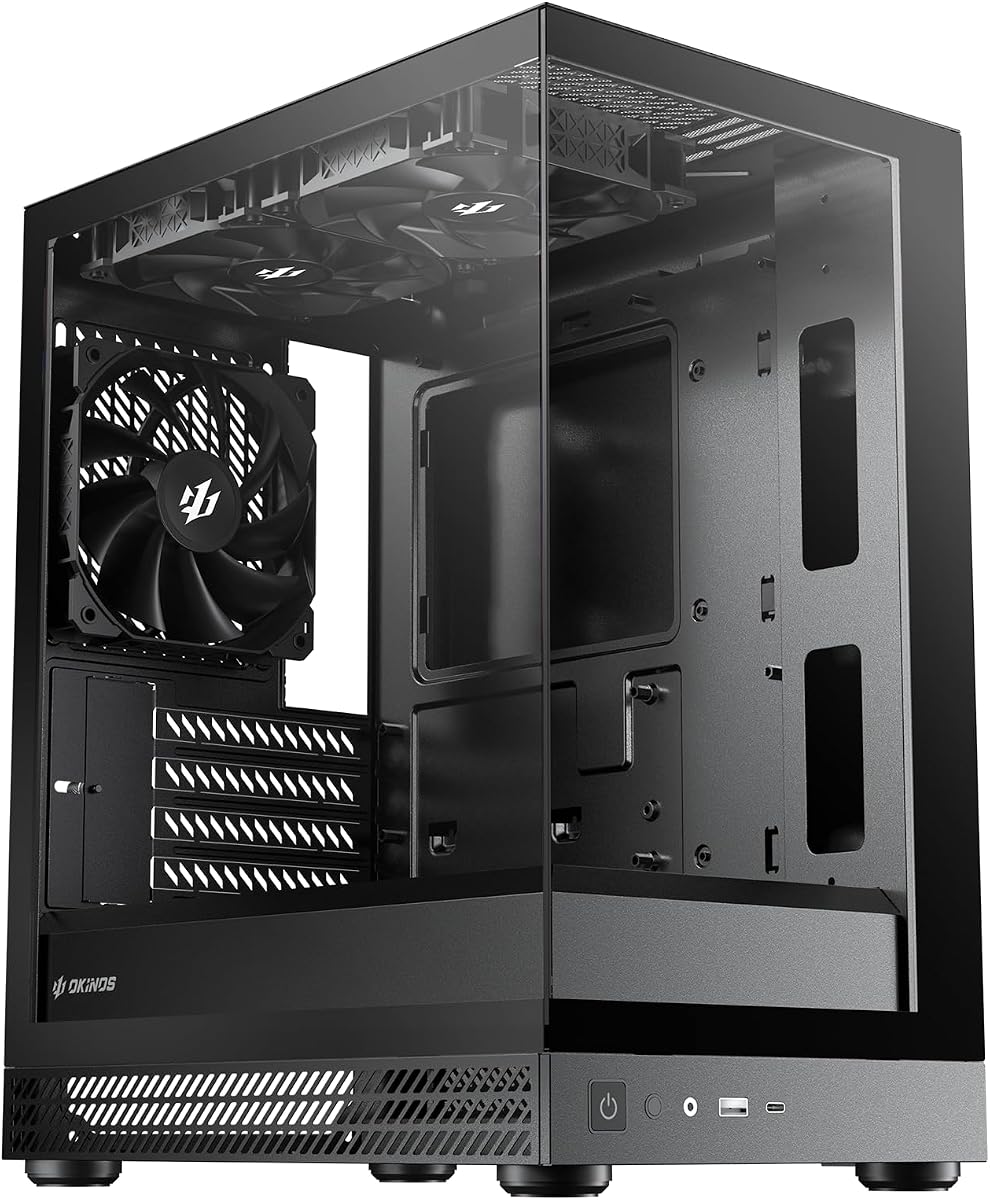
The Okinos Genuine Walnut Wood case combines natural aesthetics with practical features. Its walnut wood front panels complement home decor while the Type-C 3.2 Gen 2 port supports fast data transfer.
We may earn a commission when you buy through this link, at no additional cost to you.
Four pre-installed non-PWM fans provide immediate cooling with a 1-to-3 splitter cable included for management. The three-sided mesh intake design maximizes airflow to keep components cool during heavy tasks.
GPU clearance is limited to 320mm with front fans which may restrict very large graphics cards. However the stylish design and included cooling make it a solid choice for mid-range builds.
Best suited for users who appreciate unique materials and value included cooling. This case offers a balance of style and function for those prioritizing aesthetics in a compact footprint.
The genuine walnut wood adds warmth to your setup making it blend seamlessly with home furniture and decor styles.
The Type-C 10Gbps port ensures you can connect modern devices quickly without needing adapters or extra cables.
We may earn a commission when you buy through this link, at no additional cost to you.
The Okinos Aqua 3 offers a unique 270 degree panoramic design with fully glass-covered front and side panels. It supports GPUs up to 320mm including the 4070 for modern gaming builds.
We may earn a commission when you buy through this link, at no additional cost to you.
A vertical airflow design with ARGB fans ensures efficient heat dissipation. The quick-release panels allow tool-free glass removal making maintenance safer and more convenient than traditional screw setups.
Diamond cut angles on the glass create a unique visual effect that enhances your build aesthetic. The 1.2mm steel mesh optimizes heat dissipation while providing excellent dust resistance.
This case suits users wanting a stunning visual presentation with practical maintenance features. It delivers a vibrant viewing experience and solid performance for gaming and creative work.
The fully glass-covered design offers an immersive 270 degree view of your components creating a unique and attractive display.
Tool-free quick-release panels let you clean or adjust glass safely without risking accidental breakage or struggling with screws.
We may earn a commission when you buy through this link, at no additional cost to you.
The Zalman CUBIX Compact focuses on a minimal yet mighty design with a 17.1 liter volume. It features a perforated front panel and pre-installed 80mm fan for optimal airflow in a small space.
We may earn a commission when you buy through this link, at no additional cost to you.
Supporting standard ATX PSUs and GPUs up to 260mm makes it versatile for mid-range builds. The sturdy 0.8T steel construction ensures durability despite its charming and compact appearance.
Limited GPU clearance and basic I/O ports may restrict some high-end component choices. However the compact form factor is ideal for small desks or desktop setups requiring space efficiency.
Best for users seeking a small footprint without sacrificing essential hardware support. This case delivers reliable performance and durability in a sleek minimalist package.
Its compact volume makes it perfect for small workspaces where every inch of desk space matters significantly.
The 0.8T steel build provides robust protection for components ensuring longevity even in a smaller chassis size.
We may earn a commission when you buy through this link, at no additional cost to you.
The TGDGAMER MATX is a slim PC case designed for high airflow with a perforated front panel. It supports normal size ATX power supplies and fits up to 2x 120mm fans.
We may earn a commission when you buy through this link, at no additional cost to you.
GPU length limits range from 225mm to 250mm depending on front fan placement. This constraint may restrict larger graphics cards but ensures efficient airflow for cooling components effectively.
Budget friendly design makes it accessible for entry level builders who need basic functionality without extras. The slim profile helps save space in smaller or constrained desktop environments.
Ideal for users prioritizing compact dimensions and airflow on a budget. This case delivers essential performance features for simple and efficient Micro ATX builds.
The slim design helps keep your desk footprint minimal while still supporting standard ATX components internally.
Perforated panels ensure air flows directly through the case keeping components cool during extended use.
We may earn a commission when you buy through this link, at no additional cost to you.
The Okinos Aqua UNO is designed exclusively for air cooling builds with no radiator support. It supports GPUs up to 309mm and CPU coolers up to 165mm for efficient thermal management.
We may earn a commission when you buy through this link, at no additional cost to you.
Full-coverage dust protection with removable filters on top side and bottom keeps internal components cleaner. Advanced quick-release panels allow tool-free removal reducing the risk of accidental damage.
Optimized cable space with dedicated routing paths ensures a neat and tidy interior. The modern I/O panel includes Type-C 5Gbps for fast data transfer and daily use convenience.
Best for users who prefer simple and easy-to-maintain cooling setups. This case delivers reliable performance and maintenance-friendly features without the complexity of liquid cooling.
Full-coverage removable dust filters help reduce dust buildup keeping your system cleaner and easier to maintain long term.
Quick-release glass panels allow easy access for cleaning without tools minimizing the risk of breakage or damage.
We may earn a commission when you buy through this link, at no additional cost to you.
The Okinos Mirage 4 Black offers a 270-degree panoramic design with a tool-free tempered glass panel. It supports up to a 240mm top radiator and features a 5-slot PCIe layout for max GPU cooling.
We may earn a commission when you buy through this link, at no additional cost to you.
Pre-installed ARGB fans come with a controller and splitter cable for dynamic lighting. A 1.2mm mesh on the right panel enhances airflow for superior cooling performance and component longevity.
Generous cable management space ensures a seamless build experience with 95mm on the right and 45mm on the left. Full-size magnetic dust filters on top and bottom ensure clean airflow.
Ideal for users wanting enhanced airflow and visual impact. This case delivers strong cooling capabilities and stylish design for versatile Micro ATX builds.
The 1.2mm mesh and vertical airflow system optimize thermal management ensuring components stay cool under load.
Included ARGB fans and a controller let you customize lighting effects to match your preferred aesthetic.
We may earn a commission when you buy through this link, at no additional cost to you.
The Lian Li B4-mATX features a premium real wood finish available in black walnut or white beech. It supports GPUs up to 358mm and 360mm AIO coolers for robust hardware compatibility.
We may earn a commission when you buy through this link, at no additional cost to you.
Dual positioning allows horizontal desktop blend or vertical tower design saving space effectively. Pre-installed slim 120mm non-RGB fans provide immediate cooling out of the box for convenient setup.
The premium wood finish adds elegance but comes at a higher cost compared to standard cases. Customizable cooling configurations offer flexibility for additional fans based on PSU choice.
Perfect for users seeking a unique wood aesthetic with flexible positioning. This case delivers strong hardware support and style for versatile desktop or tower configurations.
The real wood finish offers a stylish unique look that elevates the aesthetic appeal of your PC setup.
Using the case horizontally or vertically lets you adapt to different desk layouts and space constraints.
We may earn a commission when you buy through this link, at no additional cost to you.
Selecting the right Micro ATX case requires balancing hardware compatibility cooling performance aesthetic design and budget. Consider these key factors to ensure your build meets your needs.
Ensure the case supports your motherboard size GPU length and CPU cooler height. Most Micro ATX cases also support Mini ITX boards so verify dimensions before purchasing.
Check GPU clearance carefully as compact cases often have limits that restrict larger graphics cards or require removing front fans.
Look for cases with mesh panels perforated designs or multiple fan mounts to ensure optimal airflow. This prevents heat buildup and keeps components stable during demanding tasks.
Consider radiator support if you plan to use liquid cooling systems for high-performance builds requiring maximum thermal efficiency.
Steel thickness and panel quality affect durability and noise reduction. Thicker steel reduces vibration and provides better protection for internal components during use.
Premium cases may include wood panels or tempered glass which add aesthetic value but require careful handling during installation and cleaning.
Spacious cable routing areas and tie points help maintain a tidy interior improving airflow and aesthetics. Look for cases with ample clearance behind the motherboard tray.
Organizing cables properly ensures components run cooler and makes future upgrades easier without struggling with tangled wires.
Modern cases often include USB Type-C ports which offer faster data transfer speeds than traditional USB 3.0 ports. Check your motherboard supports these standards before relying on them.
Audio jacks and power/reset buttons should be easily accessible for daily use without needing to reach behind the case.
Magnetic or removable dust filters on intake points keep dust from accumulating on fans and radiators. This simplifies maintenance and extends component lifespan.
Regular cleaning is essential but cases with easy-access filters reduce effort and prevent debris from entering critical cooling areas.
Prices vary based on included features like fans ARGB lighting and premium materials. Set a realistic budget that meets your needs without overspending on unnecessary extras.
Budget cases may lack extra fans or premium finishes but still offer reliable performance if airflow and clearance are prioritized.
Choose a design that matches your space such as minimalist wood panels or colorful ARGB lighting. The case is often the largest visual component of your desktop setup.
Consider how glass panels and internal components will look in your environment to ensure a cohesive and pleasing visual result.
Install your motherboard standoffs according to the case layout to ensure proper grounding and support. Verify that all screws match the motherboard mounting holes to avoid short circuits.
Plan cable routes before securing components to use tie points and grommets effectively. Proper cable management improves airflow and makes future upgrades much easier to access.
Clean dust filters every month using a soft brush or vacuum to maintain optimal airflow. Inspect fans for debris and ensure all panels are securely closed after cleaning.
A Micro ATX case is smaller than standard ATX cases but supports similar hardware including GPUs and PSUs. It balances compact size with efficient airflow and component clearance for desktop setups.
Some cases come with pre-installed fans while others require separate purchases. Check the included fan count and airflow design to decide if additional fans are necessary for cooling.
No Micro ATX cases are designed for Micro ATX or Mini ITX boards. Installing a full ATX motherboard may not fit due to size constraints and mounting hole differences.
Most Micro ATX cases feature magnetic or removable dust filters on top and bottom. Take them out gently and clean with compressed air or a soft brush to maintain airflow.
Check your graphics card dimensions against the case clearance specifications. Some cases support up to 400mm while others limit to 300mm or less depending on front fan placement.
Many compact cases support 240mm radiators but space limits are common. Verify specific case dimensions before installing radiators to ensure proper fit without blocking other components.
These ten Micro ATX cases offer diverse options from budget-friendly to premium designs. The Lian Li A3-mATX leads with airflow and style while budget picks deliver essential features for entry builds.
Prioritize hardware compatibility cooling performance and cable management when selecting your case. Ensure your GPU and cooler dimensions fit before finalizing your choice to avoid costly returns.
Always check current availability and pricing as these details change frequently. Your ideal case will match both your technical needs and aesthetic preferences for a successful build.