
HP Everyday Slim Laptop
5.0Editor score
HP True Vision 720p camera
Dual array microphones
Lightweight portable design
This guide compares the best laptops and accessories for Zoom calls, focusing on camera quality, microphone clarity, performance, and lighting to optimize your
Finding the right laptop for Zoom calls is essential for clear communication and professional presence. A good device ensures stable video, crisp audio, and reliable performance during virtual meetings.
We compared top models based on camera resolution, microphone quality, processing power, and display clarity. Our list includes laptops and accessories that enhance video conferencing for professionals and students.
Each pick highlights key features that matter most for Zoom calls. Prices may fluctuate due to market conditions, so verify current offers before purchasing to ensure you get the best value available today.
5.0Editor score

5.0Editor score
4.6Editor score
This side-by-side comparison highlights the key specifications and features of each product to help you choose the ideal setup for your virtual meetings and remote work needs.






The HP 14 inch Laptop offers an affordable entry point for basic Zoom calls with its Intel N150 processor and 4GB DDR5 RAM. It ensures lightweight portability and clear visuals on its 14 inch non-touch display.
We may earn a commission when you buy through this link, at no additional cost to you.
This model features versatile connectivity with USB 3.0 Type-C and Type-A ports alongside HDMI for external monitors. The slim 0.71 inch profile makes it easy to carry between home and office settings.
While the 4GB RAM might struggle with extensive multitasking beyond simple video calls, the 1TB cloud storage compensates for limited local SSD capacity. The anti-glare coating helps reduce eye strain during long meetings.
Ideal for students or professionals needing a budget-friendly machine for daily Zoom meetings, this laptop balances essential features with mobility. It supports Microsoft 365 for productivity needs while maintaining a compact form factor.
Weighing only 3.24 lbs with a slim profile, this laptop is perfect for commuting or working from different locations without burdening your backpack.
With USB-C USB-A HDMI ports and a headphone mic combo jack, you can connect peripherals easily without needing extra dongles for your Zoom setup.
We may earn a commission when you buy through this link, at no additional cost to you.
The Cyezcor Video Conference Lighting Kit improves your Zoom presence with its ring light design that offers even illumination. It features three color temperatures and five brightness levels to match any environment.
We may earn a commission when you buy through this link, at no additional cost to you.
Its clip on design ensures stable placement on monitor edges without loosening during use. The 48 LED lamp beads provide 10W brightness while maintaining a soft light that is not dazzling to participants.
Although it requires a USB power connection which may limit placement flexibility compared to battery options, the portable size makes it easy to pack for travel. This accessory transforms poorly lit room into a professional studio.
Best for anyone struggling with dark backgrounds or shadows on their face, this kit is an affordable upgrade for video calls. It suits remote workers, streamers, and content creators needing consistent lighting quality.
Switch between white warm and natural light settings to find the perfect tone that flatters your skin and matches your room ambiance.
Simply clamp the clip to your screen edge and plug into a USB port for instant brightening of your video feed without complex installation.
We may earn a commission when you buy through this link, at no additional cost to you.
The HP Everyday Slim Laptop stands out with dedicated video call enhancements including a True Vision 720p HD camera with temporal noise reduction. Dual array microphones ensure your voice is clear even in noisy environments.
We may earn a commission when you buy through this link, at no additional cost to you.
Its full-size keyboard includes a dedicated Microsoft Copilot key for quick access to AI tools during meetings. The multi-touch HP Imagepad allows for effortless navigation through presentation slides or shared documents.
Despite the modest 4GB RAM and 128GB SSD storage, the focus on input features and battery life makes it excellent for pure video conferencing needs. The thin profile ensures it fits easily in bags.
Ideal for professionals prioritizing clear audio and video quality on a budget, this laptop delivers reliability without unnecessary bulk. It supports seamless navigation and typing comfort during long Zoom sessions.
The HP True Vision 720p camera reduces background noise to keep your image sharp and professional even when lighting conditions are not perfect.
Dual array microphones work together to isolate your voice from background noise, ensuring participants hear you clearly without distractions.
We may earn a commission when you buy through this link, at no additional cost to you.
The NIMO 15.6 FHD Copilot AI-Laptop handles intensive workloads with its 16GB RAM and 512GB NVMe SSD ensuring zero lag during Zoom calls with multiple browser tabs open. The 15.6 inch Full HD display provides sharp visuals for shared screens.
We may earn a commission when you buy through this link, at no additional cost to you.
It boots in just 8 seconds allowing you to join meetings quickly. The 175 degree flat hinge enables easy document sharing during group meetings by laying the screen flat on tables.
Weighing 3.74 lbs it is slightly heavier than smaller laptops but the added weight comes with robust build quality and extensive port selection including USB-C HDMI and SD readers for flexibility.
Perfect for remote workers or students who run multiple apps alongside video calls this laptop balances performance and connectivity. The included fingerprint unlock adds security for public workspace usage.
With 16GB RAM you can keep dozens of tabs and apps open while streaming HD video without experiencing slowdowns or freezes.
The 512GB NVMe SSD ensures files load instantly and applications start immediately helping you stay efficient during critical meeting times.
We may earn a commission when you buy through this link, at no additional cost to you.
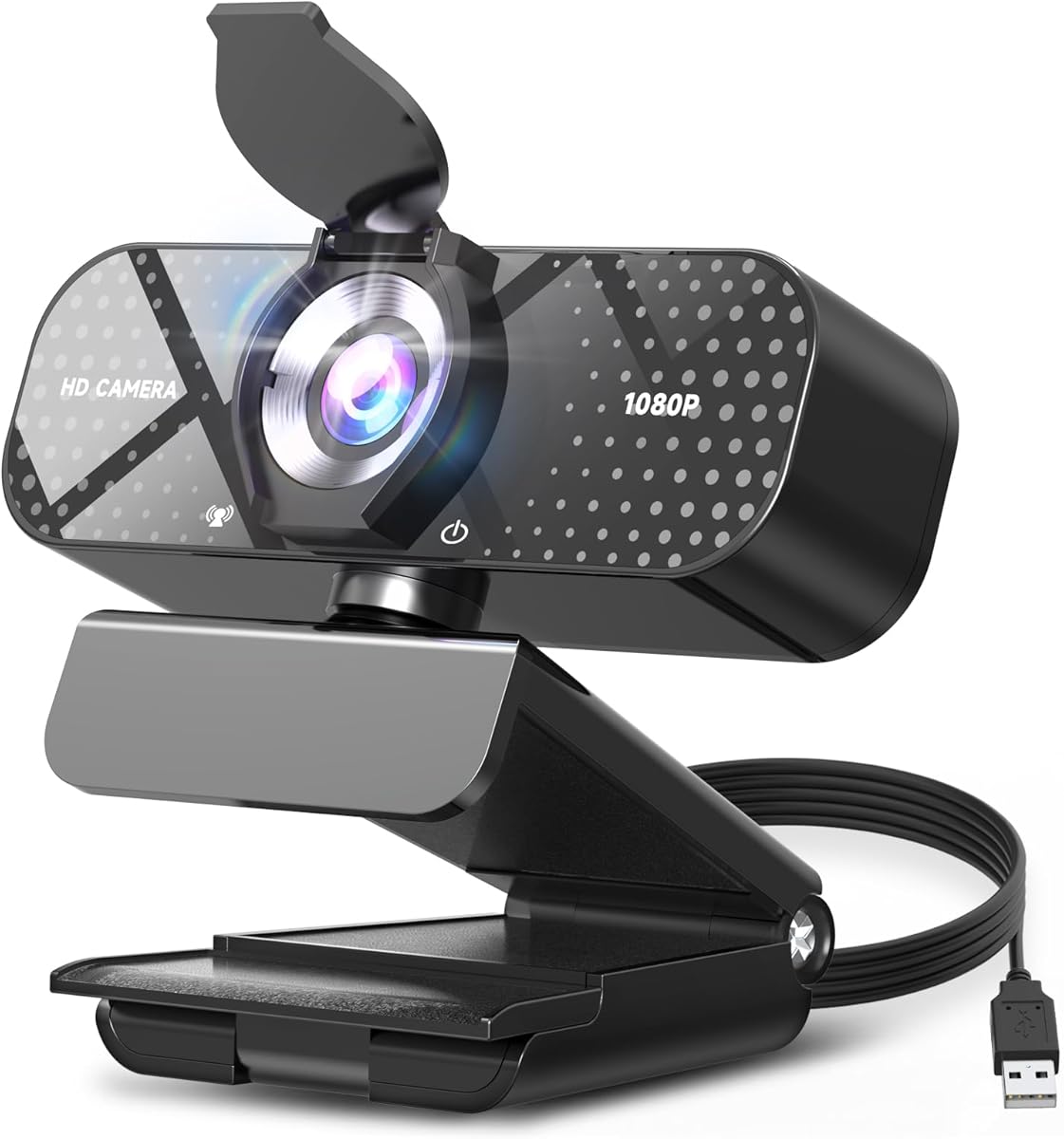
The TRAUSI 1080P FHD Webcam upgrades your video quality significantly with crisp 1080p resolution at 30 frames per second. Its auto light correction technology adjusts brightness to suit any lighting condition for a polished look.
We may earn a commission when you buy through this link, at no additional cost to you.
A built-in noise-canceling microphone ensures your voice remains clear even in noisy environments like busy offices or homes. The included privacy cover lets you protect your privacy when not in use.
While it requires an external USB connection which adds a cable to your setup, the plug-and-play design makes installation easy. The wide-angle lens captures more detail and context in your frame.
Best for professionals wanting to upgrade their existing laptop camera this webcam offers superior clarity and convenience. It is ideal for content creation, teaching, or high-stakes client calls.
The webcam dynamically adjusts brightness and color to ensure you look your best whether your room is dimly lit or brightly illuminated.
Its advanced noise-canceling technology filters out background distractions so your participants focus on your message rather than your environment.
We may earn a commission when you buy through this link, at no additional cost to you.
This Zoom Lighting for Computer uses edge-lit technology to deliver uniform soft illumination that reduces glare and eye strain. With three color temperatures and ten brightness levels it adapts to various scenarios effortlessly.
We may earn a commission when you buy through this link, at no additional cost to you.
Its adjustable height range from 22 to 32.5 inches allows ergonomic positioning to avoid glare. The 360 degree rotation ensures you can direct light exactly where needed for optimal visibility.
The high CRI of 97.8 ensures accurate color reproduction on video making your appearance natural and vibrant. This light functions as both a desk lamp and a conferencing fill light for versatility.
Ideal for home office setups where monitor clip-on lights are impractical this desk lamp provides dedicated lighting. It suits professionals who need stable high-quality illumination for recording or calls.
With a high CRI score your skin tones and clothing colors appear true to life on camera enhancing your professional appearance.
Adjustable height lets you position the light perfectly to reduce eye fatigue and improve comfort during long work sessions.
We may earn a commission when you buy through this link, at no additional cost to you.
This Ring Light for Computer features a 6-inch circular design with upgraded coatings to provide brighter illumination while avoiding glare. It offers three color temperatures and dimming levels for precise control over lighting conditions.
We may earn a commission when you buy through this link, at no additional cost to you.
The high CRI over 95 ensures accurate color reproduction for vivid realistic photos and videos. Multiple modes allow cycling through warm mixed and cold settings to match your mood or environment.
Although it lacks a remote control which might require manual adjustments, the simple switch interface is intuitive. The compact size makes it portable for travel between different workspaces easily.
Best for content creators or professionals needing quick lighting improvements this light is effective and affordable. It enhances skin tone and reduces shadows for a polished look on Zoom.
The curved design diffuses light evenly to create a soft flattering glow that protects your eyes and improves video quality.
With high color rendering index your image appears natural and vibrant ensuring participants see you clearly without color distortion.
We may earn a commission when you buy through this link, at no additional cost to you.
This HP 14 Business Laptop comes with one-year Office 365 included enhancing productivity for work tasks. It features an Intel N150 Quad-Core processor that manages daily workflows efficiently for business users.
We may earn a commission when you buy through this link, at no additional cost to you.
The 14 inch LED display offers anti-glare protection for comfortable viewing in various lighting conditions. Multiple ports including USB-C USB-A HDMI allow connecting peripherals without adapters for seamless connectivity.
Storage and RAM are modest at 128GB and 4GB respectively but sufficient for lightweight tasks and meetings. The pale rose gold finish adds a stylish professional aesthetic to the design.
Ideal for small business owners needing a reliable device for meetings and documentation this laptop covers essential requirements. It supports smooth browsing and basic multitasking within a compact frame.
With included Office 365 you can access Word Excel and other tools immediately to work on documents during or after meetings.
Variety of ports lets you connect projectors, external drives, or mice easily keeping your setup flexible for any business scenario.
We may earn a commission when you buy through this link, at no additional cost to you.
This HP New Everyday Slim Laptop delivers up to 7.5 hours of wireless streaming and 11 hours of video playback for extended mobile use. It includes Microsoft Office 365 and ample cloud storage for your files.
We may earn a commission when you buy through this link, at no additional cost to you.
Enhanced video call features include the HP True Vision 720p camera with noise reduction and dual array microphones for clear audio. The dedicated Copilot key offers quick access to AI tools during meetings.
Weighing just 3.24 lbs its lightweight design fits easily into bags for travel. The sleek Natural Silver chassis looks professional and modern while maintaining durability for everyday tasks.
Best for travelers who need long battery life and cloud storage this laptop supports remote work on the go. It balances essential features with mobility for consistent performance.
With 1TB of cloud storage you can store important documents securely and access them from anywhere without worrying about local hard drive space.
The dedicated Copilot key helps streamline tasks quickly allowing you to manage schedules or notes efficiently during busy workdays.
We may earn a commission when you buy through this link, at no additional cost to you.
The yAyusi Dual-lamp Video Conference Lighting uses two light bars to provide brighter and more even illumination than single options. It includes both remote and touch control for convenient adjustments.
We may earn a commission when you buy through this link, at no additional cost to you.
Its rotatable design supports 360 degree horizontal and 180 degree vertical rotation to meet various lighting needs. The two usage modes allow clip-on or desktop placement for flexibility.
Three color modes and ten brightness levels let you customize the atmosphere perfectly. Built-in sponge pads prevent scratching devices during installation ensuring your monitor remains safe.
Best for professionals needing superior brightness this dual lamp setup enhances video quality effectively. It suits podcasters streamers or anyone wanting a professional studio feel at home.
Two light bars ensure even illumination across your face reducing shadows and creating a more natural look on camera.
Remote and touch controls allow you to change settings instantly without interrupting your meeting flow or leaving your desk.
We may earn a commission when you buy through this link, at no additional cost to you.
Selecting the right device involves evaluating several factors that impact video clarity audio quality and overall performance during meetings.
Camera resolution determines how clear you appear to others. Look for devices with at least 720p or ideally 1080p HD cameras for sharper video. Features like noise reduction or auto light correction enhance image quality in poor lighting conditions.
A higher resolution camera ensures details remain visible and reduces graininess making your presence more professional during important meetings.
Audio clarity is as important as video. Dual array microphones help isolate your voice from background noise effectively. Some laptops include noise-canceling software that filters out ambient sounds for clearer communication.
Check for built-in microphone quality reviews or consider an external option to ensure participants hear you clearly without distractions.
Processing power ensures smooth running of video applications alongside other tasks. A processor with multiple cores helps handle multitasking without lag. Aim for at least a quad-core CPU for reliable performance.
Sufficient processing power prevents freezing or stuttering during video calls allowing you to focus on the conversation rather than technical issues.
RAM affects how many applications you can run simultaneously without slowdowns. At least 8GB of RAM is recommended for seamless multitasking. Storage space determines how many files and applications you can keep locally.
Higher RAM capacity allows smoother operation of video conferencing apps with other tools like browsers or note-taking software open together.
A clear display helps you read shared documents or see participants clearly. Anti-glare coatings reduce eye strain during long meetings. Screen size should balance visibility with portability based on your work habits.
Investing in a display with good brightness and color accuracy improves the overall experience by making visuals easier to interpret.
Multiple ports allow you to connect external webcams, microphones, or monitors without dongles. USB-C HDMI and headphone jacks are standard options. Ensure the device supports fast data transfer for external accessories.
Versatile connectivity ensures you can expand your setup as needed without replacing hardware for new peripherals or devices.
Long battery life is crucial for mobile professionals attending meetings away from power outlets. Aim for devices offering at least 8 hours of usage to cover a full workday. Power-efficient components help extend battery duration.
A reliable battery means you can stay connected throughout long meeting schedules without worrying about finding a power source.
Lightweight designs make commuting easier without physical strain. Consider dimensions and weight to ensure it fits your bag comfortably. Thin profiles contribute to overall portability without sacrificing durability.
A portable device ensures you can work from anywhere while maintaining productivity and comfort during extended periods of use.
Start by updating your operating system and Zoom application to the latest versions to ensure compatibility and security. Check your settings to confirm the correct camera and microphone are selected before joining meetings.
Keep your device clean by wiping the screen and keyboard regularly with a soft cloth. Avoid exposing it to extreme temperatures or humidity which can damage internal components and reduce battery life.
Use external accessories like lighting or better microphones if needed to enhance your setup. Regularly restart your computer to clear memory and maintain performance for smooth video calls.
A suitable laptop features a high-quality camera and microphone for clear communication. It should have a processor and RAM capable of handling video apps without lag. Good display quality and battery life also contribute to a better user experience.
Not necessarily as many modern laptops include HD built-in webcams. However if your built-in camera is low quality or outdated an external 1080p webcam can significantly improve your video presence and image clarity.
At least 8GB of RAM is recommended for smooth performance during video calls. If you multitask heavily with other apps open 16GB provides more headroom to prevent slowdowns and ensure consistent quality.
Yes using an external microphone or headphones with a built-in mic can enhance audio quality. Most laptops have microphone settings that can be adjusted to reduce noise and focus on your voice.
Blurry video often results from poor lighting or low camera resolution. Ensure you have adequate light sources and check your camera settings to maximize resolution. Using a webcam accessory may help improve clarity.
USB-C and USB-A ports are useful for connecting peripherals like webcams or external drives. HDMI allows connecting to external monitors for better visibility. A headphone jack is needed if your headset requires a wired connection.
Choosing the right device involves balancing performance camera quality and affordability for your specific needs. Our top picks include the NIMO laptop for power HP Everyday for portability and TRAUSI webcam for premium visuals.
Prioritize audio video features and battery life if you attend meetings frequently. A device that ensures clear communication will save time and enhance your professional presence during virtual interactions.
Remember to check current prices and availability before purchasing as market conditions change. Invest wisely to ensure you have the tools needed for productive and successful remote work sessions.