
Nektar SE49
4.5Editor score
Comprehensive MIDI functionality
DAW integration for most apps
Includes Bigwig Studio DAW
This guide compares the top 49 Key MIDI Keyboards for producers and performers, evaluating features, integration, and value to help you choose the right
Finding the right 49 Key MIDI Keyboard can transform your music production workflow significantly. These controllers offer a sweet spot between portability and playability, making them ideal for home studios and live setups alike.
We compared ten leading models based on key feel, software integration, control layout, and overall value. Our analysis focuses on how well each unit handles modern production demands and DAW compatibility across platforms.
Each pick highlights unique strengths and potential trade-offs to help you decide quickly. Remember that prices and availability change frequently, so check current listings before making your final purchasing decision today.
4.5Editor score

4.7Editor score

4.4Editor score
This side-by-side comparison outlines the core specifications and capabilities of each of the ten selected controllers to help you visualize differences at a glance.




The Novation Launchkey 49 MK4 stands out as the top choice for producers seeking seamless software interaction. It scores highly for its ability to integrate directly with major digital audio workstations.
We may earn a commission when you buy through this link, at no additional cost to you.
Its standout features include the FSR drum pads that offer polyphonic aftertouch, allowing for dynamic expression beyond simple triggering. The Scale and Chord modes make songwriting accessible even for those less familiar with music theory.
While the price is higher than entry-level options, the build quality and depth of control justify the investment for serious users. The setup process is straightforward but benefits from a few minutes of configuration to unlock full potential.
This controller is best suited for intermediate to advanced producers who want a central hub for their studio setup. If deep integration and expressive control are your priorities, this model delivers exceptional value over time.
Launchkey offers custom mappings that bring mixer and channel controls directly under your fingers for faster editing.
Arpeggiators and chord triggers let you generate complex melodies and harmonies with minimal effort during jams.
We may earn a commission when you buy through this link, at no additional cost to you.
The Arturia KeyLab mk3 in white is a premium option designed for users who demand both aesthetics and functionality. It features a robust build quality that stands up to heavy daily use in professional environments.
We may earn a commission when you buy through this link, at no additional cost to you.
Its key highlights include twelve pressure-sensitive performance pads and nine encoders that provide tactile control over virtually any parameter in your software. The inclusion of aftertouch on the keys adds another layer of expressiveness to performances.
The main trade-off is the price and weight, which might be prohibitive for budget-conscious or mobile users. However, those seeking a centerpiece for their studio will find the extra features well worth the investment in the long run.
Ideal for producers who prioritize build quality and visual impact, this controller elevates the workspace experience. It pairs exceptionally well with users already invested in the Arturia ecosystem or those seeking a high-end feel.
The white finish offers a clean modern look that fits well in minimalist or high-end studio environments.
Nine encoders and dedicated buttons allow for precise manipulation of effects and instrument parameters instantly.
We may earn a commission when you buy through this link, at no additional cost to you.
The Nektar SE49 offers an excellent entry point for anyone looking to start producing music without breaking the bank. It balances essential features with a price that makes it accessible to students and hobbyists.
We may earn a commission when you buy through this link, at no additional cost to you.
Key strengths include its comprehensive MIDI functionality and pre-integrated DAW support that simplifies setup significantly. The inclusion of Bigwig Studio and sound content makes it a complete package right out of the box for new users.
While it lacks some of the advanced controls found in higher-end models, it performs reliably for core tasks like recording and basic mixing. The trade-off in features is acceptable given the low cost and solid performance.
This model is best for beginners or those needing a secondary keyboard for on-the-go ideas. If you need a dependable controller that focuses on the fundamentals without extra bells and whistles, this is a strong choice.
With included software and cross-platform support, you can start making music immediately without extra purchases.
Works seamlessly with Mac PC and iOS devices ensuring flexibility across different workflow setups easily.
We may earn a commission when you buy through this link, at no additional cost to you.
The M-AUDIO Oxygen 49 MKV distinguishes itself with intelligent features designed to speed up the production workflow. It targets users who want quick access to chord structures and preset management without manual tweaking.
We may earn a commission when you buy through this link, at no additional cost to you.
Its standout capabilities include Smart Chord and Smart Scale modes that help users create harmonically correct progressions quickly. The NKS integration also allows for browsing and controlling Native Instruments presets directly from the hardware.
The build feels lightweight and functional, which might not appeal to users seeking a heavy-duty feel. However, the auto-mapping and software bundle offer enough value to compensate for the lighter construction in many studio contexts.
Recommended for producers who rely heavily on virtual instruments and want tight integration with Native Instruments libraries. If you value software features and smart aids over physical weight, this controller provides a lot of utility.
Scale and Chord modes allow for instant harmony generation without needing deep music theory knowledge.
Browse and tweak Native Instruments sounds using the physical controls rather than the computer mouse.
We may earn a commission when you buy through this link, at no additional cost to you.
The Arturia KeyLab Essential mk3 shines with its impressive software package that adds significant value beyond the hardware itself. It is particularly appealing to those looking for a versatile controller that grows with their skills.
We may earn a commission when you buy through this link, at no additional cost to you.
Highlights include the RGB-backlit pads and a dedicated LCD screen that provide clear visual feedback during use. The inclusion of Analog Lab V and subscriptions like Loopcloud make this a comprehensive production package for many users.
Some users may find the plastic construction less premium than other models and the menus require some learning to navigate efficiently. However, the creative features and software depth often outweigh these minor physical limitations for most producers.
This controller is best for producers seeking a balance between hardware utility and software versatility. If you value having a wide range of sounds and control options out of the box, it offers strong value.
The dedicated LCD screen displays parameter values and feedback clearly to reduce guesswork during sessions.
Analog Lab V provides thousands of presets across genres to inspire immediate creativity without extra costs.
We may earn a commission when you buy through this link, at no additional cost to you.
The 49-Key MIDI Keyboard Controller with ABS construction prioritizes compactness and affordability above advanced features. It serves well for users needing a simple interface for melody and arrangement without a lot of extra controls.
We may earn a commission when you buy through this link, at no additional cost to you.
Its main strengths are the physical dimensions which allow it to fit easily on small desks and the straightforward black finish that blends into any workspace. It is designed for general creative sessions and practice rather than complex automation.
The lack of detailed documentation and extra features like pads or sliders limits its use for complex production workflows. However, for basic input and testing ideas, it offers a practical and accessible entry point at a low price.
Best suited for students or casual users with limited desk space who need a straightforward controller. If you just need a keyboard for basic MIDI input without worrying about complex routing, this fits the niche.
The compact profile ensures it fits comfortably on smaller workstations without crowding your monitor area.
Focuses on core keyboard functionality to support everyday creative sessions without unnecessary complexity.
We may earn a commission when you buy through this link, at no additional cost to you.
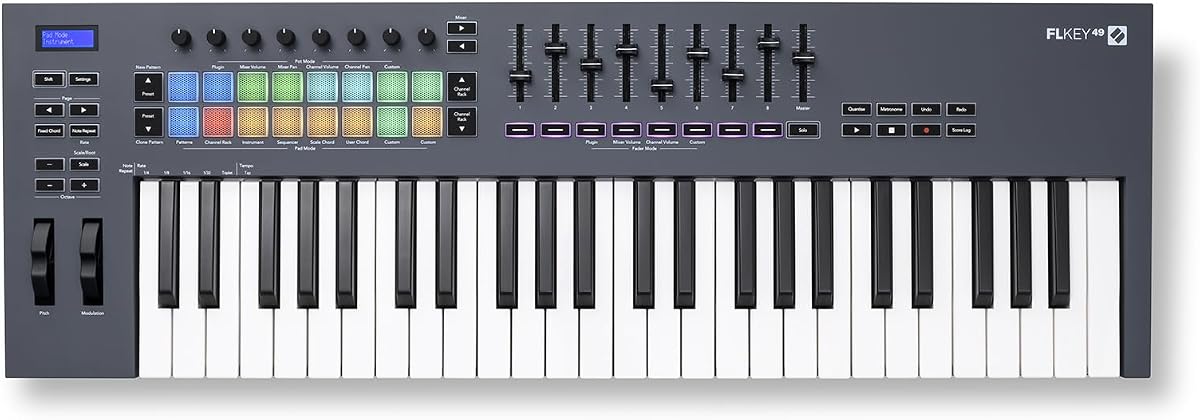
The Novation FLkey 49 is specialized for users working primarily within FL Studio. It maps directly to the software mixer and channel rack to remove the need for manual mouse assignments.
We may earn a commission when you buy through this link, at no additional cost to you.
Key strengths include the dedicated pots and faders that allow for quick tweaking of volumes and automation. The Sequencer Mode turns the pads into a step sequencer interface which speeds up beat programming significantly.
Its specialization means it is less versatile for users working with other DAWs where generic mappings might be less efficient. The faders can also feel a bit stiff compared to other controllers but function reliably under use.
This model is ideal for FL Studio enthusiasts who want to minimize mouse clicks and maximize hands-on tweaking. If you produce almost exclusively in FL Studio, this controller provides a workflow advantage that generic units cannot match.
Transport and mixer controls map automatically to FL Studio channels for seamless hands-on mixing adjustments.
Use the pads to program patterns directly in Sequencer Mode for faster and more intuitive beat creation.
We may earn a commission when you buy through this link, at no additional cost to you.
The M-AUDIO Oxygen Pro 49 offers a robust feature set tailored for beat makers and instrument players alike. It combines a quality keybed with a large pad section to support both melodic and rhythmic production tasks.
We may earn a commission when you buy through this link, at no additional cost to you.
Highlights include sixteen RGB backlit velocity-sensitive drum pads with Note Repeat which are essential for beat production and clip launching. The semi-weighted keys with aftertouch provide a more expressive playing feel than many competitors.
While slightly heavier than essential models, the build feels solid enough for regular studio use. The extra cost might be considered for budget users but the added versatility in key feel and pad count justifies it for many.
This controller is best for producers who need to switch between melodic composition and drum programming frequently. If you value physical performance feedback through semi-weighted keys and a large pad array, this offers strong capability.
Large pad section combined with semi-weighted keys supports both beat making and detailed keyboard performance.
Aftertouch and velocity sensitivity allow for nuanced dynamics that bring virtual instruments to life.
We may earn a commission when you buy through this link, at no additional cost to you.
The midiplus AK490 is a no-frills option designed for users who need fundamental MIDI capabilities without complexity. It provides a straightforward keybed and standard control wheels for pitch and modulation.
We may earn a commission when you buy through this link, at no additional cost to you.
Its main strengths are the inclusion of a MIDI out Din Jack which is rare on USB controllers and the simple plug-and-play setup. This makes it highly compatible with hardware synthesizers and legacy gear easily.
The lack of DAW integration and basic build materials mean it is not suitable for those needing modern software control. However, for basic input or connecting to hardware, it delivers exactly what is needed at a low price.
Best suited for hobbyists or hardware-focused producers who need a secondary keyboard input device. If you need MIDI out and basic controls without software mapping, this provides a simple and affordable solution.
Standard MIDI out connection ensures compatibility with hardware synths and interfaces beyond just computer software.
Minimal controls and basic design make it easy to use for straightforward recording and input tasks.
We may earn a commission when you buy through this link, at no additional cost to you.
The M-AUDIO Keystation 49 MK3 prioritizes ease of use and immediate connectivity for users starting in music production. It requires no drivers and works with a computer as soon as it is plugged in.
We may earn a commission when you buy through this link, at no additional cost to you.
Its strengths include the compact design and the bundled software suite which helps new users get started with production tools right away. The keys are velocity-sensitive and designed to provide a natural feel for basic performance tasks.
While it lacks advanced control features like knobs or faders, it excels as a simple and reliable tool for capturing ideas. The trade-off is less customization, but this is acceptable for those who just need to play notes and records.
This controller is best for beginners or anyone needing a simple secondary keyboard. If your priority is quick setup and a clean design without extra buttons, this model delivers the essentials effectively.
No drivers or power supply are required so you can start making music immediately upon connection.
Includes industry standard software like Ableton Live Lite to help you start producing tracks right away.
We may earn a commission when you buy through this link, at no additional cost to you.
Selecting the right controller involves evaluating how its features align with your specific production needs and workflow preferences.
The physical feel of the keys greatly impacts how naturally you can express musical ideas. Look for velocity-sensitive keys for dynamic control and consider semi-weighted options if you prefer a piano-like resistance over plastic springs.
Prioritize a keybed that matches your playing style whether you focus on fast electronic rhythms or expressive melodic lines.
Check how well the controller integrates with your specific digital audio workstation to minimize manual mapping. Controllers like Novation and Arturia often offer custom scripts that bring mixer controls directly under your fingers.
Ensure the mapping supports your main software to save time and keep your workflow smooth during sessions.
Consider the arrangement of knobs faders and buttons and whether they provide enough access to your instruments parameters. More controls allow for deeper editing without reaching for the mouse constantly.
Choose a layout that places your most used functions within easy reach to maintain creative momentum during work.
Many keyboards include digital audio workstations and virtual instruments which can significantly add to the total value. Review what is included to see if it covers your basic production needs upon purchase.
Look for licenses that are permanent and useful rather than trial versions that may limit your long-term use.
The construction material determines durability and weight so consider if you need to transport the unit regularly. Plastic builds are lighter but might feel less premium than metal or reinforced options.
Balance the physical sturdiness with the weight to ensure it fits your workspace and travel requirements.
Modern controllers rely on USB but some still offer MIDI out or USB-C for broader compatibility. If you use hardware gear look for a MIDI out jack to connect to external synthesizers easily.
Confirm the connection type matches your computer ports to avoid needing extra adapters or extension cables.
Features like aftertouch scale modes and chord triggers can speed up creation for users with limited theory knowledge. These tools allow for complex harmonies without needing to know every single note by heart.
Evaluate which smart features actually fit your workflow before paying extra for capabilities you might not use.
Set a budget that reflects the importance of the controller in your setup to ensure you do not overspend. Entry-level models provide basic MIDI data while premium units offer enhanced physical controls and software.
Focus on getting the features you need now rather than future capabilities that may not be relevant to your work.
Start by connecting the keyboard to your computer using the provided USB cable or a compatible adapter to ensure power and data transfer. Allow your operating system to recognize the device automatically before launching your digital audio workstation software.
Configure your MIDI settings within the software to map the controller inputs to specific tracks or virtual instruments. Adjust the velocity and pressure sensitivity in your DAW preferences to match your playing style and ensure the sound responds naturally.
Keep the surface clean with a soft dry cloth and avoid placing drinks or food near the unit to prevent spills that could damage internal electronics. Regularly check USB ports and connections to ensure reliable performance over time.
49 keys offer a middle ground between portability and range allowing you to play full octaves and chords easily. This size fits well on most desks and provides enough range for bass lines and melodies without overwhelming your workspace.
Most modern controllers are plug-and-play and do not require manual drivers to function with macOS or Windows. Some advanced features may benefit from manufacturer software but basic MIDI transmission works immediately upon connection.
Yes many 49 key controllers can connect to tablets and phones using the appropriate USB Camera Adapter or OTG cable. This allows for mobile production and sketching ideas on the go without needing a desktop setup.
Aftertouch lets you change sound parameters after a key is pressed adding expression through vibrato or filter changes. It is a powerful tool for dynamic performances but less critical for users focused on basic composition.
Yes you can connect multiple keyboards to your computer as separate MIDI devices or merge them into one logical setup. This helps you layer sounds or split the keyboard across different instruments for more complex arrangements.
Select a controller that explicitly supports your chosen software like Ableton or Logic for the smoothest setup experience. Native scripts usually save time by mapping controls to your DAW's mixer and transport instantly.
Most keyboards rely on the computer for power but some have USB ports to charge devices or act as hubs. Check if your workflow requires extra connectivity or if you prefer a dedicated power source for reliability.
We reviewed ten top 49 Key MIDI Keyboards covering options from basic controllers to high-end professional units with unique features.
Prioritize keybed feel and software integration to ensure the controller enhances your creative process rather than becoming a barrier during work.
Prices and features change frequently so verify the latest details on our links before making your final purchase decision today.