
Canon MegaTank G3270
4.1Editor score
Up to 2 years ink included
Print 6000 black pages
Wireless connectivity included
Finding the right ink tank printer can save you significant money on printing costs over time. These devices replace expensive cartridges with large refillable tanks that hold enough ink for thousands of pages. Whether you print documents or photos, an ink tank system offers consistent performance and lower long-term expenses.
We evaluated ten leading models based on print speed, ink capacity, connectivity options, and overall value. Our analysis includes detailed specifications and real-world performance metrics to help you make an informed decision. Each product was selected for its ability to deliver reliable high-quality output for various printing needs.
Every pick in this list showcases unique strengths ranging from wireless convenience to superior photo reproduction. Note that product prices and availability may change frequently so verify current offers before purchasing. We aim to provide clear unbiased insights to guide your selection process effectively.
4.1Editor score

4.2Editor score

4.2Editor score
As an Amazon Associate we earn from qualifying purchases.
This table provides a side-by-side overview of all ten selected ink tank printers highlighting their core specifications and key capabilities for easy comparison.





The Canon MegaTank G3270 stands out as an affordable entry point for high-volume printing needs. It comes with enough ink to last up to two years making it ideal for households or small offices seeking long-term savings without a large upfront investment.
We may earn a commission when you buy through this link, at no additional cost to you.
Its wireless capabilities ensure seamless integration with modern devices allowing you to print directly from smartphones or tablets. The included ink sets promise up to six thousand black and white pages and seven thousand seven hundred color pages reducing the frequency of refills significantly.
While the unit offers solid performance the absence of auto two-sided printing may increase paper usage for document heavy users. The smaller LCD screen also limits navigation options compared to higher end models but functions adequately for basic tasks.
This model is best suited for budget-conscious buyers who prioritize cost efficiency over advanced features. If you need reliable everyday printing with minimal maintenance the G3270 delivers excellent value and meets most standard home printing requirements effectively.
By including up to two years of ink with the purchase you avoid recurring cartridge expenses. This setup reduces long-term operating costs by as much as one thousand dollars compared to traditional cartridge-based printers.
The built-in wireless module allows connection via Wi-Fi enabling direct printing from mobile devices. This feature enhances convenience allowing users to send jobs from anywhere within the network range without needing a computer.
We may earn a commission when you buy through this link, at no additional cost to you.
The HP Smart Tank 5003 offers exceptional value with enough ink to last up to three years out of the box. Its mess-free refill system simplifies maintenance and reduces the risk of spills making it a user-friendly choice for busy environments.
We may earn a commission when you buy through this link, at no additional cost to you.
This model supports borderless prints which is ideal for creating photo-quality documents without wasted paper. The inclusion of AI-capable features suggests advanced optimization for print quality and efficiency ensuring sharp text and vibrant colors across various media types.
Although the upfront price is higher the long-term savings on ink justify the investment for heavy users. However the printer is relatively large so ensure you have adequate desk space before installation.
We recommend this printer for users seeking a balance between premium features and affordability. It is perfect for home offices needing reliable high-volume output without frequent interruptions for ink changes.
With up to three years of ink included this printer minimizes the need for frequent purchases. This extended supply ensures uninterrupted operation which is critical for time-sensitive projects and consistent productivity.
The easy-access refill system allows bottles to plug directly into the tank letting ink drain without squeezing. This design prevents spills and ensures a clean refilling process even for those with limited technical experience.
We may earn a commission when you buy through this link, at no additional cost to you.
The Canon Megatank G3290 elevates home printing with premium features like automatic two-sided printing and a large color LCD touchscreen. These enhancements streamline workflow and offer intuitive control over complex printing tasks.
We may earn a commission when you buy through this link, at no additional cost to you.
Its ink capacity supports up to seven thousand seven hundred color pages ensuring vibrant outputs for photos and graphics. The high yield combined with the convenience of auto duplex printing makes it an efficient choice for document and photo heavy environments.
The higher price reflects the added functionality and robust construction. While it requires more desk space the versatility it offers justifies the cost for users needing professional-grade output regularly.
Buy this if you want top-tier performance and advanced features. It is tailored for power users who value convenience and quality in equal measure for their daily printing needs.
The 2.7-inch LCD color touchscreen provides clear visibility and easy navigation through settings. This feature simplifies operation allowing users to adjust print quality or select paper types with minimal effort.
Automatic two-sided printing reduces paper consumption by up to fifty percent per document. This capability not only saves money on paper but also supports environmental sustainability goals for eco-conscious users.
We may earn a commission when you buy through this link, at no additional cost to you.
The Epson EcoTank ET-2803 offers reliable printing with Micro Piezo Heat-Free technology that produces sharp text and graphics. It includes enough ink for up to two years ensuring fewer interruptions for maintenance or refills.
We may earn a commission when you buy through this link, at no additional cost to you.
Its EcoFit ink bottles make refilling simple and prevent accidental mixing of colors. This thoughtful design minimizes waste and promotes environmental sustainability by reducing plastic cartridge disposal significantly.
While it lacks automatic duplex printing the compact size fits easily into small spaces. Voice-activated printing via smart assistants adds convenience for hands-free operation during busy work sessions.
Ideal for households with moderate printing needs the ET-2803 balances performance and space efficiency. It is a solid choice for those prioritizing simplicity and ease of use in their printing setup.
Epson designed these bottles to fit securely into the tanks to prevent mix-ups. This innovation simplifies the refilling process and ensures accurate ink levels without mess or confusion for users.
The built-in connectivity allows voice commands to trigger print jobs directly from smart devices. This feature adds convenience especially when hands are occupied or when quick access is needed without touching a screen.
We may earn a commission when you buy through this link, at no additional cost to you.
The Epson EcoTank ET-4800 delivers consistent performance with its high-capacity ink tanks and durable permanent printhead. It is designed for users seeking reliable quality over long periods without frequent maintenance.
We may earn a commission when you buy through this link, at no additional cost to you.
Its Micro Piezo Heat-Free technology ensures vibrant color photos and sharp text on virtually any paper type. This versatility makes it suitable for diverse printing tasks ranging from basic documents to professional presentations.
While it carries a higher price the low ongoing costs justify the investment for heavy users. The durable design reduces the need for repairs extending the overall lifespan of the unit.
This model fits professional home offices needing high volume and quality. It is a robust choice for those committed to a cartridge-free system and long-term efficiency.
Unlike replaceable cartridges this printer features a permanent printhead designed to last the life of the unit. This reduces maintenance needs and provides consistent print quality over many years of use.
This proprietary technology produces sharp text and rich colors without heating the ink. It prevents paper jams and ink wastage ensuring efficient performance even with varied media types.
We may earn a commission when you buy through this link, at no additional cost to you.
The Epson EcoTank ET-2903 delivers fast 11 pages per minute black print speeds with zero warmup time for immediate task execution. It includes enough ink for up to three years ensuring minimal interruption during critical work sessions.
We may earn a commission when you buy through this link, at no additional cost to you.
Its high 5760 dpi resolution produces stunning photographic quality ideal for home users needing detailed output. The built-in scanner and copier streamline document management without requiring extra hardware for multifunction tasks.
While it lacks auto duplex printing the speed and ink capacity compensate well for general use. Epson recommends genuine ink to maintain performance preventing warranty issues or print degradation over time.
We recommend this model for users balancing speed and cost savings. It excels in environments requiring frequent high-quality prints without frequent maintenance or ink replacements.
Zero warmup time allows immediate printing as soon as a job is sent. This feature boosts productivity by eliminating delays and ensuring fast turnarounds for urgent documents or photos.
With 5760 x 1440 dpi resolution this unit produces vivid details and sharp edges. This makes it suitable for printing high-quality photos and professional graphics directly at home.
We may earn a commission when you buy through this link, at no additional cost to you.
This HP Smart Tank 5003 model offers an affordable entry point into high-yield printing with three years of ink included. Its design focuses on simplicity ensuring that setup and daily use remain straightforward for all users.
We may earn a commission when you buy through this link, at no additional cost to you.
The mess-free refill system eliminates the mess typically associated with ink tank maintenance. This feature is particularly useful for households with children or users who prefer a cleaner workspace.
While it lacks advanced automation it delivers reliable everyday printing. The AI-Capable features optimize output quality ensuring sharp text and clear graphics without manual intervention.
It is an excellent choice for light to moderate users. If you need a dependable printer that saves money over time this model provides a solid balance of function and affordability.
The straightforward setup process requires minimal technical knowledge allowing quick integration. Once connected the unit operates reliably with minimal user intervention or technical support required.
Despite its budget positioning the printer delivers consistent results across various document types. It handles standard text and graphics well ensuring reliable output for routine home office needs.
We may earn a commission when you buy through this link, at no additional cost to you.
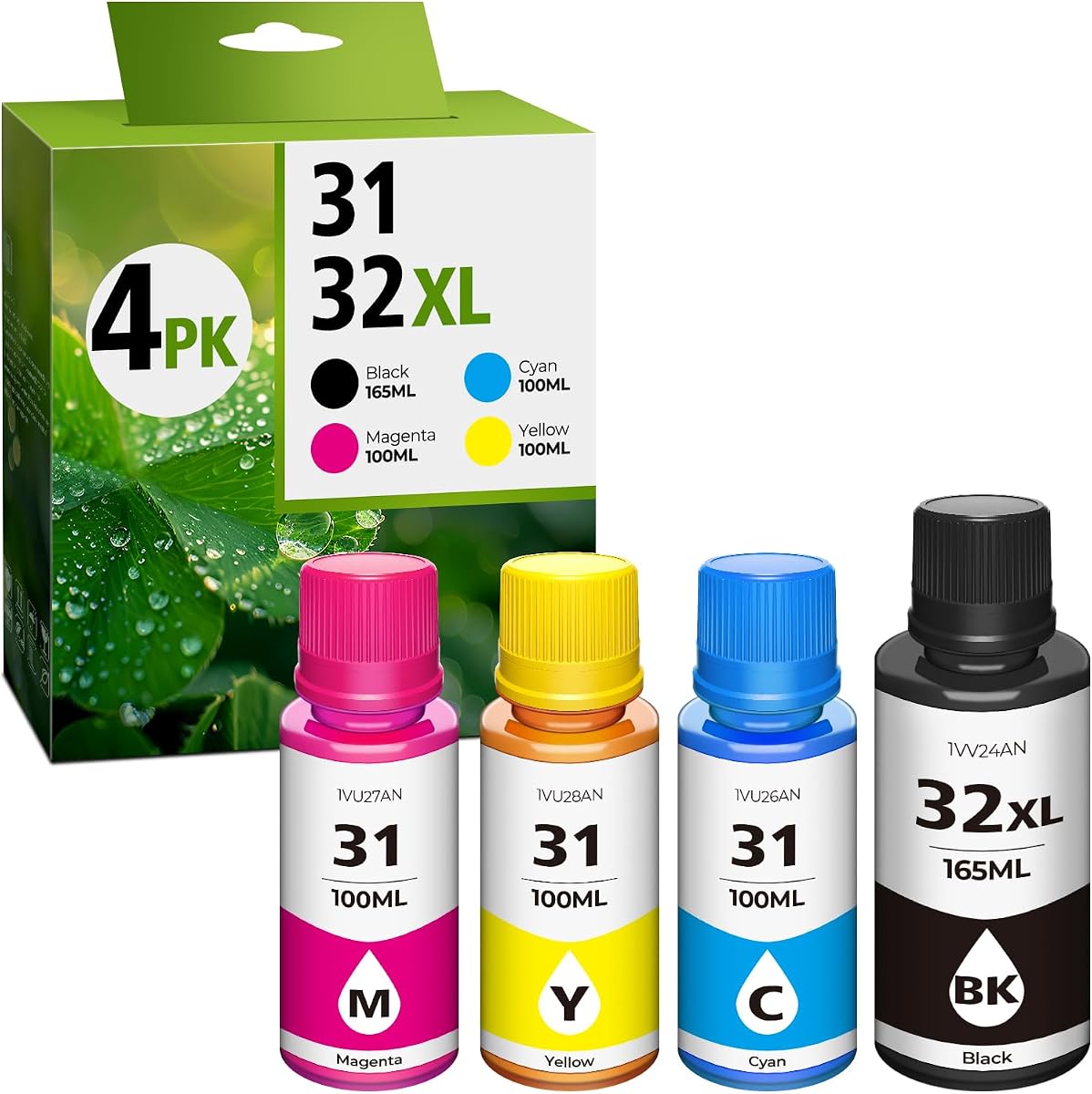
This third-party ink refill set offers significant cost savings for HP Smart Tank owners. It provides high yields of up to 9500 pages per black bottle ensuring extended operation before needing replacements.
We may earn a commission when you buy through this link, at no additional cost to you.
The bottles are designed with a leakage-resistant structure preventing mess during refills. This feature maintains a clean workspace and ensures ink is used efficiently without waste.
Users must note that these are dye inks which differ from OEM pigment blacks. Cleaning the printhead before switching ensures optimal performance and protects the printer integrity.
Ideal for budget-conscious users this set extends the printer lifespan economically. It suits those comfortable with third-party solutions seeking maximum volume at minimal cost.
These refill bottles cost less than OEM options offering substantial long-term savings. This reduction allows users to allocate funds elsewhere while maintaining high-quality output.
The set supports a wide range of Smart Tank models reducing search time for replacements. This versatility ensures availability across multiple printer generations and models easily.
We may earn a commission when you buy through this link, at no additional cost to you.
The Epson EcoTank ET-2980 provides substantial ink capacity with enough supply to last up to three years. Its high yield supports heavy usage without frequent interruptions ensuring consistent performance for all tasks.
We may earn a commission when you buy through this link, at no additional cost to you.
The Smart Panel app enhances connectivity allowing seamless management from smart devices. This feature simplifies monitoring ink levels and executing complex print jobs remotely without a computer.
While the build is robust it requires more desk space due to its dimensions. Users should ensure adequate room before purchase to avoid cluttering the workspace.
This model is recommended for users prioritizing longevity and high volume. It delivers professional-grade output with minimal maintenance and maximum efficiency for home or small office setups.
The inclusion of enough ink for three years ensures minimal maintenance over time. This feature reduces downtime and keeps workflows uninterrupted during busy periods.
The Smart Panel app provides intuitive controls for all printing needs. This convenience allows quick adjustments and monitoring from any connected device anywhere in the house.
We may earn a commission when you buy through this link, at no additional cost to you.
The Epson EcoTank ET-2800 offers a balance of speed and economy ideal for budget-conscious buyers. With a yield of 4500 black pages it supports frequent printing without frequent cartridge replacements.
We may earn a commission when you buy through this link, at no additional cost to you.
Its compact design fits easily into small workspaces while maintaining robust performance. The zero cartridge waste feature aligns with eco-friendly goals by reducing plastic disposal significantly.
While it lacks duplex printing the fast speeds help manage large document volumes efficiently. The Micro Piezo Heat-Free technology ensures consistent output quality over time without overheating.
This model suits small businesses or home offices with moderate needs. It delivers reliable results at a lower cost point making it a practical choice for everyday printing tasks.
This unit is designed to minimize desk space without compromising output quality. Its small footprint makes it suitable for apartments or compact office setups efficiently.
By eliminating cartridges this printer reduces plastic waste significantly. It supports sustainability efforts by using refillable tanks that last for thousands of pages.
We may earn a commission when you buy through this link, at no additional cost to you.
Selecting the right ink tank printer requires understanding key factors that affect performance and cost savings.
Ink capacity refers to the volume of ink stored in the tanks which dictates how many pages can be printed before refilling. Look for printers that promise high yields such as 5000 pages or more to ensure long-term efficiency and reduced refill frequency.
High capacity tanks minimize the need for frequent maintenance allowing you to focus on productivity rather than managing supplies.
Print speed is measured in pages per minute (ppm) indicating how fast the printer can complete jobs. Faster speeds are beneficial for busy environments while resolution measured in dots per inch (dpi) affects the sharpness of text and images.
Balance speed and resolution based on your needs ensuring the printer produces clear output for your specific document types.
Modern printers offer Wi-Fi and mobile app support enabling printing from smartphones or tablets. Ensure the model supports protocols like AirPrint or Mopria to avoid compatibility issues with your devices.
Wireless connectivity enhances convenience by allowing remote printing and scanning from anywhere within your home network.
A well-designed refill system prevents spills and simplifies maintenance. Look for features like color-coded bottles or direct-pour systems that reduce the risk of ink mistakes.
User-friendly refilling designs ensure that even non-technical users can maintain the printer efficiently without frustration.
While ink tank printers have a higher upfront cost than cartridge models they save money over time due to cheaper ink prices. Calculate the cost per page to ensure the device fits your budget and usage volume.
Prioritize models with high page yields to maximize the return on investment over several years of usage.
Paper trays determine how many sheets the printer can hold at once reducing the need for constant reloading. Consider models with larger trays if you handle high-volume printing frequently.
Adequate paper capacity ensures smoother workflow and fewer interruptions during printing tasks.
Durability is critical for long-term use. Check warranty terms and read reviews regarding the lifespan of the printhead which is often a permanent part of these units.
A solid warranty provides peace of mind protecting your investment against manufacturing defects or unexpected failures.
Begin by unboxing the printer and removing all protective tape from the exterior. Place it on a flat surface away from direct sunlight and heat sources to prevent damage to the internal components.
Fill the ink tanks carefully by aligning the bottles with the corresponding colored slots. Allow the ink to drain completely before removing the bottles to avoid air bubbles in the system.
Regularly print a test page to keep the printhead from drying out. If the unit sits unused for extended periods run a cleaning cycle to maintain optimal performance and prevent clogs.
You can save up to one thousand dollars or more annually depending on your usage volume. The high-capacity ink systems cost significantly less per page than traditional cartridges ensuring substantial long-term savings.
Manufacturers recommend using genuine ink to maintain optimal performance and warranty coverage. Using non-genuine ink may cause damage or print quality issues not covered by the limited warranty.
Most ink tank printers work with standard paper types but photo paper requires specific settings for best results. Ensure the paper is compatible with your printer model to avoid jams or quality issues.
Depending on the model and usage ink can last up to three years out of the box. High-yield models are designed to reduce refill frequency ensuring consistent operation over long periods.
Clogs can occur if the printer is unused for long periods. Run a cleaning cycle via the printer menu or software to clear blockages and restore print quality.
Yes many models support borderless printing and have high resolution for photo-quality output. Look for features like Micro Piezo technology or dedicated photo modes for best results.
Yes most modern ink tank printers support mobile printing via apps and standards like AirPrint or Mopria. This allows seamless printing from smartphones or tablets without a computer.
Regularly update the firmware and run self-cleaning cycles to maintain performance. Store the printer in a cool dry place and avoid moving it while the ink is wet to prevent spills.
Choosing the right ink tank printer depends on your specific needs and budget. Top picks like the Epson EcoTank ET-2903 and Canon MegaTank G3270 offer excellent balance of features and affordability.
Prioritize high ink capacity and reliable connectivity to ensure smooth daily operations. Consider your specific use cases such as photo printing or heavy document work to select the ideal model.
Prices and availability change so verify current offers before purchasing to secure the best value. Regularly check for updates on firmware and ink compatibility to maintain optimal performance.