
Redragon BM4195 AI Wireless Optical Computer Office Mouse
3.9Editor score
Affordable voice typing
Five DPI levels
Type-C fast charging
This guide compares the top ten AI smart wireless mouse models featuring voice typing translation and AI assistance to help you choose the best productivity
AI smart wireless mice are transforming how professionals interact with their computers by enabling voice commands and advanced translation features. These devices integrate artificial intelligence directly into hardware to streamline workflows and reduce typing fatigue during long work sessions.
We evaluated ten leading models based on voice recognition accuracy connectivity options and AI feature depth. Our analysis focuses on real-world performance for multilingual teams and content creators who need reliable transcription and instant summarization capabilities.
Each selection highlights unique strengths from budget-friendly options to premium productivity hubs. While ratings and availability shift quickly the core capabilities remain consistent so verify current pricing before purchasing to ensure the best value for your specific needs.
3.9Editor score

4.1Editor score

5.0Editor score
The following comparison details the specific capabilities of each model to help you identify the right fit for your workflow needs and technical requirements.


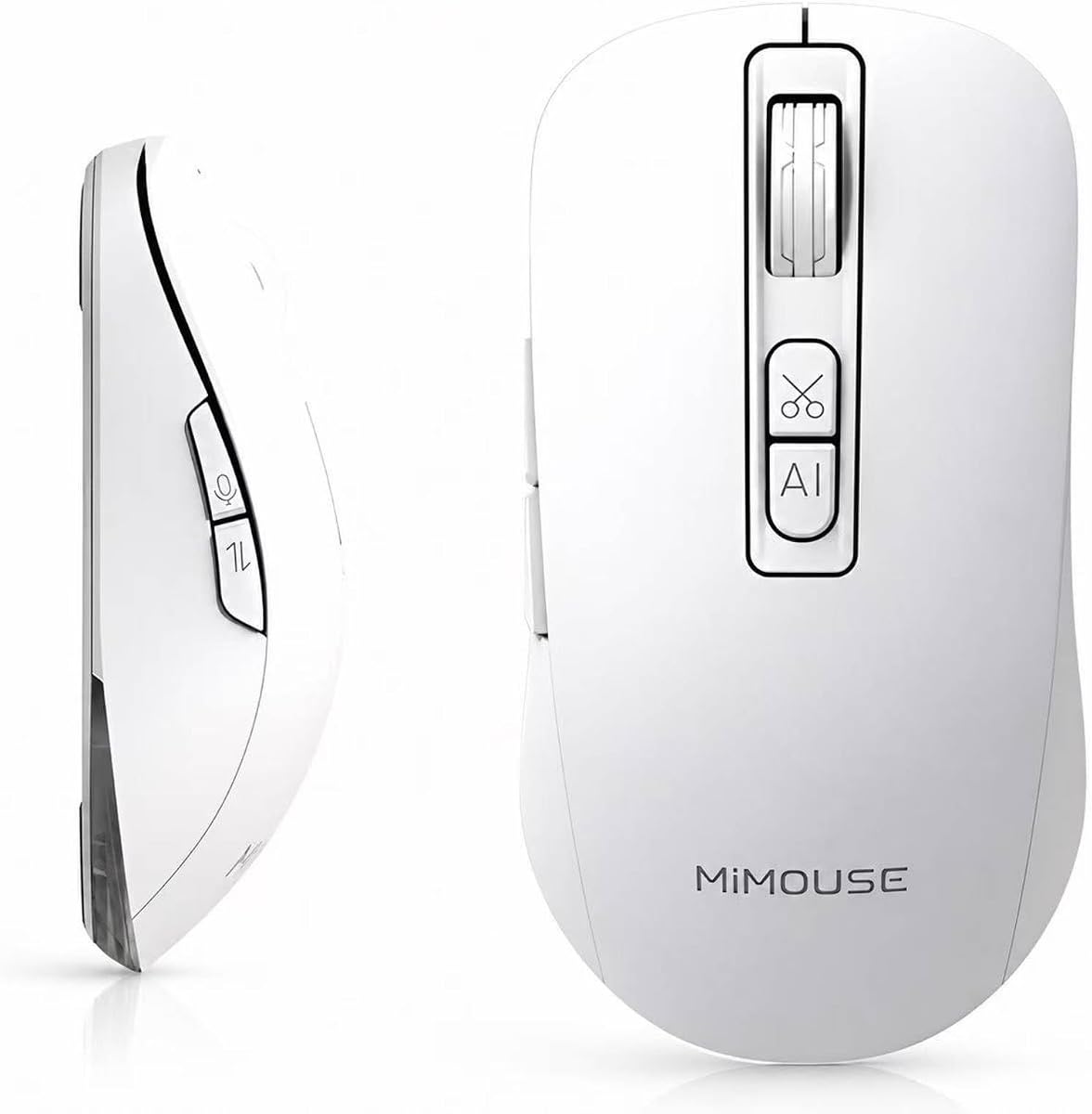


This model leads our list with a 4.1 rating and comprehensive AI tools. It offers robust voice typing and local processing to ensure data privacy during sensitive work sessions.
We may earn a commission when you buy through this link, at no additional cost to you.
The 600mAh battery supports extended use while silent clicks minimize office disruption. Its ergonomic shape fits naturally in the hand for comfort during long writing or coding sessions.
Users must download the companion app to unlock full functionality which may slow initial setup. However the offline capabilities ensure reliable performance even without internet connectivity.
Buy this if you prioritize accuracy and privacy alongside versatile AI writing and summarization tools for daily professional tasks.
Data remains on device ensuring sensitive information stays secure from external servers.
The high capacity cell supports all-day productivity without frequent recharging interruptions.
We may earn a commission when you buy through this link, at no additional cost to you.
This affordable option brings voice control to budget-conscious users with solid wireless performance. It handles basic transcription tasks well while maintaining reliable connectivity across multiple devices.
We may earn a commission when you buy through this link, at no additional cost to you.
The five DPI levels allow precise cursor control for varied screen resolutions. Type-C fast charging ensures minimal downtime when the battery runs low during busy workflows.
Advanced AI tools are limited compared to premium models requiring reliance on standard voice-to-text functions. Users seeking deep summarization may find these capabilities insufficient for complex projects.
Ideal for entry-level professionals who want to experiment with voice input without a large upfront investment.
Provides essential AI functions at a price point accessible to students and new graduates.
Supports switching between three devices ensuring compatibility with mixed workstation setups.
We may earn a commission when you buy through this link, at no additional cost to you.
This model earns the highest rating with a unique magnetic detachable design that doubles as a presentation tool. It combines standard mouse functions with advanced AI recording for meetings and conferences.
We may earn a commission when you buy through this link, at no additional cost to you.
The air mode allows cursor control via hand movements ideal for standing presentations. A 20-day battery life eliminates recharge anxiety during extended business trips or busy weeks.
The premium price may be prohibitive for casual users who do not need specialized presentation features. Detaching the device requires practice to ensure smooth cursor control without a physical surface.
Perfect for executives and presenters who value innovation and need a portable all-in-one tool for meetings.
Detachable host enables hands-free cursor control ideal for keynote speeches and remote demos.
High-end materials ensure durability and a premium feel during daily professional use.
We may earn a commission when you buy through this link, at no additional cost to you.
This model focuses on comfort with an ergonomic shape that reduces hand strain during long typing sessions. Its quiet clicks make it suitable for shared office environments where noise is a concern.
We may earn a commission when you buy through this link, at no additional cost to you.
Bluetooth 5.0 ensures a stable connection to modern laptops and tablets. The software allows key mapping for efficiency though advanced AI remains basic compared to specialized competitors.
Voice accuracy lags behind top performers which may frustrate users relying heavily on dictation. The design prioritizes physical comfort over cutting-edge AI capabilities for productivity.
Best for office workers seeking a comfortable wireless mouse with basic voice translation for daily tasks.
Silent switches maintain a quiet atmosphere suitable for libraries or open plan workspaces.
Contoured shape supports the hand naturally to reduce fatigue during extended daily use.
We may earn a commission when you buy through this link, at no additional cost to you.
While it lacks dedicated AI buttons it integrates with Logi Options plus for smart features. Its reputation for reliability makes it a safe choice for enterprise environments requiring consistency.
We may earn a commission when you buy through this link, at no additional cost to you.
The battery lasts up to 24 months reducing maintenance interruptions significantly. Multi-device connectivity supports switching between laptops and tablets seamlessly for hybrid workers.
Advanced AI tools depend on software integration rather than hardware which may limit speed. Users seeking instant voice dictation buttons may find this approach less direct.
Recommended for businesses prioritizing durability and long-term support over immediate AI hardware features.
Proven stability and support make it ideal for large scale corporate deployments.
Exceptional battery life ensures minimal downtime and cost over extended periods.
We may earn a commission when you buy through this link, at no additional cost to you.
This model adds RGB lighting to standard AI functions appealing to users who value aesthetics alongside utility. It offers robust offline processing to keep data secure during sensitive tasks.
We may earn a commission when you buy through this link, at no additional cost to you.
The silent clicks and ergonomic design support long working hours without distraction. Software features include summarization and writing assistance for diverse professional content creation needs.
Enabling RGB reduces battery life significantly which requires frequent recharging. Setup involves multiple steps to sync the app which may deter non-technical users.
Best suited for tech enthusiasts who want a customizable look with reliable local AI processing.
Customizable lighting adds a unique touch to workspace setups for individual expression.
Local processing ensures that private documents remain isolated from external servers.
We may earn a commission when you buy through this link, at no additional cost to you.
This model excels with a centralized platform that aggregates multiple AI services for seamless workflows. It handles audio transcription and text summarization effectively for complex professional meetings.
We may earn a commission when you buy through this link, at no additional cost to you.
The battery life reaches up to 30 days ensuring reliability during extended business travel. Multi-device connectivity allows switching between computers and tablets without connectivity loss.
Platform access requires account login which adds a layer of privacy consideration for users. The price point places it in the upper tier for basic productivity tools.
Ideal for professionals needing a unified interface for multiple AI tools across various devices.
Access multiple AI models through one interface to streamline daily digital tasks efficiently.
Accurate transcription captures key discussion points for quick review and documentation.
We may earn a commission when you buy through this link, at no additional cost to you.
This mouse integrates well with tablets and iPads making it ideal for mobile professionals. Voice transcription and translation support real-time work in diverse international environments.
We may earn a commission when you buy through this link, at no additional cost to you.
Triple-mode connectivity allows switching between desktops and tablets without lag. The ergonomic shape ensures comfort during long work sessions whether at home or in transit.
Features are sometimes limited on PC compared to tablet apps which affects overall utility. Users relying heavily on desktop tools may find fewer integrations available.
Best for mobile workers who prioritize cross-device flexibility and instant translation capabilities.
Designed to enhance workflow on tablets allowing efficient document editing anywhere.
Instant switching between devices reduces setup time for multi-screen users.
We may earn a commission when you buy through this link, at no additional cost to you.
This model offers a straightforward experience focused on basic voice-to-text functionality. It is suitable for users who want simple dictation without complex software requirements or setup steps.
We may earn a commission when you buy through this link, at no additional cost to you.
The silent design minimizes noise in shared spaces making it useful for library or home office use. Basic summarization tools help organize thoughts quickly during initial drafts.
User feedback indicates inconsistent voice accuracy which may disrupt productivity tasks. Advanced AI capabilities are minimal compared to other models offering richer workflows.
Best for casual users seeking an inexpensive entry point into voice-controlled typing tools.
Minimal configuration steps ensure immediate use for those prioritizing ease of setup.
Low-noise clicks support focused environments by reducing auditory distractions.
We may earn a commission when you buy through this link, at no additional cost to you.
This model provides balanced features at a competitive price point for daily users. It combines voice typing with a comprehensive suite of AI writing tools for general content creation.
We may earn a commission when you buy through this link, at no additional cost to you.
The 600mAh battery supports full workdays without frequent charging interruptions. Silent operation ensures that office or home environments remain quiet during extended use.
App setup requires time to configure all features which may slow initial adoption. The interface is functional but lacks the polish of premium enterprise tools.
Recommended for professionals seeking reliable performance without paying for advanced customization features.
Combines essential voice functions with basic AI writing tools for comprehensive utility.
Strong capacity supports continuous use across multiple time zones and long hours.
We may earn a commission when you buy through this link, at no additional cost to you.
Selecting the right AI mouse depends on your specific workflow needs and technical environment.
Look for models claiming at least 98 percent accuracy to ensure reliable transcription during meetings. Inaccurate recognition leads to extra editing time which defeats the purpose of productivity tools.
Prioritize devices that allow voice calibration to adapt to your specific speaking style and accent.
Ensure the mouse supports Bluetooth and 2.4G wireless to connect to multiple devices seamlessly. Switching between a laptop and tablet should happen instantly without lag or disconnection.
Verify compatibility with your operating system to avoid driver issues or limited functionality.
Local offline processing is essential for privacy-conscious users who handle sensitive data. Cloud-based systems may send data to external servers which poses security risks for professional documents.
Choose a model that allows offline AI features if you work on confidential projects.
Long battery life ensures that you can work through long days without frequent charging breaks. A 24-hour capacity is standard but 30-day life supports travel better for mobile professionals.
Check if the mouse supports charging while in use to avoid work interruptions.
The companion app should integrate smoothly with Windows and macOS environments for consistent performance. Proprietary software may limit how you access AI features across different platforms.
Confirm that the software receives regular updates to keep AI tools current and secure.
A comfortable ergonomic design prevents strain during extended typing or writing sessions. Lightweight mice reduce fatigue while maintaining durability for daily handling and travel.
Consider the grip style and shape to ensure it fits your hand size naturally.
Support for over 200 languages is vital for multilingual teams or international research work. Real-time translation allows instant communication without switching apps constantly during meetings.
Ensure that the translation feature works offline if internet access is unreliable.
Quiet clicks help maintain a professional atmosphere in shared workspaces or during meetings. Excessive noise can distract colleagues and reduce focus during collaborative sessions.
Test the sound level if possible to ensure it matches your environment requirements.
Start by installing the official software from the manufacturer to unlock all AI features. Follow the setup wizard to calibrate the voice recognition for your specific environment.
Regularly update the companion app to ensure you have access to the latest AI models and bug fixes. Keeping software current improves accuracy and adds new translation languages over time.
Clean the sensor and exterior gently with a dry microfiber cloth to maintain performance. Avoid exposing the device to excessive moisture which can damage internal components.
Many models offer offline processing for privacy. Check product specs for local AI capabilities.
Most top models support over 200 languages including major global languages like English and Spanish.
Yes most models support macOS 10.15 and newer ensuring seamless integration with Apple devices.
Top models claim 98 percent accuracy when properly calibrated for your specific voice and environment.
Some models have adjustable DPI for gaming but most focus on productivity tasks rather than gaming.
Basic functions usually work without subscriptions but advanced AI services may require monthly plans.
The Redragon BM4195 offers great value while the Cheerdots2 provides premium presentation features.
Prioritize privacy and connectivity when choosing a model for your specific workflow needs.
Always check current prices and availability before purchasing to ensure you get the best deal.