
HDMI KVM Switch 3 Monitors 2 Computers 4K@60Hz
4.6Editor score
4 USB 3.0 ports included
Supports 4K@60Hz output
Simple panel and remote switching
Compare the top 10 KVM switches for triple monitors to find the best model for your dual PC setup, resolution needs, and budget constraints today.
Managing multiple computers with a triple monitor setup can quickly become messy with tangled cables and constant hardware swapping. A high-quality KVM switch allows you to control three displays and peripherals from a single keyboard and mouse, streamlining your workspace for better productivity and focus.
We evaluated the leading KVM switches for triple monitors based on resolution support, port connectivity, switching speed, and build quality. Our analysis includes models ranging from budget-friendly options to premium docking stations that support advanced features like USB-C charging and high refresh rates for gaming and creative work.
Each pick below highlights key features, compatibility details, and real-world use cases to help you choose the right device. Remember that product availability and pricing fluctuate frequently, so always verify current offers and system requirements before making your final purchase decision.
4.6Editor score

4.9Editor score

4.2Editor score
The following comparison table breaks down the core specifications and capabilities of each top-rated triple monitor KVM switch to help you quickly identify which model aligns with your specific hardware and performance requirements.





The AV Access KVM Docking Station stands out as the top choice for users needing a seamless triple monitor experience across two computers. With an impressive rating, it delivers unmatched versatility by combining video switching with full docking station capabilities like charging and network access.
We may earn a commission when you buy through this link, at no additional cost to you.
Its standout feature is the USB-C connection for laptops which provides video data and up to 100W of power delivery through a single cable. This significantly reduces desk clutter and keeps devices charged while switching. The support for 8K@60Hz ensures future proofing for high-end monitors.
However the premium price may be a barrier for casual users who only need basic switching. Additionally you must ensure your laptop supports video output over USB-C for full functionality. These trade-offs are acceptable given the comprehensive feature set and build quality it offers.
This device is ideal for professionals and enthusiasts who use both a laptop and desktop with a triple monitor setup. It eliminates the need for multiple docks and hubs making it the most complete solution available for complex workstation environments.
The built-in SDXC card reader and headset jack eliminate the need for separate adapters. You can transfer data and connect audio directly through the switch without cluttering your desk with extra hubs.
Unlike standard KVMs this model keeps the Ethernet connection active on both computers. You can maintain downloads or remote sessions on the inactive PC while working on the primary system.
We may earn a commission when you buy through this link, at no additional cost to you.
This HDMI KVM Switch is a fantastic entry-level option for those needing to share three monitors between two computers without breaking the bank. It delivers solid 4K performance and includes essential USB connectivity for your peripherals.
We may earn a commission when you buy through this link, at no additional cost to you.
The device supports extended and copy modes allowing you to configure your displays as needed. The inclusion of four USB 3.0 ports ensures fast data transfer for drives and other devices. The external power adapter helps maintain stability for high draw peripherals.
While it lacks the advanced features of docking stations it covers all the basics reliably. The only limitation is that it works exclusively with HDMI so you must have compatible video outputs on your PCs. For most home office setups this is sufficient.
It is highly recommended for users who want a clean desk setup without investing in expensive premium models. If your computers have HDMI outputs and you need basic switching this model offers the best value for money.
LED lights clearly show which computer is currently active. This visual cue helps you confirm the switching state instantly without needing to check your screen configuration.
You can switch between computers using the panel buttons or the included wired controller. This flexibility lets you place the switch button where it is most convenient for your workflow.
We may earn a commission when you buy through this link, at no additional cost to you.
This AV Access model is a powerhouse for power users who need high performance across multiple monitors. It combines the utility of a KVM switch with advanced docking features to create a premium workstation experience.
We may earn a commission when you buy through this link, at no additional cost to you.
The switch supports impressive refresh rates up to 480Hz which is ideal for competitive gaming and smooth motion. It also maintains network connectivity on both PCs ensuring no interruptions to background tasks like downloads or updates during switching.
The premium price reflects its advanced capabilities and build quality but it may be overkill for basic office work. You must ensure your hardware supports high resolutions and specific port types to maximize the benefits of this device.
This switch is perfect for professionals and gamers who demand the best performance and reliability. If you need high refresh rates and seamless docking this model delivers a top-tier experience that justifies the cost.
Support for high refresh rates ensures smooth gameplay across all three monitors. This makes it an excellent choice for users who integrate gaming into their workflow.
Multiple high speed USB ports allow for fast file transfers and connection of many peripherals. This connectivity ensures your workflow remains efficient and uninterrupted.
We may earn a commission when you buy through this link, at no additional cost to you.
This AOOCOO KVM Switch is designed for users who need to manage three monitors across four different computers. It offers a high level of flexibility and performance for complex setups.
We may earn a commission when you buy through this link, at no additional cost to you.
The device supports high resolution output up to 8K@60Hz and allows for both HDMI and Displayport connections. This hybrid approach ensures compatibility with a wide range of graphics cards and monitors.
Setting up four computers requires careful planning and compatible graphics cards on each PC. While powerful the setup is more complex than typical two PC switches. This makes it best suited for IT environments or advanced users.
If you need to share three monitors across four workstations this is a rare and valuable solution. It offers robust performance and connectivity options that are hard to find in standard KVM switches.
The support for 8K ensures future compatibility with high-end monitors. This allows for sharp image quality and precise details for professional work.
The package includes USB cables which simplifies initial setup. This reduces the need to purchase extra accessories separately.
We may earn a commission when you buy through this link, at no additional cost to you.
This 8K KVM Switch is designed for users who want high performance and versatile video input options. It combines Displayport and HDMI support to handle various monitor types and resolutions.
We may earn a commission when you buy through this link, at no additional cost to you.
The device supports high refresh rates and offers robust USB 3.0 connectivity for fast data transfer. The included power switch allows for easy resets if signal issues occur without unplugging cables.
Setup requires careful attention to cable lengths and video port availability. The hybrid input support is great for mixed setups but you must ensure compatibility with your specific monitors.
This switch is a solid choice for mixed environment setups that need high resolution and flexible inputs. It balances performance and versatility well for both creative and general use.
The included power switch lets you restart the unit easily if needed. This helps avoid the hassle of unplugging cables when troubleshooting connection issues.
The device works with a wide range of operating systems including Mac and Linux. This ensures broad compatibility for diverse computing environments.
We may earn a commission when you buy through this link, at no additional cost to you.
This CMSTEDCD KVM Switch offers reliable performance for users needing to switch between two computers with three monitors. It focuses on ease of use and stable connectivity.
We may earn a commission when you buy through this link, at no additional cost to you.
The device supports 4K@120Hz which is great for smooth motion and high quality visuals. The included USB 3.0 ports provide fast data transfer for your peripherals.
While it lacks advanced features like docking capabilities it performs well for basic switching tasks. The external power supply helps maintain stability for connected devices.
This switch is a practical choice for home offices that need reliable performance without extra frills. If you need simple switching with good video quality this model fits well.
The 4K@120Hz support ensures smooth video playback and gaming. This makes it suitable for users who value motion clarity.
Both panel buttons and a remote controller are provided for switching. This gives you flexibility in how you control the device.
We may earn a commission when you buy through this link, at no additional cost to you.
This AOOCOO KVM Switch is designed for users who need to manage three monitors across three different computers. It offers flexibility and performance for complex setups.
We may earn a commission when you buy through this link, at no additional cost to you.
The device supports high resolution output and allows for both HDMI and Displayport connections. This hybrid approach ensures compatibility with a wide range of graphics cards.
Setting up three computers requires careful planning and compatible graphics cards on each PC. While powerful the setup is more complex than typical two PC switches.
If you need to share three monitors across three workstations this is a valuable solution. It offers robust performance and connectivity options that are rare in standard KVM switches.
The support for 8K ensures future compatibility with high-end monitors. This allows for sharp image quality and precise details.
The package includes USB cables which simplifies initial setup. This reduces the need to purchase extra accessories separately.
We may earn a commission when you buy through this link, at no additional cost to you.
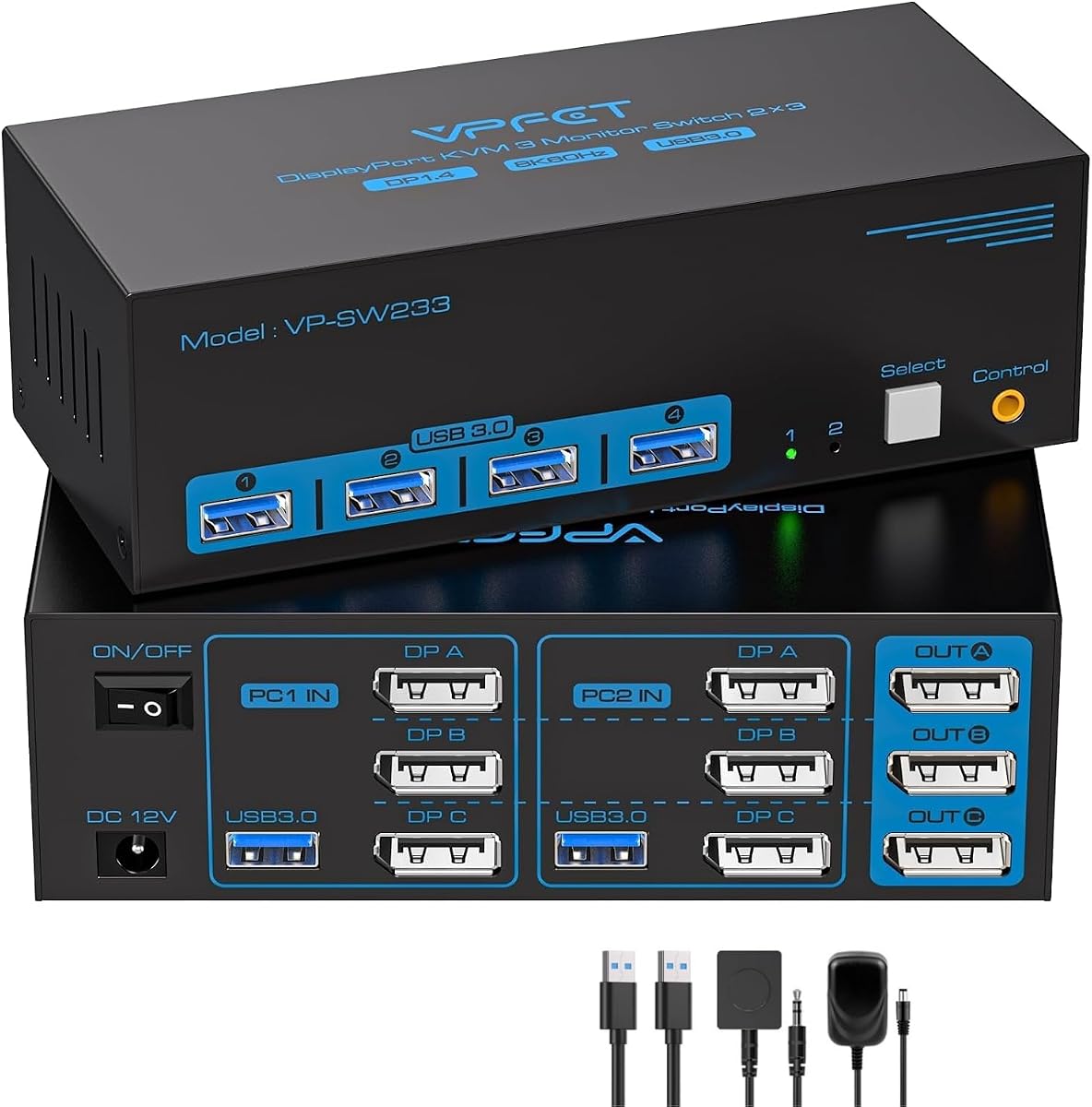
This DisplayPort KVM Switch is designed for users who need high performance and reliable signal transmission. It offers high refresh rates that are ideal for demanding workflows.
We may earn a commission when you buy through this link, at no additional cost to you.
The device supports 4K@144Hz ensuring smooth motion and high quality visuals. The included USB 3.0 ports provide fast data transfer for your peripherals.
While it is limited to DisplayPort inputs this ensures stable and high quality video. It is best suited for users with compatible hardware and specific performance needs.
This switch is an excellent choice for professionals and gamers who need reliable high refresh rates. If you have DisplayPort monitors and need high performance this model is a great fit.
The dedicated DisplayPort connections ensure stable signal transmission. This reduces the risk of flickering or connection drops.
Support for 144Hz provides smooth motion for gaming and video editing. This ensures a fluid visual experience across your monitors.
We may earn a commission when you buy through this link, at no additional cost to you.
This HDMI DisplayPort KVM Switch is designed for users who need versatility and high performance. It offers a hybrid approach to video inputs for maximum compatibility.
We may earn a commission when you buy through this link, at no additional cost to you.
The device supports high resolution output and includes fast USB 3.0 connectivity. The included 1-year warranty provides additional peace of mind for your investment.
Setup requires careful attention to video port availability and cable types. The hybrid input support is great for mixed setups but you must ensure compatibility.
This switch is a solid choice for mixed environment setups that need high resolution and flexible inputs. It balances performance and versatility well for both creative and general use.
The included 1-year warranty adds value and protection to your purchase. This ensures support is available if issues arise.
The support for 8K ensures future compatibility with high-end monitors. This allows for sharp image quality and precise details.
We may earn a commission when you buy through this link, at no additional cost to you.
This UGREEN KVM Switch is designed for users who need high performance and durability. It offers a hybrid approach to video inputs for maximum compatibility.
We may earn a commission when you buy through this link, at no additional cost to you.
The device supports high resolution output and includes fast USB 3.0 connectivity. The aluminum build ensures a robust and premium feel for your setup.
Setup requires careful attention to video port availability and cable types. The hybrid input support is great for mixed setups but you must ensure compatibility.
This switch is a solid choice for mixed environment setups that need high resolution and flexible inputs. It balances performance and durability well for both creative and general use.
The aluminum casing provides a robust and premium feel. This ensures the device can withstand daily use and wear.
The support for 8K ensures future compatibility with high-end monitors. This allows for sharp image quality and precise details.
We may earn a commission when you buy through this link, at no additional cost to you.
Selecting the right KVM switch for triple monitors requires careful evaluation of resolution support, port compatibility, and additional features to ensure smooth operation across your multi-computer setup.
Ensure the switch supports the maximum resolution and refresh rate of your monitors to avoid performance bottlenecks. Look for devices that support 8K@60Hz or 4K@144Hz if you plan to use high-end displays for gaming or creative work.
Verify that the cables and ports match your monitor requirements to avoid signal loss or reduced quality.
Check whether your computers and monitors use HDMI Displayport or a mix of both. Hybrid switches offer flexibility but may require specific cable configurations for optimal performance.
Choose a switch that matches your existing ports to avoid needing expensive adapters that may limit functionality.
Decide how many computers you need to share between your triple monitor setup. Most switches support two computers but some advanced models allow three or four.
Ensure the switch supports the number of PCs you plan to use to avoid limitations in your workflow.
Look for USB 3.0 ports to ensure fast data transfer for peripherals like drives and webcams. More ports allow for more devices to be shared without additional hubs.
Check USB compatibility with your devices to avoid connectivity issues or slow performance.
Consider switches that offer additional features like USB-C charging Ethernet sharing or SD card readers. These can replace multiple devices and reduce desk clutter.
Assess whether these extra features are necessary for your workflow to avoid overspending on unneeded capabilities.
Evaluate the switching methods such as panel buttons wired controllers or remote controls. Choose one that fits your desk layout and personal preference for ease of use.
Ensure the mechanism is intuitive and responsive to avoid frustration during daily use.
Check if the switch includes an external power supply to ensure stable operation especially when connecting high power USB devices. A reliable power source prevents drops in performance or disconnection.
Verify the power adapter specifications match the device requirements to avoid potential hardware issues.
Confirm that the switch supports your operating systems such as Windows macOS or Linux. Cross-platform support ensures seamless switching without configuration issues.
Look for driverless plug and play functionality to simplify setup and reduce software dependency.
Connect your computers to the KVM switch using the appropriate HDMI or Displayport cables ensuring that each port is correctly matched to your monitors. Plug in the USB cables for your keyboard and mouse to enable peripheral sharing.
Power the switch using the included adapter and wait for the LED indicators to show active status before starting your computers. Use the panel button or remote controller to toggle between devices as needed.
Regularly inspect cables for wear and keep the device clean from dust to maintain signal integrity. Avoid moving the switch frequently to prevent cable strain and connection issues.
Yes most triple monitor KVM switches require specific HDMI or Displayport cables to achieve high resolutions. Ensure you use the included or recommended cables to avoid signal loss or reduced performance.
Most modern KVM switches support both extended and copy modes allowing you to use your monitors as a single workspace or duplicate displays. Check the product specs to confirm mode support before purchasing.
Many KVM switches are cross-platform compatible but some features may vary by operating system. Confirm OS support in the product details to ensure seamless switching between Mac and Windows devices.
Premium KVM switches offer support for high refresh rates like 144Hz or higher for smooth gaming. Basic models may limit refresh rates so choose a device that matches your gaming requirements.
Check your graphics card specifications to confirm it supports multiple displays. Most modern GPUs support triple monitors but older models may have limited port availability or configuration options.
Most KVM switches are plug and play and do not require drivers. However some advanced features may need configuration on your computer to function correctly.
Selecting the right KVM switch for triple monitors depends on your specific needs for resolution, port types, and additional features like docking capabilities. Our top picks include the AV Access KVM Docking Station for its robust feature set and the HDMI KVM Switch for budget-conscious users.
Prioritize switches that support your maximum resolution and refresh rates to ensure smooth performance. Consider whether you need additional features like USB-C charging or shared network access to justify higher costs.
Always verify compatibility with your computers and monitors before purchasing to avoid issues. Check current prices and availability to ensure you get the best value for your investment today.