
KAMRUI Hyper H2 Mini Gaming PC
4.5Editor score
Latest 14th Gen CPU
Expandable Storage Options
Silent Cooling System
This guide compares the top Intel Core i9 Mini PC models available in October 2026 based on performance, connectivity, and user ratings.
The Intel Core i9 Mini PC represents the pinnacle of compact computing power available today. These devices pack high-performance processors into tiny chassis, making them ideal for space-constrained offices and homes. With rapid advancements in cooling and architecture, users can now enjoy flagship desktop performance without the bulk of a traditional tower.
We have carefully evaluated ten leading models to identify the most capable options on the market. Our comparison focuses on processor architecture, memory and storage capabilities, connectivity options, and thermal management. By analyzing real-world usage scenarios, we ensure that each recommendation meets specific needs for creativity, productivity, and home entertainment.
Each pick in this list highlights distinct strengths tailored to different user profiles and budgets. From budget-friendly workstations to premium AI-ready machines, you will find a detailed breakdown of what each unit offers. Please note that prices fluctuate frequently, so verifying current costs before purchasing is always recommended for the best value.
4.5Editor score

4.5Editor score

4.6Editor score
This table provides a side-by-side comparison of all ten selected models. We highlight key specifications such as processor generation, core count, memory type, and unique features to help you quickly identify the right fit for your workflow needs.


The MINISFORUM M1-1390 Mini PC stands out as a powerful contender in the compact computing space. With a 4.5 user rating, it delivers exceptional performance for demanding tasks like video editing and 3D rendering without taking up much desk space.
We may earn a commission when you buy through this link, at no additional cost to you.
Its standout feature is the Intel Core i9-13900HX processor which offers 24 cores and 32 threads. This hybrid architecture intelligently distributes tasks ensuring smooth multitasking. The inclusion of 32GB DDR4 RAM and 1TB PCIe 4.0 SSD provides a solid foundation for heavy workloads and fast data access.
While the performance is flagship level, there are trade-offs to consider. The use of DDR4 memory instead of DDR5 limits bandwidth slightly compared to newer models. Additionally, the cooling system may produce noticeable noise under sustained heavy loads. However these are acceptable compromises for the price and performance ratio.
This unit is perfect for professionals needing a desktop replacement in a small form factor. Whether you are a content creator or a power user, the M1-1390 offers the horsepower required for efficient workflows. We highly recommend it for anyone seeking a balance of power and portability.
The 8-performance and 16-energy efficiency cores ensure optimal resource allocation for varied workloads.
Connecting up to three 4K monitors maximizes screen real estate for complex design tasks and multitasking.
We may earn a commission when you buy through this link, at no additional cost to you.
The Beelink GTi13 Mini PC earns a high user rating of 4.6 due to its impressive feature set and premium build quality. It is designed for users who need advanced connectivity and security features alongside robust processing power for daily and creative tasks.
We may earn a commission when you buy through this link, at no additional cost to you.
This model features the Intel Core i9-13900HK processor paired with 32GB of DDR5 RAM which offers faster data transfer speeds than DDR4. The inclusion of Thunderbolt 4 allows for high-speed data transfer and daisy-chaining displays. The built-in fingerprint sensor adds a layer of security for fast login and file encryption.
One minor drawback is the higher price point compared to basic models. Additionally, utilizing the fingerprint sensor requires initial setup which might be confusing for some users. However the added speed from DDR5 and the versatility of Thunderbolt 4 make these minor inconveniences worth the investment for professionals.
Ideal for creative professionals and tech enthusiasts, this unit delivers a premium experience. The advanced cooling system ensures stability during long rendering sessions. If you value fast connectivity and security features, the GTi13 is a top choice for your desktop needs.
The fingerprint sensor provides quick secure login and file encryption without needing external peripherals.
Thunderbolt 4 supports up to 40Gbps transfers making it ideal for external drives and docks.
We may earn a commission when you buy through this link, at no additional cost to you.
The KAMRUI Hyper H2 Mini Gaming PC is a top choice for those seeking the latest processor technology at a reasonable price. With a 4.5 user rating, it proves that high-end performance is accessible even in budget-friendly categories without sacrificing essential features.
We may earn a commission when you buy through this link, at no additional cost to you.
Powered by the 14th Gen Intel Core i9-14900HX, it reaches up to 5.8GHz which is excellent for fast single-core performance. The 32GB DDR4 RAM and dual M.2 slots allow for future upgrades. The silent cooling system ensures that it remains quiet even during high-load gaming or video editing tasks.
While it uses DDR4 memory which is slower than DDR5, the raw speed of the CPU compensates for this in many scenarios. Also it lacks discrete GPU expansion which limits heavy gaming capabilities. These are acceptable trade-offs for a machine that delivers desktop-level CPU performance in a tiny footprint.
This unit is perfect for gamers and creators on a budget who prioritize CPU power. The VESA mount allows it to be hidden behind a monitor for a clean look. If you need a powerful, compact PC without breaking the bank, the Hyper H2 is highly recommended.
The 14th Gen i9 delivers up to 40% performance gains over previous generations for multitasking.
Upgraded fans and heat pipes keep noise low while ensuring efficient heat dissipation.
We may earn a commission when you buy through this link, at no additional cost to you.
The MINISFORUM NAB9S Mini PC offers a strong entry point into the Core i9 class with a 4.5 user rating. It is designed for users who need reliable performance and specific connectivity features like dual Ethernet ports for networking tasks.
We may earn a commission when you buy through this link, at no additional cost to you.
It features the Intel Core i9-13900HK processor which handles multitasking efficiently. While it comes with 16GB RAM and 500GB SSD, it supports easy expansion. The dual 2.5G Ethernet ports are unique and useful for NAS or firewall applications. The quad screen support enhances productivity significantly.
The main trade-off is the lower base memory and storage compared to other models. However these are easily upgradeable. The cooling system is robust enough to maintain stability during long sessions. This makes it a versatile choice for home lab enthusiasts.
This machine is best suited for network engineers and home office users needing specific ports. The quad display output allows for extensive workspace. If you need stable operation and networking flexibility, the NAB9S is a practical choice for your setup.
Two 2.5G Ethernet ports allow for link aggregation or dedicated server connections.
Quad screen support increases workflow efficiency for trading or complex design work.
We may earn a commission when you buy through this link, at no additional cost to you.
The MINISFORUM MS-01 Mini Workstation is a powerhouse designed for enterprise and advanced home lab users. With a 4.5 rating, it stands out for its unique ability to accept discrete graphics cards and high-speed networking components in a small form factor.
We may earn a commission when you buy through this link, at no additional cost to you.
This unit uses the Intel Core i9-13900H processor with vPro enterprise support. The PCIe 4.0 x16 slot allows for external GPUs which is rare for mini PCs. The dual 10G SFP+ ports provide massive bandwidth for data storage and network tasks. 32GB DDR5 RAM ensures fast data processing.
It is expensive and may require technical knowledge to set up the expansion components. However the flexibility it offers is unmatched in the category. For professionals who need specific enterprise features, this is the right tool for the job.
This workstation is ideal for server enthusiasts and CAD designers needing GPU power. The ability to add an external graphics card changes how mini PCs can be used. If you need enterprise grade features in a desktop, the MS-01 is the top pick.
The PCIe slot allows for discrete graphics cards enhancing rendering and gaming performance.
10G SFP+ ports support high-speed data transfer and NAS connectivity for professionals.
We may earn a commission when you buy through this link, at no additional cost to you.
The GEEKOM IT13 MAX AI Mini PC is a premium choice for those looking into local AI processing. With a 4.6 user rating, it offers unique features like a dedicated NPU for AI tasks and a strong warranty for peace of mind.
We may earn a commission when you buy through this link, at no additional cost to you.
It features the Intel Ultra 9 185H which is optimized for AI workloads. The NPU allows for faster inference and local LLMs without cloud dependency. The device is whisper quiet and durable for heavy use. Linux support makes it versatile for developers and server admins.
The base 16GB RAM might be limiting for heavy virtualization. AI features are still emerging and may evolve over time. However the raw performance and quality of build are solid. This machine sets a new standard for what mini PCs can do.
This unit is perfect for developers and creatives working on AI projects. The silent operation makes it great for shared spaces. If you want a reliable premium device with future-proof tech, the IT13 MAX is a solid investment.
The NPU handles AI workloads locally ensuring privacy and faster processing speeds.
A 3 year warranty and quiet cooling make it suitable for continuous 24/7 operation.
We may earn a commission when you buy through this link, at no additional cost to you.
The MINISFORUM MS-01 Barebone provides a unique entry point for users who want full control over their components. With a 4.5 rating, it appeals to advanced users who need enterprise storage and networking capabilities without pre-installed parts.
We may earn a commission when you buy through this link, at no additional cost to you.
It offers the same powerful Core i9 processor as the full version but leaves RAM and storage to the user. The support for U.2 SSDs allows for massive storage capacities. The dual 10G SFP+ ports make it a strong candidate for networking gear or home labs.
The lack of OS and RAM means you must source these parts separately which adds time. Setup is complex and requires technical expertise. However this flexibility is unmatched for specific high-end builds. It is ideal for server enthusiasts.
This barebone unit is best for tech experts who know exactly what they need. The PCIe slot supports discrete graphics for specific compute tasks. If you want a tailor-made workstation, the MS-01 Barebone offers the ultimate flexibility.
Support for U.2 SSDs enables massive storage capacities in a compact form factor.
Dual 10G SFP+ ports allow for link aggregation and fast data transfer to servers.
We may earn a commission when you buy through this link, at no additional cost to you.
The GEEKOM XT13 Pro offers significant storage and memory out of the box making it great for media professionals. With a 4.1 rating, it shows reliability in performance but has some mixed feedback on noise and build consistency.
We may earn a commission when you buy through this link, at no additional cost to you.
It includes a massive 2TB SSD which is rare in this price range. The Core i9 processor handles creative workloads well. The AI assisted features help with productivity tasks like summarizing and organizing content. The 3-year warranty gives confidence in the hardware.
Some users report fan noise under load and the rating is slightly lower than competitors. However the storage capacity is a major advantage for those with large libraries. The included parts make it a ready-to-go solution for creators.
This model is best for video editors and media servers needing lots of space. The AI tools support efficient workflows. If you need a machine with plenty of room for files right out of the box, the XT13 Pro is a strong contender.
2TB SSD eliminates the need for external drives for most media collections.
AI assisted features help summarize and organize content for faster production.
We may earn a commission when you buy through this link, at no additional cost to you.
The GEEKOM GT13 MAX focuses on secure and private AI workflows for business users. With a 4.4 rating, it delivers strong performance with a focus on local data handling and versatile display options for productivity.
We may earn a commission when you buy through this link, at no additional cost to you.
Powered by the Intel Ultra 9 185H and Arc graphics, it handles multimedia well. The local AI NPU allows sensitive tasks to be processed on-device without cloud uploads. Quad display support is excellent for monitoring and multitasking. The durable design ensures long term reliability.
The price is high and AI features are still being adopted by users. However the privacy aspect is a key benefit for enterprises. It supports Linux and Windows making it flexible. This machine is ideal for security conscious professionals.
This unit is best for business environments where data privacy is paramount. The quad display setup allows for extensive workspaces. If you need a secure and powerful PC with AI potential, the GT13 MAX is a premium choice.
Local processing ensures sensitive files stay on-device reducing cloud risks.
Intel Arc graphics with ray tracing supports modern gaming and video editing.
We may earn a commission when you buy through this link, at no additional cost to you.
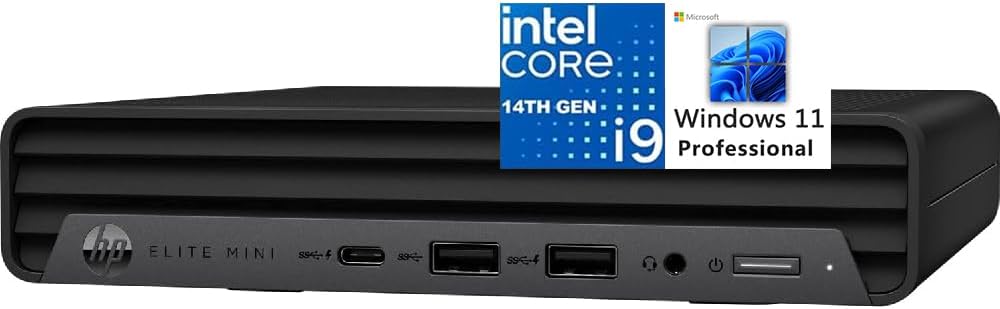
The HP Elite Mini 800 G9 is a top tier business machine with a 4.6 rating. It combines the latest 14th Gen Core i9 processor with professional features like Windows 11 Pro and a robust chassis for enterprise environments.
We may earn a commission when you buy through this link, at no additional cost to you.
It features Intel UHD Graphics 770 and 16GB DDR5 RAM for fast performance. The ultra-quiet design ensures it fits seamlessly in any office setting. It supports triple 4K displays which is great for multi-monitor setups. Keyboard and mouse are included which simplifies setup.
The price is high and it is less upgradeable than other models. However the build quality and reliability are excellent for corporate use. It is designed for stability and security which is critical for business users. If you want a no hassle machine this is it.
This unit is best for corporate IT departments needing reliable and fast PCs. The quiet operation makes it suitable for open offices. If you need a professional and efficient PC with modern OS support, the HP Elite Mini 800 G9 is the top business pick.
Designed for continuous operation with Windows 11 Pro and security features.
Silent fans ensure minimal noise disruption in shared workspace environments.
We may earn a commission when you buy through this link, at no additional cost to you.
Selecting the right Intel Core i9 Mini PC involves balancing performance needs with physical constraints. We break down the key factors that determine suitability for your specific workflow.
The generation of the Core i9 processor determines raw speed and efficiency. Newer models like the 14th Gen offer better multi-core performance and higher clock speeds for demanding tasks like 3D rendering and video editing. Look for processors ending in H or HX for higher performance capabilities.
Newer generations generally provide better power efficiency and AI capabilities for a smoother user experience.
DDR5 RAM is significantly faster than DDR4 providing higher bandwidth for data transfer. This is crucial for applications that rely on rapid data access such as virtualization or large dataset processing. If your budget allows prioritize models with DDR5 to ensure future readiness.
DDR5 memory improves overall system responsiveness and multitasking capabilities for heavy workloads.
Ports determine how you connect external devices. Look for Thunderbolt 4 or USB4 ports for high-speed data transfer and daisy-chaining monitors. Ethernet speed like 2.5G or 10G is vital for network professionals. Ensure the unit has enough USB ports for your peripherals without needing a hub.
Robust connectivity options reduce the need for external docks and streamline your workspace.
Small form factors can lead to heat buildup. A good cooling system with heat pipes and efficient fans is essential to maintain performance under load. Check for reviews mentioning noise levels since compact fans can be loud. Proper cooling ensures longevity and stability during intensive tasks.
Effective thermal management prevents throttling and keeps the device quiet during operation.
Storage needs grow over time so look for models with multiple M.2 slots. Being able to expand storage without replacing the drive is a huge benefit for media professionals. Some high-end models even support U.2 NVMe drives for enterprise capacity. Ensure the chassis allows tool-free access to slots.
Expandable storage allows you to adapt the PC to growing data needs without buying a new unit.
Some units come with Windows 11 Pro while others are barebone. Windows 11 Pro offers enterprise features like BitLocker and remote desktop which are useful for business users. If you prefer Linux check for driver support. Having the OS pre-installed saves time and ensures compatibility out of the box.
A pre-installed OS with proper licensing simplifies setup and ensures full functionality.
A longer warranty period indicates manufacturer confidence in the hardware. Look for brands offering 3 years or more to protect your investment. Good customer support is vital for technical issues. Check for local repair centers or online support resources to resolve problems quickly.
Strong warranty and support provide peace of mind for long term usage and business deployments.
Identify your primary use case whether it is AI development, gaming or office work. AI focused models have NPUs while gaming models prioritize GPU expansion. Office units focus on security and durability. Choosing based on your primary workflow ensures you get the most value for your money.
Aligning the hardware with your specific daily tasks optimizes efficiency and avoids overspending.
Place your mini PC in a well-ventilated area to ensure proper airflow. Avoid enclosing it in tight cabinets or near heat sources. This helps maintain optimal operating temperatures and prevents thermal throttling during heavy use.
Regularly update your drivers and operating system to ensure security and performance. Use system monitoring tools to check CPU and memory usage. This allows you to identify bottlenecks and optimize your workflow for better efficiency.
Clean the exterior and vents with compressed air every few months. Dust accumulation can block airflow and lead to overheating. Using a soft cloth to wipe the chassis keeps the device looking new and protects internal components from debris.
Yes these devices handle video editing well due to high core counts and fast processing speeds. Models with dedicated graphics or strong integrated graphics like Arc can manage 4K workflows efficiently. Check RAM capacity to ensure smooth timeline performance.
Most models allow for RAM and SSD upgrades if they have accessible slots. Check if the specific model has user-accessible SO-DIMM or M.2 slots. Some business units may have soldered RAM which limits future expansion options.
They can run warmer due to the compact chassis but modern cooling systems are designed to manage this. If placed in a ventilated spot they perform stably. Noise levels may be higher under load compared to larger desktop towers.
No only specific business focused models come with Windows 11 Pro pre-installed. Many consumer units ship with Windows 11 Home or require a separate license. Always verify the included operating system before purchasing to meet your needs.
Newer models with NPU cores handle local AI tasks like summarization and recognition efficiently. Dedicated AI accelerators reduce reliance on cloud services for better privacy. For heavy training you may still need a dedicated GPU.
Many models offer triple or even quad display support via HDMI and USB-C ports. This allows for extensive multitasking setups ideal for traders and designers. Verify the maximum resolution and refresh rates supported for each port.
The top picks include the MINISFORUM M1-1390 for overall balance the KAMRUI Hyper H2 for budget performance and the GEEKOM IT13 MAX for AI readiness. Each model excels in specific areas ensuring you can find the right fit for your needs.
Consider your primary workflow when deciding which features matter most. For creative work look for strong connectivity and cooling. For business prioritize reliability and security. Ensure the unit matches your budget while offering enough power for daily tasks.
Prices change frequently so always check current deals before purchasing. Verifying the latest specs ensures you get the best value for your investment. With the right model you can enjoy desktop power in a compact package.