
HP Chromebook 14 x360 Plus
4.2Editor score
360-degree hinge design
Touchscreen display support
Lightweight portable build
Finding the right laptop often means weighing performance against price and ecosystem. MacBook alternatives provide diverse options ranging from lightweight Chromebooks to powerful Windows machines. Each device offers unique strengths tailored to specific workflows and budgets without compromising essential computing needs.
We compared ten leading devices based on build quality, processing power, display clarity, and battery endurance. Our analysis focuses on real-world usability for everyday tasks like browsing, studying, and creative work. This list highlights the most reliable choices available in the current market landscape.
Each pick showcases key specifications and ideal use cases to help you make an informed decision. Remember that availability and specific configurations may vary by region and retailer. Always verify current details before purchasing to ensure the device meets your specific requirements and expectations.
4.2Editor score

4.4Editor score

4.6Editor score
As an Amazon Associate we earn from qualifying purchases.
This side-by-side comparison highlights the key specifications and strengths of each laptop to help you identify the best fit for your needs.


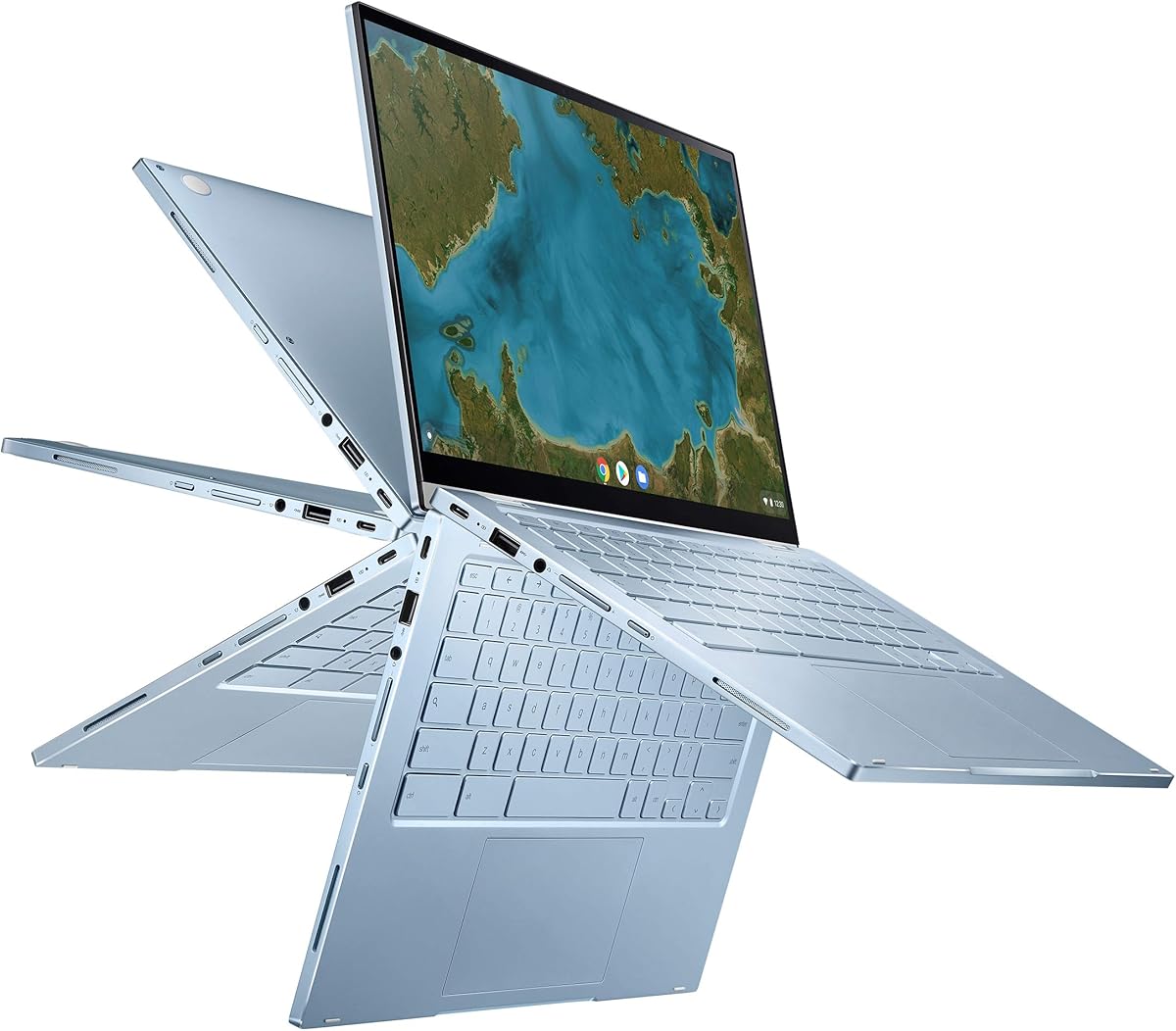


The HP Chromebook 14 x360 Plus stands out as a reliable and affordable option for students and families seeking a versatile laptop. With a solid 4.2 rating, it delivers dependable performance for everyday tasks like browsing, streaming, and light document editing. Its touchscreen capability adds a layer of interactivity that enhances usability for casual users.
We may earn a commission when you buy through this link, at no additional cost to you.
This device excels in flexibility thanks to its 360-degree hinge which allows it to function as a laptop, tent, stand, or tablet. The 14-inch WUXGA display offers crisp visuals and a responsive touch interface making it suitable for multimedia consumption and reading. Additionally, the build quality is robust having passed rigorous MIL-STD 810H testing to withstand daily wear and tear.
While it handles light multitasking well the 4GB of RAM and 128GB storage may limit power users who need to run multiple heavy applications simultaneously. The Intel N150 processor is efficient for basic workflows but might struggle with demanding software or intensive creative work. These trade-offs are acceptable given the budget-friendly nature of the device.
This Chromebook is ideal for K-12 students homeschool learners or anyone needing a secondary device for web-based tasks. If you prioritize portability and value over raw processing power this model offers a practical and secure computing experience powered by Chrome OS. It remains a top contender for those seeking an affordable alternative to traditional laptops.
The 360-degree hinge enables four distinct modes enhancing how you interact with the device for different activities like collaboration or entertainment.
Chrome OS provides automatic updates built-in virus protection and seamless access to Google apps ensuring a safe and straightforward user experience.
We may earn a commission when you buy through this link, at no additional cost to you.
The ASUS Chromebook Flip CX1 offers a compelling mix of performance and versatility with its 8GB of RAM which is a standout feature in this price range. Rated at 4.3 stars it handles everyday multitasking with ease allowing users to keep multiple browser tabs and apps open without significant slowdowns. The convertible design adds significant utility for different work and play scenarios.
We may earn a commission when you buy through this link, at no additional cost to you.
Featuring a 14-inch FHD NanoEdge touchscreen this device provides a immersive viewing experience with narrow bezels that maximize screen real estate. The inclusion of a free Google One AI Premium plan for three months adds extra value offering access to advanced AI features and additional cloud storage. Connectivity is robust with Wi-Fi 6 and Bluetooth 5.2 ensuring fast and reliable wireless performance.
While the Intel Celeron N4500 processor is capable of basic tasks it may not be suitable for intensive computing needs or heavy multimedia editing. The 128GB eMMC storage is adequate for cloud-centric users but might feel limited for those storing large media files locally. These limitations are balanced by the device's durability and battery life which supports up to 11 hours of use.
This model is best suited for students or professionals who need a reliable portable machine for notes taking online classes and general productivity. Its lightweight yet durable build makes it easy to carry while the flexible screen options enhance interaction. For those seeking a Chromebook with extra RAM and modern connectivity this is a strong choice to consider.
With 8GB of RAM users can manage multiple applications simultaneously more efficiently than on typical budget Chromebooks with 4GB memory.
The included Google One AI Premium plan provides extended access to advanced AI tools and generous cloud storage for three months at no extra cost.
We may earn a commission when you buy through this link, at no additional cost to you.
The Samsung Galaxy Book4 delivers exceptional performance and functionality making it a top choice for professionals and power users seeking a robust MacBook alternative. With a 4.4 rating it features a powerful 10-Core Intel Core 7 processor and 16GB of RAM which ensures smooth performance even under heavy workloads. The 512GB SSD provides ample space for applications and files without compromising speed.
We may earn a commission when you buy through this link, at no additional cost to you.
This laptop boasts a large 15.6-inch FHD IPS display that offers vibrant colors and wide viewing angles ideal for presentations and content consumption. The full-size backlit keyboard includes a numpad which enhances typing efficiency for data entry and spreadsheet tasks. Security is enhanced with a built-in fingerprint reader and Windows 11 Home ensures a modern and protected computing environment.
While the device is robust it is slightly heavier and larger than ultraportable models which may affect extreme portability needs for frequent travelers. The battery life is solid but not class-leading compared to some ARM-based laptops so planning for charge cycles is wise during long work sessions. However the performance gains and connectivity options far outweigh these minor drawbacks for most business users.
For those needing a traditional Windows experience with high performance this laptop is an excellent investment. It handles multitasking creative work and business applications with ease while offering versatile connectivity including HDMI and multiple USB ports. If you prioritize power and screen real estate over ultra-lightweight design this Galaxy Book4 is a superior option.
The combination of a 10-Core processor and 16GB RAM allows for seamless multitasking and efficient handling of demanding business applications.
With HDMI USB-C and LAN ports this device connects easily to monitors projectors and networks without requiring adapters for most scenarios.
We may earn a commission when you buy through this link, at no additional cost to you.
The Google Pixelbook Go is renowned for its premium build quality and exceptional portability offering a sleek experience for users on the go. Boasting a 4.2 rating it weighs barely 1kg making it one of the lightest Chromebooks available. The up to 12-hour battery life ensures you can work or study unplugged throughout the day without worrying about finding an outlet.
We may earn a commission when you buy through this link, at no additional cost to you.
This device features a fast 8th Gen Intel Core processor that handles everyday tasks with speed and responsiveness. The design includes a fanless system which keeps the device cool and quiet even during extended use on your lap. The touchscreen and dual stereo speakers enhance multimedia interactions providing a satisfying experience for video calls and streaming content.
While the performance is adequate for productivity it may not keep pace with the latest high-end chips in more powerful competitors. The price point is also higher than many other Chromebooks which can be a consideration for budget-conscious buyers. However the superior build materials and portability justify the cost for those who value a premium physical design and travel frequently.
Ideal for frequent travelers or students who need a reliable light companion the Pixelbook Go excels in daily usability. The fast charging feature allows for quick top-ups ensuring you stay productive even during short breaks. If portability and battery efficiency are your top priorities this model remains a standout choice in the Chromebook market.
Weighing less than a kilogram and measuring just 13mm thin this laptop is incredibly easy to carry in a backpack or bag.
The fanless design ensures the device remains cool and noiseless providing a quiet environment for focused work or study sessions.
We may earn a commission when you buy through this link, at no additional cost to you.
The Lenovo Flex 14 is a versatile convertible laptop that balances performance and features well for general users. Rated at 4.4 stars it comes with 12GB of DDR4 RAM which provides comfortable headroom for multitasking and running multiple applications smoothly. The included active pen adds significant value for note-taking and creative tasks on the touchscreen display.
We may earn a commission when you buy through this link, at no additional cost to you.
Powered by the AMD Ryzen 5 3500U processor it offers decent performance for everyday work and light creative tasks. The Radeon Vega 8 graphics enable faster video and photo editing capabilities compared to integrated Intel graphics in similar price ranges. Privacy-conscious users will appreciate the built-in physical shutter on the webcam which allows you to disconnect the camera completely when not in use.
While the device includes Windows 10 users should be aware that newer versions of Windows may require additional setup or may not be pre-installed. The processor is older but still functional for basic computing needs making it a solid budget-friendly option for those who need a Windows convertible. The battery life is reliable with rapid recharge capabilities that power the device up quickly.
This model is an excellent choice for students or home users who need a flexible laptop for drawing writing and general productivity. The combination of good RAM and included pen tools makes it a comprehensive package for learning and light content creation. If you prefer Windows flexibility over Chrome OS this offers a robust and affordable solution.
The included active pen allows for natural handwriting and note-taking directly on the screen enhancing creativity and study efficiency.
The built-in physical webcam shutter provides a simple and effective way to ensure your privacy during video calls or when the camera is idle.
We may earn a commission when you buy through this link, at no additional cost to you.
The ASUS Chromebook Flip C433 stands out with its premium design and capable performance for a Chromebook. It features an Intel Core m3 processor which provides snappy performance for web browsing and multitasking. The 8GB of RAM is a significant advantage allowing for smoother switching between applications and tabs compared to entry-level models with 4GB.
We may earn a commission when you buy through this link, at no additional cost to you.
Its 14-inch FHD NanoEdge display features ultra-narrow bezels creating an immersive viewing experience in a compact footprint. The 360-degree hinge allows versatile usage modes making it suitable for reading drawing or presenting content. A backlit keyboard enhances usability in low-light conditions ensuring you can work comfortably anywhere without eye strain.
The primary limitation is the 64GB eMMC storage which is quite limited for storing large local files or media libraries. Users relying heavily on cloud storage will find this acceptable but power users may need external drives for additional capacity. Additionally the processor is older and may not support the most demanding web applications or future updates as well as newer chips.
For those seeking a stylish and functional Chromebook for daily tasks this model offers a balanced experience. The combination of decent RAM a quality screen and versatile hinge makes it a reliable choice for students and casual users. If you prioritize build quality and display aesthetics this is a strong contender in the mid-range Chromebook market.
The NanoEdge design with ultra-narrow bezels maximizes the screen area providing a larger view in a smaller chassis.
The backlit keyboard ensures clear visibility in dim environments allowing for consistent productivity regardless of lighting conditions.
We may earn a commission when you buy through this link, at no additional cost to you.
The Lenovo Flagship Chromebook offers a streamlined and efficient computing experience powered by the MediaTek Kompanio 520 processor. This chip is designed to balance performance and power consumption making it suitable for everyday tasks and class-based activities. With a rating of 4.2 it provides a reliable option for users seeking a no-frills machine for web browsing and streaming.
We may earn a commission when you buy through this link, at no additional cost to you.
Its 14-inch FHD IPS display offers clear visuals and wide viewing angles suitable for shared viewing or individual work. The inclusion of Wi-Fi 6 ensures fast and stable internet connections which is essential for video conferencing and large downloads. The slim and light chassis makes it easy to carry and store while the privacy shutter adds a layer of security.
With only 4GB of RAM and 64GB of storage this model is best suited for users who rely heavily on cloud services and light applications. Heavy multitasking or offline media storage may be challenging given these constraints. However for basic schoolwork and home use these limitations are often manageable with proper file management habits.
This device is ideal for students and home users who need a simple and affordable Chromebook for online learning and entertainment. The processor offers a good balance of efficiency and speed for typical browser-based workflows. If you prioritize portability and connectivity over raw power this represents a solid entry-level choice.
Wi-Fi 6 support ensures faster and more reliable wireless connections improving performance during video calls and streaming sessions.
Weighing just 2.86 pounds and measuring under an inch thick this laptop is incredibly easy to transport and store.
We may earn a commission when you buy through this link, at no additional cost to you.
The Apple 2026 MacBook Neo represents a significant leap in portable computing performance offering a powerful AI-ready experience in a sleek design. With a 4.6 rating it features the A18 Pro chip which delivers exceptional speed and efficiency for creative workflows and daily productivity. The up to 16-hour battery life ensures all-day usage without the need to carry a charger.
We may earn a commission when you buy through this link, at no additional cost to you.
Its 13-inch Liquid Retina display provides vibrant colors and sharp text ideal for media consumption and professional work. The 1080p FaceTime HD camera and dual-mic array enhance communication quality for meetings and video calls. Seamless integration with iPhone and iPad via Apple Intelligence features streamlines workflows and boosts productivity across devices.
While the 8GB of unified memory is sufficient for most tasks it is not upgradeable which limits longevity for users with heavy multitasking needs. Additionally the device lacks a touchscreen option which some users might prefer for certain creative tasks. Despite these points the overall performance and battery efficiency make it a highly capable machine for students and professionals.
This model is perfect for users invested in the Apple ecosystem who need a reliable and fast laptop for work and study. The durable aluminum design and lightweight build ensure it remains portable while delivering top-tier performance. If you prioritize battery life and ecosystem integration this MacBook Neo is a standout option to consider.
Built-in Apple Intelligence tools help summarize notes and automate tasks enhancing productivity with advanced on-device machine learning capabilities.
Up to 16 hours of battery life supports full workdays and study sessions without needing a charge allowing true mobility anywhere.
We may earn a commission when you buy through this link, at no additional cost to you.
The Apple 2021 MacBook Pro with M1 Max Chip delivers professional-grade performance suitable for demanding creative and technical workflows. Rated at 4.4 stars this renewed model offers substantial power with 64GB of RAM and 2TB of storage which allows for seamless handling of large datasets and media files. The 14-inch Retina display ensures accurate colors and sharp details for design and editing work.
We may earn a commission when you buy through this link, at no additional cost to you.
The M1 Max processor provides exceptional speed and efficiency making it a robust alternative to high-end PC workstations. Its battery life remains strong allowing for hours of intensive use without plugging in. The renewed status means it has been professionally inspected and cleaned ensuring a reliable experience at a lower price point than a new unit.
Users should note that renewed items may have minimal cosmetic signs or non-original accessories though functionality is guaranteed. The weight of the device is also slightly higher than entry-level laptops which may affect portability for those traveling constantly. However for desktop replacement scenarios or power users these factors are often secondary to raw performance capabilities.
This laptop is ideal for professionals needing a powerful machine for video editing software development or heavy multitasking. The combination of high RAM and massive storage makes it future-proof for complex projects. If you want top-tier Apple performance without the premium new price this renewed model is a strategic and smart investment.
The M1 Max chip with 64GB RAM supports intensive workflows like video editing and coding without slowdowns or system bottlenecks.
With 2TB of SSD storage users can store large libraries of media and projects locally without relying heavily on cloud backups.
We may earn a commission when you buy through this link, at no additional cost to you.
This renewed Apple MacBook Pro offers a classic and capable Windows alternative for those who prefer macOS but want to save costs. With a 3.7 rating it features a 2.6GHz Intel Core i7 processor and 16GB of RAM which handles everyday productivity tasks reliably. The 15-inch Retina display provides a spacious workspace for multitasking and content consumption.
We may earn a commission when you buy through this link, at no additional cost to you.
The build quality remains solid even in a renewed state offering a premium feel with durable materials and a timeless design. It serves as a practical choice for users who need specific Mac features or compatibility with legacy software. The 512GB storage is sufficient for general users needing space for apps and documents.
However the Intel processor means shorter battery life compared to newer Apple Silicon models and potentially higher heat generation during heavy use. Renewed units may also lack original accessories or come in generic packaging which is a trade-off for the lower price. These considerations are important for users prioritizing battery efficiency over raw cost savings.
This model is best suited for budget-conscious users who need a reliable Mac experience for standard tasks. It offers a balance of performance and value for those who do not require the latest chip architecture. If you need a large screen and macOS at a lower cost this renewed Pro is a viable option to explore.
The 15-inch Retina screen offers ample real estate for multitasking and detailed work without sacrificing portability in a traditional form factor.
Buying renewed provides access to a premium brand and design at a lower price point while ensuring functionality through professional inspection.
We may earn a commission when you buy through this link, at no additional cost to you.
Choosing the right laptop requires evaluating several key factors to ensure the device meets your specific needs and budget.
The operating system dictates the apps you can run and how the device functions. Chromebooks are great for web-based tasks while Windows offers broad software support and macOS provides seamless integration with other Apple devices. Decide which ecosystem fits your workflow before choosing a model.
Choose Chrome OS for simplicity and security or Windows for software compatibility. macOS is ideal if you own an iPhone or iPad.
The processor determines how quickly your computer can handle tasks. Intel Core i5 and i7 or AMD Ryzen 5 and 7 processors are suitable for most users. Apple Silicon chips like M1 or A18 offer exceptional efficiency. Avoid lower-end Celeron chips for demanding workloads.
Opt for at least an i5 or Ryzen 5 processor for smooth performance. Apple chips are excellent for battery and speed efficiency.
Memory allows you to run multiple apps at once while storage holds your files. Aim for at least 8GB of RAM for comfortable multitasking and 256GB of SSD storage. Cloud storage can compensate for limited local space but local drives are faster. Do not settle for 4GB RAM unless it is a basic web device.
Prioritize 8GB RAM and 256GB SSD minimum. More memory helps keep your system responsive during heavy daily use.
A good display reduces eye strain and enhances media consumption. Look for Full HD resolution or higher with good color accuracy. Touchscreens add versatility but may drain battery. IPS panels provide wider viewing angles for better image quality on the go.
Choose an IPS display with at least 1920×1080 resolution for clear visuals and reduced eye strain during long sessions.
Battery life is critical for users who work away from power outlets. Aim for a device that offers at least 8 to 10 hours of real-world use. Check independent reviews for accurate reports since manufacturers often state ideal conditions. USB-C charging is now standard and offers convenient fast charging options.
Select a laptop with a proven 10-hour battery life for all-day productivity without frequent charging interruptions.
Weight and dimensions matter if you travel frequently with your device. Ultrabooks are lighter but may sacrifice ports. Look for durable materials like aluminum that can withstand daily transport. A good keyboard and trackpad are essential for comfort during long typing sessions.
Pick a device under 4 pounds for easy carrying. Ensure the keyboard is comfortable and the build feels sturdy enough for daily use.
Check the ports available on the device to avoid needing many dongles. USB-C and USB-A ports are common but having HDMI or an SD card reader helps with peripherals. Wi-Fi 6 ensures fast internet speeds. Bluetooth connectivity is standard for pairing wireless devices like mice or headphones.
Ensure the laptop has enough USB-C and USB-A ports for your needs. Wi-Fi 6 support is a key feature for modern connectivity.
Determine your spending limit but consider value over just the lowest price. A slightly more expensive model with better longevity may save money in the long run. Renewed options can offer great savings but check warranty details. Ensure the device supports updates for several years.
Balance your budget with performance needs. Investing in a durable device often yields better long-term value than a cheap disposable option.
Keep your device clean by using a microfiber cloth to wipe the screen and keyboard regularly. Avoid using harsh chemicals that could damage the display coating or chassis. Store the laptop in a protective case when transporting to prevent scratches and physical damage.
Manage your storage by regularly deleting unused files and clearing cache. Utilize cloud services to offload large media files and free up space. Keep the operating system updated to ensure security patches and performance improvements are applied promptly.
Protect your battery by avoiding extreme temperatures and not leaving the device plugged in constantly. Calibrate the battery occasionally by draining and recharging it fully to maintain accuracy. Use a surge protector for charging to avoid power spikes that could harm internal components.
A Chromebook can be an excellent alternative if your work is mostly web-based. They are often cheaper faster to boot and more secure than traditional Windows laptops. However they lack full desktop software support so check if your essential apps are available on Chrome OS first.
The HP Chromebook 14 x360 Plus and Lenovo Flagship Chromebook are great budget choices. They offer decent performance for online classes and browsing without breaking the bank. Their flexible designs and long battery life make them ideal for daily school use.
Windows offers more software variety and hardware options while macOS provides a polished and integrated ecosystem. If you need specific engineering or creative software Windows might be better. For users already in the Apple ecosystem macOS remains the seamless choice.
Yes many MacBook alternatives like the Samsung Galaxy Book4 offer professional-grade performance. They feature powerful processors and ample memory for handling demanding business applications. Just ensure the OS supports the specific software required for your industry.
Most modern alternatives offer between 8 and 16 hours of battery life depending on usage. Chromebooks often excel in efficiency while Apple laptops provide the best endurance. Always check real-world reviews to gauge actual performance under your typical workload.
Buying renewed can save significant money but check the warranty and return policy carefully. Ensure the battery health is verified as these components degrade over time. Certified refurbished items from reputable sellers offer a balance of cost savings and reliability.
We have reviewed ten distinct options ranging from budget Chromebooks to powerful Windows laptops and premium Apple devices. The HP Chromebook 14 x360 Plus offers great value while the Samsung Galaxy Book4 stands out as a versatile Windows powerhouse. For Apple ecosystem fans the 2026 MacBook Neo delivers unmatched performance and battery efficiency.
Your choice should depend on your specific workflow budget and ecosystem preferences. Consider what software you need most and how much portability matters to your daily routine. Prioritizing battery life and build quality ensures your device lasts longer and remains reliable.
Always check current prices and specifications as these can change frequently. Compare the deals available to get the best value for your investment. With the right choice you can enjoy a seamless and productive computing experience that meets all your needs.