
Redragon K618 PRO
4.1Editor score
Tri-mode connectivity support
Macro zone without software
Slim low profile design
This guide compares the top ten low profile mechanical keyboards for speed comfort and customization helping you find the perfect slim typing solution for work
Low profile mechanical keyboards offer a unique blend of speed and comfort by reducing key travel distance. They are ideal for users who want tactile feedback without the bulk of traditional mechanical switches. This category has grown significantly as professionals and gamers seek ergonomic solutions that save desk space.
We evaluated ten standout models based on build quality, switch performance, connectivity options, and customization features. Each product was selected for its ability to deliver reliable typing experiences across different operating systems. Our analysis focuses on real-world usability rather than just technical specifications to ensure practical value.
Each pick highlights specific strengths like wireless flexibility, compact layouts, or advanced customization tools. You will find detailed breakdowns of switch types, keycap materials, and connectivity modes. Please note that availability and specific feature sets may change over time so verify details before purchasing.
4.1Editor score

4.7Editor score
4.1Editor score
The following table provides a side-by-side view of key specifications for all ten models. It highlights layout sizes, switch types, connectivity methods, and unique features to help you quickly identify which device matches your specific workflow and space constraints.


The Redragon K618 PRO stands out as an accessible entry point into low profile mechanical keyboards. With a 4.1 rating it delivers solid performance for users seeking speed and compactness without breaking the bank. Its standout quality lies in the dedicated macro zone that requires no software installation to function immediately.
We may earn a commission when you buy through this link, at no additional cost to you.
Key strengths include tri-mode connectivity allowing seamless switching between USB-C Bluetooth and 2.4GHz wireless. The low profile design reduces travel distance for faster actuation which benefits both gaming and rapid typing. The Win/Mac toggle button ensures compatibility across different operating systems effortlessly.
Trade-offs include a lighter build feel compared to premium aluminum models and average battery endurance. However these compromises are acceptable given the price point and the convenience of instant macro programming. Users prioritizing function over heavy construction will find this model sufficient for daily tasks.
This keyboard is ideal for budget-conscious buyers or those needing a secondary portable device for multiple computers. If you value quick setup and customizable lighting effects on a tight budget the Redragon K618 PRO offers excellent value and functionality.
The dedicated macro zone allows you to record complex key combinations directly on the keyboard without installing any software. This ensures productivity tasks can be automated immediately upon setup.
Tri-mode support lets you connect to a PC laptop and tablet simultaneously. Switch between them without re-pairing keeping your workflow uninterrupted across different devices.
We may earn a commission when you buy through this link, at no additional cost to you.
The Keychron K3 Version 2 is a refined 75% layout designed for peak productivity and tactile typing. It holds a 4.3 rating among users who value both Mac and Windows compatibility. Its standout quality is the open-source QMK firmware which offers endless customization possibilities for advanced users.
We may earn a commission when you buy through this link, at no additional cost to you.
Strengths include a unique Mac layout with necessary multimedia keys and extra keycaps for Windows. The Broadcom Bluetooth 5.1 chipset ensures stable connections across three devices. The reinforced aluminum body adds durability while remaining one of the thinnest wireless mechanical keyboards available.
Trade-offs involve the plastic bottom frame which may feel less premium than all-metal alternatives. The compact layout also sacrifices arrow keys for a more streamlined footprint. These are acceptable for users prioritizing portability and customizability over full-sized key availability.
Ideal for Mac users or developers needing extensive customization this keyboard balances performance and ergonomics. The built-in AI assistant beta simplifies complex configurations making it accessible even to those less familiar with QMK scripting and remapping.
Open-source QMK firmware allows you to remap any key and set infinite keybinding combinations. This flexibility makes the keyboard adaptable to any specific workflow or gaming setup.
Extra keycaps for both Windows and Mac are included ensuring seamless transition between operating systems. The Mac layout includes dedicated multimedia keys for better media control.
We may earn a commission when you buy through this link, at no additional cost to you.
The Cherry MX 10.0N leverages decades of switch expertise to deliver a reliable low-profile experience. Rated 4.3 it combines style with functionality in an ultra-thin profile of just 0.87 inches. Its standout quality is the use of genuine Cherry MX Low Profile Speed switches known for linear and responsive feedback.
We may earn a commission when you buy through this link, at no additional cost to you.
Key strengths include a sturdy aluminum housing that feels durable and sleek. The RGB backlighting offers customizable colors and effects for personalized illumination. An integrated fold-out support bar provides an ergonomic typing position reducing wrist strain during extended sessions.
Trade-offs involve the standard layout size which may not save as much desk space as 75% or 60% models. The price point is also higher than generic brands. These factors are acceptable for users who prioritize build quality and brand reputation over compactness.
This keyboard is perfect for enthusiasts who trust original components and want a premium feel. The combination of aluminum construction and authentic Cherry switches ensures long-term reliability and consistent performance for both gaming and professional work.
Cherry MX Low Profile Speed switches provide linear quiet and responsive feedback. They are optimized for smooth typing and gaming with minimal actuation force required.
The fold-out aluminum support bar allows you to adjust the typing angle. This feature helps maintain a natural wrist position during long work hours.
We may earn a commission when you buy through this link, at no additional cost to you.
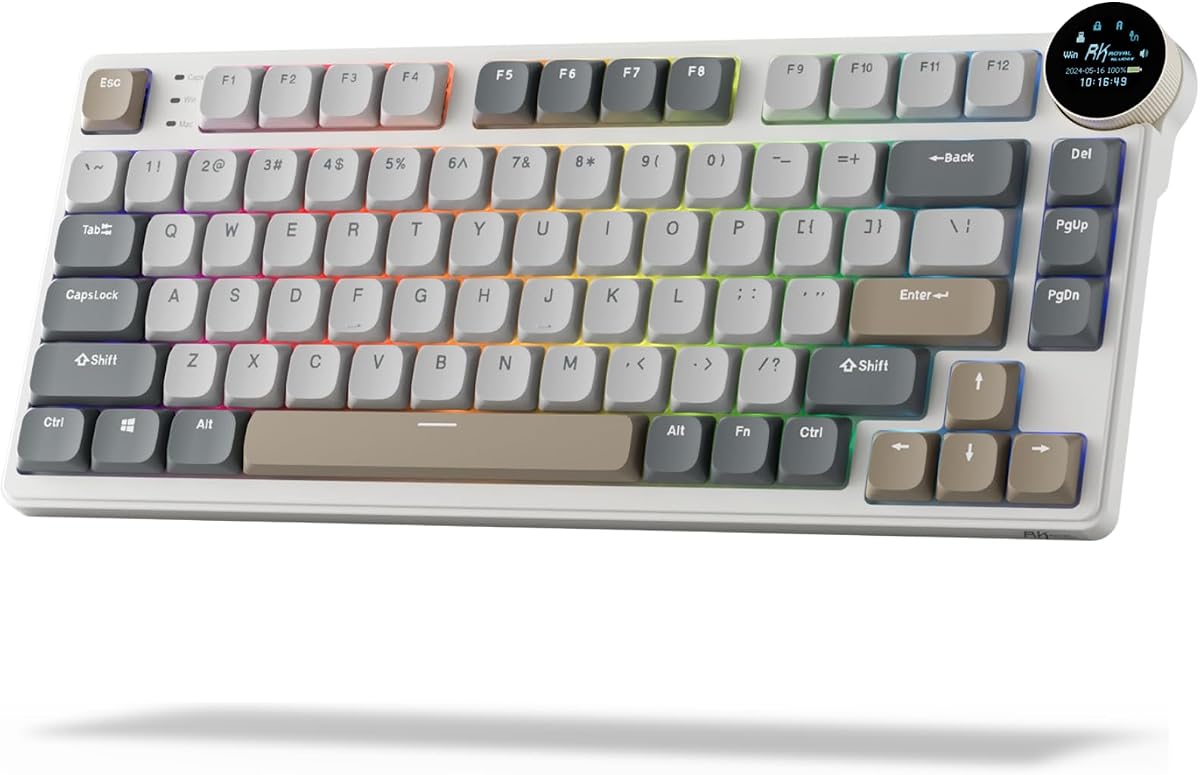
The RK ROYAL KLUDGE N80 redefines versatility with a dynamic display screen showing custom GIFs and connection modes. It holds a 4.1 rating among users looking for unique features. Its standout quality is the small screen which adds a personalized touch to your desk setup.
We may earn a commission when you buy through this link, at no additional cost to you.
Strengths include an intuitive knob for controlling volume and RGB modes effortlessly. The tri-mode connectivity offers stable Bluetooth 5.0 and 2.4GHz wireless options. A heavy-duty base solves wobbling issues while triple sound-absorbing layers minimize hollow sounds.
Trade-offs involve the unique look that might not suit minimalists and software dependency for customizing GIFs. However the stability and sound dampening make it a pleasure to use. Users who value customization and solidity will appreciate these practical improvements.
Ideal for gamers or streamers wanting visible connection status or custom animations this keyboard delivers. The combination of a sturdy base and top-mounted design ensures firm keystrokes and increased typing feedback for better gaming control.
The smart screen showcases dates connection modes and battery status dynamically. You can also display custom GIFs to personalize your workspace visually.
Dual layer sound-absorbing foams and a silicone bottom pad reduce cavity noise. This ensures a smooth quiet typing experience suitable for shared environments.
We may earn a commission when you buy through this link, at no additional cost to you.
The Flow Lite 84 Keys focuses on comfort and aesthetics with a textured ABS body and marble theme. Rated 4.3 it prioritizes natural wrist positioning to reduce fatigue. Its standout quality is the Specter Full POM linear switches which lower operating force significantly.
We may earn a commission when you buy through this link, at no additional cost to you.
Key strengths include PBT double-shot keycaps that resist shine and offer a comfortable matte texture. The gasket design provides soft cushioning for each keystroke making typing satisfying. Battery life is remarkable at up to 80 hours on a single charge.
Trade-offs involve the use of ABS instead of aluminum which affects the premium feel. The price is higher than budget alternatives. These are acceptable for users prioritizing ergonomics and long-term comfort over raw build material costs.
Ideal for typists spending long hours at a desk this keyboard reduces strain effectively. The combination of low-profile mechanical keys and a gasket mount delivers precision and comfort unmatched by standard designs.
The lower front height allows for a more natural wrist position reducing strain during long sessions. The 40gf switches lower finger joint fatigue significantly.
PBT double-shot keycaps provide a durable non-slip texture. The two-tone design ensures backlighting visibility without compromising the tactile feel.
We may earn a commission when you buy through this link, at no additional cost to you.
The Keychron K1 Ultra 8K leads the pack with an exceptional 4.7 rating and high-speed performance. It supports up to 8K wired polling which is rare in mechanical keyboards. Its standout quality is the hot-swappable low-profile POM switches allowing easy customization.
We may earn a commission when you buy through this link, at no additional cost to you.
Strengths include a compact 80% TKL layout retaining common keys while saving space. The programmable knob handles volume and media functions efficiently. Wax-oil treated hardwood side panels add a premium touch alongside durable materials and sound-dampening layers.
Trade-offs involve a higher price point and potential complexity for casual users unfamiliar with ZMK firmware. However the responsiveness is unmatched for competitive gaming. Users seeking top-tier performance will find these trade-offs well worth the investment.
Ideal for power users and competitive gamers this keyboard delivers speed and precision. The combination of high polling rates and AI-assisted customization ensures it grows with your evolving workflow and skill set.
Supporting up to 8K wired polling ensures minimal latency during intense gaming sessions. This level of responsiveness is rare in low-profile wireless options.
The 80% TKL layout saves desk space while keeping arrow keys and function rows. A programmable knob adds intuitive control over media and brightness.
We may earn a commission when you buy through this link, at no additional cost to you.
The Keychron K17 Max packs a 96% layout into an ultra-slim wireless profile perfect for productivity. It holds a 4.4 rating and supports 2.4 GHz and Bluetooth for seamless switching. Its standout quality is the compact design that keeps the numpad without adding bulk.
We may earn a commission when you buy through this link, at no additional cost to you.
Key strengths include Gateron low-profile switches that are 31% thinner than standard ones for tactile feedback. Open-source QMK firmware ensures transparency and security while allowing deep customization. The double-shot PBT keycaps offer excellent oil resistance for long-term use.
Trade-offs include the learning curve for QMK firmware and the heavier weight compared to compact layouts. However the functionality for data entry and spreadsheets is unmatched. Users needing full number pad access in a small footprint will appreciate this design.
Ideal for professionals using Excel or accounting software this keyboard balances speed and utility. The aluminum frame ensures stability while the low-profile design keeps the profile slim and elegant on any desk.
The 96% layout retains the numeric keypad while significantly reducing overall footprint. This saves desk space without sacrificing essential productivity keys.
Running on QMK open-source firmware ensures security and transparency. Regular updates via the Launcher app keep features fresh and optimized.
We may earn a commission when you buy through this link, at no additional cost to you.
The Flow Lite 100 Keys offers a full-size layout with a focus on comfort and longevity. Rated 4.4 it features a massive 3000mAh battery providing up to 100 hours of use. Its standout quality is the 1000Hz polling rate ensuring fast responsive performance wirelessly.
We may earn a commission when you buy through this link, at no additional cost to you.
Strengths include Specter linear switches with 40gf operating force to reduce finger fatigue. The gasket design brings a soft cushioned feel to each keystroke. A built-in volume wheel and adjustable kickstand add practical convenience to daily use.
Trade-offs involve the larger footprint which may not suit small desks or travel. The ABS body is durable but less premium than aluminum. However the battery endurance and typing comfort make it a strong choice for stationary work setups.
Ideal for users needing a numpad and full layout this model delivers ergonomic comfort. The combination of swappable switches and long battery life ensures it remains versatile and reliable for extended periods without recharging.
A built-in 3000mAh battery provides up to 100 hours of working time on one charge. This ensures long uninterrupted usage sessions for office work.
With 1000Hz polling support the keyboard offers fast responsive performance wirelessly. This is perfect for high-performance devices needing low latency.
We may earn a commission when you buy through this link, at no additional cost to you.
The Keychron K3 Max SE balances speed and comfort with a refined 75% layout. Rated 4.6 it supports 2.4 GHz wireless for ultra-fast responsiveness. Its standout quality is the hot-swappable support allowing you to change switches in seconds without soldering.
We may earn a commission when you buy through this link, at no additional cost to you.
Key strengths include advanced acoustic foam for a quieter more cushioned typing experience. Redesigned stabilizers reduce wobble on larger keys for consistent keystrokes. It also comes with premium double-shot PBT keycaps for long-lasting performance and oil resistance.
Trade-offs involve the premium price and limited availability in some regions. However the stability and sound dampening make it a joy to use. Users seeking a silent and stable typing experience will find these features invaluable.
Ideal for both gaming and work this keyboard delivers precise control and durability. The triple connectivity options and Mac layout compatibility ensure it fits seamlessly into diverse workflow ecosystems.
Advanced EPDM acoustic foam paired with bottom case foam reduces noise. This elevates every keystroke for a quieter more cushioned experience.
Redesigned stabilizers reduce wobble on keys like the spacebar and shift. This results in a smoother more consistent typing experience.
We may earn a commission when you buy through this link, at no additional cost to you.
The Razer Ornata V3 offers a hybrid Mecha-membrane switch feel blending mechanical feedback with membrane softness. Rated 4.5 it prioritizes natural hand positioning to reduce strain. Its standout quality is the UV-coated keycaps ensuring fade-resistant legends and greater protection against wear.
We may earn a commission when you buy through this link, at no additional cost to you.
Strengths include dedicated backlit media keys for instant control of volume and tracks. The magnetic soft touch wrist rest provides ample comfort during long gaming sessions. This combination makes it an ideal choice for users transitioning from standard keyboards.
Trade-offs involve the lack of true mechanical switches which limits customization options. However the snappy clicky feedback remains satisfying for most users. If you value comfort and durability over deep customization this model is highly effective.
Ideal for gamers seeking comfort and reliable media control the Ornata V3 delivers. The durable keycaps and included wrist rest ensure a smooth setup with minimal extra accessories required.
Mecha-membrane switches fuse the snappy clicky feedback of mechanical with familiar membrane feel. This provides precise keystrokes with reduced physical strain.
UV-coated keycaps ensure legends are fade-resistant and protected against wear and tear. This ensures the keyboard looks new even after frequent use.
We may earn a commission when you buy through this link, at no additional cost to you.
Selecting the right low profile mechanical keyboard involves balancing layout size switch type and connectivity features. This guide breaks down the critical factors to consider before making your purchase.
Layout size determines how much desk space the keyboard occupies and which keys are available. Common options range from compact 60% and 75% layouts to full-size boards with numpads. A smaller layout saves space and improves ergonomics by reducing shoulder strain during typing. However if you use a numpad frequently you should look for a 96% or 100% layout. Consider your typical tasks to decide if you can spare a full-size footprint or prefer a compact form factor.
Choose a layout that matches your screen real estate and key needs.
Switch type defines the tactile feel and actuation force of each keystroke. Low profile switches typically offer shorter travel distances than standard mechanical switches for faster typing. Options include linear switches for smoothness tactile switches for feedback or clicky switches for audible confirmation. Consider your environment; quiet linear switches are better for shared offices. The operating force measured in grams also impacts fatigue over long sessions. Lighter forces reduce finger strain while heavier ones provide more control. Select a switch that feels natural to your fingers.
Test switch samples if possible to ensure they match your preference.
Connectivity determines how the keyboard connects to your computer. Wired connections offer maximum stability and speed for gaming. Wireless options like Bluetooth or 2.4GHz dongles provide freedom from cables. Tri-mode connectivity allows you to switch between devices seamlessly without re-pairing. Look for stable Bluetooth versions like 5.0 or higher to minimize lag. For competitive gaming ensure the wireless mode has a high polling rate comparable to wired performance. If you move between a PC tablet and laptop often wireless is essential.
Prioritize 2.4GHz wireless for gaming and Bluetooth for multi-device work.
Build quality affects durability and overall typing stability. Aluminum housing provides a sturdy and premium feel compared to plastic chassis. Some models include a reinforced base to prevent wobbling during intense typing sessions. Check for features like stabilizer design which impacts the feel of large keys like Spacebar. A heavy duty base ensures the keyboard stays in place without shifting. High-quality materials like PBT keycaps resist wear better than ABS. Consider the weight if you need portability versus stability.
Look for metal components and sound-dampening features for a premium experience.
Customization allows you to tailor the keyboard to your specific workflow. Hot-swappable sockets let you change switches without soldering for future upgrades. Open-source firmware like QMK or ZMK enables deep remapping of any key. Software tools may include macro recording and lighting effect customization. Some models offer AI-assisted customization to simplify complex setups. Check if the keyboard supports multiple layers for different profiles. The ability to reprogram keys ensures long-term adaptability.
Hot-swap support and open-source firmware offer the best flexibility.
Battery life determines how long you can use the keyboard wirelessly. Larger capacity batteries like 2000mAh or 3000mAh provide extended usage time. Look for models that support efficient power management for backlighting. USB-C charging ensures you can recharge using standard cables. Consider whether the keyboard has a sleep mode to save power when idle. If you plan to use it daily without frequent plugging check the estimated hours with lights off. Longer battery life reduces downtime significantly.
Select models with at least 50 hours of usage for reliable daily use.
Ergonomics focus on wrist comfort and positioning during long typing sessions. Low-profile designs naturally reduce hand strain compared to standard mechanical boards. Look for adjustable kickstands or integrated folding stands to change the typing angle. Some keyboards include integrated wrist rests or supports to keep wrists straight. A lower front height helps maintain a more neutral hand position. Consider the weight of the board; heavier models stay put better while lighter ones are portable. Prioritize comfort features if you type for hours daily.
Choose a low profile design with a stand for natural wrist positioning.
Operating System compatibility ensures all keys work correctly with your device. Many keyboards come with dual layouts for Windows and macOS. Extra keycaps are often included to match specific system requirements. Check for a dedicated toggle switch to change systems instantly. Some firmware supports Linux or mobile OS compatibility through Bluetooth. Ensure media keys and function keys map correctly for your OS. Incompatibility can lead to frustrating missing functions in daily workflows.
Verify that Mac or Windows keys are included for your primary OS.
Start by connecting the keyboard using a stable mode such as USB-C or 2.4GHz wireless. Install any necessary software for remapping or macros to configure your preferred layout. For wireless models pair the device via Bluetooth following the manufacturer's pairing instructions carefully. Ensure the firmware is updated to the latest version for optimal performance.
Clean the keyboard regularly using compressed air to remove dust from between the keycaps. Avoid using liquids directly on the keys; instead use a microfiber cloth for surface wiping. If your model supports hot-swapping you can easily replace switches to customize the tactile feel over time. Do not apply excessive force on the keys to prevent internal damage.
For battery longevity unplug the keyboard or switch it off when not in use for long periods. Store it in a cool dry place to prevent moisture damage to internal components. If you use it as a daily driver keep the stand adjusted to maintain comfortable ergonomics. Check the manufacturer's warranty for specific maintenance advice.
Low profile keyboards offer shorter actuation distances which can lead to faster response times in competitive games. Many models support high polling rates and stable wireless connectivity to minimize latency. However if you prefer deep tactile feedback standard mechanical switches might still suit some players better. It depends on whether you prioritize speed or traditional tactile feel.
Only specific models designed with hot-swappable sockets allow for switch replacement without soldering. Check the product specifications to confirm if it supports low-profile hot-swap features. If your board is non-hot-swappable you will need to purchase a new unit to change switch types. Look for brands that explicitly mention hot-swap support in their features.
Most modern low profile mechanical keyboards support both Mac and Windows out of the box. They often include extra keycaps and a physical toggle switch to change the layout instantly. Ensure the media keys function correctly for your specific OS before purchasing. Compatibility is a standard feature for most models from major brands.
Low profile keyboards have shorter travel distance and a flatter profile than standard mechanical keyboards. This reduces wrist strain and allows for faster typing speeds due to less key movement. The build is usually more compact which saves desk space effectively. However they may lack the deep tactile bump of some traditional mechanical switches.
Wireless low profile keyboards generally offer between 50 to 100 hours of battery life on a single charge. Models with RGB backlighting will consume more power than those with standard lighting. Check the specific capacity in mAh to estimate how often you need to recharge. USB-C charging is standard for most modern wireless models.
Yes they are excellent for typing due to their reduced actuation force and travel distance. This design minimizes finger fatigue allowing for longer comfortable typing sessions. The compact layout keeps your hands closer together which can improve posture. Look for models with PBT keycaps and sound-dampening layers for a premium feel.
Most keyboards allow lighting customization through dedicated software or onboard key combos. Some advanced models support firmware-level customization via QMK or ZMK tools. Check if the brand offers a web-based configurator for easy setup without installing software. You can usually choose from various colors and effects to match your style.
Yes many low profile mechanical keyboards feature linear switches that are inherently quieter than clicky ones. Some models include sound-dampening layers to further reduce noise during typing. If silence is a priority look for specific 'Silent' or 'Linear' switch variants. These options are ideal for shared office environments.
The ten models reviewed in this guide offer a range of options from budget-friendly to premium performance. Whether you need a compact layout for portability or a full-size board for productivity there is a fit for every workspace. High-rated models like the Keychron K1 Ultra 8K and RK ROYAL KLUDGE N80 stand out for their unique features and reliability.
Prioritize factors like switch type and connectivity based on your daily needs to ensure satisfaction. Consider whether you need wireless flexibility for multitasking or speed for gaming. The ergonomics of low-profile designs make them a great investment for long hours of typing and work. Evaluate your budget against the features like hot-swap or high polling rates.
Remember to check current availability and warranty details before making a final purchase. Product features and stock may change so verify specifications on the manufacturer's site. Investing in the right low profile mechanical keyboard will enhance your typing comfort and efficiency for years to come.