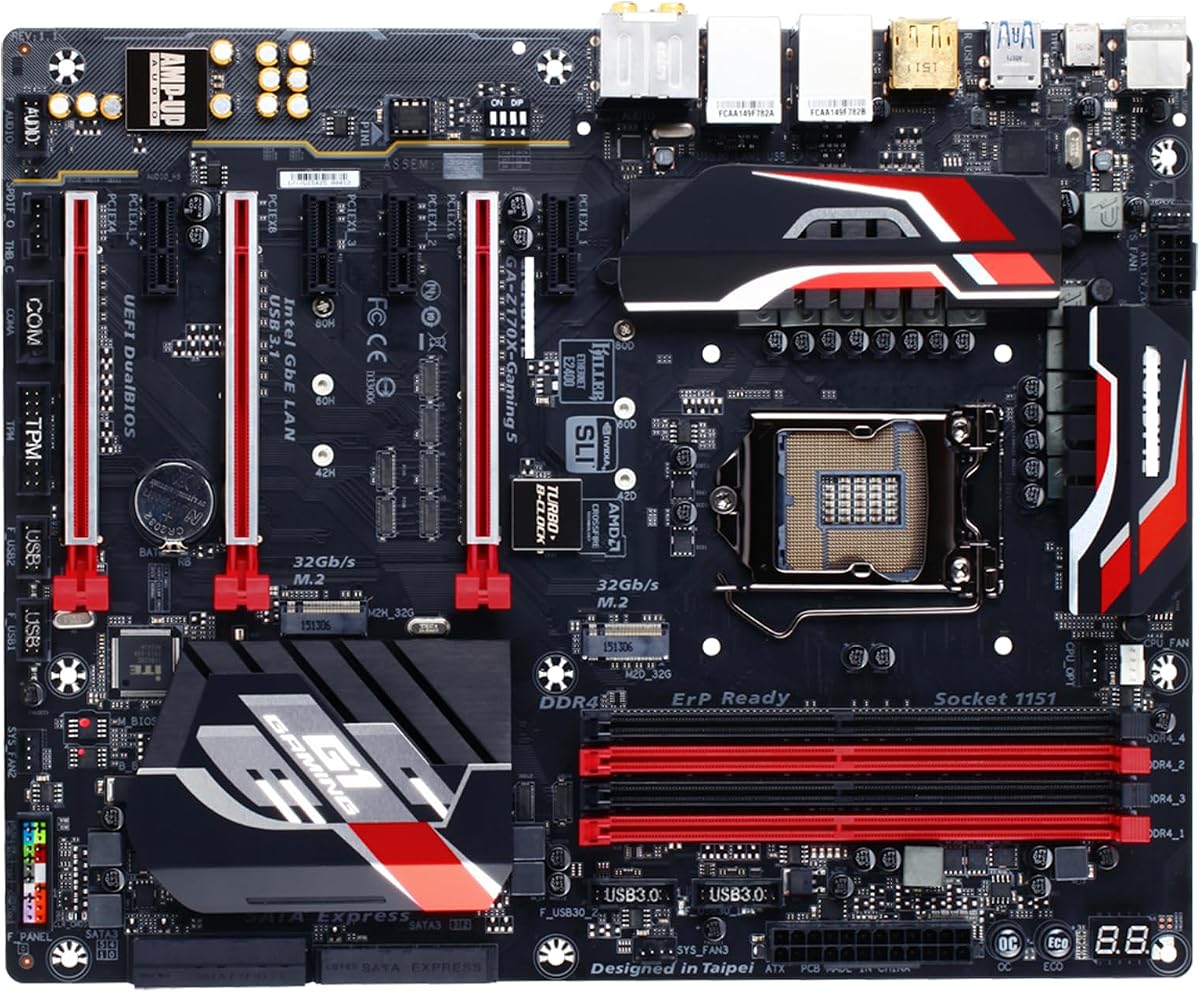
GIGABYTE GA-Z170X-Gaming 5
5.0Editor score
Supports 6th and 7th Gen
Dual M.2 Socket 3 Connectors
Industrial Packaged Value
Explore our expert guide comparing the top 1151 Z170 Skylake gaming motherboards for performance, features, and value in October 2026.
Finding the right foundation for your gaming PC is crucial for peak performance and longevity. The 1151 Z170 Skylake motherboards offer a robust platform for 6th and 7th Gen Intel processors, balancing budget and high-end capabilities effectively.
We evaluated ten top-rated models based on build quality, connectivity options, audio performance, and overclocking potential. Our analysis ensures you get a reliable board that supports modern storage and networking standards without unnecessary bloat.
Each pick highlights specific strengths like USB 3.1 support, M.2 slots, or premium audio codecs. Prices fluctuate frequently, so verify current deals before purchasing to ensure you secure the best value for your specific build requirements.
5.0Editor score

4.2Editor score

4.2Editor score
This side-by-side comparison highlights the distinct strengths of each motherboard to help you decide based on your specific gaming needs and budget constraints.


The Asus ROG Maximus VIII Hero stands out as a premier choice for enthusiasts seeking a balanced Z170 platform. With a strong 4.2 rating from verified buyers, this board delivers exceptional power and audio features essential for modern gaming setups.
We may earn a commission when you buy through this link, at no additional cost to you.
Its Extreme Engine DIGI+ technology ensures precise voltage control, making overclocking safe and efficient. The SupremeFX 2015 audio system provides immersive sound, while USB 3.1 connectivity future-proofs your build against slower legacy standards.
While the price reflects its premium status, the durability justifies the investment. The lighting control options add aesthetic flair, though users should be prepared to navigate a detailed BIOS to unlock full potential.
This board is ideal for gamers who prioritize audio fidelity and stable performance. If you want a reliable platform that supports high-end CPUs without compromise, the Maximus VIII Hero remains a top contender today.
The SupremeFX 2015 codec minimizes interference, ensuring crystal clear in-game communication and immersive audio experiences.
Incorporating USB 3.1 Type A and C connectors allows for faster data transfers and compatibility with modern peripherals.
We may earn a commission when you buy through this link, at no additional cost to you.
The GIGABYTE GA-Z170X-Gaming 5 offers incredible value, achieving a perfect 5.0 rating among buyers. It supports 6th and 7th Gen Intel processors, making it versatile for various budget builds today.
We may earn a commission when you buy through this link, at no additional cost to you.
Its industrial packaging lowers costs while ensuring the motherboard remains genuine and original. With dual M.2 sockets and support for DDR4 up to 3466 MHz via overclocking, performance remains competitive with pricier alternatives.
Installation requires some technical knowledge, so professionals recommend guidance for first-timers. However, the robust chipset and dual-channel memory architecture provide stability for serious gaming sessions without breaking the bank.
If you seek maximum performance per dollar, this board is an excellent choice. Just ensure you update your BIOS for 7th Gen compatibility and have the necessary tools for a safe installation process.
Dual M.2 connectors support PCIe x4/x2 SSDs, enabling lightning-fast load times compared to traditional SATA drives.
The industrial packaging focuses on essentials, eliminating unnecessary boxes to pass savings directly to the consumer.
We may earn a commission when you buy through this link, at no additional cost to you.
For enthusiasts requiring multi-GPU configurations, the Gigabyte GA-Z170X-Gaming 7 delivers with robust SLI and Crossfire support. It is designed to handle 6th Gen Intel Core processors efficiently with ample room for expansion.
We may earn a commission when you buy through this link, at no additional cost to you.
This model features multiple high-speed USB ports and DDR4 memory slots, ensuring your system can grow with future demands. The 4.2 rating reflects strong user satisfaction regarding stability and gaming performance.
Its ATX form factor offers great airflow but might not fit compact cases. The premium price is justified by the multi-GPU capabilities, which are rare on standard boards at this price tier.
This board is perfect for gamers planning dual-GPU setups or extensive connectivity needs. If you need a reliable platform for high-end hardware, this model provides the necessary infrastructure for success.
Supporting 2-Way NVIDIA SLI and 3-Way AMD Crossfire, this board is built for maximizing graphical performance in demanding titles.
With 7 USB 3.0 ports and dedicated USB 3.1 ports, you can connect all your peripherals without dongles or adapters.
We may earn a commission when you buy through this link, at no additional cost to you.
The ASUS Z170 PRO Gaming is a solid choice for users who rely on integrated graphics or need video outputs on the motherboard. With a 4.1 rating, it balances affordability with useful features like HDMI and DisplayPort.
We may earn a commission when you buy through this link, at no additional cost to you.
LANGuard technology protects your network from surges, ensuring stable online gaming sessions. The integrated USB 3.1 and M.2 slots offer fast storage and peripheral connectivity without needing add-on cards.
While it lacks some high-end features of top-tier boards, its durability and smart DIY features make it accessible. Users appreciate the balance between cost and performance for mid-range gaming builds.
This board suits gamers who need a simple, reliable setup. If you plan to use an integrated GPU initially or want versatile video outputs, the PRO Gaming delivers consistent results.
LANGuard provides high-speed networking with hardware-level surge protection to prevent unexpected disconnections during online play.
Built-in HDMI and DP ports allow for immediate display connectivity even if you do not have a dedicated graphics card installed.
We may earn a commission when you buy through this link, at no additional cost to you.
Designed for serious gamers, this motherboard emphasizes upgraded power design and enhanced cooling to maximize performance. Although its rating is currently unavailable, the description highlights robust durability suitable for marathon gaming sessions.
We may earn a commission when you buy through this link, at no additional cost to you.
With support for up to 64GB of DDR4 memory, it accommodates heavy multitasking alongside gaming. The enhanced power delivery ensures stability under load, while the connectivity options support fast data transfer.
It aims to optimize performance for the latest processors, though buyers should verify compatibility with their specific CPU models. The rugged design suggests long-term reliability for users planning extensive system usage.
This board appeals to users prioritizing power and memory capacity. Ensure you confirm fit with your case and CPU before purchase to guarantee seamless integration into your gaming setup.
Supporting up to 64GB of DDR4 RAM allows for massive multitasking and future-proofing for upcoming game engines.
Advanced cooling features help maintain optimal operating temperatures during extended gaming sessions, preserving component lifespan.
We may earn a commission when you buy through this link, at no additional cost to you.
The GIGABYTE GA-Z170X-GAMING 5 offers extensive expansion options with multiple PCIe slots for diverse hardware configurations. It supports 6th Gen Intel Core processors, ensuring solid performance for gaming and creative tasks.
We may earn a commission when you buy through this link, at no additional cost to you.
With six SATA 6Gb/s connectors and support for 2-Way SLI, this board caters to users needing multiple storage devices or dual graphics cards. The 3.7 rating suggests mixed experiences, potentially due to compatibility or BIOS nuances.
It delivers reliable power delivery and dual-channel memory support for speed. While the price point is competitive, ensure you check reviews regarding installation complexity before committing to this specific variant.
This board is suitable for users requiring multiple expansion capabilities. If you need space for several add-on cards or storage drives, it provides the necessary infrastructure for a versatile build.
Multiple PCIe slots allow you to add sound cards, capture cards, or additional GPUs to suit your specific needs.
Six SATA ports support multiple hard drives and SSDs, enabling massive storage capacity for large game libraries.
We may earn a commission when you buy through this link, at no additional cost to you.
The ASRock Z170 EXTREME4 stands out for its extensive storage and PCIe options. With a 4.2 rating, it is known for supporting up to 64GB of DDR4 memory and multiple graphics configurations.
We may earn a commission when you buy through this link, at no additional cost to you.
It includes three PCIe Express slots and six SATA ports, making it ideal for users who need multiple drives. The Realtek ALC1150 audio provides high-quality sound, adding value to the technical design.
The motherboard focuses on raw functionality rather than flashy aesthetics. Its flexible PCIe layout allows for custom builds, though users should note that audio and storage are its primary strengths.
This board is recommended for storage-heavy or multi-GPU builds. If you need maximum flexibility in drive connections and expansion slots without paying for premium branding, this is a solid choice.
The Realtek ALC1150 supports 7.1-channel audio with premium features for high-fidelity sound in games and media.
Six SATA ports and SATA Express support allow for connecting multiple SSDs and hard drives without port limiters.
We may earn a commission when you buy through this link, at no additional cost to you.
MSI’s Z170 Krait Gaming focuses heavily on audio and durability features. It supports Intel 6th Generation processors and includes Audio Boost 3 for clearer sound during gaming sessions.
We may earn a commission when you buy through this link, at no additional cost to you.
With eight USB 3.1 Gen1 ports, you can connect many peripherals without adapters. The Steel Armor slots provide added protection for your graphics card, ensuring longevity during heavy use.
While the rating is lower, users appreciate the practical features like ample USB connectivity. It remains a viable option for those who prioritize audio and peripheral support over high-end aesthetics.
This board is suitable for mid-range gaming setups. If you want reliable audio quality and plenty of ports at a reasonable price point, the Krait Gaming offers solid utility.
MSI’s dedicated audio features isolate audio paths to reduce interference and deliver a more immersive listening experience.
Steel Armor reinforcement on PCIe slots prevents sagging and damage when using heavy graphics cards or other expansion cards.
We may earn a commission when you buy through this link, at no additional cost to you.
The Asus Z170-A is widely praised for its ease of use and stability, reflected in a strong 4.3 rating. It supports 6th Gen Intel processors and offers intuitive features like 5-Way Optimization.
We may earn a commission when you buy through this link, at no additional cost to you.
USB 3.1 Boost and M.2 support provide fast connectivity for modern storage drives. The 5X Protection II hardware safeguard your system against power surges and dust accumulation over time.
Users find it reliable for both gaming and daily tasks. The straightforward design makes it accessible for first-time builders without sacrificing essential performance capabilities for mainstream gaming.
This board is perfect for those who want reliability without complexity. If you prioritize stable performance and easy configuration over extreme overclocking, the Z170-A is an excellent choice.
5-Way Optimization automatically tailors motherboard settings to your specific hardware, making it easy to get maximum performance.
5X Protection II ensures your hardware is shielded from common threats, extending the lifespan of your entire system.
We may earn a commission when you buy through this link, at no additional cost to you.
The Asus ROG MAXIMUS VIII GENE offers premium features in a compact mATX form factor. As a Certified Refurbished unit, it provides high-end specs at a reduced price for space-conscious builders.
We may earn a commission when you buy through this link, at no additional cost to you.
It retains Extreme Engine DIGI+ and SupremeFX 2015 audio, ensuring quality performance despite its smaller size. The USB 3.1 connectivity ensures modern standards are met for peripherals and storage.
The refurbished status means it has been tested and cleaned to work like new. This makes it an attractive option for those wanting high-end ROG quality without the full retail price tag.
This board is ideal for small form factor gaming PCs. If you want top-tier performance in a smaller case, the MAXIMUS VIII GENE delivers robust features in a compact design.
The mATX form factor saves space while retaining premium power delivery and audio features found in full-sized boards.
Refurbished units come tested and repackaged with warranties, offering a reliable and affordable way to access premium hardware.
We may earn a commission when you buy through this link, at no additional cost to you.
Selecting the right motherboard involves evaluating socket compatibility, expansion options, and features like USB 3.1 support.
Ensure the motherboard supports the LGA1151 socket for 6th and 7th Gen Intel Core processors. This is critical for physical fit and electrical connection.
Always verify BIOS updates are available for your specific CPU to guarantee stability.
Look for boards with at least four DDR4 DIMM slots to support up to 64GB of RAM. This allows for future upgrades and high-performance multitasking.
Check supported speed ratings to ensure compatibility with your chosen memory kit for best performance.
Prioritize models with M.2 slots for fast NVMe SSDs. Also check for sufficient SATA ports if you need multiple hard drives.
More connectivity options provide flexibility for expanding your storage as your library grows.
Verify PCIe x16 slots for graphics cards. If you plan dual-GPU setups, look for explicit SLI or Crossfire support.
More expansion slots allow you to add capture cards or sound cards as needed.
USB 3.1 Type C and Type A ports provide faster data transfer for peripherals. Ensure enough USB ports exist for your mouse, keyboard, and headset.
Modern ports prevent bottlenecks and improve overall system usability.
High-quality audio codecs and gigabit Ethernet are essential for immersive gaming. Look for protected networking features to ensure stable online play.
Good audio and network integration improve your competitive edge significantly.
Robust VRM design ensures stable power for CPU overclocking. Better components prevent throttling during long gaming sessions.
Investing in a well-built board ensures longevity and consistent performance.
Choose reputable brands with strong customer support and clear warranties. Certified refurbished units can offer value but require careful vendor selection.
A reliable warranty protects your investment against manufacturing defects.
Always install the motherboard on a non-conductive surface before mounting it into the case. This prevents accidental shorts and damage to sensitive components during installation.
Connect all power cables securely to ensure stable voltage delivery to the CPU and RAM. Loose connections can lead to boot failures or unstable system performance.
Regularly clean dust from the board using compressed air to maintain cooling efficiency. Keeping it dust-free helps prevent overheating and extends the lifespan of your hardware.
The Asus ROG Maximus VIII Hero is highly recommended for overclocking due to its robust VRM design. It offers stable voltage control and premium components that handle high CPU loads effectively.
Yes, most Z170 boards support 7th Gen CPUs, but a BIOS update is often required. Always check the manufacturer's CPU support list before purchasing to ensure compatibility.
Many models include M.2 slots that support NVMe SSDs for fast storage. Verify the specific slot type to ensure it supports PCIe speed for optimal performance.
Z170 boards support CPU overclocking and have more PCIe lanes than H170. If you plan to overclock or use multiple GPUs, Z170 is the superior choice.
Certified refurbished units from reputable sellers are tested and often come with warranties. They can be a cost-effective option for high-end boards if verified properly.
Most of these boards feature high-quality integrated audio that suits most gamers. A separate card is only necessary for professional audio work or specific enthusiast needs.
The Asus ROG Maximus VIII Hero stands out as the top choice for overall performance and audio. Its robust power design ensures stability for high-end gaming setups.
For budget-conscious gamers, the GIGABYTE GA-Z170X-Gaming 5 offers excellent value with solid features. It balances cost and performance effectively for most users.
Always check current prices and availability before purchasing. Deals change frequently, and verifying the latest offers ensures you get the best value for your specific build needs.