
FLASHFORGE Creator 5 Pro
4.0Editor score
4-Toolhead System With FlashSwap Changer
65C Active Heated Chamber For Advanced Filaments
CoreXY Motion Structure Up To 600mm/s
This expert guide compares the top 3D printers for figurines and models, evaluating speed, precision, and multi-color capabilities for creators in October 2026.
Finding the right 3D printer for figurines and models requires balancing speed with intricate detail. Hobbyists and professionals alike need machines that can reproduce fine textures and complex geometries without excessive waste or failed prints.
We compared ten leading models based on real-world performance, ease of use, and advanced features like multi-color printing and automatic calibration. Our analysis focuses on reliability and output quality for detailed miniatures and artistic sculptures.
Each pick highlights specific strengths such as build volume, material compatibility, or smart software integration. Please note that product availability and costs may shift, so verify current details before making your final decision today.
4.0Editor score

4.7Editor score

4.4Editor score
The following table offers a side-by-side comparison of all ten featured printers, highlighting key specifications and unique capabilities to help you identify the right tool for your specific modeling needs.





The Bambu Lab A1 3D Printer stands out as a top contender for creators needing precision and speed. With its impressive acceleration and active flow rate compensation, it delivers flawless prints that capture intricate textures essential for detailed figurines. Its user-friendly interface makes it accessible even for those new to 3D printing.
We may earn a commission when you buy through this link, at no additional cost to you.
One of its strongest advantages is the potential for multi-color printing when paired with the AMS lite system. This flexibility allows artists to bring characters to life with vibrant accents without manual swaps. The active flow compensation ensures that even at high speeds, the extrusion remains consistent, preventing common defects like blobbing or uneven surfaces.
While the A1 excels in most areas, the need to purchase the AMS lite separately for multi-color capabilities might be a hurdle for budget-conscious buyers. Additionally, its open frame design restricts it mostly to standard materials like PLA and PETG, limiting options for high-temperature engineering plastics that some advanced models require.
Overall, the A1 is an excellent choice for hobbyists and professionals alike who value speed and quality. Whether you are prototyping new designs or printing final pieces, its reliability and ease of use make it a standout option in the current market.
The A1 maintains exceptional accuracy even while printing at blazing-fast speeds thanks to its active flow compensation algorithm.
Manual calibration is a thing of the past with the A1, which handles Z-offset and bed leveling automatically every time.
We may earn a commission when you buy through this link, at no additional cost to you.
The FLASHFORGE Creator 5 Pro is designed for users who demand industrial-grade performance. Its four independent toolheads allow for seamless multi-material and multi-color printing without wasting filament on purging. This feature is particularly beneficial for functional prototypes and complex assemblies where material integrity is crucial.
We may earn a commission when you buy through this link, at no additional cost to you.
A standout feature is the active heated chamber, which supports high-temperature filaments like ABS and PC without warping. This ensures that your prints maintain their shape and structural integrity even when working with difficult materials. The dual HEPA filtration system further ensures a safe workspace by trapping harmful particles and fumes.
Despite its advanced capabilities, the Creator 5 Pro may be overwhelming for beginners due to its complexity and cost. The system requires a learning curve to fully leverage its multi-head functionalities. Additionally, the price point is significantly higher than standard hobbyist printers, which may not be justified for casual users.
For professionals and serious enthusiasts, this printer offers unmatched versatility and efficiency. The ability to switch toolheads rapidly and print with multiple materials in a single run streamlines production workflows significantly. If you need a reliable machine for high-end projects, this is a top-tier choice.
The FlashSwap changer eliminates the need to purge old filament, saving material and time during multi-color swaps.
The 65C chamber allows for printing advanced materials like ABS and PC without warping or structural issues.
We may earn a commission when you buy through this link, at no additional cost to you.
The FLASHFORGE AD5X offers an impressive array of features for a competitive price point. Its Independent Filament System (IFS) enables multi-color printing without the high cost associated with other brands. This makes it an ideal entry point for those wanting to explore vibrant prints without breaking the bank.
We may earn a commission when you buy through this link, at no additional cost to you.
With a nozzle capable of reaching 300 degrees Celsius, this printer can handle a wide variety of materials including PLA, PETG, and ABS. The fully automatic leveling system ensures that your prints start off correctly every time, reducing the frustration often associated with bed calibration. The large build volume allows for bigger models to be printed in one go.
While the AD5X performs well, the IFS system requires careful setup to ensure smooth switching between colors. Some users might find the learning curve slightly steeper compared to simpler models. Additionally, build quality consistency can vary, so checking recent reviews before purchasing is advisable.
Ultimately, the AD5X provides excellent value for creators looking for speed and color capabilities. It bridges the gap between basic hobbyist printers and more advanced machines. If you need a versatile machine for diverse projects at a reasonable cost, this printer is a strong contender.
The IFS technology allows for printing with four different colors simultaneously, creating vibrant designs easily.
A 300C nozzle allows for printing various materials, offering flexibility for different project requirements.
We may earn a commission when you buy through this link, at no additional cost to you.
The Bambu Lab P2S Combo combines high-speed printing with advanced multi-color capabilities through the AMS 2 Pro system. This package is designed for users who need reliability and performance. The AMS 2 Pro not only manages color but also dries filament to ensure consistent quality during long print jobs.
We may earn a commission when you buy through this link, at no additional cost to you.
Its adaptive airflow system adjusts cooling based on the material being used, ensuring crisp overhangs and stable chamber temperatures for materials like ABS. The enclosure makes it suitable for a broader range of filaments than open-frame alternatives. Setup is quick, allowing users to start printing within minutes of unboxing.
The main downside is the cost, as the combo unit represents a significant investment. Furthermore, relying heavily on the AMS for multi-color means losing some flexibility if you prefer single-spools for certain materials. It is optimized for a specific workflow that might not suit everyone.
For professionals needing consistent results and multi-material options, this system delivers. The drying feature prevents moisture issues that can ruin prints. If you prioritize a complete package that handles advanced materials seamlessly, this is a powerful solution.
The AMS 2 Pro keeps filament dry before printing, ensuring better flow and reduced nozzle clogging.
Smart airflow management balances cooling and heat retention for consistent results across different materials.
We may earn a commission when you buy through this link, at no additional cost to you.
The P1S is an excellent choice for those who need an enclosed printer without paying a premium. Its enclosure allows for printing materials like ABS and ASA which warp easily. The speed of 500mm/s ensures that large models are completed quickly without sacrificing quality.
We may earn a commission when you buy through this link, at no additional cost to you.
When paired with the AMS, it becomes a versatile multi-color powerhouse. The auto bed leveling feature makes initial setup incredibly simple, removing a common barrier for new users. Its compact size fits well in smaller spaces while maintaining a high build volume.
However, achieving multi-color results requires an additional AMS unit, which adds to the total cost. While the printer itself is reliable, this adds complexity to the initial budget. It is important to consider these accessory costs when planning your purchase.
Overall, the P1S strikes a great balance between performance and flexibility. It is a robust machine for those who want to expand their material options beyond basic PLA. If you need a reliable enclosed printer, this is a strong choice.
The fully enclosed design allows printing of ABS and ASA, expanding your creative possibilities significantly.
High acceleration and speed ensure quick turnaround times for prototyping and production runs.
We may earn a commission when you buy through this link, at no additional cost to you.
The Snapmaker U1 offers a unique approach to multi-material printing with its SnapSwap system. This allows for rapid tool changes without purging filament, saving time and reducing waste. It is ideal for functional prototypes requiring different materials in one object.
We may earn a commission when you buy through this link, at no additional cost to you.
Its smart calibration ensures that each toolhead is perfectly aligned for precise first layers. The CoreXY motion system provides stability at high speeds, ensuring consistent quality. The build volume is generous, allowing for substantial models to be created easily.
The system might be overkill for simple single-color projects due to its complexity and cost. Additionally, the workflow is specific, requiring users to adapt their slicing settings to utilize the multi-tool features effectively. It is not always plug-and-play for simple tasks.
For professionals who need specific material combinations, this printer is unmatched. The ability to combine flexible and rigid materials in one print opens up new design possibilities. If you need advanced capabilities for complex prototypes, this is a top choice.
Swapping tools instead of purging saves material and reduces costs for multi-material projects.
Smart calibration algorithms ensure accurate alignment for reliable results across all toolheads.
We may earn a commission when you buy through this link, at no additional cost to you.
The SPARKX i7 integrates AI tools to simplify the modeling process. You can upload a portrait and generate a 3D model instantly. This feature makes it accessible for beginners who want to create custom figurines without advanced software knowledge.
We may earn a commission when you buy through this link, at no additional cost to you.
The printer is mostly pre-assembled, reducing setup time significantly. Its multi-color system reduces waste by half compared to traditional setups, saving money on materials. The AI camera monitors prints in real-time, detecting failures and alerting you immediately.
However, reliance on proprietary AI features may limit flexibility if you prefer custom workflows. The software ecosystem is tied to the hardware, so updates can impact functionality. It is best suited for those who want an integrated experience rather than standalone hardware.
If you value convenience and automation, this printer is a strong candidate. The ability to quickly turn images into models is a unique advantage. For hobbyists interested in AI-driven creation, this offers a fresh and easy-to-use approach.
Upload a photo and the AI generates a 3D model ready to print, skipping complex modeling software.
The AI camera detects spaghetti or failures instantly to save material and prevent wasted print jobs.
We may earn a commission when you buy through this link, at no additional cost to you.
The Adventurer 5M Pro brings high-speed capabilities to a compact frame. Its CoreXY structure ensures stability even at 600mm/s, delivering smooth surfaces with minimal ghosting. This speed makes it ideal for rapid prototyping where time is critical.
We may earn a commission when you buy through this link, at no additional cost to you.
Quick-swap nozzles allow for fast transitions between different print sizes. The fully enclosed design keeps noise levels low and ensures thermal stability for better results. A dual filtration system makes it safer to run in shared or residential spaces.
Software can sometimes lag during monitoring or updates, which can disrupt the workflow slightly. Also, the price reflects its premium features, placing it above basic budget options. Users looking for speed will find it a worthy investment despite these minor issues.
Overall, this is a powerful tool for makers prioritizing efficiency. The balance of speed and quality makes it stand out in its class. If you need to produce high volumes quickly, this printer is a solid choice.
The CoreXY system maintains accuracy even when printing at high speeds up to 600mm/s.
The quick-swap nozzle system allows changing nozzles in seconds without tools.
We may earn a commission when you buy through this link, at no additional cost to you.
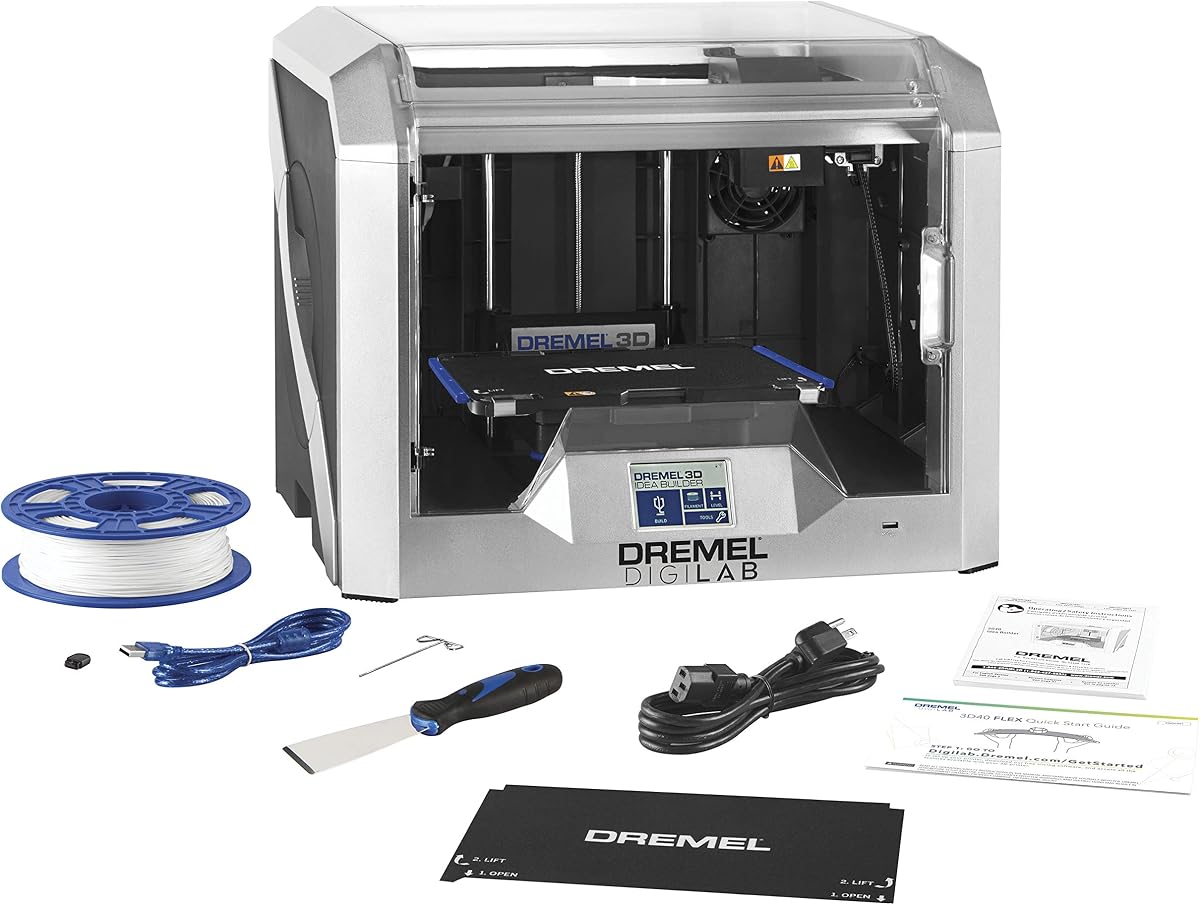
The Dremel 3D40 Flex is known for its reliability and ease of use. It is designed for consistent results with minimal tweaking. The direct drive extruder reduces clogging, ensuring smoother prints over time.
We may earn a commission when you buy through this link, at no additional cost to you.
The flexible build plate allows for easy removal of printed models, a common pain point with many printers. Its 9-point leveling sensor guarantees a flat bed, reducing the risk of failed prints. It is fully enclosed, ensuring safety and thermal stability.
However, it operates at slower speeds compared to newer models, which might not suit urgent projects. Multi-color printing is not natively supported without external modifications. Users looking for speed may find it limiting.
For schools or home studios valuing safety and consistency, this is an excellent choice. The user-friendly nature makes it accessible for beginners. If reliability is your priority over speed, this machine delivers steady results.
The flexible build plate makes removing prints easy and reduces the risk of damaging your models.
The direct drive extruder is clog resistant, ensuring smoother and more consistent prints.
We may earn a commission when you buy through this link, at no additional cost to you.
The Bambu Lab A1 Combo offers a complete solution out of the box. It includes the AMS Lite for multi-color printing, saving the hassle of separate purchases. This makes it ideal for users wanting immediate access to multi-color capabilities.
We may earn a commission when you buy through this link, at no additional cost to you.
The active flow compensation ensures precision even at high speeds. Automatic calibration handles every print job, removing guesswork and ensuring consistent quality. The quick change nozzle design simplifies maintenance tasks, keeping the printer running smoothly.
However, this comprehensive package comes at a higher cost compared to the base A1 model. Additionally, the reliance on the AMS for multi-color means you lose some flexibility if you prefer manual swaps. It is a specialized choice for efficiency.
For creators prioritizing convenience and performance, this combo is hard to beat. It delivers professional results with minimal user intervention. If you want an all-in-one solution for detailed and colorful prints, this is a top recommendation.
The combo includes AMS Lite, providing immediate access to multi-color printing without extra purchases.
Active flow compensation ensures accurate extrusion, delivering high-quality details at high speeds.
We may earn a commission when you buy through this link, at no additional cost to you.
Selecting the right printer involves weighing speed against precision and understanding material needs. This guide breaks down essential factors to help you find the perfect match for your workflow.
Print speed impacts production time, but resolution determines the fine detail on your figurines. High-speed printers may sacrifice texture quality unless they use advanced flow compensation to maintain detail at fast rates.
Prioritize printers that balance acceleration with stable extrusion to ensure your models look sharp without taking days to complete.
If you need vibrant characters, multi-color printing is essential. Look for systems like AMS or IFS that manage multiple filaments smoothly. These systems save time by reducing manual filament changes during a single print job.
Ensure the system integrates well with your slicing software to avoid color mixing errors in your final output.
Consider the dimensions of your typical projects. Larger build volumes allow for full-scale figurines or larger miniatures in one print. This reduces the need for assembly and increases overall production efficiency.
Choose a printer with sufficient space for your largest standard models to avoid resizing or splitting parts unnecessarily.
Different materials offer varying strengths and visual qualities. High-temperature filaments like ABS or ASA require enclosed chambers to prevent warping. Ensure the printer can support the materials you plan to use for your specific designs.
Check nozzle temperature limits to confirm compatibility with engineering plastics if you need durable or flexible parts.
Time spent on setup detracts from time spent creating. Automatic bed leveling and calibration features simplify the start process. These features reduce human error and ensure your first layers are perfect every time.
Look for user-friendly interfaces and quick-assembly designs to get printing immediately after unboxing.
Modern printers often include smart software for monitoring and failure detection. AI tools can help generate models from images or detect print failures early. This adds value by reducing wasted filament and failed projects.
Ensure the software is intuitive and offers the features you need without requiring excessive configuration.
Printers used at home should be quiet to avoid disturbance during night prints. Active noise canceling and well-ventilated housings contribute to a better environment. Safety features like filament detection add reliability.
Check decibel ratings and enclosure quality to ensure the machine fits safely in your intended workspace.
Consider the total cost of ownership, including accessories and consumables. Models with quick-swap nozzles or toolheads reduce downtime during maintenance. Higher initial costs can be offset by durability and reduced material waste.
Evaluate long-term expenses like replacement parts and software subscriptions to ensure the value matches your budget.
To get started, ensure the bed is clean and the nozzle is free of debris. Follow the manufacturer's calibration guide to set the correct Z-offset for your first layer.
Regularly maintain the printer by cleaning the nozzle and checking belt tension. Use a soft brush to clear any dust from the extruder to prevent clogs.
Store filament in dry containers to avoid moisture absorption. If your printer lacks a built-in dryer, use a separate dry box to keep materials fresh.
Yes, these models support high resolution needed for fine details. Ensure you use fine nozzles like 0.2mm and enable high layer counts in your slicer settings.
Yes, multi-color printing requires a system to manage multiple spools. Look for printers that include or support multi-filament accessories.
PETG and ASA offer good durability and weather resistance. Enclosed printers are required for these materials to prevent warping during cooling.
Clean the bed with isopropyl alcohol and use adhesive like glue sticks. Ensure the bed is leveled correctly for even contact across the entire surface.
Use a printer with a camera and AI detection to monitor progress. Power failure recovery features can help you resume prints from the point of failure.
Many modern printers feature noise-canceling motors and enclosures. Check decibel ratings before purchasing if you plan to run them in quiet spaces.
Use smaller nozzles like 0.2mm for detailed figurines and larger ones like 0.6mm for general parts. This balances resolution with print speed based on your needs.
Most support slicing software like Cura or PrusaSlicer. Some manufacturers offer proprietary software for optimized profiles and integrated features.
The top picks offer a range of solutions from budget-friendly options to industrial-grade systems. Each model brings unique advantages in speed, color capability, and ease of use to help you create detailed figurines efficiently.
Focus on your specific needs such as color variety or material versatility when deciding. If speed is critical, look for CoreXY systems. For ease of use, prioritize automatic calibration and enclosed designs.
Always verify current stock and support terms before purchasing to ensure the best value. Your choice should align with your production goals to deliver satisfying results every time.