
OBSBOT Meet SE
4.4Editor score
1080P 100FPS Max
AI Framing and Tracking
Multiple Color Options
AI powered webcams have revolutionized how we communicate online by offering automatic framing and enhanced image quality without manual adjustments. These devices use advanced algorithms to track movement and optimize settings ensuring you always look professional during calls and streams.
We evaluated ten leading models based on sensor size, tracking accuracy, audio quality, and software capabilities to provide a comprehensive comparison. Each product offers unique strengths whether you need portability for remote work or high performance for live broadcasting and content creation.
Each pick highlights key specifications and ideal use cases so you can quickly identify which camera fits your workflow. Keep in mind that pricing and availability may change frequently so verify current details before making your final purchase decision.
4.4Editor score

4.4Editor score

4.6Editor score
As an Amazon Associate we earn from qualifying purchases.
The following table provides a side-by-side comparison of all ten models highlighting their core specifications and primary strengths so you can quickly see which features matter most for your specific needs.




The OBSBOT Tiny 3 stands out as the premier choice for professionals seeking top tier video and audio quality. With its large 1/1.28 CMOS sensor and DCG HDR technology it delivers stunning clarity even in challenging lighting conditions.
We may earn a commission when you buy through this link, at no additional cost to you.
Its upgraded AI Tracking 2.0 system identifies and locks onto targets with remarkable precision whether tracking a single person or an entire group. The triple-mic array provides professional spatial audio ensuring your voice sounds clear and natural during any call.
While the price is higher than some competitors the image quality and audio fidelity justify the investment for serious content creators. The ability to control the camera with gestures or voice adds a layer of convenience that enhances workflow efficiency.
If you need the best possible webcam for streaming business presentations or educational content the Tiny 3 is the definitive recommendation. It balances high-end specs with user-friendly features better than any other model currently available.
The 1/1.28 CMOS sensor captures more light for vibrant colors and sharp details in any environment.
Three microphones work together to isolate your voice and reduce background noise effectively.
We may earn a commission when you buy through this link, at no additional cost to you.
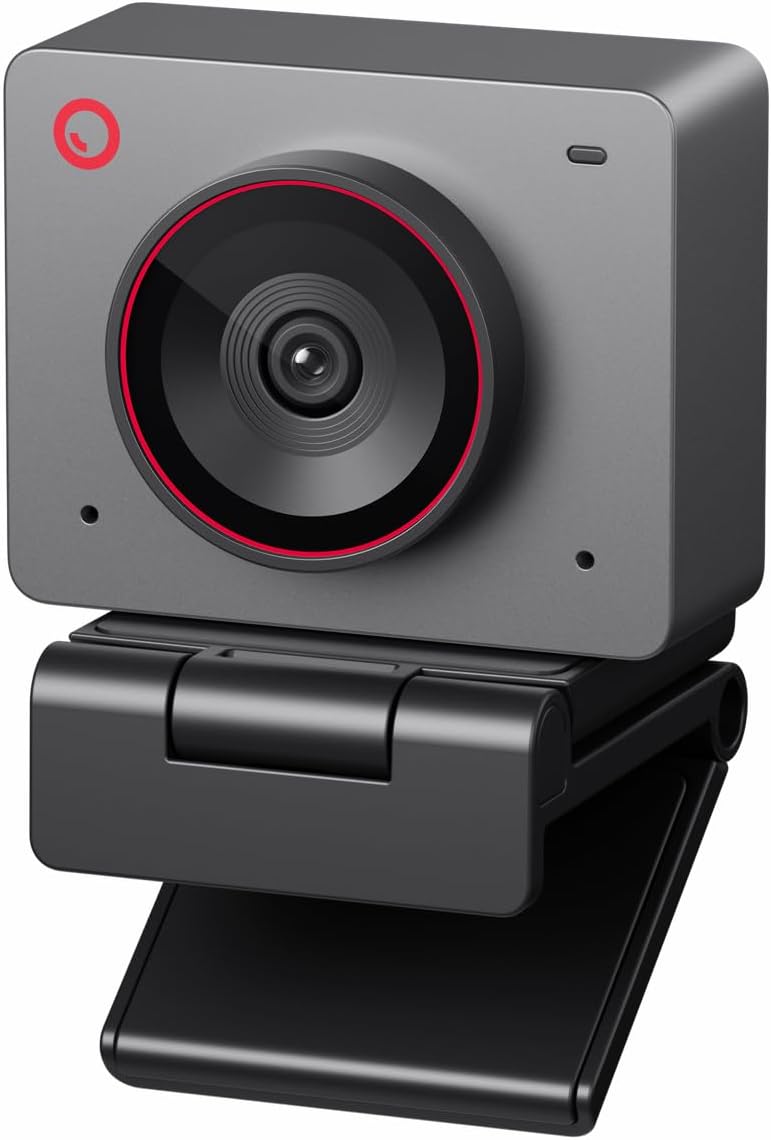
The OBSBOT Meet SE offers an excellent balance of performance and affordability making it ideal for casual users and streamers. It delivers smooth 1080P video at up to 100 frames per second which is rare in this price range.
We may earn a commission when you buy through this link, at no additional cost to you.
Its stacked CMOS sensor and staggered HDR ensure that your video looks great even in low light without needing extra lighting equipment. The smart AI framing keeps you centered without you having to adjust your position manually.
While it lacks 4K resolution the high frame rate makes motion look incredibly smooth which is perfect for active streaming or gaming. The inclusion of gesture control adds a premium feel despite the lower cost compared to higher models.
If you want professional grade features without spending a fortune the Meet SE is the smartest choice on this list. It is perfect for students remote workers or anyone looking to upgrade their setup affordably.
High frame rates reduce motion blur ensuring your movements look natural during live sessions.
Advanced HDR technology balances exposure so you stay visible even in dim rooms.
We may earn a commission when you buy through this link, at no additional cost to you.
The YOLOLIV YoloCam S3 is designed for creators who demand DSLR-like quality and control in a webcam form factor. Its massive 1/1.3 sensor delivers unmatched image fidelity and dynamic range for any lighting situation.
We may earn a commission when you buy through this link, at no additional cost to you.
Unlike most webcams it includes a dedicated color grading engine called Picasso Resolve which allows you to tune contrast and saturation for a cinematic look. The all-aluminum body acts as a heat sink ensuring stable performance during long streams.
While the software features are Windows focused currently the image quality alone makes it a top choice for professional videographers. The lack of mechanical PTZ is offset by excellent digital zoom that maintains sharpness at 1080P.
If you prioritize image aesthetics and build quality above all else the YoloCam S3 is the ultimate tool for high-end production. It bridges the gap between consumer webcams and professional camera systems effectively.
The large sensor captures more light and detail than any other sensor in its class.
Aluminum housing dissipates heat efficiently allowing for continuous operation without throttling.
We may earn a commission when you buy through this link, at no additional cost to you.
The OBSBOT Tiny 2 Lite brings mechanical PTZ capabilities to the 4K webcam market allowing for dynamic camera movements during broadcasts. Its AI tracking system allows you to define specific zones for tracking giving you precise control over the frame.
We may earn a commission when you buy through this link, at no additional cost to you.
Built for business and teaching scenarios it supports multiple shooting modes including portrait and upside-down orientations without losing image quality. You can also use custom gesture commands to lock on to subjects quickly without touching your keyboard.
While it simplifies some streaming features to focus on productivity the hardware quality remains high with a solid 1/2 CMOS sensor. The support for SDK and Stream Deck makes it versatile for integrators who need custom workflow solutions.
If you need a camera that moves like a studio camera but fits on a desk the Tiny 2 Lite is the right choice. It offers unique mechanical flexibility that most static webcams cannot match for presentations or streaming.
Define custom areas for the camera to focus on excluding parts of your background if needed.
Shoot horizontally vertically or inverted to fit your monitor or streaming setup perfectly.
We may earn a commission when you buy through this link, at no additional cost to you.
The EMEET PIXY is unique for its dual-camera system where one sensor handles video and the other handles autofocus and exposure optimization. This design ensures your skin tones remain accurate and your focus is locked instantly even if you move quickly.
We may earn a commission when you buy through this link, at no additional cost to you.
Its three-chip AI tracking predicts motion and adjusts lighting for seamless movement tracking. The camera offers a wide 310-degree pan range which is ideal for fitness streams or product demonstrations where movement is frequent.
The built-in software includes features like whiteboard mode which auto-detects boards without requiring physical stickers. However the advanced setup might be slightly complex for users who just want plug-and-play simplicity without configuration.
If you need a camera that handles dynamic movement and lighting changes automatically the PIXY is a strong contender. The dual-sensor approach is innovative and provides better image consistency than single-sensor competitors.
Separate sensors for video and tracking ensure consistent focus and color accuracy at all times.
Predictive algorithms adjust framing faster than standard cameras reducing lag in the video feed.
We may earn a commission when you buy through this link, at no additional cost to you.
The OBSBOT Tiny 3 Lite shrinks the form factor while maintaining strong performance for 4K streaming and calls. It is 48% smaller than its predecessor making it easy to carry in a laptop bag for remote work.
We may earn a commission when you buy through this link, at no additional cost to you.
Despite its size it retains a large 1/2 CMOS sensor that delivers sharp images and supports 1080P at 120 frames per second for smooth motion. The upgraded audio system includes a triple-mic array for professional spatial audio recording.
The camera supports voice commands to wake up or change settings which adds convenience without extra hardware. However it caps at 30 frames per second in 4K mode which is standard but limits ultra-smooth high-resolution video.
If you want the benefits of the Tiny 3 series but need a more portable option the Lite version is the perfect fit. It balances size and performance exceptionally well for travelers and mobile workers.
Lightweight design allows you to use the same camera at home and office without hassle.
High frame rate at 1080P ensures smooth video for active meetings or fitness content.
We may earn a commission when you buy through this link, at no additional cost to you.
The Insta360 Link 2C brings gimbal stabilization to webcams allowing for smooth and stable video even when you move around your desk. Its mechanical balance and auto-framing ensure you stay perfectly centered without pixelation issues.
We may earn a commission when you buy through this link, at no additional cost to you.
It features a dedicated privacy switch that is easy to access for peace of mind during non-work hours. The companion app lets you control settings and framing directly from your smartphone which is useful if your hands are busy.
While it is not compatible with ARM-based Windows systems like the latest Surface Pro it works well on standard Intel or AMD PCs. The AI noise-canceling mic filters out background sounds so your voice stands out clearly during calls.
If you want smooth mechanical stability and privacy controls the Link 2C is a top-tier option. Its combination of hardware stabilization and smart software features makes it one of the most versatile webcams available.
Mechanical 3-axis balancing reduces shake for smoother video during movement.
Adjust framing and zoom from your phone to manage setup without touching the camera.
We may earn a commission when you buy through this link, at no additional cost to you.
The OBSBOT Meet Flip is designed for laptop users who need a compact and private solution for video calls. Its foldable design acts as a physical privacy cover when closed making it convenient for travelers who work in public spaces.
We may earn a commission when you buy through this link, at no additional cost to you.
Despite its small size it supports 4K resolution and has a large 1/2 CMOS sensor for clear images. The built-in AI includes meeting transcription and smart highlights which can save time during long collaborative sessions.
The integrated stand makes it easy to position on any laptop screen without needing extra accessories. Its extremely low weight ensures it does not stress your laptop hinge while remaining durable enough for daily travel.
If you travel frequently and value privacy features the Meet Flip is the ideal companion for your laptop. It combines portability with productivity tools like transcription that enhance business communication effectively.
Foldable hinge doubles as a privacy shield protecting your lens when not in use.
Auto transcription and summaries help you stay focused during important business discussions.
We may earn a commission when you buy through this link, at no additional cost to you.
This 4K conference webcam is built for small meeting rooms and hybrid collaboration sessions rather than individual desks. Its 120-degree wide-angle lens captures the entire room without needing to reposition the device frequently.
We may earn a commission when you buy through this link, at no additional cost to you.
It includes both microphones and speakers so you do not need separate audio hardware for quick team meetings. The Zoom certification ensures seamless integration with popular conferencing software and reliable performance.
While the image sensor is standard the focus is on audio range and group framing. Presenter tracking follows the active speaker which is great for training sessions or client presentations in a boardroom setting.
If you need a complete all-in-one solution for a meeting room this camera simplifies setup significantly. The combination of audio and video in one device reduces cable clutter and IT complexity.
Wide angle lens ensures all participants are visible without turning the device manually.
Built-in speakers and microphones provide a complete communication package for any table.
We may earn a commission when you buy through this link, at no additional cost to you.
The OBSBOT Meet 2 is a compact powerhouse that weighs only 40.5 grams making it one of the lightest 4K webcams available. Its larger 1/2 CMOS sensor improves light capture for brighter images even in dim environments.
We may earn a commission when you buy through this link, at no additional cost to you.
Dynamic gesture control allows you to toggle framing and zoom with hand signals which is useful for hands-free operation. The dual noise-canceling microphones filter out keyboard noise so your voice remains clear on calls.
Because of its small form factor the camera may get warm during extended use which is normal but worth noting. However the high performance and low cost make it a practical choice for mobile workers.
If you need a lightweight 4K option that does not add bulk to your laptop setup the Meet 2 is ideal. It brings professional imaging to a portable design without compromising on essential features.
Tiny size makes it easy to carry in a pocket or small bag for remote work.
Bigger sensor captures more light reducing graininess in low-light conditions significantly.
We may earn a commission when you buy through this link, at no additional cost to you.
Choosing the right AI webcam depends on your specific needs for resolution, tracking, and audio quality. This guide outlines the critical factors to consider to ensure you make an informed decision.
Resolution determines the sharpness of your video while frame rate affects how smooth motion appears. Most modern webcams offer 4K resolution which provides excellent clarity for professional presentations. However high frame rates like 1080P at 120FPS are better for streaming or active content.
If you prioritize detailed imagery choose a model with 4K at 30FPS. If you need smooth motion for tutorials or streaming look for higher frame rates at lower resolutions.
AI tracking is a core feature that keeps you centered in the frame automatically. Some models use simple face detection while others use object tracking that follows specific movements or items on your desk.
For active presentations choose a PTZ camera with physical movement. For standard calls a digital tracking system is sufficient and often more reliable.
The image sensor size is a key determinant of video quality especially in low light. Larger sensors like the 1/1.28 CMOS capture more light resulting in better dynamic range and less noise.
Prioritize webcams with larger sensors if you often work in dimly lit rooms. Smaller sensors may look washed out in dark environments.
Clear audio is just as important as video for effective communication. Look for microphones with noise-canceling features that filter out keyboard clicks and background hum.
Triple-mic arrays or directional mics provide the best results for professional settings. Avoid basic built-in microphones if you need clear voice isolation.
Companion software allows you to adjust settings and use advanced features like beauty modes or framing presets. Gesture control adds convenience by letting you operate the camera without touching your keyboard.
Ensure the software supports your operating system. Check for features like privacy modes if you work in shared spaces.
If you travel frequently the weight and size of the webcam matter significantly. Foldable designs or models with integrated stands are convenient for laptop users.
Lightweight cameras around 40 grams are ideal for remote work. Heavier models might be better for a fixed desktop setup.
Compatibility with platforms like Zoom or Microsoft Teams is essential for business use. Look for Zoom Certified models to ensure seamless integration and reliability.
Always check the supported operating systems especially if you use a Mac or specialized hardware like ARM-based Windows PCs.
A durable build ensures longevity especially if the camera is moved frequently. A physical privacy cover or switch gives you peace of mind when the camera is not in use.
Metal bodies often dissipate heat better than plastic. Physical privacy switches are superior to software toggles.
To get started plug the webcam into a USB 3 port on your computer for best performance. Most modern devices are plug-and-play so you can begin using them immediately without installing drivers. If the model requires specific settings download the official companion software.
Position the camera at eye level for a natural perspective during video calls. Use a stable surface or mount to prevent wobbling during operation. Adjust the tracking sensitivity in software to match your room size and movement style.
Clean the lens gently with a microfiber cloth to avoid scratches or smudges. Do not use harsh chemicals or sprays directly on the unit as moisture can damage internal components. Store it in a dry place when not in use to protect the lens.
Most AI tracking features operate locally on the device so they do not require an internet connection for basic use. However software updates and cloud-based features like remote control might need connectivity. Always check the specific model manual for offline capabilities.
4K resolution offers four times the pixel count of 1080P resulting in much sharper details. While 1080P is smoother for motion due to higher frame rates 4K looks more professional for static shots. Choose based on your need for detail versus smoothness.
Gesture controls use the camera sensor to detect specific hand movements like a wave or open palm. These signals are processed by onboard AI to trigger commands like zooming or changing modes. This allows for hands-free control without touching a keyboard.
Yes webcams with larger sensors and HDR support perform well in low light. Models like the OBSBOT Tiny 3 include advanced low-light modes that brighten the image without adding noise. Look for a wide ISO domain for the best performance.
Most webcams are compatible with macOS but check specific requirements as some features might vary. Models like the Insta360 Link 2C support macOS but avoid ARM-based Windows systems if possible. Always verify software compatibility before buying.
AI noise canceling uses algorithms to identify and remove background sounds like keyboard clicks or fans. It isolates your voice to make it sound clearer on calls. This feature is built into the microphone hardware or companion software.
The top picks for AI powered webcams in November 2026 offer excellent options for every need from budget-friendly choices to premium studio quality. The OBSBOT Tiny 3 leads overall while the Meet SE provides the best value for general users.
Prioritize sensor size and tracking features if you need professional results for streaming or business meetings. For travelers consider portability and privacy features like foldable designs or physical covers to keep your data secure.
Remember that prices and availability may change so check current listings before making your final purchase decision. Investing in a quality webcam ensures your professional image remains sharp and clear for every call you take.