
ASUS ROG Raikiri II Pro PC Controller
4.0Editor score
8K sampling rate speed
Hot-swappable TMR joysticks
Full color display screen
Finding the right controller can transform your gaming experience significantly. Whether you play on PC or handheld devices, having precise inputs and comfort is essential for long sessions and competitive play.
We analyzed the latest ASUS ROG controllers designed for Ally compatibility and broader use. Our evaluation focused on connectivity, build quality, customization options, and overall performance metrics to ensure a comprehensive list.
Each pick highlights specific strengths and ideal use cases for different gamers. Please note that pricing and availability fluctuate frequently so verify current details before making your final purchase decision today.
4.0Editor score

3.9Editor score

4.1Editor score
As an Amazon Associate we earn from qualifying purchases.
Explore the side-by-side comparison of all ten controllers to see how they stack up against each other in terms of features, design, and overall value for money.


The ASUS ROG Raikiri II Xbox Wireless Gaming Controller stands out with its versatile connectivity and precise TMR joysticks. It offers a solid mix of features for PC and Xbox Ally users.
We may earn a commission when you buy through this link, at no additional cost to you.
Its tri-mode connectivity allows seamless switching between wired USB-C, 2.4GHz RF, and Bluetooth. The anti-drift TMR joysticks ensure accuracy over time without consuming excessive power compared to Hall Effect options.
While it boasts a 1000Hz polling rate for low latency, the battery life might be affected if you use RGB lighting heavily. The included accessories like the charging stand add value to the package.
This controller is ideal for gamers who want a reliable all-rounder with premium features. If you prioritize precision and connectivity options, this model delivers on those fronts effectively.
Switch easily between PC and Xbox Ally with multiple connection protocols for maximum flexibility.
TMR joysticks provide long-term accuracy and reduce drift issues common in standard controllers.
We may earn a commission when you buy through this link, at no additional cost to you.
The ASUS ROG Raikiri II Pro PC Controller targets competitive players with its 8K sampling rate and hot-swappable components. It represents the high end of the ROG controller lineup.
We may earn a commission when you buy through this link, at no additional cost to you.
With an 8K sampling rate enabled by ROG SpeedNova technology, input lag is virtually eliminated in wired and 2.4GHz modes. The hot-swappable TMR joysticks allow you to change feel without buying a new unit.
A full color display on the back adds customization options for profiles and calibration. However, the high price tag might be a barrier for casual users looking for standard features only.
Choose this controller if you demand the absolute best responsiveness and customization. It is built for enthusiasts who want total control over their gaming inputs and aesthetics.
Experience near-instant response times with the industry-leading 8K sampling rate technology.
Adjust profiles and swap joystick modules effortlessly to match your specific gaming preferences.
We may earn a commission when you buy through this link, at no additional cost to you.
The ASUS ROG Tessen Mobile Gaming Controller offers a foldable design ideal for mobile gamers on the go. It supports a wide range of Android phones and provides console-grade control at a lower cost.
We may earn a commission when you buy through this link, at no additional cost to you.
Its ergonomic handles and analog triggers ensure comfortable gameplay during extended sessions. The 500Hz polling rate via wired USB-C ensures zero-latency performance without needing batteries for the controller itself.
While it lacks wireless capabilities, the pass-through charging feature means you can play while charging your phone. The aluminum rear paddles add a premium touch for executing complex commands quickly.
This is the top pick for mobile gamers looking for value. It balances build quality and functionality perfectly for titles like Call of Duty: Warzone Mobile.
Fold the controller flat to fit it in your pocket for gaming anywhere anytime.
Enjoy ergonomic handles and analog triggers that mimic professional console controller ergonomics.
We may earn a commission when you buy through this link, at no additional cost to you.
The ASUS ROG Raikiri Pro OLED brings a built-in display for animations and profile switching. It focuses heavily on software customization and immersive audio features for PC and Xbox users.
We may earn a commission when you buy through this link, at no additional cost to you.
With remappable buttons and adjustable joystick sensitivity via Armoury Crate, you can tailor the controller to any game genre. The ESS DAC and 3.5mm jack provide premium audio without needing external headphones.
The selectable step triggers allow switching between short and full-range modes, giving you control over trigger behavior. However, relying on software for settings can be a hurdle for some users.
This controller suits users who value visual feedback and audio quality. It is a strong choice for those who want a highly personalized gaming experience.
Use the OLED screen to see status indicators and animations while you game.
Built-in ESS DAC delivers superior sound quality directly through the controller's audio jack.
We may earn a commission when you buy through this link, at no additional cost to you.
The ASUS ROG Raikiri Pro Gaming Controller offers a long battery life and an OLED display for visual customization. It is similar to other Pro models but focuses on core usability and connectivity.
We may earn a commission when you buy through this link, at no additional cost to you.
With a battery life of up to 48 hours, you can game for days without charging. The tri-mode connectivity ensures you can use it across PC and Xbox setups seamlessly.
Rear controls allow for quick on-the-fly adjustments, enhancing gameplay efficiency. However, some users report issues with software configuration, which might be a drawback for beginners.
This model is a good alternative for those seeking long playtime and visual customization. It holds up well for general use across multiple platforms.
Enjoy up to 48 hours of wireless play before needing a recharge.
Connect via USB-C or wireless to use with PC and Xbox systems easily.
We may earn a commission when you buy through this link, at no additional cost to you.
This renewed version of the ASUS ROG Raikiri Pro Gaming Controller offers the same OLED display and features at a lower price. It is certified to look and work like new.
We may earn a commission when you buy through this link, at no additional cost to you.
Renewed products go through functional testing and inspection, ensuring they are ready for use. You save money while still getting the premium features like the OLED screen and tri-mode connectivity.
With a 90-day warranty included, there is some protection against defects. This is a great way to access higher-end specs if your budget is tight.
Consider this option if you want top-tier features without the full cost. It is reliable and functional for most gaming scenarios.
Tested and inspected to meet high standards for performance and appearance.
Get premium features for less by choosing a certified renewed product.
We may earn a commission when you buy through this link, at no additional cost to you.
While not just a controller, the ASUS ROG Xbox Ally is a complete handheld gaming device. It brings the Xbox experience to your hands with powerful specs and a high refresh rate display.
We may earn a commission when you buy through this link, at no additional cost to you.
Powered by AMD Ryzen Z2 A, it handles heavy titles with ease. The 120Hz screen ensures smooth visuals for fast-paced games like shooters or racing sims.
You get 3 months of Xbox Game Pass Premium included, providing instant access to a large library. The ergonomic design mimics the controllers it supports for comfortable use.
This device is for those who want an all-in-one handheld solution. It is ideal for travelers who want console quality on the go.
Connect directly to Xbox services for instant game access on Windows 11.
120Hz display with FreeSync Premium ensures fluid gameplay without screen tearing.
We may earn a commission when you buy through this link, at no additional cost to you.
The renewed version of the ASUS ROG Raikiri II Xbox Wireless Gaming Controller offers cost savings while maintaining key features. It supports TMR joysticks and includes a travel case for convenience.
We may earn a commission when you buy through this link, at no additional cost to you.
Up to 50 hours of battery life ensures long sessions without constant recharging. The web-based configuration simplifies setup compared to downloading heavy software.
With anti-slip grip and durable construction, it holds up well even if pre-owned. It is a practical choice for budget-conscious gamers needing reliability.
Opt for this if you want a proven controller without the premium price. It is functional and ready for use right out of the box.
Configure your settings quickly using web-based tools without installing extra apps.
Includes a travel case to protect your controller during daily commutes.
We may earn a commission when you buy through this link, at no additional cost to you.
The CRKD NEO S Wireless Collectible Controller works with a wide range of devices including Rog Ally and PC. It uses Hall Effect thumbsticks to prevent drift and ensure precise control.
We may earn a commission when you buy through this link, at no additional cost to you.
With re-mappable back buttons and adjustable trigger sensitivity, you can customize the feel to your liking. The collectible designs make it a unique accessory for gamers.
It connects via Bluetooth for seamless pairing with mobile and handheld devices. While Bluetooth can have latency, it is manageable for casual gaming sessions.
This is a great option for users with multiple devices. Its wide compatibility and customization options make it a flexible choice.
Hall Effect thumbsticks guarantee precise control without the risk of stick drift.
Pair with multiple platforms including Switch, PC, and Rog Ally via Bluetooth.
We may earn a commission when you buy through this link, at no additional cost to you.
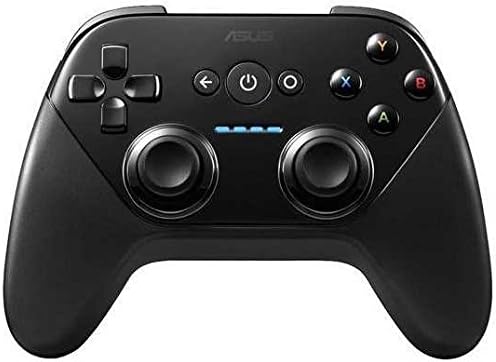
The ASUS TV500BG Gamepad is designed for Android TV and Windows systems. It allows you to play games on your HDTV with wireless freedom.
We may earn a commission when you buy through this link, at no additional cost to you.
It supports Google Play Games for progress tracking across devices. The controls are accurate enough for casual gaming on a big screen.
While it lacks modern features like RGB, it is simple to use and effective for its purpose. It is an entry-level option for living room gaming.
Choose this if you want a basic controller for TV games. It keeps things straightforward and affordable.
Stream games to your HDTV and play comfortably on the couch.
Wireless connection pairs quickly with Android TVs for instant play.
We may earn a commission when you buy through this link, at no additional cost to you.
Selecting the right controller depends on your platform and budget. Here are key factors to consider.
Ensure the controller supports the connection methods you need. Most ROG controllers offer wired USB-C and wireless 2.4GHz or Bluetooth.
Tri-mode connectivity is preferred for flexibility across devices like PC and Ally.
Look for TMR or Hall Effect joysticks to prevent stick drift over time. These technologies use magnetic sensors for greater longevity.
Standard potentiometer sticks may develop drift issues after heavy use.
Check the rated battery life for wireless models. Some offer up to 79 hours while others offer 30 hours depending on features like RGB.
If you play for long sessions, longer battery life reduces interruptions.
Programmable rear buttons and triggers enhance gameplay by allowing quick access to commands. Software support is essential for these features.
Ensure the controller comes with software to remap inputs effectively.
Ergonomics and grip materials affect comfort during long sessions. Controllers with skin-friendly anti-slip grips are more comfortable.
Durable materials ensure the controller withstands daily use.
Verify that the controller is certified for your specific device. Some models are designed specifically for Xbox and PC while others focus on Android.
Compatibility ensures smooth pairing and functionality without errors.
Controllers range from affordable mobile options to premium PC models. Set a budget to narrow down choices that fit your financial situation.
Higher priced models often include extra features like OLED displays.
A 3.5mm audio jack allows direct connection to headphones for immersive sound. Controllers with built-in DACs offer higher audio quality.
Check for mute buttons and audio controls if sound is a priority.
Connect the controller via USB-C or pair wirelessly using the 2.4GHz receiver or Bluetooth. Ensure your system is on and ready to accept the connection.
Use Armoury Crate software to customize button mappings and update firmware. This ensures you get the latest features and bug fixes.
Store the controller in a protective case when not in use. Avoid exposing it to extreme temperatures or moisture to maintain longevity.
The ASUS ROG Raikiri II and Pro models are top choices due to their tri-mode connectivity and TMR joysticks. They support Xbox and PC seamlessly with low latency.
Yes, most models support Bluetooth along with wired USB-C and 2.4GHz RF. This versatility allows you to switch between devices easily without cables.
Controllers with TMR or Hall Effect joysticks minimize drift. If drift occurs, ensure firmware is updated or consider replacing swappable modules if available.
Some models like the ROG Tessen are optimized for Android phones. Others support mobile via Bluetooth but may not have specific phone mounts.
Armoury Crate is the primary software for customization and settings. It is available for PC and allows full control over button remapping and triggers.
Renewed products come with limited warranties like 90 days. New products typically include standard manufacturer warranties depending on the retailer.
We highlighted top picks like the Raikiri II for all-rounders and the Tessen for budget mobile needs. Each option offers distinct features suited to different gaming styles.
Prioritize connectivity and battery life based on your usage habits. Wireless performance and long playtime ensure uninterrupted gaming sessions.
Check current pricing and stock status before purchasing. Deals and availability change so verify details on the product pages.