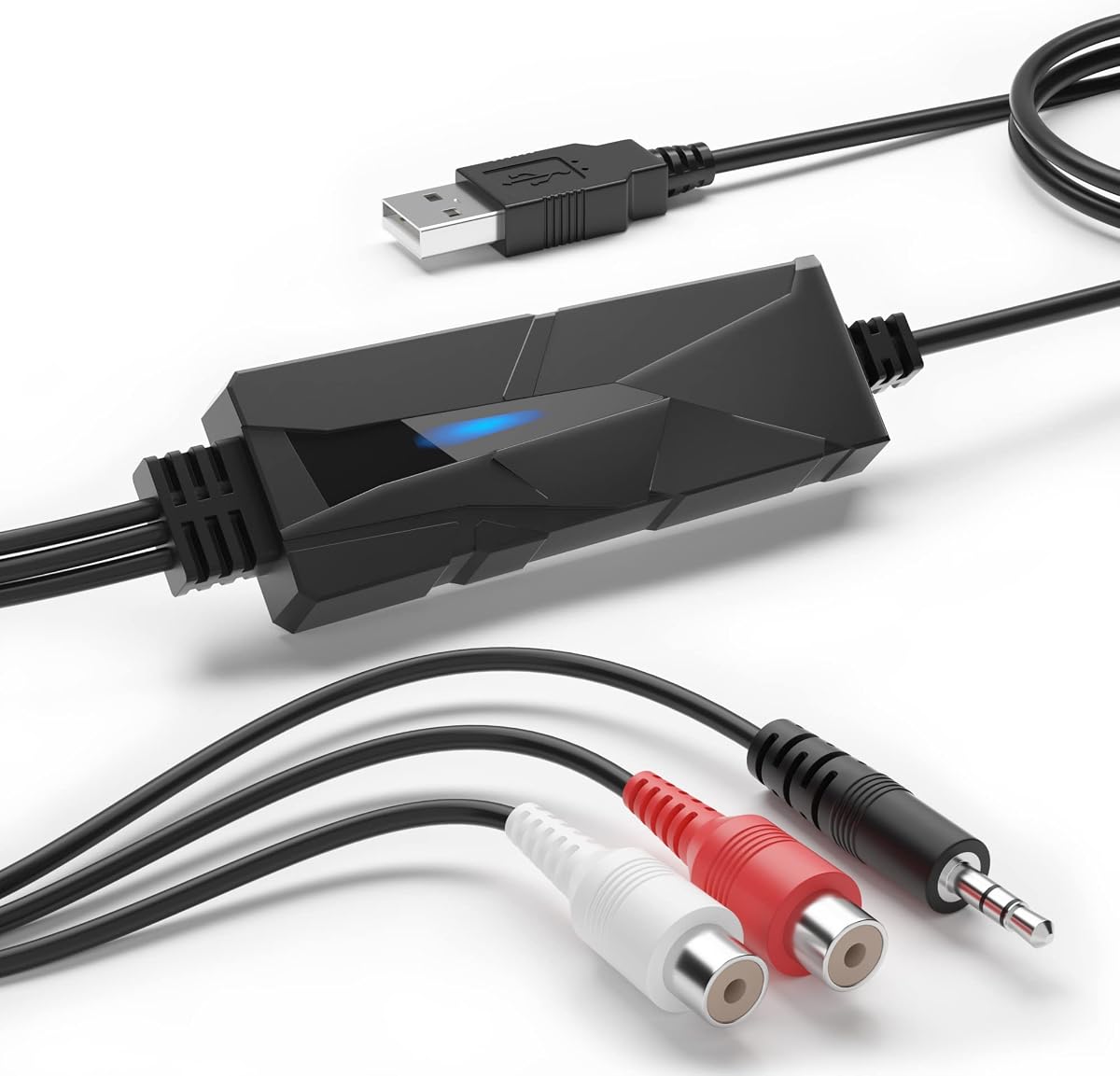
DriverGenius AudioXfer USB Audio Capture Card Device
4.2Editor score
Analog to digital conversion
Includes Audacity software
USB plug and play
This guide compares the top ten audio converters for Mac to help you find the best digital to analog or analog to digital solution for your setup.
Finding the right audio converter for your Mac can be challenging with so many options available today. Whether you need to digitize old tapes or connect high-end headphones, the right device ensures crystal clear sound quality and seamless compatibility with your system.
We have evaluated ten top-rated products based on their performance, features, and user feedback. Our comparison focuses on digital to analog converters, analog to digital recorders, and audio interfaces that work reliably with macOS systems for various use cases.
Each pick highlights specific strengths such as build quality, sound fidelity, and ease of use. Prices and availability can change frequently so please check the current listings before making your final decision to ensure you get the best value for your needs.
4.2Editor score

4.3Editor score

4.6Editor score
The following table provides a side by side overview of all ten products. Each entry includes key specifications to help you quickly identify the device that matches your specific audio requirements and budget constraints.


The DriverGenius AudioXfer is an excellent choice for users looking to digitize analog audio sources without breaking the bank. With a rating of 4.2 stars it offers reliable performance for converting cassette tapes and other analog devices into digital formats like MP3 and WAV.
We may earn a commission when you buy through this link, at no additional cost to you.
Its standout quality is the inclusion of Audacity software which allows users to edit and enhance their recordings immediately. The device features 3.5mm and RCA inputs making it easy to connect various legacy audio equipment to your Mac for conversion tasks.
One trade-off is that it only supports analog input meaning it cannot handle digital signals directly. Additionally users should note that while it works with macOS 15 Windows 12 is not supported so check your operating system before purchasing.
This product is ideal for hobbyists or anyone wanting to preserve old music collections. If you need a straightforward way to capture audio from tapes or vinyl to your Mac this device provides the necessary tools at a very accessible price.
The device allows you to record live audio on your Mac and transfer analog signals to digital formats easily.
Audacity is included to help you edit and save your music directly after capturing it from analog sources.
We may earn a commission when you buy through this link, at no additional cost to you.
The Fosi Audio K5 Pro stands out as a versatile audio converter and headphone amplifier combo. With a 4.3 star rating it delivers high fidelity sound and features an upgraded microphone function making it suitable for gaming and communication tasks on Mac.
We may earn a commission when you buy through this link, at no additional cost to you.
Key strengths include its ability to convert USB Type C optical and coaxial signals to RCA and 3.5mm outputs. The use of the NE5532 op-amp chip ensures a low noise floor and clean audio which enhances your listening experience significantly.
While it is more expensive than basic DACs the added functionality justifies the cost. The only minor limitation is the requirement for a USB-A or USB-C port on your device which is standard on most modern Macs but worth checking.
This product is perfect for gamers and audiophiles who need a high quality external sound card. It works seamlessly with Mac systems and provides the necessary inputs to connect various audio sources for an immersive experience.
Born for gaming this DAC headphone amplifier is perfect for your home gaming system and compatible with PS5 and Mac.
The K5 Pro converts USB Type C optical and coaxial signals to analog outputs for versatile connectivity options.
We may earn a commission when you buy through this link, at no additional cost to you.
The PROZOR 192KHz DAC is a premium choice for users needing high resolution digital to analog conversion. It supports sampling rates up to 192kHz and 24-bit audio ensuring that you get the best possible sound quality from your digital sources.
We may earn a commission when you buy through this link, at no additional cost to you.
Its aluminum alloy housing provides enhanced electromagnetic shielding and heat dissipation which improves durability and performance. The gold-plated connectors and detachable design ensure long-term professional use and flexibility in your audio setup.
A notable trade-off is that the power adapter is not included so you must ensure you have a compatible 5V 1A plug. Additionally you may need to adjust TV settings to PCM format to avoid audio issues which can be slightly confusing at first.
This converter is ideal for home cinema systems and audiophiles who demand high fidelity audio. It works with devices like Apple TV and gaming consoles making it a versatile addition to any high-end audio system connected to a Mac.
Supports sampling rates up to 192kHz and 24-bit S/PDIF for high-resolution audio output.
Aluminum alloy housing delivers enhanced shielding and heat dissipation outperforming standard plastic.
We may earn a commission when you buy through this link, at no additional cost to you.
The Douk Audio U2PRO is a compact digital interface designed to unlock pristine lossless audio from your Mac. With a rating of 4.1 stars it converts USB signals into clean optical coaxial and I2S outputs for those classic DACs.
We may earn a commission when you buy through this link, at no additional cost to you.
Key strengths include the XMOS XU316 chip which ensures virtually no latency and stable signal transmission. It supports PCM up to 32-bit/768kHz and DSD512 making it perfect for high-end music streaming and professional audio playback on macOS.
One trade-off is that driver issues were previously reported though recent updates have resolved this. Additionally it is limited to digital output so it cannot directly connect to analog speakers without a separate DAC.
This product is best for audiophiles and DIYers who want to upgrade their existing DAC. It is portable and USB-powered making it easy to transport between setups while maintaining high fidelity audio standards.
Easily convert USB signals into clean optical coaxial and I2S outputs for instant sound quality upgrade.
Ample internal space accommodates compatible crystal oscillators to further reduce jitter and improve performance.
We may earn a commission when you buy through this link, at no additional cost to you.
The SMSL SU-1 is a high-resolution DAC that supports MQA and DSD formats for superior audio fidelity. With a 4.2 star rating it utilizes the AK4493S chip to achieve distortion lower than 0.00013% ensuring clean sound reproduction.
We may earn a commission when you buy through this link, at no additional cost to you.
Its standout quality is the ability to decode MQA CD which restores the original high-resolution signal heard in the studio. It works with Mac OS X and Linux driverless making it a convenient choice for Apple users.
One trade-off is that drivers are required for Windows users which can be a hassle. Additionally the design is quite basic which might not appeal to those looking for premium aesthetics or extra features.
This product is ideal for audiophiles who stream MQA content or use high-resolution files. It provides a clear accurate signal conversion that lets your amplifiers and speakers reveal more of your music without extra noise.
The MQA decoder can restore the original high-resolution signal heard in the studio and confirm it.
The SU-1 utilizes the latest AKM DAC chip for achieving a distortion lower than 0.00013%.
We may earn a commission when you buy through this link, at no additional cost to you.
The SMSL PO100 PRO is a highly rated portable audio converter that supports MQA decoding without additional software. With a 4.6 star rating it features the XMOS XU316 chip and supports PCM 32-bit/768kHz for high resolution audio.
We may earn a commission when you buy through this link, at no additional cost to you.
Key strengths include its compact size which makes it easy to stow in bags for travel. It offers a Type-C USB input and optical/coaxial output providing flexibility for various digital audio setups on Mac or other devices.
One trade-off is that you need to adjust the UAC mode correctly before use which can be confusing for some. Additionally it does not provide analog outputs directly so you will need an external DAC or amplifier.
This product is best for users who need a portable high resolution converter for travel. It works well with PS5 and other devices making it a versatile tool for maintaining audio quality on the go.
A very compact USB digital interface that can be easily stowed in bags and backpacks for light travel.
MQA playback does not require additional software allowing you to use any music player with ASIO.
We may earn a commission when you buy through this link, at no additional cost to you.
The Sound Blaster Play! 3 is a simple and effective USB audio adapter for Mac users who need quick audio upgrades. With a 4.5 star rating it offers 24-bit 96kHz support and works straight out of the box without drivers.
We may earn a commission when you buy through this link, at no additional cost to you.
Its standout quality is the ease of use which makes it ideal for non-technical users. The adapter is compatible with all analog headsets and allows for easy connection without the need for Y-splitter cables.
One trade-off is that it offers basic features compared to more advanced DACs. The software is downloadable but limited to audio enhancements and profiles for earphone brands which may not be enough for pros.
This product is ideal for casual users who want a quick fix for poor audio quality on their Mac. It is affordable and reliable making it a great choice for everyday listening and gaming.
Compatible with all analog headsets and connects headsets with single or split stereo/mic connector easily.
The control panel software gives powerful Audio Enhancements and unprecedented control for your sound.
We may earn a commission when you buy through this link, at no additional cost to you.
The iFi Audio Go Link Max is a premium portable headphone amp and DAC dongle designed for high-resolution audio. With a 4.5 star rating it uses dual ESS Sabre DAC chips and supports up to 32-bit/384kHz PCM.
We may earn a commission when you buy through this link, at no additional cost to you.
Key strengths include the balanced 4.4mm output which provides up to 241mW of power. It also features Dynamic Range Enhancement technology and THD compensation ensuring a clean and immersive listening experience for your Mac.
One trade-off is the higher price point which reflects its premium components and performance. Additionally the cable is flexible but not detachable which might be a concern for long term durability in daily use.
This product is best for audiophiles who need high-quality audio on the go. It is ideal for use with high impedance headphones and supports DSD 256 for true high fidelity playback on your Mac device.
Dynamic Range Enhancement technology and THD compensation ensure clean and immersive audio.
Balanced 4.4mm output provides up to 241mW power to drive demanding headphones.
We may earn a commission when you buy through this link, at no additional cost to you.
The Fosi Audio Q6 is a high-performance desktop DAC that supports up to 32-bit/768kHz PCM and DSD512. With a 4.6 star rating it offers crystal-clear audio and is ideal for home stereo amplifiers or powered speakers.
We may earn a commission when you buy through this link, at no additional cost to you.
Its standout quality is the powerful yet compact design which connects seamlessly with various digital sources like Mac or TV. The use of the AK4493S chip and OPA1612 op-amp ensures low-noise and high-fidelity sound output.
One trade-off is that it cannot drive headphones or passive speakers directly meaning you need an external amplifier. This limits its use as an all-in-one solution but improves performance as a dedicated converter unit.
This product is ideal for audiophiles building a home audio system around their Mac. It provides a sophisticated touch and clean accurate signal conversion that lets your amplifier and speakers reveal more of your music.
Supports maximum sampling rates of PCM 32-bit/768kHz and DSD512 for crystal-clear audio.
Features Optical Coaxial and USB-C inputs as well as RCA and Sub-Out outputs.
We may earn a commission when you buy through this link, at no additional cost to you.
The Shure MVX2U Gen 2 is a professional audio interface designed to streamline recording and streaming setups. With a 4.5 star rating it converts any XLR microphone to USB-C and features advanced digital audio processing.
We may earn a commission when you buy through this link, at no additional cost to you.
Key strengths include onboard DSP such as Auto Level Mode and a real-time denoiser for consistent audio quality. It provides up to +60 dB clean gain and 48V phantom power which makes it suitable for condenser microphones.
One trade-off is the higher price and focus on recording rather than playback. If you are primarily looking to improve headphone output this might be overkill but for content creators it is invaluable.
This product is ideal for podcasters and streamers using a Mac. It allows you to manage settings via apps and activate audio processing for professional results without needing complex software setups.
Features onboard Shure Digital Audio Processing including Auto Level Mode and Real-Time Denoiser.
Manage settings on desktop using MOTIV Mix and Video apps to customize sound with EQ.
We may earn a commission when you buy through this link, at no additional cost to you.
Selecting the right audio converter depends on your specific needs and setup. This guide covers key factors to consider to ensure compatibility and optimal performance with your Mac.
Check the inputs your device offers such as USB optical coaxial or analog. Ensure it matches the cables you have and the ports on your Mac or other audio gear.
Look for devices with the right ports to avoid needing extra adapters that may degrade signal quality.
For high fidelity music listening look for converters that support high sampling rates like 192kHz or more. Higher resolution means better sound quality and detail.
Prioritize devices that support 24-bit audio for deeper dynamic range and clearer sound.
If you need to digitize tapes or vinyl ensure the converter supports analog input. Check if it comes with software to help you edit the recordings immediately.
Make sure the software included is compatible with your Mac OS version to avoid issues.
Aluminum alloy housings provide better shielding against interference and heat dissipation. This ensures the device lasts longer and performs consistently over time.
Avoid plastic builds if you plan to use the device in environments with many other electronics.
If you travel often choose a compact USB powered device that fits in your bag. This allows you to maintain audio quality on the go without bulky equipment.
Consider the weight and size when selecting a device for frequent transport.
Ensure the device lists macOS compatibility on its specs. Some devices might have driver issues with newer Mac OS versions.
Check reviews from Mac users to confirm the device works well with your specific operating system.
Look for features like microphone inputs or volume control which add versatility to the device. These can be useful for gaming or communication tasks.
Extra features should match your usage needs so you do not pay for what you will not use.
Compare prices across different models to find the best value. Higher prices do not always mean better performance but often include better build quality.
Check for warranty coverage and after-service support in case you encounter issues with the device.
To use your audio converter simply connect it to your Mac via USB or the appropriate port. Ensure the power supply is adequate and that any required drivers are installed before connecting audio sources.
Regularly update the software or firmware provided by the manufacturer to maintain compatibility with your Mac OS. This helps prevent audio dropouts and ensures the device runs smoothly.
Store your device in a dry and cool place when not in use to protect the internal components. Avoid bending the cables too much to prevent damage to the connectors over time.
Most modern audio converters are plug and play and do not require drivers on Mac. However some high-performance devices may need specific drivers for full functionality. Always check the product description for compatibility details.
Yes many analog to digital converters support inputs from tape recorders or turntables. Look for devices with RCA or 3.5mm analog inputs to connect your old equipment easily.
A DAC converts digital signals to analog which is used for listening to music on headphones. An ADC converts analog signals to digital which is used for recording audio from external sources.
Most USB powered audio converters are compatible with Mac laptops and desktops. Just ensure your laptop has the necessary USB ports or use a compatible adapter for connection.
To use optical input connect the optical cable to the converter and then to your Mac. Go to your Mac sound settings and select the converter as the output device.
A good quality converter can significantly improve sound quality by reducing noise and increasing resolution. It provides better signal conversion than built-in audio chips in many Macs.
We have explored ten top-rated audio converters for Mac ranging from budget-friendly recorders to high-resolution DACs. Each product offers unique features to suit different needs whether you want to record or play back audio.
Prioritize devices based on your primary usage such as recording old tapes or enhancing headphone output. A clear understanding of your needs will help you choose the most effective solution for your setup.
Prices and availability are subject to change so please check current listings before making a purchase. This ensures you get the best value and the most up-to-date features for your audio requirements.