
N80 Bluetooth Thermal Printer
4.1Editor score
No ink required
Compact and lightweight
Bluetooth connectivity
Discover the top battery powered portable printers for 2026. We compare wireless inkjet and thermal models for travel, business, and home use.
Portable printing technology has evolved significantly, offering users the ability to produce high-quality documents without being tethered to a wall outlet. Battery powered portable printers are essential for professionals and travelers who need reliable output on the move.
This guide compares ten distinct models ranging from inkjet to thermal technology. We evaluate connectivity options, battery life, print quality, and physical dimensions to help you find the ideal device for your specific workflow needs.
Each selection highlights unique strengths such as wireless direct modes or inkless efficiency. Please note that availability and specific features may change over time, so verify current details before making your final purchase decision today.
4.1Editor score

4.4Editor score
4.5Editor score
The following comparison table outlines the core specifications and capabilities of each selected model to assist in rapid evaluation of their technical strengths and limitations.



The Canon PIXMA TR160 stands out as a top contender for those seeking versatile color output without compromising on portability. It delivers sharp black text and vibrant details suitable for professional documents and photos alike.
We may earn a commission when you buy through this link, at no additional cost to you.
Its 5-Color Hybrid Ink System ensures rich color reproduction while the Wireless Direct Mode allows printing without a router. The 1.44-inch OLED display simplifies status checks and ink level monitoring.
While it is highly portable, users should note that detailed battery runtime specifications are not highlighted in the core specs compared to dedicated mobile models. However, for frequent travelers needing color, it remains a strong choice.
If you require high-quality color prints on the go and value lightweight design, this model offers a balanced blend of performance and ease of use for various environments.
The 5-Color Hybrid Ink System enables sharp text and vibrant details including square and borderless prints ideal for professional use.
Print effortlessly with the Canon PRINT app Apple AirPrint or Mopria Print Service ensuring compatibility across most modern devices.
We may earn a commission when you buy through this link, at no additional cost to you.
The HP OfficeJet 250 is a robust all-in-one solution designed for business users who need to print scan and copy virtually anywhere. It includes a battery and supports a wide range of paper sizes for diverse office tasks.
We may earn a commission when you buy through this link, at no additional cost to you.
Its Fast Charge feature allows rapid power-ups while the HP Auto Wireless Connect simplifies setup. The included battery adds significant value for those requiring extended operation without access to an outlet.
Although it is compact enough for a briefcase, it may be slightly bulkier than dedicated printers. For users needing multifunction capabilities on the road, this trade-off is often justified by the convenience.
This device is ideal for professionals who need a complete mobile office solution including scanning and copying alongside printing without relying on a fixed network.
Use your laptop tablet or smartphone to print scan and copy on the go without having to connect to a network.
Charge within 90 minutes while the printer is turned off using HP Fast Charge to minimize downtime between tasks.
We may earn a commission when you buy through this link, at no additional cost to you.
The HP OfficeJet 200 is a compact portable printer designed for business documents anytime and anywhere. It includes a battery and supports a wide range of paper sizes to meet various needs.
We may earn a commission when you buy through this link, at no additional cost to you.
It features HP Auto Wireless Connect for easy setup and HP Fast Charge to power up quickly. The Original HP 62 series cartridges deliver high page yields for longer printing periods.
While it supports a wide range of paper sizes, it relies on standard cartridges which may need replacement sooner than high-yield models. However, for most mobile users, this balance is effective.
This printer is perfect for those needing reliable wireless printing with a battery included for uninterrupted work whether you are in the car or at a temporary office.
HP Auto Wireless Connect allows for easy setup right out of the box so you can print wirelessly with or without a router.
Original HP 62 series cartridges deliver the highest in-class page yields allowing you to print longer between replacements.
We may earn a commission when you buy through this link, at no additional cost to you.
The Epson Workforce WF-110 is a wireless color mobile portable inkjet printer designed for performance on the go. It features a built-in rechargeable lithium-ion battery for dependable output in a small package.
We may earn a commission when you buy through this link, at no additional cost to you.
Users benefit from Wi-Fi Direct support and flexible battery charging options including USB and AC adapter. An external accessory battery is available for extended print volumes during busy work sessions.
The Epson printing system is designed for genuine cartridges which may limit third-party ink options but ensures consistent quality. This device suits those needing reliable wireless color printing away from desks.
Ideal for professionals who need color output without network cables, the WF-110 combines portability with the flexibility to charge via multiple sources for seamless operation.
A built-in rechargeable lithium-ion battery offers dependable performance in a small package for mobile printing needs.
Choose from a variety of charging options including via USB and AC adapter or print on AC power as needed.
We may earn a commission when you buy through this link, at no additional cost to you.
The Gloryang Inkless Portable Printer uses advanced thermal technology requiring no ink toner or ribbons for cost-effective printing. It weighs just 1.75 pounds and fits easily into backpacks for on-the-go use.
We may earn a commission when you buy through this link, at no additional cost to you.
It connects via Bluetooth to iOS and Android devices and includes a carry case and paper rolls. The built-in paper bin saves space and keeps your workspace tidy whether you are traveling or in a car.
Users must use specific thermal paper as regular copy paper is not supported. This limitation simplifies maintenance but requires planning for paper supplies during long trips or busy workdays.
Perfect for students or professionals needing quick documents without the mess of ink, this printer offers a clean lightweight solution for printing contracts notes or emergency materials anywhere.
No ink toner or ribbons are required during printing offering cost-effective solutions and no clogging or cleaning problems.
Weighing just 1.75 pounds it is lightweight and compact fitting easily into backpacks or briefcases for travel.
We may earn a commission when you buy through this link, at no additional cost to you.
The A285M Small Inkless Thermal Printer is an ultra-compact device weighing only 1.5 pounds making it easy to carry in backpacks or briefcases. It supports multiple paper sizes and connects via Bluetooth or USB-C.
We may earn a commission when you buy through this link, at no additional cost to you.
It works with thermal roll paper and continuous sheets allowing printing of documents invoices or receipts. The built-in paper bin keeps the workspace tidy while the printer supports both mobile and laptop connectivity.
This printer is limited to black and white printing and thermal paper only. However for basic document needs this restriction is often acceptable given the low cost and high portability it provides.
Ideal for small offices construction sites or home use this model delivers reliable thermal printing in a highly portable form factor suitable for everyday document tasks.
Supports 5 sizes of thermal paper including US Letter A4 and various roll widths to meet most printing needs.
Compatible with phones via Bluetooth and laptops via USB-C offering versatile connection options for different devices.
We may earn a commission when you buy through this link, at no additional cost to you.
The D90E Inkless Portable Thermal Printer is a lightweight solution for printing documents without the need for ink or toner. It includes a travel case and supports both Bluetooth and USB connections for flexibility.
We may earn a commission when you buy through this link, at no additional cost to you.
It uses advanced thermal technology and supports A4 thermal paper for various printing requirements. The Labelnize app enables mobile printing while drivers allow PC connectivity for more complex tasks.
While it does not support Chromebooks or regular paper it is excellent for notaries teachers and students needing a compact printing solution. The package includes paper and a guide to simplify setup immediately.
This printer is perfect for those seeking a portable and clean printing experience. Its gift-ready packaging makes it a suitable choice for classroom or professional use in diverse environments.
Connect this D90E portable printer to iPhones or Android via Bluetooth and it also works with PC over USB for broad compatibility.
Uses advanced thermal technology requiring no ink toner or ribbons delivering cost-effective prints without messy ink cartridges.
We may earn a commission when you buy through this link, at no additional cost to you.
The JADENS Portable US Letter Thermal Printer combines direct thermal technology with powerful app features including AI image generation and translation. It is ultra-compact and offers up to 3 hours of continuous printing.
We may earn a commission when you buy through this link, at no additional cost to you.
It uses 203 DPI resolution for sharp text and images. The app enables private local printing without cloud uploads ensuring security for sensitive documents. The printer supports custom designs and daily worksheets.
This model is tailored for those using specific JADENS thermal paper and does not support other brands. For users seeking creative tools alongside printing, this offers a unique advantage over standard portable models.
Perfect for schools and creative projects it allows users to edit print and save designs on the go. The rechargeable battery and small size make it ideal for travel and home office use.
Create custom designs with AI image generation AI erasing and AI translation tools within the Jadens Printer app.
Print directly from your connected device without uploading files to the cloud keeping personal and sensitive documents private.
We may earn a commission when you buy through this link, at no additional cost to you.
The N80 Bluetooth Thermal Printer uses direct thermal technology for cost-effective printing without ink or toner. It supports tattoo transfer paper making it a unique choice for artists alongside standard documents.
We may earn a commission when you buy through this link, at no additional cost to you.
It includes a 1500mAh battery offering printing capacity for around 160 sheets per charge. The 203 DPI resolution ensures clear results for web pages PDFs and pictures anytime and anywhere.
Laptop connection requires USB and a driver download. While this is slightly less flexible than Bluetooth for mobile it is acceptable for stationary setups or when printing large files from a computer.
This printer is excellent for those needing a lightweight solution for both office documents and creative transfer projects. Its portability and low cost make it suitable for schools and home use.
The N80 thermal printer has a wide range of uses including tattoo template printing for art and business document output.
Adopts high-definition printing technology with 203 DPI resolution to provide you with clear printing results on thermal paper.
We may earn a commission when you buy through this link, at no additional cost to you.
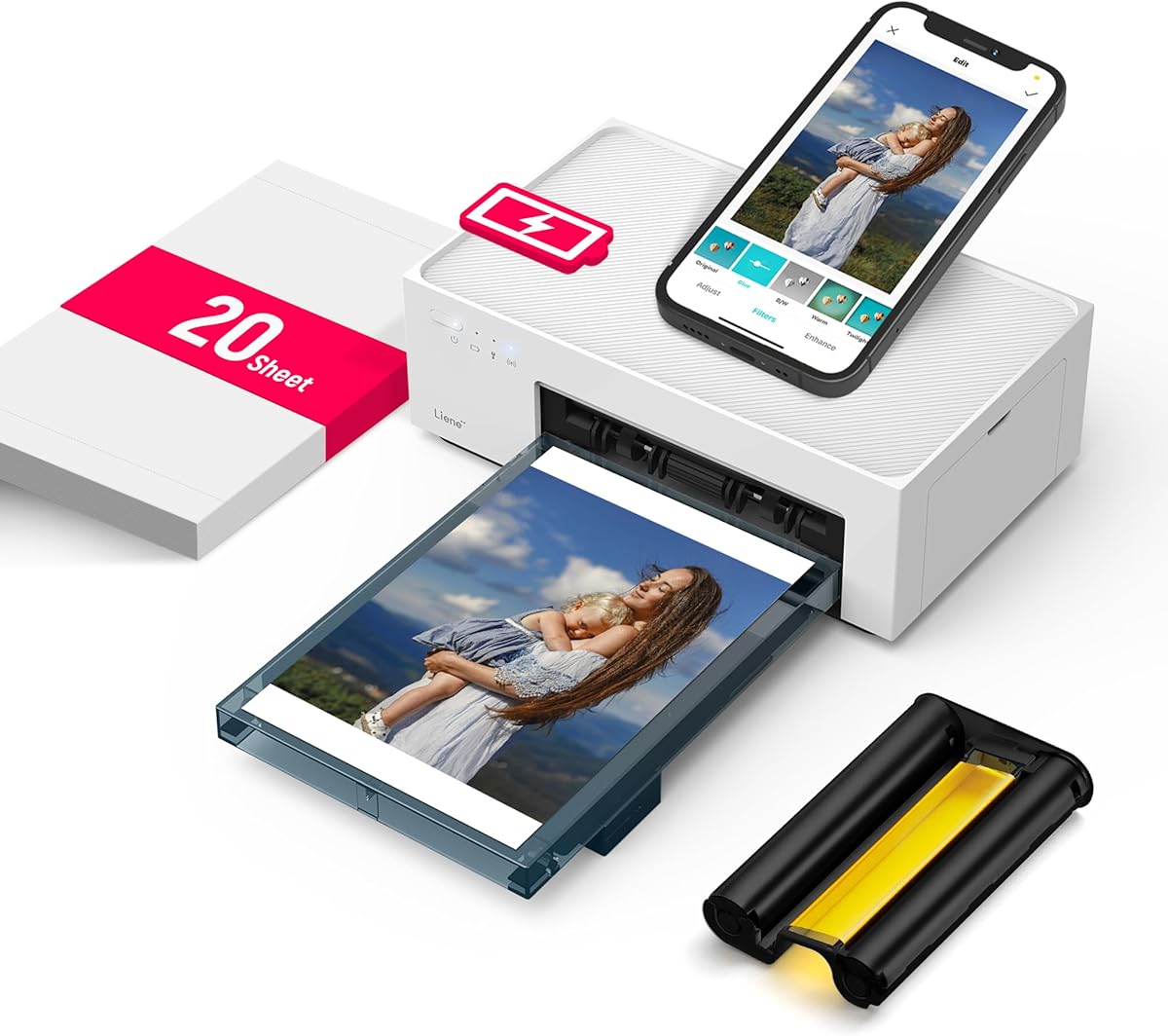
The Liene White M200 is a dedicated photo printer using dye sublimation technology to produce vibrant water-resistant images. It features a rechargeable battery for 50 prints per charge ideal for travel.
We may earn a commission when you buy through this link, at no additional cost to you.
It connects via a built-in WiFi hotspot for stable and easy setup. The app offers basic editing filters and borders. Users get complimentary photo papers and ink cartridges to start immediately.
This device is limited to 4×6 inch photos and does not support document printing. For photography enthusiasts this specificity ensures high quality but requires dedicated photo paper usage.
If you want to capture memories on the go with professional quality prints this printer delivers outstanding image quality and lifespan. Its sleek design makes it a great gift for anyone with an iPhone.
Dye sublimation printing allows 3 primary colors to penetrate the paper layer by layer creating clear and vibrant images.
Features a built-in WiFi hotspot for quick connection in 3 seconds allowing up to 5 users to connect at once.
We may earn a commission when you buy through this link, at no additional cost to you.
Choosing the right battery powered portable printer requires understanding how different technologies impact performance cost and convenience in various environments.
Thermal and inkjet are the two main technologies available. Thermal printers are cheaper to maintain but often limited to black and white. Inkjet offers color and document versatility but may have higher long-term costs.
Evaluate whether color is essential or if black and white thermal is sufficient for your daily needs.
Battery capacity varies between models and significantly affects uptime. Some include batteries in the package while others require separate purchases. Charging speed and support for AC or USB power also matter.
Ensure the battery runtime aligns with your typical usage duration before needing a recharge or replacement.
Most printers offer Bluetooth or Wi-Fi for mobile printing. Some support Wi-Fi Direct for router-free connections. USB connectivity is useful for laptops but may require drivers and cables.
Select a model with connectivity that matches your primary devices and preferred workflow setup.
Thermal models typically require specific paper rolls while inkjet can handle standard sizes. Some models support 8.5×11 inch paper while others are limited to 4×6 inch photos.
Confirm the supported paper sizes and types before purchasing to avoid running out of compatible materials.
Portable printers range from ultra-lightweight to slightly heavier all-in-one units. Consider how often you will move the device and what bag or briefcase it will fit in.
Lighter devices are better for frequent travel while heavier ones may offer more functionality or better battery life.
Higher DPI ensures sharper text and clearer images. Photo printers use dye sublimation for depth and durability. Document printers focus on readability and text consistency.
Prioritize models that match your quality expectations for either text or photographic output.
Apps often enable editing AI tools or cloud-free printing. Some brands offer exclusive features that enhance usability. Check if the app supports your device's operating system.
A robust app can simplify setup and expand what you can print from mobile devices.
Thermal models have no ink costs but need specific paper. Inkjet models need cartridges but support standard paper. Consider replacement costs for batteries and paper.
Choose a model where ongoing costs fit your budget without compromising daily usage.
Connect your device via Bluetooth or Wi-Fi and install the required app or drivers to start printing. Ensure the printer is powered on and paper is loaded correctly.
Keep the printer clean and stored in a cool dry place when not in use. Avoid exposing it to direct sunlight or extreme temperatures to maintain battery health.
Regularly update the firmware and app to ensure compatibility with new devices. Replace ink or paper when low and clean the print head if prints become blurry.
Most models support Bluetooth or Wi-Fi Direct which allows connection without a traditional router. This enables printing in areas where internet access is unavailable.
Thermal printers are excellent for text-based documents because they are cheap and reliable. However they generally produce black and white output only and require specific thermal paper.
Battery life varies by model and usage. Some offer hours of continuous printing while others last longer on standby. Check the capacity before purchasing for your needs.
Yes inkjet portable printers support full color. Some photo models use dye sublimation for high-quality color images. Most thermal options are black and white only.
Portable printers often support 8.5×11 inches or 4×6 inches. Check the specs carefully because some may be limited to roll paper or specific sizes only.
Mobile apps often remove the need for drivers on phones. Laptops may require specific drivers for USB printing. Ensure you download the correct drivers for your system.
Yes their compact size and battery operation make them ideal for travel. Look for lightweight models with included cases to protect them during transit.
Most portable printers weigh between 1.5 and 3 pounds. This range allows for easy packing in a backpack while still offering stability during operation.
We have reviewed ten top models ranging from inkjet to thermal technologies. Each offers unique strengths for different users whether they need color documents or compact photo prints.
Prioritize your needs such as battery life weight or app features to narrow down the best fit. The right printer can save time and effort in any mobile workflow.
Remember to check current availability and features before buying as models may evolve. This guide provides a solid foundation for making an informed decision today.