
Acer 13-in-1 Laptop Docking Station
4.5Editor score
Triple display support with MST
110W power adapter included
Gigabit Ethernet and USB-C data
This guide compares the top 10 docking stations with 2 HDMI ports for laptops. We evaluate connectivity, video performance, power delivery, and reliability.
Finding the right docking station with 2 HDMI ports is essential for modern professionals who need expanded display capabilities. These devices transform a single USB-C connection into a full desktop workstation. They allow users to connect multiple monitors, peripherals, and network cables simultaneously for enhanced productivity and efficiency in any workspace.
We have carefully compared ten leading models based on their video output quality, port selection, power delivery capabilities, and overall build quality. Our analysis focuses on real-world performance scenarios including home offices and corporate environments. Each product was evaluated against specific criteria to ensure you find the perfect match for your laptop setup and workflow needs today.
Each pick in this list showcases unique strengths ranging from budget-friendly options to premium multi-display solutions. You will see detailed breakdowns of ports video support, and charging speeds for every model. Please note that prices and availability can change frequently, so check the current listings before making your final purchase decision online.
4.5Editor score

4.5Editor score

4.4Editor score
The following comparison table details the key specifications and features of each top-rated docking station. Use this side-by-side view to quickly identify which model offers the specific ports and video capabilities you need for your unique laptop configuration and professional workflow requirements.


The Anker Laptop Docking Station Dual Monitor stands out as the top choice for professionals seeking reliable dual display expansion. With a solid 4.5 rating it delivers consistent performance for home and office setups. The 8-in-1 design covers all essential connectivity needs without overwhelming your desk space.
We may earn a commission when you buy through this link, at no additional cost to you.
This hub features two HDMI ports capable of 4K@60Hz output on a single device or 4K@30Hz across dual screens. Power Delivery compatibility ensures your laptop stays charged with up to 85W pass-through. Additional ports include Ethernet and SD readers for versatile workflow integration.
While it lacks Linux support and mirrors on macOS these trade-offs are acceptable for most Windows and ChromeOS users. The compact aluminum body dissipates heat well during long sessions. It is a dependable solution for daily multitasking without sacrificing video quality.
Buy this if you need a straightforward dual HDMI dock with trusted build quality. It balances port selection and charging speed effectively. The included warranty adds peace of mind for long-term daily use in professional environments.
Stream content to one 4K display or mirror across two for wider workspace views.
Keep your laptop powered while transferring data and connecting multiple peripherals simultaneously.
We may earn a commission when you buy through this link, at no additional cost to you.
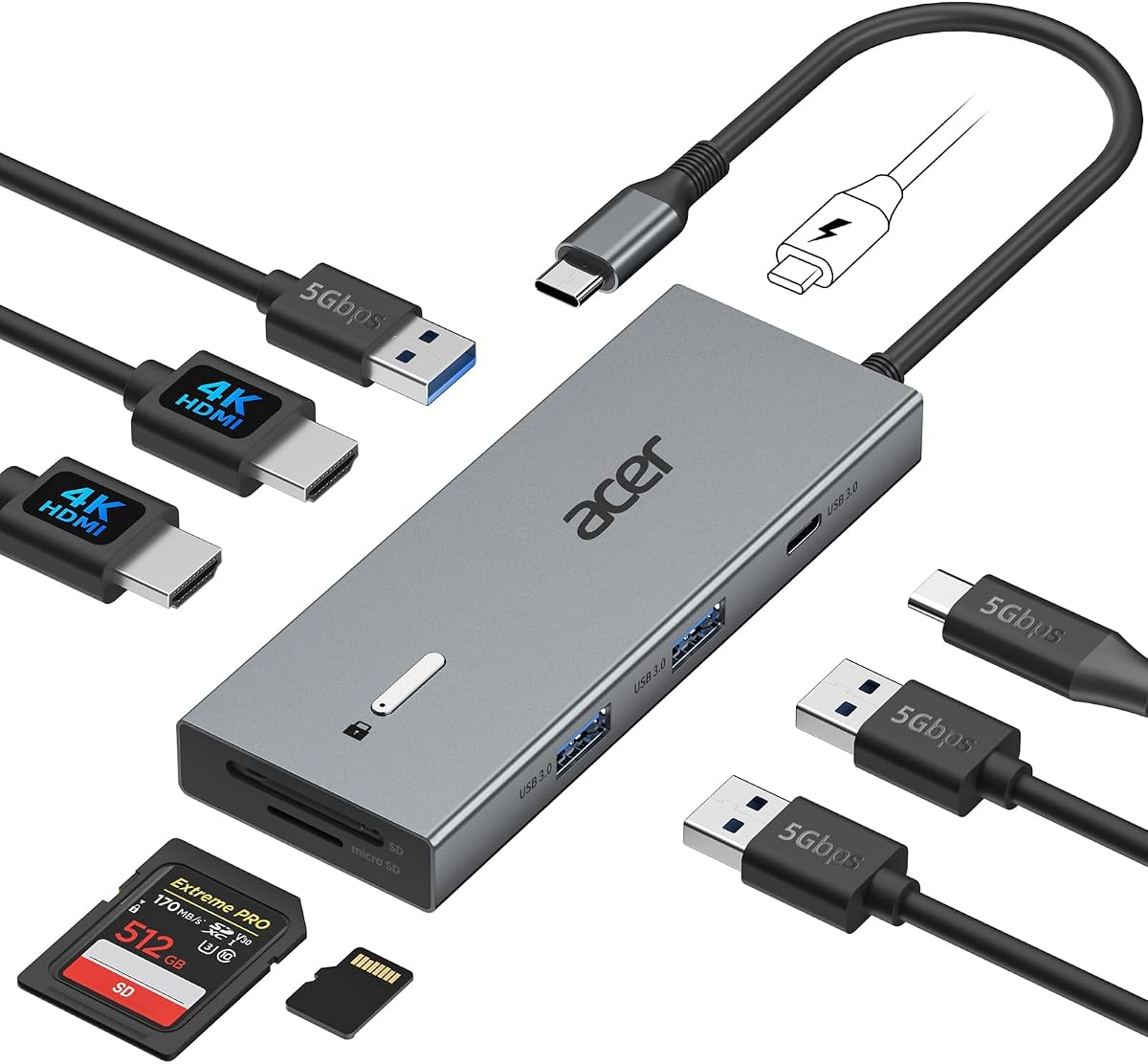
The Acer 13-in-1 Laptop Docking Station offers premium triple display capabilities for power users requiring extensive screen real estate. It supports independent screens via MST technology for Windows laptops. This makes it ideal for complex workflows involving coding trading or video editing across multiple windows.
We may earn a commission when you buy through this link, at no additional cost to you.
Included in the box is a robust 110W power adapter ensuring stable charging even under heavy loads. The aluminum body helps dissipate heat efficiently during prolonged use. Security features like the lock slot add physical protection for office environments.
MacOS users should note extended desktop mode is restricted though mirroring works fine. The higher price reflects the advanced connectivity and included power brick. Performance varies by laptop GPU support for Display Stream Compression.
Choose this dock if you need three monitors without buying extra adapters. The included adapter saves cost and ensures reliability. It is the best premium pick for expanding your workstation with high-performance connectivity.
Connect three independent screens using 2 HDMI and 1 DP for maximum multitasking.
The 110W adapter ensures sufficient power for all ports and your host laptop.
We may earn a commission when you buy through this link, at no additional cost to you.
The Selore USB C Docking Station Dual Monitor provides an affordable entry point for users needing dual 4K displays. With a 4.4 rating it performs reliably for basic office tasks. The 8-in-1 layout covers essential ports without unnecessary complexity.
We may earn a commission when you buy through this link, at no additional cost to you.
It supports dual 4K@60Hz on Windows laptops with DP1.4. The 100W PD port allows fast charging while working. USB 3.0 ports enable quick file transfers for external drives and peripherals.
Lack of Ethernet is a limitation for wired networks but wireless often suffices. The aluminum body ensures durability. It is a cost-effective choice for students and home users on a budget.
Buy this if you want dual 4K support without breaking the bank. It balances performance and value well. The simple setup makes it easy to deploy for immediate productivity gains.
Enjoy crisp 4K visuals on two external monitors for enhanced visual workspace.
Keep your laptop charged with sufficient power pass-through for most models.
We may earn a commission when you buy through this link, at no additional cost to you.
The Acer 9-in-1 Laptop Dock includes a unique security lock button for quick screen privacy. This feature is valuable for shared workspaces. It supports dual 4K@60Hz HDMI outputs ensuring clear visuals for presentations and data work.
We may earn a commission when you buy through this link, at no additional cost to you.
The hub delivers 100W PD charging to keep your laptop powered. Built-in lock button secures devices instantly with a single click or press. The aluminum body ensures heat dissipation and durability.
The built-in cable is short which might limit placement options. macOS users must accept mirror mode. However the security and video quality make it a strong choice for offices.
Choose this dock if security is a priority. It balances port selection with unique features. The lock button adds practical protection for sensitive work environments.
Press and hold to lock Windows screens instantly for privacy during meetings.
Receive high-speed charging while connecting multiple peripherals simultaneously.
We may earn a commission when you buy through this link, at no additional cost to you.
The Dell D3100 Docking Station is a robust option for enterprise environments using legacy Windows systems. It supports triple display output via HDMI and DP. The included HDMI cable adds immediate value out of the box.
We may earn a commission when you buy through this link, at no additional cost to you.
With 65W power delivery it can sustain basic office workloads. The design focuses on reliability and wide compatibility. It connects easily to older Dell laptops with USB 3.0.
The lack of USB-C limits modern laptop compatibility. It is bulky compared to newer hubs. However it remains a staple for older enterprise fleets requiring stable connectivity.
Buy this if you manage legacy hardware needing triple display. It is reliable and compatible with older operating systems. A practical choice for long-term office infrastructure needs.
Connect up to three monitors for expanded workspace across different devices.
Designed for stability with older Windows versions and enterprise hardware.
We may earn a commission when you buy through this link, at no additional cost to you.
The Anker 7-in-1 USB-C Hub is designed for travelers and mobile workers needing dual display expansion. It is compact and lightweight for easy transport. It supports two 1080p monitors which is sufficient for most work apps.
We may earn a commission when you buy through this link, at no additional cost to you.
A standout feature is the 10Gbps data port for ultra-fast file transfers. It supports 100W PD charging to keep devices powered. The warranty adds confidence to your purchase.
HDMI resolution is limited to 1080p. Ethernet is missing which might slow down network speeds. But for travel it offers excellent value and versatility.
Choose this if you move between offices often. It balances weight and function perfectly. A great tool for modern nomadic professionals.
Compact size fits easily in laptop bags for travel convenience.
Move large files quickly with the 10Gbps USB port.
We may earn a commission when you buy through this link, at no additional cost to you.
The MOKiN 13-IN-1 Dock Solution offers extensive connectivity for users with many peripherals. It supports dual 4K@60Hz for sharp visuals. The privacy lock button allows quick screen locking for security.
We may earn a commission when you buy through this link, at no additional cost to you.
It includes a Gigabit Ethernet port for reliable internet speeds. USB-C and USB-A ports cover all device types. The aluminum body aids in heat dissipation.
With so many ports it can be complex to manage. It requires a powerful USB-C port on your laptop. But it delivers versatility unmatched by smaller hubs.
Buy this if you have many devices to connect. It handles multiple tasks simultaneously. A strong option for power users with diverse hardware needs.
Connect multiple peripherals simultaneously with thirteen available ports.
Protect sensitive data instantly with a dedicated lock button.
We may earn a commission when you buy through this link, at no additional cost to you.
The Selore 10-in-1 Multiport Adapter stands out for its triple 4K display support on Windows. It allows you to extend across three screens simultaneously. The monitor control button lets you switch modes quickly.
We may earn a commission when you buy through this link, at no additional cost to you.
Ethernet ensures stable internet for large file transfers. It supports 8K output via DP for high-resolution needs. The aluminum chassis offers durability for daily use.
Windows users get true extended desktop capability. Mac users remain limited to mirroring. It requires a DP1.4 host which might limit older laptops.
Choose this if you need three 4K screens. It offers robust connectivity for heavy workloads. An excellent choice for creative professionals needing multiple views.
Connect three 4K monitors via HDMI and DP ports easily.
Switch display modes instantly without digging into settings.
We may earn a commission when you buy through this link, at no additional cost to you.
The Anker 13-in-1 USB-C Dock transforms laptops into desktops for home offices. It includes a 135W adapter for high power delivery. The vertical design saves valuable desk space.
We may earn a commission when you buy through this link, at no additional cost to you.
It supports up to three external monitors for multitasking. Multiple USB-C ports allow simultaneous charging and data. Ethernet ensures stable internet connectivity.
MacOS users get charging but limited video. The vertical design might not suit all desks. But it is a robust all-in-one solution.
Buy this for a full workstation setup. It simplifies connections with one cable. A great choice for permanent home office installations.
Transform your laptop into a powerful desktop workstation.
Compact vertical design frees up valuable desk surface.
We may earn a commission when you buy through this link, at no additional cost to you.
The Selore 9-in-1 Dual HDMI Hub is a reliable choice for Mac users needing dual screens. It mirrors content consistently across both displays. The 4K@60Hz resolution ensures smooth visuals.
We may earn a commission when you buy through this link, at no additional cost to you.
It offers strong 100W charging to keep laptops powered. The SD card reader helps photographers transfer files. Aluminum build ensures heat dissipation.
Extended display is limited on macOS due to system constraints. Ethernet is missing but usually acceptable for Mac setups. It balances simplicity and function.
Choose this for Mac users needing dual 4K. It mirrors consistently for presentations. A solid value pick for Apple ecosystem users.
Reliable mirroring for consistent dual-screen views on Mac.
High-speed charging ensures your device stays powered during use.
We may earn a commission when you buy through this link, at no additional cost to you.
Selecting the right docking station requires understanding your laptop's video capabilities and port requirements. This guide outlines the essential factors to consider before purchasing a dual HDMI hub.
Check if the dock supports 4K@60Hz or 4K@30Hz on both HDMI ports simultaneously. Some devices require DP1.4 to reach 60Hz on dual screens. If you need high refresh rates for design work, ensure the specs match your monitor capabilities.
Prioritize models offering 4K@60Hz for smoother visuals during work.
Look for docks with at least 85W to 100W Power Delivery to charge laptops under load. Ensure the charging port supports high wattage to keep your device running. Lower wattage might not sustain heavy usage.
Choose a dock with sufficient charging power for your specific laptop model.
Verify if the hub supports extended desktop mode on your OS. Windows users should check for MST support. macOS users should expect mirroring across HDMI ports unless using Apple Display Protocol.
Confirm OS compatibility to avoid display limitations after purchase.
Count the USB-A and USB-C ports available for peripherals. Ensure enough ports for your keyboard mouse and external drives. Additional Ethernet and SD card slots add flexibility.
Match port counts to your daily connected devices for convenience.
Aluminum bodies usually dissipate heat better than plastic. A sturdy build ensures longevity in busy work environments. Consider weight if you travel frequently with the dock.
Opt for aluminum for better durability and heat management.
Short built-in cables may limit desk placement. Check if external cables are included for flexibility. Longer cables allow more versatile setups on crowded desks.
Ensure the cable length fits your workspace layout comfortably.
Some docks include lock buttons or Kensington slots. These features protect against unauthorized access. Security is key in public or shared workspaces.
Look for lock buttons if physical security is a priority.
Check for at least an 18-month warranty for protection. Reliable brands offer better support for hardware failures. Good warranty terms ensure long-term usability.
Prioritize products with strong warranty coverage for peace of mind.
Connect the USB-C cable to your laptop's video and power port. Ensure the port supports DisplayPort Alt Mode for video. Once connected, your monitors should detect automatically. For Mac, check display settings to adjust mirror or extended mode.
Connect your monitors to the HDMI ports using high-speed HDMI cables. Adjust resolution settings in your OS to match monitor specs. Use Ethernet for stable internet if available in the dock.
Keep the dock in a well-ventilated area to prevent overheating. Clean the ports regularly with compressed air to remove dust. Avoid bending the cables sharply to ensure long-term durability.
No, your laptop must have a USB-C port with DisplayPort Alt Mode to support video output. Without this feature, the HDMI ports on the dock will not work. Check your laptop specs to confirm video capabilities before buying.
macOS limits external displays via USB-C hubs to mirroring due to system restrictions. Extended desktop usually requires Thunderbolt support or specific native graphics. Some brands support extended displays via DisplayLink drivers.
Most work for charging and data, but video often mirrors on macOS. For extended displays, check for DisplayLink compatibility or Thunderbolt support. Always verify model compatibility in product details.
60Hz offers smoother visuals for motion, while 30Hz is adequate for static screens. High-resolution setups might drop to 30Hz if bandwidth is limited. Choose 60Hz for better performance in active workflows.
Connect both HDMI cables to the dock and monitors. Open display settings in your OS to arrange screens. Select extend to spread apps or duplicate to mirror screens for presentations.
Some models include the adapter, others require your own 100W USB-C charger. Check product details to see if a brick is included. Having the right adapter ensures full charging functionality.
Support varies by brand. Some hubs require drivers like DisplayLink to work. Standard USB-C hubs often work but may lack video. Check compatibility notes for Linux users before purchasing.
The dock might provide video but no charging. You will need to use your laptop's original charger. Ensure your laptop supports PD to use the dock's charging pass-through effectively.
We have reviewed ten top-rated docking stations offering dual HDMI connectivity for various needs. From budget-friendly options like the Selore hub to premium picks like the Acer 13-in-1, each model offers unique benefits for different users.
Prioritize power delivery and OS compatibility to match your workflow. Ensure your laptop supports video output before purchasing a dock. Security features can add value for office environments needing extra protection.
Check current prices and availability online to secure the best deal. Product features and offers change regularly so verify the latest details before checkout. Choose the model that fits your setup for maximum productivity.