
THUSTAR 8MP Document Camera
4.4Editor score
Adjustable image reversal
3-level LED lights
Foldable design
Educators today need reliable visual tools to engage students effectively. A document projector for classroom settings allows teachers to display textbooks, worksheets, and 3D objects in real time. Choosing the right device ensures clear visibility and smooth operation during lessons.
We evaluated ten leading models based on resolution, connectivity, and ease of use. Our analysis includes both dedicated document cameras and traditional projectors that support document display. Each product offers unique features suited for different classroom sizes and budgets.
Every pick in this list highlights key strengths and potential limitations for teachers. You will find detailed specs and real-world performance notes for each device. Please note that prices and availability can change frequently on retail platforms.
4.4Editor score

4.5Editor score

4.9Editor score
As an Amazon Associate we earn from qualifying purchases.
The following table provides a side-by-side overview of each model evaluated in this guide. Review the specifications to determine which device aligns with your specific classroom requirements and technical setup needs.


The IPEVO V4K stands out as a top-tier document camera designed for modern classrooms. With its 8 Megapixel camera, it captures Ultra High Definition live images that keep students engaged. Teachers appreciate its ability to work seamlessly across Mac, Windows, and Chromebook systems.
We may earn a commission when you buy through this link, at no additional cost to you.
Key strengths include the Sony CMOS Image Sensor which provides exceptional noise reduction and color reproduction. The high frame rate ensures that live streaming remains smooth even when switching between materials quickly. The multi-jointed stand allows flexible positioning for various document sizes.
While the stand joints may require occasional tightening due to heavy daily use, this is a manageable trade-off for the flexibility offered. The max shooting area is sufficient for most standard documents but may limit larger A3 papers.
Educators seeking a reliable balance of quality and compatibility should strongly consider this model. It delivers consistent performance for live demos and distance learning sessions without complex setup requirements.
The 8MP sensor ensures crisp details even in lower light conditions.
Compatible with major operating systems used in schools today.
We may earn a commission when you buy through this link, at no additional cost to you.
The Apollo Overhead Projector offers a classic approach to document projection that many schools still prefer. Its open head design allows easy placement of transparent slides or physical documents directly under the lens. This model delivers 2000 lumens which is adequate for smaller or dimly lit rooms.
We may earn a commission when you buy through this link, at no additional cost to you.
Teachers benefit from both VGA and USB connectivity options which provide flexibility in connecting to older or newer displays. The 10 x 10 inch viewing area covers most standard sheet sizes used in classrooms. Its construction is designed to withstand frequent daily handling.
Compared to modern document cameras this unit is physically larger and may take up more desk space. Some users might find the analog feel less convenient than digital plug-and-play systems available today.
This projector remains a practical choice for institutions with existing overhead setups or those preferring traditional methods. It provides dependable performance for showing physical documents without needing a computer connection.
Ideal for users accustomed to standard overhead projection workflows.
Supports various connection types for diverse classroom tech.
We may earn a commission when you buy through this link, at no additional cost to you.
The IPEVO VZ-X brings wireless freedom to the classroom environment. Teachers can move around the room while capturing images up to 33 feet away from the display. It supports three connectivity modes including Wi-Fi HDMI and USB for maximum adaptability.
We may earn a commission when you buy through this link, at no additional cost to you.
Its 8MP sensor captures high definition images in Wi-Fi mode and near 4K in USB mode. The built-in LED illuminates the viewing area ensuring clear images even in challenging lighting. Battery life lasts up to 12 hours covering a full day of classes.
The premium price reflects the advanced wireless capabilities and build quality. Setting up wireless connections might require initial network configuration depending on school IT policies.
This device is ideal for dynamic teaching environments where movement and flexibility are priorities. It simplifies distance learning by allowing seamless connections to mobile devices and projectors without cables.
Eliminates cable clutter for a cleaner and safer classroom.
Sufficient power to last through extended teaching sessions.
We may earn a commission when you buy through this link, at no additional cost to you.
The THUSTAR 8MP offers impressive features at a budget-friendly price point. It supports A3 size documents which is great for larger spreadsheets or art pieces. The image inversion function allows teachers to adjust how the output appears on screen easily.
We may earn a commission when you buy through this link, at no additional cost to you.
Brightness control is adjustable with three levels to handle different room lighting conditions. Dual microphones help capture sound during video chats reducing background noise. The USB plug-and-play compatibility works well with Windows Mac and Chromebooks.
While the build quality feels lighter than premium models it remains functional for regular use. Manual focus buttons require user interaction which can interrupt flow compared to auto focus systems.
Schools with limited budgets will find this device provides excellent value. It covers essential classroom needs like document sharing and remote teaching without breaking the bank.
Delivers core features without premium costs for tight budgets.
Accommodates larger A3 papers which many models exclude.
We may earn a commission when you buy through this link, at no additional cost to you.
The INSWAN INS-2 delivers professional grade imaging with a 13MP SONY sensor. This allows for clear 4K Ultra HD images perfect for detailed visual learning. It captures up to A3 size documents making it versatile for art and science classes.
We may earn a commission when you buy through this link, at no additional cost to you.
Included Documate software adds value with zoom annotation and video recording tools. The multi-joint arm supports flexible angle adjustments to suit any setup. Anti-glare sheet helps maintain clarity when projecting bright documents.
Users need to download the software separately which might confuse non-technical staff. iPad users require a USB-C port which might not be available on older devices.
This camera is best for educators who need crisp visuals and interactive software tools. It enhances presentations significantly through high fidelity image capture and built-in utility features.
The 13MP sensor ensures fine details are visible on large screens.
Offers extra tools like OCR and annotation for deeper lessons.
We may earn a commission when you buy through this link, at no additional cost to you.
The Lumens DC166 operates independently without needing a computer connection. This standalone feature is useful for quick presentations where setting up a PC is not feasible. It stores up to 120 JPEG images internally for instant playback.
We may earn a commission when you buy through this link, at no additional cost to you.
Optical zoom allows users to focus on specific details of an object digitally. The SD card slot provides an easy way to share content offline with others. It is designed to work with all interactive whiteboards available.
Resolution is limited to SXGA which might not meet high definition standards expected today. Connectivity options are fewer compared to newer models that support HDMI and USB directly.
This device suits environments where simplicity and offline functionality are more important than resolution. It remains a solid choice for basic visual aids without computer dependency.
Functions completely on its own for faster classroom setup times.
6x optical zoom helps highlight small details without moving.
We may earn a commission when you buy through this link, at no additional cost to you.
The Epson PowerLite 118 is a full-sized LCD projector perfect for large classrooms. Its 3LCD technology produces vibrant images that make lessons visually engaging. It includes a built-in speaker for audio without needing external devices.
We may earn a commission when you buy through this link, at no additional cost to you.
The lamp life of 17000 hours reduces maintenance and replacement costs over time. HDMI connectivity simplifies setup by transferring video and audio through a single cable. The moderator function allows up to 50 users to connect simultaneously.
Its size and cost make it a significant investment compared to document cameras. Installation might require professional mounting to ensure optimal viewing angles.
This projector is the premium choice for schools needing to project documents and media to large groups. It delivers long-term reliability and high-quality visuals for professional educational settings.
Long lamp life ensures minimal downtime for teachers over years.
Suitable for whole class instruction with consistent bright visuals.
We may earn a commission when you buy through this link, at no additional cost to you.
The DLP Business Projector provides 3300 lumens for clear display in bright rooms. This brightness level helps maintain visibility even with windows open during the day. DLP technology ensures enhanced contrast for detailed teaching materials.
We may earn a commission when you buy through this link, at no additional cost to you.
Quick start functionality reduces waiting time before lessons begin which saves valuable minutes. The wired setup is simple requiring only a cable connection to start showing content. It suits team meetings and daily training sessions effectively.
Wireless connectivity is not highlighted in the description which might limit flexibility. The focus on daytime use means it is optimized for specific lighting conditions.
Educators working in well-lit classrooms will appreciate the high brightness output. It ensures that charts and slides remain readable without closing all curtains.
High lumen count combats ambient light for better visibility.
Fast startup allows immediate teaching without waiting for warm-up.
We may earn a commission when you buy through this link, at no additional cost to you.
The Epson PowerLite E20 combines reliable LCD performance with a flexible design. Its 3LCD technology produces true-to-life images that help students see content clearly. The built-in speaker provides adequate sound for small to medium class sizes.
We may earn a commission when you buy through this link, at no additional cost to you.
Installation is straightforward allowing easy display from virtually anywhere in the room. HDMI connectivity supports modern devices with a single cable setup. The lamp life of 12000 hours offers decent durability for standard use.
While lamp life is shorter than some premium models it remains sufficient for most academic years. The feature set is basic compared to higher-end interactive projectors available.
This unit is an excellent balance of performance and portability for smaller schools. It delivers dependable projection without requiring complex infrastructure.
Flexible construction allows easy relocation between different rooms.
True-to-life colors ensure accurate representation of educational materials.
We may earn a commission when you buy through this link, at no additional cost to you.
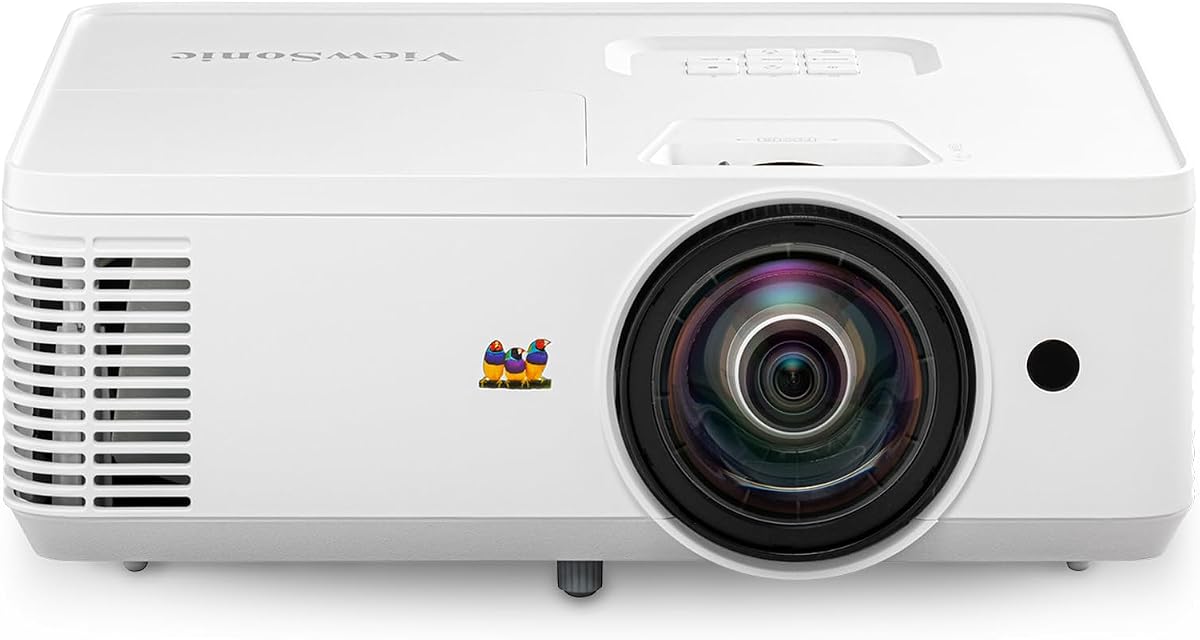
The ViewSonic PS502W uses short throw technology to project large images in tight spaces. With a 0.5 throw ratio it can create a 100-inch image from just 4.5 feet away. This minimizes shadows from teachers moving in front of the screen.
We may earn a commission when you buy through this link, at no additional cost to you.
Its 4000 lumens brightness ensures images stay visible during daytime sessions without closing blinds. Dual HDMI ports simplify connecting multiple devices simultaneously. Vertical auto-keystone correction helps achieve a perfectly squared display easily.
Short throw projectors can be more expensive due to specialized lens technology. The throw distance limits some installation options compared to standard projectors.
Ideal for small classrooms or crowded rooms where traditional projectors would cast shadows. It maximizes limited floor space while delivering large clear visuals for lessons.
Projects big screens from short distances perfect for tight rooms.
Avoids blocking light beam by staying further from the screen.
We may earn a commission when you buy through this link, at no additional cost to you.
Selecting the right visual aid requires understanding your classroom environment and teaching style. The following factors will help you narrow down options to find the most suitable device.
Higher resolution ensures that text and small details on documents remain readable when projected. Look for models offering at least 1080p or 4K support to maintain clarity during lessons. Poor resolution can make handwriting or diagrams difficult for students to read from a distance.
Prioritize models with high megapixel sensors if you frequently show detailed texts or artwork.
Modern classrooms use a mix of laptops tablets and mobile devices so versatile connectivity is key. Check if the device supports USB HDMI or wireless connections like Wi-Fi for seamless integration. Some older projectors may only offer VGA which limits compatibility with newer computers.
Ensure the projector connects easily to your existing display system to avoid setup hassles.
Classroom lighting varies greatly and some projectors struggle in bright environments. High brightness measured in lumens helps ensure visibility even with overhead lights on. Document cameras with built-in LEDs also help illuminate the subject area regardless of room light.
Select a device with high lumens if your classroom has large windows or bright artificial lights.
Teachers need devices that are intuitive to operate without lengthy technical training. Plug-and-play models reduce the time spent on configuration before class starts. Look for physical buttons on the camera for quick adjustments when using software might be slow.
Simple controls and automatic features like auto-focus make daily use much more efficient.
Standard paper sizes range from Letter to A3 and you must ensure the camera covers what you teach. Larger sensors accommodate spreadsheets or science diagrams without needing to cut them apart. Some models specify a maximum viewing area that should match your typical materials.
Check the maximum shoot area to confirm it fits your largest common documents comfortably.
Classroom equipment undergoes heavy daily use so robust construction is essential for longevity. Joints and stands should be tight enough to hold position without constant readjustment. Consider warranty and support options when investing in expensive projectors for long term use.
Look for reinforced stands and metal components to withstand frequent adjustments by students.
Extra tools like built-in microphones software annotation capabilities add value to your purchase. These features facilitate remote learning and interactive sessions without needing extra accessories. Some models offer free software suites that enhance basic projection with zoom and recording tools.
Identify which extras like sound or annotation matter most for your specific teaching style.
Prices for document projectors vary widely from budget-friendly cameras to premium full projectors. Determine how much you can spend before narrowing down the list of available options. While expensive models offer more features cheaper ones often meet basic classroom needs adequately.
Balance your financial limits with essential features to get the best return on investment.
Start by connecting your device to a display using the recommended cable such as HDMI or USB. Ensure the display input source matches the port used on the projector to avoid signal issues. Once connected adjust the camera height to center the document or object being shown.
Adjust brightness and focus settings before class begins to ensure optimal visibility for students. For cameras with built-in lights turn them on if the room is dim or the document is dark. Use the focus buttons to sharpen details on the screen before presenting content.
Clean the lens gently with a microfiber cloth to avoid scratches during storage or transport. Store the device in a dry cool place when not in use to protect electronic components. Regularly check all joints and screws on stands to maintain stability over time.
Yes many document cameras and projectors are compatible with interactive whiteboards. They allow teachers to display text directly on the board for annotation. Always verify compatibility with your specific whiteboard model before purchasing to ensure seamless integration.
Some models require a computer while others like standalone projectors do not. Cameras usually plug into a PC or Mac but some support HDMI directly to projectors. Check the product specs to confirm if a host computer is mandatory for your needs.
Wireless connectivity allows teachers to move freely around the room during lessons. It eliminates cable clutter which can be a safety hazard in busy classrooms. Wireless models are especially useful for distance learning where mobility is important for engagement.
Use a soft dry microfiber cloth to gently wipe the lens surface in circular motions. Avoid using harsh chemicals or paper towels that could scratch the coating on the lens. Always power off the device before cleaning to prevent accidental damage or electrical issues.
Document cameras offer higher resolution and digital flexibility compared to overhead projectors. They allow for easier zooming capturing of video and integration with computers. Overhead projectors are cheaper and simpler but lack modern digital features and resolution capabilities.
For clear text and diagrams aim for at least 1080p or Full HD resolution. Higher resolutions like 4K ensure fine details remain sharp on larger screens. Always check the native resolution of the projector to avoid blurry output in bright classrooms.
We have reviewed ten top models that range from budget cameras to premium projectors for classrooms. Each device offers unique strengths such as high resolution wireless freedom or standalone simplicity. Choosing the right one depends on your specific classroom size budget and teaching style.
Prioritize resolution and compatibility first to ensure clear visuals for all students. Also consider connectivity options like HDMI or USB to match your current classroom tech setup. Investing in a durable device will save costs on replacements and maintenance in the future.
Please remember that product prices and availability fluctuate regularly on online stores. Always verify the current price and stock status before making your final purchase decision. Our guide provides a solid foundation to help you make an informed and confident choice.