
PILSAMAS WiFi Caregiver Pager
4.1Editor score
Smart Wi-Fi app control
Wearable wristband panic button
No monthly subscription fees
This guide compares the top elderly monitoring systems for safety and dignity. Find the best fall detection, video, and alert tools for caregivers and seniors
Ensuring the safety of older adults requires reliable tools that respect their independence. Modern elderly monitoring systems offer peace of mind without compromising dignity or comfort for those aging in place.
We evaluated ten leading solutions based on ease of use, range, alert reliability, and privacy features. Our analysis focuses on systems that balance proactive safety with minimal disruption to daily life.
Each pick highlights specific strengths like fall detection, video clarity, or wireless range. Note that availability and pricing may shift, so verify current details before making your final selection for home care.
4.1Editor score

4.4Editor score

3.8Editor score
The following table provides a side-by-side comparison of the ten systems reviewed in this guide. Each entry lists key specifications to help you quickly identify the right fit for your specific caregiving needs.






The Lunderg Wireless Early Alert Bed Alarm System stands out for its focus on dignity and early detection. It uses a wireless pager to alert caregivers before a senior leaves bed. This approach aligns with modern safety guidance while avoiding restraints.
We may earn a commission when you buy through this link, at no additional cost to you.
Its patented PreRise technology places the sensor at hip level rather than shoulders to reduce false alarms. The system requires no Wi-Fi or app, making it easy to set up and use. Caregivers get peace of mind with a device that respects independence.
While the range is generous at up to four hundred feet, environmental factors can influence performance. The pad is durable and easy to clean, though batteries are not included in the box. These minor trade-offs are acceptable for the safety and privacy it provides.
This system is ideal for families prioritizing dignity and reliable fall prevention at home. It offers a straightforward solution for monitoring seniors without complex technology. We recommend it as a top choice for proactive and respectful care.
Federal guidance classifies wired bed alarms as potential restraints so this wireless pager alternative avoids that issue.
No app or Wi-Fi configuration is needed which makes installation quick for tech hesitant users.
We may earn a commission when you buy through this link, at no additional cost to you.
The Nomo Medical Alert System offers a full security setup with a Smart Hub and wearable tags. It provides reliable fall detection and emergency alerts through secure WiFi. This makes it suitable for seniors who need comprehensive monitoring at home.
We may earn a commission when you buy through this link, at no additional cost to you.
Two-way voice communication ensures clear contact during emergencies without needing a landline. The app tracks movement and sends notifications to a trusted care circle. Setup is plug-and-play with no hidden fees or technician visits required.
Keep in mind that while there is a thirty-day trial, ongoing protection requires a subscription. The system relies on home internet which might be a constraint in areas with weak signals. These are manageable considerations for the advanced features offered.
This kit works well for families wanting a modern replacement for traditional life alert systems. It balances ease of use with robust safety features. We suggest it for households already equipped with stable internet connectivity.
The kit includes extenders and tags to ensure thorough coverage throughout the house.
Movement patterns are tracked to help identify potential risks before they become emergencies.
We may earn a commission when you buy through this link, at no additional cost to you.
This elderly monitor with camera delivers video and audio without needing a Wi-Fi connection. It features a clear two-way talk system and an SOS button for urgent help. The design prioritizes privacy and simplicity for seniors and patients.
We may earn a commission when you buy through this link, at no additional cost to you.
Infrared night vision ensures visibility in total darkness and temperature alerts help prevent health issues. Medication reminders can be set for specific intervals which aids those with memory challenges. The portable screen allows caregivers to check in from anywhere in the home.
The twenty-eight inch screen is compact but might feel small for extended viewing. Battery life depends on usage though the VOX mode helps conserve power. These limitations are minor compared to the privacy benefits of a direct connection.
It is a strong choice for users who value security and ease of use over smart home integration. The system is ready to use out of the box without extra setup. We recommend it for private monitoring at home.
Using FHSS technology ensures the video feed stays within the home network without internet exposure.
Multiple buttons allow seniors to signal for help with water or movement needs easily.
We may earn a commission when you buy through this link, at no additional cost to you.
The PILSAMAS WiFi Caregiver Pager offers smart alerts at a budget-friendly price. It connects to home Wi-Fi to send app notifications when a call button is pressed. This includes a wearable wristband for on-the-go protection and peace of mind.
We may earn a commission when you buy through this link, at no additional cost to you.
Users can customize ringtones and volume through the app for quick device identification. The system has no monthly fees making it cost-effective for long-term use. It works well for homes and clinics where quick response is essential.
The wristband is adjustable and hypoallergenic which supports all-day comfort. However full SMS and email alerts require a subscription which adds to the cost. This is a minor trade-off for the otherwise free lifetime updates.
This solution is ideal for caregivers wanting flexible monitoring without recurring expenses. It bridges the gap between simple call buttons and full smart home systems. We recommend it for those looking for affordable and reliable alerts.
The flexible design allows you to place buttons anywhere without worrying about wiring.
Real-time status tracking helps ensure the system is always ready when needed.
We may earn a commission when you buy through this link, at no additional cost to you.
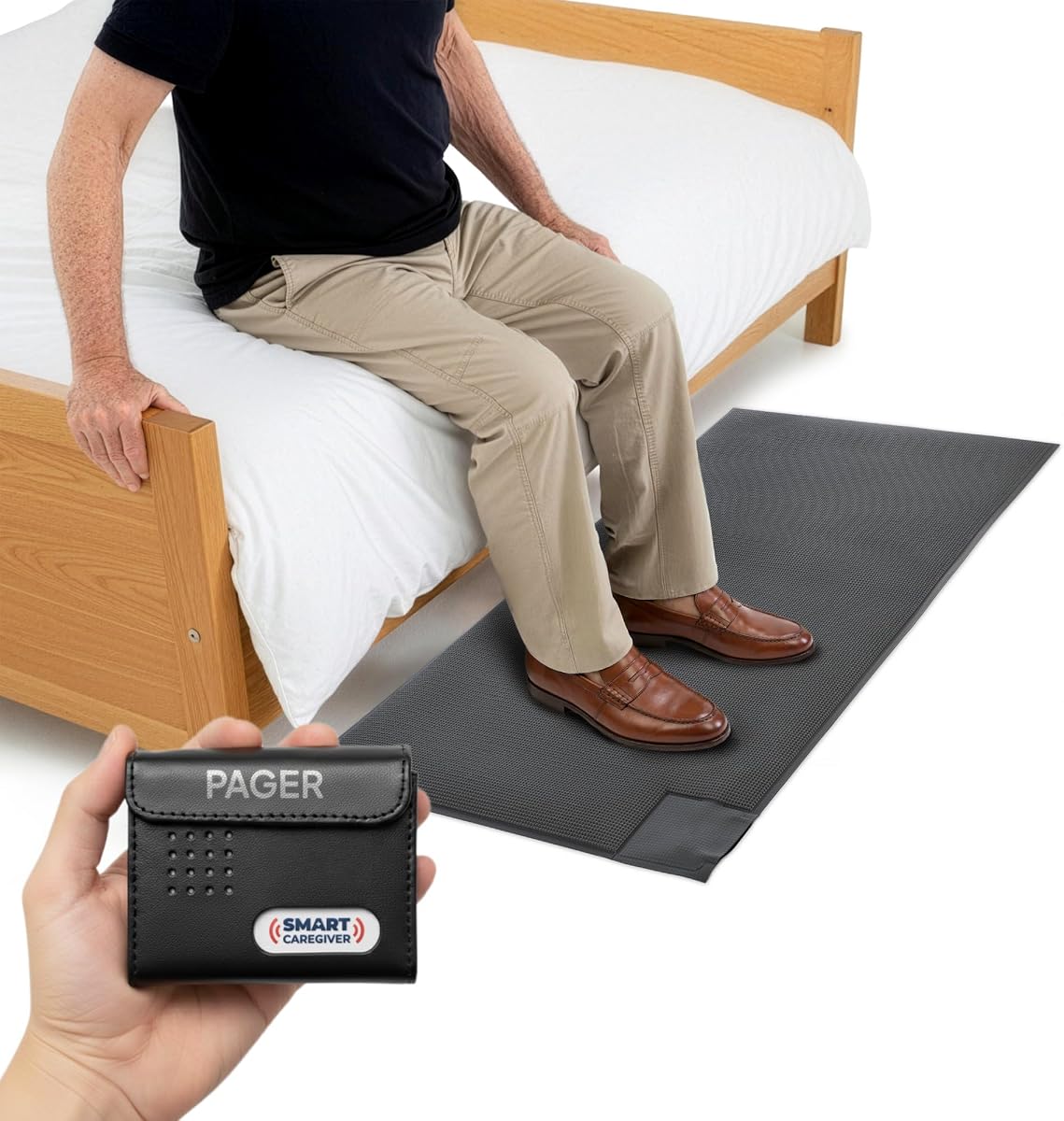
This wireless floor mat alarm alerts caregivers when a senior steps on the mat near a bed or door. The pager provides sound or vibration alerts up to three hundred feet away. It helps prevent falls and wandering without disturbing the patient.
We may earn a commission when you buy through this link, at no additional cost to you.
The system is easy to set up and pairs with other Smart Caregiver devices for expanded monitoring. Caregivers can focus on tasks knowing they will be alerted if movement occurs. The mat is durable and sized for standard bedside placement.
Batteries for the pager are not included so plan to purchase AA cells separately. The mat may shift slightly if stepped on roughly but this rarely affects function. These are small issues for such a robust safety tool.
It is a great addition for patients prone to wandering or night wandering risks. The silent alerts mean peace for the patient while keeping staff informed. We suggest it for home and facility use alike.
Place the mat by the bed or exit door to alert before an exit occurs.
The pager can monitor multiple devices allowing for comprehensive room coverage.
We may earn a commission when you buy through this link, at no additional cost to you.
The SecuLife pendant provides active protection with fall detection and GPS tracking. Alerts go directly to family contacts rather than a call center for faster response. It supports two-way calling to communicate clearly during any emergency.
We may earn a commission when you buy through this link, at no additional cost to you.
Features like geofence zones allow you to define safe areas and get notified if the user leaves. The device is water resistant and offers up to six days of battery life. This makes it suitable for daily wear and active seniors.
A monthly subscription is required to keep all safety and tracking features active. It also depends on cellular network coverage which may vary by location. For many users these are reasonable costs for continuous and real-time safety.
This pendant is a strong choice for seniors who need reliable help outside the home. The direct contact model reduces wait times and keeps loved ones involved. We recommend it for active users with family support.
SOS notifications bypass call centers so family members are contacted immediately during an alert.
GPS tracking ensures you know the user location at all times for better coordination.
We may earn a commission when you buy through this link, at no additional cost to you.
This portable video monitor provides a secure connection without using Wi-Fi or apps. It includes a call button so seniors can reach for help when needed. The monitor is rechargeable and works as a standalone safety tool.
We may earn a commission when you buy through this link, at no additional cost to you.
Caregivers can move around the house while keeping an eye on the senior via the portable screen. Infrared night vision allows clear viewing in dark rooms. The system is ready to use with a simple plug and play setup.
Battery life on the camera may require daily charging for continuous overnight use. It lacks app features so remote viewing outside the home is not possible. These limits are acceptable for a local private monitoring solution.
It suits families wanting a straightforward and secure way to keep tabs on elders. The simplicity makes it accessible for users who prefer not to deal with internet. We suggest it for room-specific supervision.
No app or internet means fewer steps and less confusion for daily use.
Included buttons offer specific alerts for bathroom or water needs.
We may earn a commission when you buy through this link, at no additional cost to you.
This camera enables one-touch video calls that help reduce loneliness for aging parents. It rings like a phone so family members answer quickly. Physical privacy mode lets you rotate the lens to cut the feed entirely.
We may earn a commission when you buy through this link, at no additional cost to you.
Built-in alerts detect loud crashes or cries for help and notify via app. You can use local storage for continuous recording without monthly fees. Family photos can be shared to display as a screensaver for comfort.
The system depends on a stable Wi-Fi connection and a constant power source. Some users may prefer battery backup but this is not included. For the comfort it offers these are minor drawbacks to consider.
It is a thoughtful choice for maintaining connection while ensuring safety. The ease of use and privacy controls make it welcoming for seniors. We recommend it for families focused on emotional and physical support.
Instant video calls let seniors see familiar faces easily without smartphones.
The physical lens rotation ensures no digital hack can view the private space.
We may earn a commission when you buy through this link, at no additional cost to you.
This system ensures private monitoring with a secure FHSS signal that needs no internet. It includes a camera with night vision and a one-press SOS button for help. A temperature sensor adds alerts for room conditions that matter.
We may earn a commission when you buy through this link, at no additional cost to you.
Caregivers can make quick checks using the portable receiver which fits in a pocket. The screen allows detailed checks via zoom and the design supports daily alerts for tasks like drinking water. It is a practical all-in-one care product.
The zoom is limited compared to high-end units but works for basic checks. Without app support you cannot view feeds remotely on a phone. These limits are acceptable for users who value local and private monitoring.
It serves well as a simple and secure tool for dementia patients or those with limited mobility. The setup is ready to use with no tech steps. We recommend it for focused room monitoring.
Operating on a dedicated signal ensures no internet-based risks affect the monitoring.
Built-in alerts prompt seniors to move or drink water throughout the day.
We may earn a commission when you buy through this link, at no additional cost to you.
This wireless motion sensor alerts a pager when movement occurs near a bed or door. It allows caregivers to monitor movement remotely without loud noises in the room. The system helps prevent falls and wandering effectively for patients.
We may earn a commission when you buy through this link, at no additional cost to you.
The motion detector is mountable with an adjustable bracket for flexible placement. The pager provides alerts up to three hundred feet away for convenient monitoring. Setup is simple with included mounting options and a clear guide.
Batteries for both the pager and sensor are included but may need replacement later. The unit focuses on single-point detection so multiple sensors are needed for larger areas. These factors make it a solid basic tool for safety.
It is a practical choice for facilities or homes needing reliable movement alerts. The ability to remove alarm noise helps maintain comfort for patients. We suggest it for users seeking basic and effective detection.
The pager range lets caregivers attend to other tasks while staying informed.
No wiring is needed so placement can be adjusted as patient needs change.
We may earn a commission when you buy through this link, at no additional cost to you.
Selecting the right system depends on the specific risks involved and the comfort levels of those being monitored. These factors help narrow down the best options for your situation.
Many systems rely on Wi-Fi to send alerts to phones or cloud services. This offers remote access but requires stable internet and raises privacy concerns for some users. Direct wireless connections avoid these issues and work independently of home networks.
Choose a system with a secure direct link if privacy and reliability are top priorities over remote access.
Alerts can be loud alarms or silent vibrations on a pager. Loud noises can startle residents and disrupt sleep which may cause agitation. Silent or vibrating alerts keep environments calm while still informing caregivers promptly.
Silent alerts are generally better for maintaining a peaceful home environment and protecting dignity.
Sensors can be placed on the bed floor or door to detect movement patterns. A bed pad might alert when someone shifts whereas a floor mat detects when they exit. Placement influences how early you are warned and the types of false alarms you might get.
Select sensors based on where the risk happens whether it is rising from a bed or exiting a room.
Fall detection uses movement patterns to identify when a person falls and needs help. This feature is crucial for seniors living alone who may not be able to reach a call button. Ensure the device offers accurate detection to avoid missed alerts.
Prioritize systems with proven fall detection if your loved one has a history of falls or health conditions.
Long battery life means fewer interruptions for charging and more consistent protection. Devices that last multiple days reduce the risk of gaps in coverage during high-risk times. Consider how often charging aligns with your daily routine and needs.
Look for devices that offer at least several days of battery to maintain reliable operation.
Complex apps or menus can discourage seniors from using the device properly. Simple buttons and clear interfaces make it easier to call for help or interact with the system. The device should be intuitive for both seniors and their caregivers.
Choose options that require minimal technical knowledge to operate day to day.
Some systems require monthly fees for monitoring services or connectivity. Others offer free use without ongoing costs which saves money over time. Evaluate what you need versus what you can afford for long term budget planning.
Consider no fee systems if you prefer upfront costs over recurring expenses.
Many seniors spend time in the shower or bath where accidents can happen. Water resistant designs ensure the device works safely in humid environments without failing. This feature is vital for continuous coverage throughout the day.
Select water resistant devices if your senior spends time in wet areas regularly.
Start by placing sensors where they are most likely to detect movement without obstruction. For floor mats ensure they lie flat so pressure triggers the alarm correctly every time. For bed sensors adjust the padding to fit the mattress comfortably and securely.
Test the connection and alert volume regularly to confirm the pager responds when triggered. If you use a wearable tag keep the charging port clean and ensure the battery is topped up. A simple routine check once a week helps prevent surprises.
Keep the base units and screens in locations that are easily accessible for everyone. Avoid placing equipment near water or direct heat sources to protect internal components. Following these care steps keeps your system running smoothly for years to come.
Not all systems require Wi-Fi. Many use secure direct wireless signals or dedicated cellular connections to operate. This allows you to choose based on whether you prefer internet-based features or privacy-focused local monitoring.
Most systems offer a range of at least three hundred feet through standard walls. This allows caregivers to move through most single-story homes while staying connected to the alarm. Range can vary slightly depending on your home layout and materials.
Yes most options are designed for plug-and-play setup without wiring. You simply place the sensor and power the pager then test the connection. No technical knowledge is needed so you can set it up yourself in minutes.
Yes some models include wearable buttons or pendants that attach to clothing or necklaces. These are lightweight and comfortable for all-day wear to ensure help is always close by. They work well for active seniors who may move around the home.
If you choose a Wi-Fi dependent model alerts may fail until service returns. However many systems use direct wireless links that work independently of the internet. Always check the product details to confirm connectivity requirements before purchasing.
Some services connect to central monitoring centers that can alert emergency responders. Others send notifications directly to family members or caregivers. Check the provider's details to understand who receives the alert when an emergency occurs.
We have reviewed ten top systems that offer distinct benefits for fall prevention and caregiver peace of mind. The Lunderg Wireless Early Alert stands out for dignity and privacy while the PILSAMAS offers a budget-friendly smart option.
Prioritize systems that balance proactive safety with simplicity to ensure consistent use by seniors. Look for features like long battery life and clear alerts to maintain reliable protection around the clock.
Remember that prices and availability can shift so check current listings before buying. We hope this guide helps you find the right tool to support aging in place with confidence and safety.