
Logitech G F310 Wired Gamepad Controller Console
4.4Editor score
10 programmable buttons
Floating D-pad design
Six-foot USB cable
This guide compares the top fightpads for PC to help you choose the best controller for fighting games based on build quality and performance.
Choosing the right fightpad for your PC can transform your gaming experience by offering precise controls and durable construction designed for competitive play.
We evaluated ten top-rated controllers based on their build quality, button responsiveness, compatibility with popular titles, and overall value for serious gamers seeking accuracy.
Each pick highlights key features and potential trade-offs so you can find the perfect match for your setup while keeping in mind that prices may vary over time.
4.4Editor score

4.4Editor score

4.2Editor score
The following table provides a side-by-side overview of each controller to help you quickly compare their key specifications and platform support before making your final decision.



The HORI Fighting Commander OCTA stands out as a top-tier option for PC gamers who demand tournament-grade performance and official licensing from major console manufacturers.
We may earn a commission when you buy through this link, at no additional cost to you.
It features Micro Switch buttons for crisp actuation and a short throw analog stick with an 8-way gate to maximize execution speed and accuracy during intense matches.
While it lacks wireless functionality and comes at a premium price point, the build quality and customizable settings via the companion app justify the investment for serious players.
We recommend this controller for those who want a reliable, officially sanctioned fightpad that delivers professional-level precision across PlayStation and PC platforms.
The inclusion of Micro Switch buttons ensures that every input is registered instantly without the latency often found in standard membrane controllers.
Users can adjust D-Pad sensitivity and save specific profiles to fine-tune the controller to their exact playing style and game preferences.
We may earn a commission when you buy through this link, at no additional cost to you.
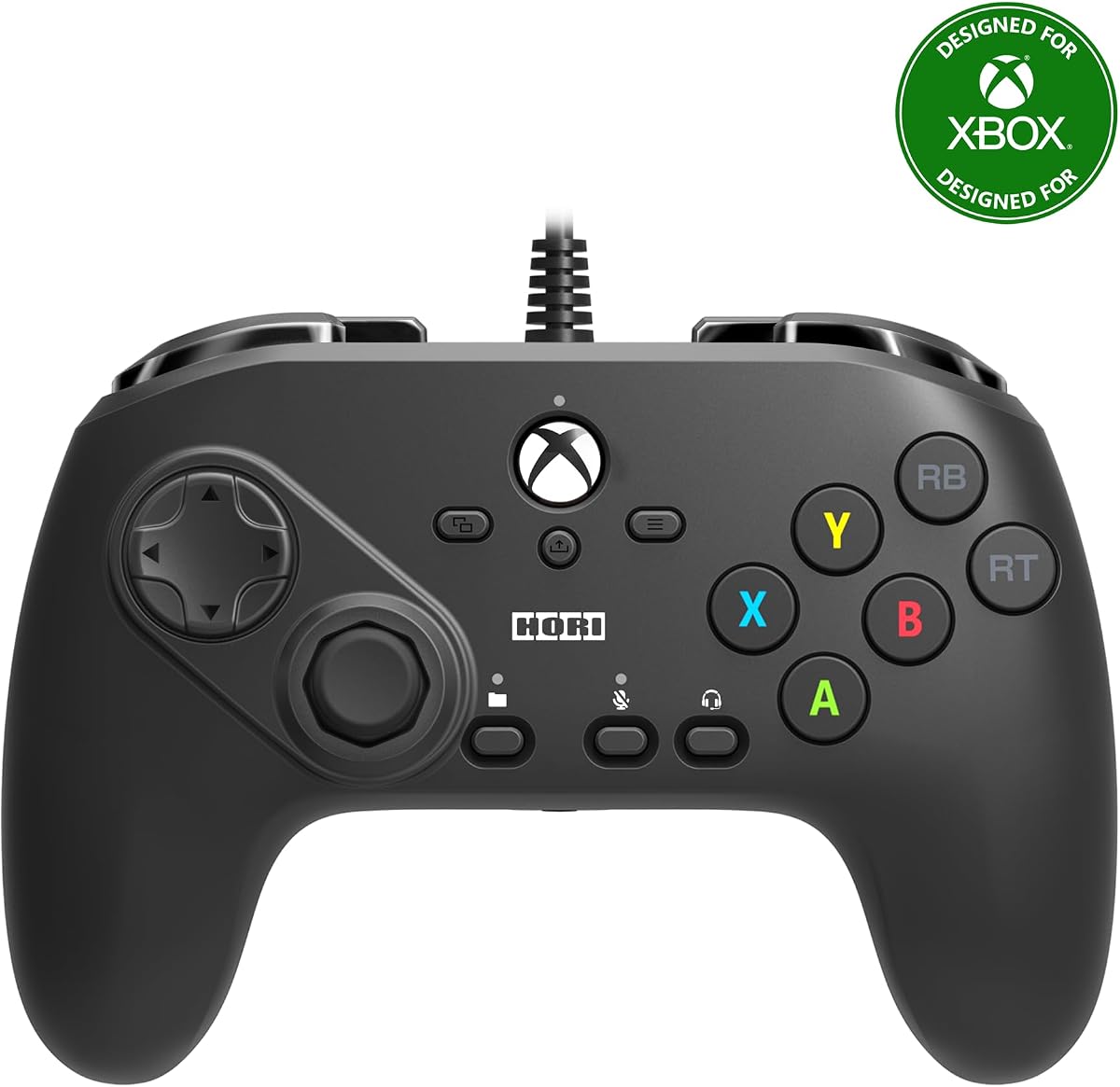
This controller is specifically designed for Xbox Series X|S and Windows 10 PC users looking for a reliable fightpad with official Microsoft licensing.
We may earn a commission when you buy through this link, at no additional cost to you.
It allows you to customize and save up to four profiles using the companion app, enabling you to switch between different game configurations quickly with a dedicated button.
While it shares many features with the PlayStation version, some users may find the overall build quality and feedback less consistent than other models in the lineup.
This is a solid choice for Xbox owners who need a dedicated fighting controller that integrates seamlessly with their existing console ecosystem.
The ability to save four distinct profiles means you can have optimized settings for different games without needing to reconfigure controls manually.
Officially licensed by Microsoft, this device ensures maximum compatibility with Xbox consoles and Windows PCs for a hassle-free gaming experience.
We may earn a commission when you buy through this link, at no additional cost to you.
The 8Bitdo M30 brings a classic design to modern platforms with official Xbox licensing and a six-button layout ideal for retro fighting games.
We may earn a commission when you buy through this link, at no additional cost to you.
It supports the 8BitDo Ultimate Software for advanced customization and includes a custom profile switch button to change between three stored configurations on the fly.
The USB-C wired connection ensures a virtually lag-free experience, while the 3.5mm audio jack allows you to plug in a headset for voice chat.
This controller is perfect for players who appreciate vintage aesthetics but still want reliable connectivity and customization on their PC or Xbox console.
Inspired by the Sega Mega Drive controller, this model offers a nostalgic feel that appeals to fans of classic arcade and console gaming.
Despite its vintage look, it uses a modern USB-C connection for stable and fast data transfer with no compatibility issues on Windows.
We may earn a commission when you buy through this link, at no additional cost to you.
The DOYOKY Leverless Controller is a powerhouse for competitive players who want complete control over their input mechanics without needing to solder components.
We may earn a commission when you buy through this link, at no additional cost to you.
It features hot-swappable mechanical switches that you can change in seconds, along with a built-in OLED screen that shows your current settings at a glance.
All customization happens via a web-based interface, meaning you can adjust buttons and macros directly in your browser without installing any third-party software.
This controller is ideal for enthusiasts who value modularity and transparency, offering tournament-level depth with a user-friendly setup process for all platforms.
Swap switches instantly to change tactile feedback or repair worn keys without tools, keeping your setup fresh and responsive over time.
The OLED screen provides instant visual confirmation of your current mode, ensuring you are always aware of how your controller is configured.
We may earn a commission when you buy through this link, at no additional cost to you.
The Akko FUNBOX represents the pinnacle of fightpad technology with its next-generation Hall Effect switches that eliminate physical contact and wear over time.
We may earn a commission when you buy through this link, at no additional cost to you.
Its rapid trigger system allows for adjustable actuation points from 0.1mm to 2.8mm, giving competitive players precise control over how light or firm their inputs are.
A full-color LCD screen and aluminum multi-function dial provide intuitive access to settings, making it easy to tweak SOCD rules and macros without diving into menus.
This premium controller is worth the investment for serious competitors who want the absolute fastest response times and the most durable build available on the market.
Magnetic switches ensure zero wear and tear, meaning your controller will maintain consistent performance for years without mechanical degradation.
Adjustable actuation lets you optimize input speed for specific characters or moves, providing a distinct edge in high-level tournament matches.
We may earn a commission when you buy through this link, at no additional cost to you.
This special edition fightpad is designed specifically for Windows PC and features official licensing from Bandai Namco Entertainment to celebrate the release of TEKKEN 8.
We may earn a commission when you buy through this link, at no additional cost to you.
It comes with top-quality components including microswitch buttons and a short throw left analog stick with an 8-way gate for increased accuracy during gameplay.
The inclusion of an analog slide pad helps with in-game navigation and menu selection without needing to take your thumbs off the stick.
Fans of the TEKKEN series will appreciate this controller for its thematic design and professional-grade layout tailored for serious fighting game enthusiasts.
Officially licensed by Bandai Namco, this controller ensures compatibility and support from the game developers for the best possible in-game experience.
The analog slide pad adds a layer of convenience for moving through menus quickly without interrupting your focus on the main gameplay screen.
We may earn a commission when you buy through this link, at no additional cost to you.
The HORI Wireless Fighting Commander OCTA Pro brings the freedom of wireless play to your PC setup without sacrificing the tournament-grade features of the wired versions.
We may earn a commission when you buy through this link, at no additional cost to you.
It features programable rear buttons and a swappable D-pad, allowing you to customize the controller to your exact hand size and grip preferences.
While wireless technology has improved significantly, competitive players should note that wired options often provide slightly lower latency for the most critical inputs.
This controller is perfect for players who prioritize convenience and setup flexibility but still demand the high-quality build and licensed features of the HORI brand.
Eliminate cable clutter and sit further from your PC with a reliable wireless connection that supports long gaming sessions comfortably.
The swappable D-pad and rear buttons ensure that the controller adapts to your play style rather than forcing you to adapt to the hardware.
We may earn a commission when you buy through this link, at no additional cost to you.
This renewed version of the HORI PlayStation 5 Fighting Commander OCTA offers a cost-effective way to get a tournament-grade fightpad for your PC console setup.
We may earn a commission when you buy through this link, at no additional cost to you.
It features an eight-button layout and touchpad along with programmable macros to streamline complex moves and actions during competitive matches.
Since it is a renewed product, it may show minor cosmetic signs of prior use, but it should function at the same standard as a brand-new unit.
This is a great option for budget-conscious gamers who want access to high-end features without paying full retail price for a new controller.
Buying a renewed model can save you money while still providing access to the premium features and build quality of a top-tier fightpad.
Despite being renewed, this controller retains all the key functionality of the new model including official licensing and macro capabilities.
We may earn a commission when you buy through this link, at no additional cost to you.
The Logitech G F310 is an accessible entry point for PC gamers who want a versatile gamepad without breaking the bank.
We may earn a commission when you buy through this link, at no additional cost to you.
Its unique floating D-pad design sits on four switches instead of a single pivot point, making it responsive to quick changes in direction which is helpful for fighting games.
While it does not have dedicated macro features built-in, the Profiler software allows you to program keyboard and mouse commands for games that lack gamepad support.
This controller is perfect for casual players or beginners who want a reliable and affordable option that works well with a wide range of titles.
The floating design reduces friction and allows for quicker directional inputs, providing a slight advantage in competitive scenarios.
Works with popular new titles and old favorites, ensuring you have a versatile controller for your entire PC library.
We may earn a commission when you buy through this link, at no additional cost to you.
The HORI Fighting Stick Mini offers a compact arcade experience for PC and console users who prefer a traditional joystick over a flat fightpad.
We may earn a commission when you buy through this link, at no additional cost to you.
It features a classic 8-button layout and a proprietary joystick with V-cut housing to ensure smooth and precise movements during every match.
With its lightweight and portable design, it is easy to transport to local tournaments or store on a desk without taking up too much space.
This controller is ideal for players who have always loved the feel of arcade sticks and want a travel-friendly version for their home setup.
Designed to be portable, this mini stick allows you to take your competitive setup anywhere without the bulk of a full-sized arcade machine.
The traditional 8-button layout ensures that you can seamlessly switch from arcade cabinets to your home PC without learning new configurations.
We may earn a commission when you buy through this link, at no additional cost to you.
Selecting the right fightpad requires understanding several key factors that affect performance and comfort during gameplay.
Always verify that the controller you choose is officially licensed or explicitly compatible with your PC operating system and any consoles you own.
Checking this before purchasing will prevent driver issues and ensure you get full access to all button functions.
Decide whether you prefer a traditional D-pad layout or a leverless box design based on your familiarity with arcade controls.
Micro switches and mechanical keys generally offer faster response times than standard rubber membrane buttons used in generic controllers.
Wired controllers provide the most stable connection with minimal input lag, which is crucial for competitive fighting games.
Wireless options offer convenience but may introduce slight latency or require frequent charging during long gaming sessions.
Look for reinforced cables and high-quality materials that can withstand the intensity of daily play and tournament use.
A sturdy base with rubber feet ensures the controller stays stable on your desk during rapid and forceful inputs.
Advanced controllers often allow you to remap buttons or save profiles for different games to suit your specific play style.
Hot-swappable switches provide the ability to change the physical feel of buttons without needing soldering skills.
Ensure the controller fits comfortably in your hands and allows your fingers to reach all buttons without strain.
A well-balanced weight distribution prevents fatigue during long play sessions and keeps your hands relaxed.
Set a budget that reflects your commitment level, ranging from affordable basic pads to premium tournament-grade units.
Higher priced models often include better materials and advanced features that justify the cost for serious competitors.
Check the manufacturer warranty terms and customer support availability in case the device fails or develops issues.
Reliable support can save you time and money if you encounter technical problems with your controller.
Begin by connecting your fightpad to your PC via USB and installing any necessary drivers provided by the manufacturer.
Download the companion software if available to configure button mappings and save custom profiles for your favorite games.
Keep your controller clean by wiping down the buttons and casing with a soft dry cloth to prevent dust buildup and maintain button responsiveness.
Yes, fightpads offer specialized layouts like six-button configurations and higher quality components such as micro switches that are essential for executing complex moves in fighting games.
Most modern fightpads work plug-and-play, but software is often available to help you remap buttons and save custom profiles tailored to specific games.
Absolutely, many fightpads designed for PlayStation are officially licensed to work on Windows PCs or have built-in support for standard PC input protocols.
A fightpad is a handheld controller with buttons similar to an arcade machine, while a fight stick is a large upright cabinet with a lever and buttons.
Regular cleaning and proper storage help reduce wear, but choosing a controller with durable switches and sturdy analog sticks minimizes drift issues.
Modern wireless technology has improved, but wired connections are still preferred by pros for guaranteed low latency and zero lag during matches.
Whether you are looking for the versatility of a standard pad or the precision of a leverless controller, there is an option on this list for every type of player.
Prioritize build quality and compatibility features that match your specific gaming needs to ensure you get the most out of your investment.
Remember to check current prices and availability before buying as market conditions can change frequently for gaming hardware.