
Stylus Pen for Touchscreen iPad
4.5Editor score
3-in-1 tip options
Wide device compatibility
Replaceable tips included
This guide compares the top ten fine point stylus pens for touch screens, evaluating accuracy, compatibility, and comfort to help you choose the best tool for
Finding the right fine point stylus can transform how you interact with your touchscreen devices. Whether you are taking notes or drawing, a precise tool ensures accuracy and reduces screen smudges.
We compared ten top-rated stylus pens based on tip precision, compatibility across devices, and user comfort. Our analysis focuses on passive and active options to help you find the perfect match.
Each pick highlights key features, pros, and cons to guide your decision. Prices and availability change frequently, so check the latest details before purchasing your next stylus pen.
4.5Editor score

4.6Editor score

4.4Editor score
The following table provides a side-by-side overview of all ten fine point stylus options. Compare their key specifications to find the best fit for your specific needs and devices.

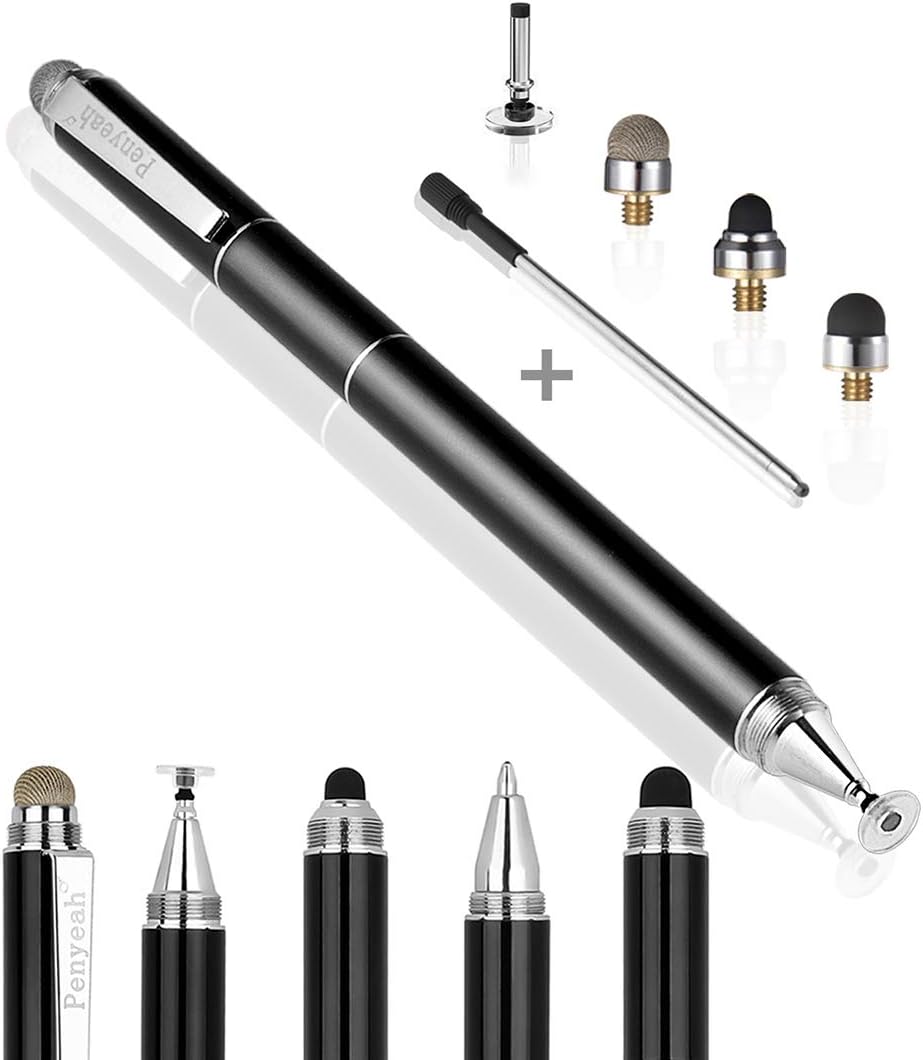


This 3-in-1 stylus pen offers exceptional value for users seeking precision across multiple devices. With a rating of 4.5 stars, it stands out for its ability to switch between different tips easily.
We may earn a commission when you buy through this link, at no additional cost to you.
The transparent disc tip allows you to see exactly where you are writing, which improves accuracy for detailed tasks. The rubber tips provide a softer touch, ideal for scrolling or gaming on various screens.
While it lacks advanced features like palm rejection, the flexible writing angle helps minimize interruptions during use. The replaceable tips extend the product life, making it a practical long-term choice.
Budget-conscious buyers or families needing multiple pens will appreciate this versatile option. It is a reliable choice for general touchscreen interaction without requiring complex setup or power sources.
The three distinct tips cater to different needs, from fine writing to smooth gaming navigation.
Works seamlessly with iPads, iPhones, Android devices, and even gaming consoles like the Nintendo Switch.
We may earn a commission when you buy through this link, at no additional cost to you.
Rated 4.6 stars, this MEKO stylus is a top choice for those who prioritize accuracy. The transparent disc tip ensures clear visibility of the contact point for precise control.
We may earn a commission when you buy through this link, at no additional cost to you.
Users love the dual-sized rubber tips that prevent screen scratches and reduce fingerprints. The protective cap keeps the disc tip safe when not in use, extending the product's lifespan.
The package includes extra replacement tips, ensuring you can keep using it without interruption. It is easy to switch tips, making it adaptable for different tasks like drawing or browsing.
For anyone looking for a reliable passive stylus, this model offers excellent performance. It is ideal for students and professionals who need consistent touch accuracy without the hassle of charging.
The silicone material resists wear and aging, ensuring smooth gliding on screens over time.
Extra tips and a protective cap make this package a comprehensive solution for daily use.
We may earn a commission when you buy through this link, at no additional cost to you.
This active stylus brings a premium feel to your iPad experience with magnetic attachment and fast charging. A rating of 4.4 reflects its strong performance for users needing advanced features.
We may earn a commission when you buy through this link, at no additional cost to you.
The magnetic design keeps the pen securely attached to your device, reducing the risk of loss. The one-touch switch makes it easy to turn on and off without navigating menus.
While it only supports specific iPad Pro models, the accuracy is high for drawing and note-taking. The included nibs allow you to adjust for different writing preferences.
If you want a stylus that behaves more like a true pen, this is a great investment. It is best suited for iPad Pro users who value convenience and precision in their workflow.
Securely attaches to the side of your iPad for easy access and storage.
Charges quickly and provides up to 10 hours of continuous use.
We may earn a commission when you buy through this link, at no additional cost to you.
This active pen features a 1.5mm tip designed for realistic writing and drawing. With a 4.0 rating, it provides solid performance for basic creative tasks without complex setup.
We may earn a commission when you buy through this link, at no additional cost to you.
The quick power-on capability means you can start writing instantly. The 1.5mm tip offers precision that feels more natural than standard capacitive pens.
However, it does not support pressure sensitivity, which may limit advanced artistic use. The automatic power-off helps conserve battery life during periods of inactivity.
For those needing an active stylus without Bluetooth connectivity, this is a practical option. It is well-suited for general note-taking on various popular tablets and smartphones.
Powers on in just one second, allowing you to begin tasks without delay.
Auto shutdown after 30 minutes helps extend battery life effectively.
We may earn a commission when you buy through this link, at no additional cost to you.
This unique stylus combines four tips in one device, including a ballpoint pen. Its 4.4 rating highlights its versatility for both digital and physical writing tasks.
We may earn a commission when you buy through this link, at no additional cost to you.
The metal body provides a sturdy feel, while the disc tip ensures precise digital navigation. The ballpoint pen adds utility for signing documents or taking notes on paper.
Because it is not palm-rejecting, users must be careful not to rest their hand on the screen. This is a minor trade-off for the wide range of features included.
Ideal for users who want a multi-tool in their pocket, this pen simplifies carrying multiple writing instruments. It is great for travel or office settings where convenience is key.
Combines digital stylus tips and a traditional pen for comprehensive utility.
Corrosion-resistant metal ensures the pen lasts through daily use.
We may earn a commission when you buy through this link, at no additional cost to you.
Designed with artists and students, this stylus features a fine tip for detailed work. Its 4.2 rating reflects strong performance in delivering a natural writing feel.
We may earn a commission when you buy through this link, at no additional cost to you.
At 13.3 grams, it is incredibly light, reducing hand fatigue during long sessions. The buffer unit at the tip enhances accuracy and prevents screen resistance.
You should avoid fast chargers to protect the internal chip. This careful battery management ensures the stylus remains safe and functional over time.
If you need a lightweight active pen that works on iPad and Android, this is a top contender. It balances performance and comfort for creative digital tasks.
The lightweight design makes it easy to hold for extended periods.
Buffer unit at tip improves control and smoothness during drawing.
We may earn a commission when you buy through this link, at no additional cost to you.
This 6-pack provides a cost-effective solution for offices or families. A rating of 4.6 shows high satisfaction with the build quality and functionality of these basic pens.
We may earn a commission when you buy through this link, at no additional cost to you.
The built-in clips make it easy to attach the pens to notebooks or pockets. The rubber tips are durable and smooth, ensuring a comfortable experience without scratching screens.
Since they require no batteries or apps, they are ready to use immediately. The vibrant colors help distinguish between different users or tasks easily.
Best for groups needing multiple pens, this bundle ensures you always have one on hand. It is a reliable choice for general touch interaction across various devices.
Six pens in one package save money for households with multiple users.
The built-in clip ensures the pen is never far from your device.
We may earn a commission when you buy through this link, at no additional cost to you.
This 4-pack comes with 12 extra tips, ensuring longevity. With a 4.5 rating, it balances quality and quantity for users needing reliable styluses.
We may earn a commission when you buy through this link, at no additional cost to you.
The aluminum barrel offers a premium grip compared to plastic options. The transparent disc tips allow for precise control, while rubber tips suit general navigation.
The package includes enough tips to replace worn parts quickly. This ensures your stylus remains functional without purchasing new sets frequently.
Ideal for schools or offices, this set provides consistent quality for everyone. It is also a thoughtful gift for anyone who uses touchscreens regularly.
Extra tips make this set a long-term investment for daily users.
The aluminum barrel adds a touch of elegance and durability.
We may earn a commission when you buy through this link, at no additional cost to you.
With a 4.7 rating, this bulk pack is highly rated for durability. It features 10 styluses with dual rubber tips for versatile touch interaction.
We may earn a commission when you buy through this link, at no additional cost to you.
The alloy metal body is solid and durable, making it resistant to daily wear. Each pen has two tip sizes, catering to different touch needs.
The package includes 20 replacement nibs, extending the utility of the set. This makes it an excellent value for large groups or classrooms.
Best for users who need many pens at once, this set simplifies sharing. It offers a natural writing feel without requiring complex technology.
Solid alloy construction ensures these pens can withstand heavy use.
Works with all capacitive screens for broad usability.
We may earn a commission when you buy through this link, at no additional cost to you.
This 10-piece set offers high precision with dual tips. A 4.6 rating indicates strong performance for general touch tasks across devices.
We may earn a commission when you buy through this link, at no additional cost to you.
The aluminum body provides a stylish look while protecting the screen from scratches. The tips are easy to replace, ensuring long-term usability.
With no batteries required, these pens are ready whenever you need them. The precision allows for detailed work, though it lacks active features.
Best for bulk needs, this set ensures you never run out of working styluses. It is a practical choice for families or shared office environments.
Aluminum body adds style and durability to the pen.
High sensitivity tips allow for accurate and smooth input.
We may earn a commission when you buy through this link, at no additional cost to you.
Selecting the right stylus involves balancing features, budget, and device compatibility. Use this guide to narrow down your choices effectively.
The tip determines the writing feel and precision. Rubber tips are durable and soft, while disc tips offer better visibility for detailed work. Mesh tips mimic paper, providing a natural glide.
Choose rubber for general use and disc for accuracy.
Ensure the stylus works with your specific device. Some pens are designed for iPads, while others are universal. Check for active features that require specific Bluetooth protocols.
Always verify compatibility with your tablet or phone model.
Active styluses need charging or batteries, while passive ones do not. Passive pens are ready instantly, but active ones offer better performance. Consider how often you write to decide.
Passive is best for simplicity; active is best for power.
The shape and weight affect comfort during long sessions. Look for pens with textured grips or balanced weight distribution. Metal bodies feel premium, while plastic is lightweight.
Prioritize comfort to avoid hand fatigue during use.
Tips wear out over time, so replaceable ones extend the product life. Look for packages that include extra tips. This saves money in the long run.
Ensure the tips are easy to swap without tools.
Prices vary from cheap bulk packs to premium active pens. Determine your budget early. Multi-packs offer better value for families than single pens.
Balance features with cost to find the best deal.
Active pens often support palm rejection, allowing you to rest your hand on the screen. Passive pens do not have this feature. Check if this is important for your workflow.
Essential for artists who draw directly on the screen.
Build quality affects how long the stylus lasts. Metal bodies resist damage better than plastic. Check reviews for reports of breakage or tip wear.
Invest in a sturdy build for daily heavy use.
Always start by ensuring your screen is clean. Dust or dirt can interfere with the stylus tip. Wipe your device with a soft cloth before using any stylus.
Replace the tips whenever they start to feel rough or sticky. This maintains precision and protects your screen from scratches. Keep spare tips handy for quick swaps.
For active styluses, charge them regularly. Avoid using fast chargers unless recommended. Store your stylus in a case to prevent accidental damage when not in use.
Most passive styluses work with any capacitive touchscreen device, including smartphones and tablets. However, active styluses often require specific hardware or Bluetooth support. Always check the manufacturer's compatibility list before purchasing to ensure it works with your device.
Quality styluses are designed with soft materials like rubber or silicone to prevent scratches. However, dirt on the tip can cause abrasion. Keep your stylus clean and avoid pressing too hard to protect your device screen.
Yes, a stylus is ideal for users with long nails. It allows you to interact with the screen precisely without using your fingertips. This prevents accidental smudges and makes navigation easier.
Passive styluses do not need power and simulate a finger touch. Active styluses have batteries and offer features like pressure sensitivity. Active pens are better for drawing; passive are better for general use.
Most styluses have screw-on or press-on tips. Simply twist or pull off the old tip and attach the new one. Check the product manual for specific instructions. Some models allow tool-free replacement.
Check if the screen is clean or the device is responsive. For active pens, ensure the battery is charged. Sometimes, restarting the device helps. If issues persist, try the pen on another device.
The top picks offer a range of options for every user. Whether you need a budget-friendly bulk pack or a precision active pen, there is a choice that fits.
Prioritize compatibility and tip type based on your main tasks. For accuracy, choose disc tips. For simplicity, choose passive options. Comfort matters for long sessions.
Prices and availability change frequently. Check current prices and ratings before making a final decision. We hope this guide helps you find the perfect stylus for your needs.