
GIGABYTE Radeon RX 9070 XT Gaming OC 16G Graphics Card
4.7Editor score
WINDFORCE Cooling System
Hawk Fan design
Server-grade thermal gel
This guide compares the top 10 flagship graphics cards for October 2026, evaluating performance, cooling, memory, and features to help gamers and professionals
Flagship graphics cards represent the pinnacle of visual computing technology, delivering unparalleled performance for gaming, content creation, and AI workloads. These high-end GPUs push the boundaries of what is possible with real-time rendering, ray tracing, and deep learning acceleration.
We have carefully evaluated the latest models from leading manufacturers like NVIDIA, AMD, ASUS, and GIGABYTE. Our analysis focuses on architectural advancements, thermal efficiency, memory bandwidth, and real-world performance metrics across various demanding applications and game titles.
Each product selection in this guide highlights specific strengths tailored to different user requirements and budgets. Please note that pricing and availability fluctuate frequently due to market dynamics, so verifying current details before purchasing is essential for making an informed decision.
4.7Editor score

4.8Editor score

4.4Editor score
This comprehensive comparison table outlines the key specifications and features of the top ten flagship graphics cards available in the current market to help you evaluate performance differences at a glance.





This graphics card stands out as the Editor's Choice due to its exceptional balance of performance, durability, and advanced features. Rated at 4.8 stars, it leverages the NVIDIA Blackwell architecture to deliver next-generation gaming experiences.
We may earn a commission when you buy through this link, at no additional cost to you.
The military-grade components ensure rock-solid power delivery and longevity, while the phase-change GPU thermal pad significantly improves heat dissipation under heavy loads. Axial-tech fans optimize airflow, making it ideal for sustained performance sessions.
While the 850W PSU requirement and large 3.125-slot design demand adequate system preparation, the enhanced reliability and thermal management justify these trade-offs for enthusiasts seeking stability and top-tier performance.
Gamers and creators prioritizing long-term durability and cutting-edge AI features should consider this card. It represents a highly reliable investment for those demanding consistent high frame rates and advanced rendering capabilities.
The phase-change GPU thermal pad ensures optimal performance and longevity, outlasting traditional thermal paste during intensive gaming sessions.
Rock-solid power delivery and longer lifespan are achieved through military-grade components and protective PCB coating against moisture and dust.
We may earn a commission when you buy through this link, at no additional cost to you.
This GIGABYTE model offers compelling performance for enthusiasts seeking flagship power without the highest premium pricing. Rated 4.6 stars, it integrates the Blackwell architecture and DLSS 4 for significant visual and computational gains.
We may earn a commission when you buy through this link, at no additional cost to you.
The WINDFORCE cooling system effectively manages thermals, while the 16GB GDDR7 memory provides ample bandwidth for demanding applications. PCIe 5.0 support ensures future compatibility with the latest motherboard standards.
Users may find overclocking potential limited compared to custom OC editions, and the RGB lighting is functional rather than highly customizable. However, these are minor compromises for a card that delivers consistent high-end performance.
Ideal for gamers seeking reliable 4K performance and future-ready connectivity, this card balances cost and capability well. It is a strong choice for those who value cooling efficiency and architectural advancements.
PCIe 5.0 integration ensures compatibility with next-generation motherboard standards for maximum data throughput.
The WINDFORCE cooling system maintains optimal operating temperatures even during extended gaming marathons.
We may earn a commission when you buy through this link, at no additional cost to you.
The VIPERA RTX 4090 Founders Edition remains a powerhouse for high-end gaming and professional workloads. With a 4.6 rating, it delivers exceptional performance via its 16,384 CUDA cores and advanced tensor cores.
We may earn a commission when you buy through this link, at no additional cost to you.
It supports 8K 60Hz HDR gaming and features new Flow Multiprocessors for enhanced power efficiency. The fourth-generation tensor cores and AI accelerated performance make it a top choice for AI-enhanced graphics tasks.
Power consumption is significant, requiring robust PSU support, and availability may be limited as newer models emerge. However, the sheer raw performance and proven stability make it a worthwhile option for professionals.
Professionals and hardcore gamers needing uncompromising performance should consider this model. It remains a benchmark for rendering and gaming tasks where cutting-edge power is essential.
With 16,384 CUDA cores and third-generation RT cores, this card offers top-tier rendering capabilities.
Fourth-generation tensor cores provide up to 2x AI performance for advanced upscaling and creative workflows.
We may earn a commission when you buy through this link, at no additional cost to you.
This model is distinguished by its aggressive factory overclock and robust build quality, earning a 4.6 rating. It leverages the Blackwell architecture to push performance boundaries right out of the box.
We may earn a commission when you buy through this link, at no additional cost to you.
The 2730 MHz boost clock and phase-change thermal pads ensure sustained performance during intense sessions. Auto-Extreme precision manufacturing enhances reliability, while the protective PCB coating guards against environmental factors.
The 3.6-slot design requires adequate case clearance and a powerful PSU. However, the enhanced thermal design and durability justify the physical footprint for users prioritizing performance and stability.
Enthusiasts and professionals requiring maximum out-of-the-box performance should choose this card. Its engineering focus on longevity and speed makes it a superior option for demanding environments.
An OC mode boost of 2730 MHz delivers immediate high-speed rendering and gaming capabilities.
Protective PCB coating and Auto-Extreme manufacturing ensure the card withstands dust, moisture, and debris.
We may earn a commission when you buy through this link, at no additional cost to you.
This card offers a compelling value proposition for budget-conscious gamers seeking flagship-level performance. Rated 4.7 stars, it utilizes the Radeon RX 9070 XT to deliver solid frame rates across modern titles.
We may earn a commission when you buy through this link, at no additional cost to you.
The WINDFORCE cooling system with Hawk Fan design ensures efficient heat dissipation, while server-grade thermal conductive gel maintains low temperatures. The 16GB GDDR6 memory supports high-resolution textures effectively.
While it uses GDDR6 rather than GDDR7 and lacks advanced AI features found in newer models, the performance per dollar is exceptional. It remains a strong choice for those prioritizing raw gaming power over cutting-edge specs.
Gamers on a budget who still demand high performance should consider this card. It balances cost and capability effectively, making flagship-grade gaming accessible to more users.
The Radeon RX 9070 XT chipset delivers robust gaming performance without breaking the bank.
Server-grade thermal conductive gel ensures efficient heat transfer for sustained operation.
We may earn a commission when you buy through this link, at no additional cost to you.
This card excels in small form factor builds without sacrificing essential performance features. With a 4.7 rating, it offers 767 AI TOPS and DLSS 4 support for efficient rendering tasks.
We may earn a commission when you buy through this link, at no additional cost to you.
The Axial-tech fan design and 0dB technology ensure quiet operation during light gaming, while the 2.5-slot design maximizes compatibility. Dual ball fan bearings contribute to long-term reliability.
While it may not match the raw power of higher-end models, its compact size and efficiency are unmatched. It is ideal for users with space-constrained cases requiring robust performance and silence.
Users building compact gaming PCs should prioritize this card. Its small footprint and efficient cooling make it perfect for hidden or mini-ITX setups.
The 2.5-slot design allows for greater compatibility in smaller cases while maintaining cooling efficiency.
0dB technology lets you enjoy light gaming in relative silence with reduced fan noise.
We may earn a commission when you buy through this link, at no additional cost to you.
This flagship card delivers unparalleled AI and professional capabilities, earning a 4.4 rating for its high-end specs. The 32GB GDDR7 memory handles large models and textures with ease.
We may earn a commission when you buy through this link, at no additional cost to you.
With 772 AI TOPS and DLSS 4 support, it accelerates complex workloads significantly. The Axial-tech fans and 2.5-slot design ensure it fits in various cases while maintaining cooling performance.
The high price and power requirements may limit its audience, but for professionals needing maximum memory and AI performance, it is unrivaled. The durability features ensure long-term reliability for critical work.
Professionals working with AI models and high-fidelity rendering should choose this card. Its combination of memory capacity and AI throughput sets a new standard for enthusiast GPU.
The 32GB GDDR7 memory allows for handling massive datasets and complex 3D models effortlessly.
With 772 AI TOPS, this card accelerates deep learning and machine learning workflows significantly.
We may earn a commission when you buy through this link, at no additional cost to you.
This model combines strong performance with a clean, reliable design, earning a 4.6 rating. The phase-change GPU thermal pad ensures optimal heat transfer and enhanced reliability under load.
We may earn a commission when you buy through this link, at no additional cost to you.
The 3030 MHz boost clock provides significant performance for gaming, while the 2.5-slot design maximizes compatibility. GPU Tweak III software allows intuitive performance tweaking and monitoring.
While it uses GDDR6 and lacks some premium features found in top-tier models, it delivers excellent value. The cooling and thermal design ensure sustained performance without overheating.
Gamers seeking reliable performance and a compact build should consider this card. It offers a balanced mix of power and practicality for everyday use.
Phase-change GPU thermal pads ensure optimal heat transfer and enhanced performance over time.
Auto-Extreme manufacturing ensures precision and reliability for a long-lasting GPU experience.
We may earn a commission when you buy through this link, at no additional cost to you.
This card delivers balanced gaming performance with excellent durability features, earning a 4.7 rating. The 12GB GDDR7 memory supports high-quality textures and modern game requirements effectively.
We may earn a commission when you buy through this link, at no additional cost to you.
Military-grade components and protective PCB coating ensure rock-solid power and longevity. The massive fin array optimized for airflow maintains cool temperatures even during extended sessions.
The 12GB memory limit may not suit the most demanding future titles, but the overall performance remains excellent. The build quality ensures stability for users prioritizing longevity over raw VRAM.
Gamers seeking a reliable, high-performance card for 1440p and 4K gaming should consider this model. It offers a stable balance of speed, cooling, and durability.
Military-grade components deliver rock-solid power and longer lifespan for ultimate durability.
The massive fin array ensures optimized airflow from three Axial-tech fans for effective cooling.
We may earn a commission when you buy through this link, at no additional cost to you.
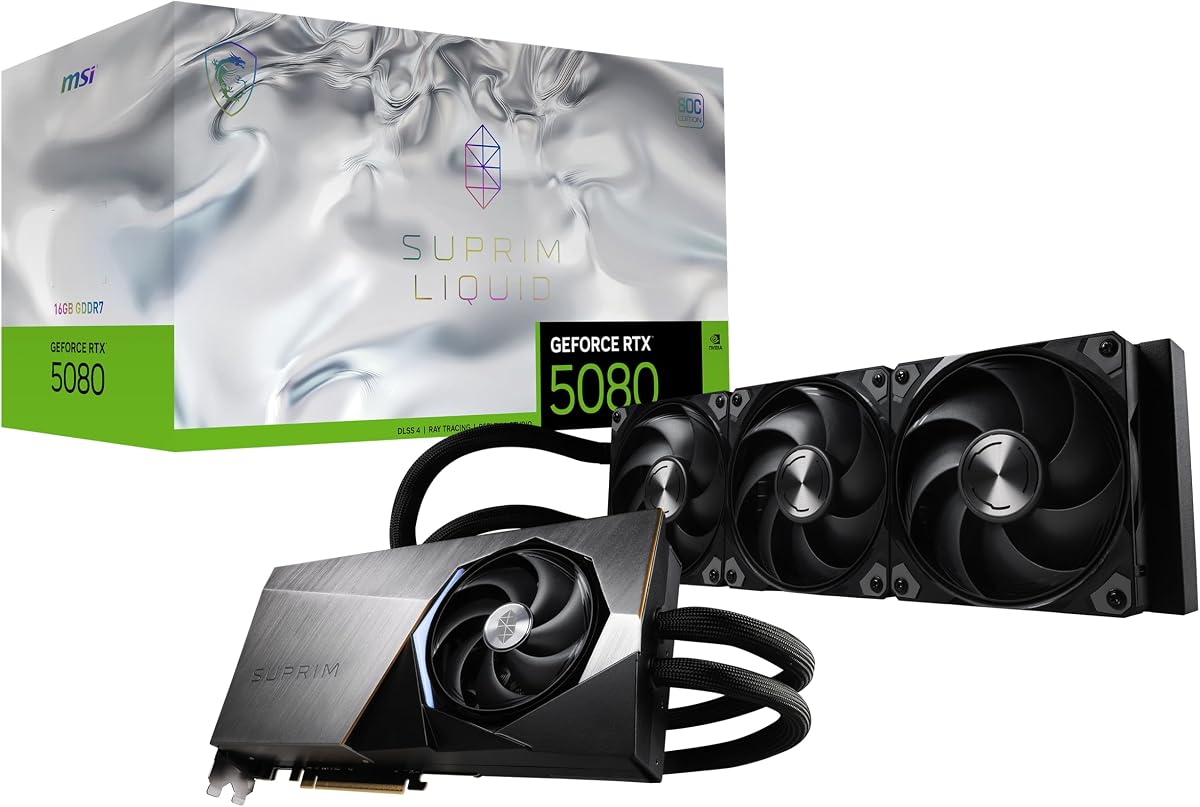
This card features advanced liquid cooling technology, earning a 4.7 rating for thermal performance. It supports up to 2760 MHz extreme performance with a 256-bit memory interface.
We may earn a commission when you buy through this link, at no additional cost to you.
The NVIDIA Blackwell architecture and 16GB GDDR7 memory deliver top-tier gaming capabilities. DisplayPort 2.1a and HDMI 2.1b outputs support high-resolution displays for immersive experiences.
The liquid cooling system requires a compatible setup and adds complexity to the build. However, for users seeking maximum thermal efficiency and performance, it offers a superior solution.
Enthusiasts with water-cooling systems should consider this card for peak performance. It represents the pinnacle of cooling and performance integration in a modern GPU.
Liquid SOC cooling delivers extreme performance by efficiently dissipating heat under high loads.
DisplayPort 2.1a and HDMI 2.1b support ensure compatibility with the latest high-resolution displays.
We may earn a commission when you buy through this link, at no additional cost to you.
Selecting the right flagship graphics card involves evaluating several critical factors that impact performance and longevity. Understanding these elements ensures you invest in a GPU that meets your specific computing and gaming needs.
Memory type such as GDDR6 or GDDR7 and capacity directly affect texture handling and rendering speeds. Higher bandwidth and larger VRAM allow for smoother performance at higher resolutions.
Prioritize GDDR7 models with at least 16GB VRAM for future-proofing and demanding workloads.
Modern architectures like Blackwell and advanced CUDA or Compute core counts significantly improve processing power and efficiency. These determine how well the card handles complex scenes and AI tasks.
Choose cards with the latest architecture and high core counts for sustained top-tier performance.
Effective cooling solutions prevent thermal throttling and extend the GPU's lifespan. Look for features like phase-change thermal pads, large fin arrays, and efficient fan designs.
Opt for models with proven cooling technology to ensure stable performance during long sessions.
High-performance cards often require powerful power supplies and specialized connectors like 12VHPWR. Ensuring adequate wattage and correct connectors prevents instability and system crashes.
Check PSU specifications and connectors carefully before purchasing to ensure compatibility.
Durability features such as military-grade components and protective coatings protect against dust, moisture, and physical stress. These contribute to the overall reliability of the GPU.
Select cards with robust build materials for long-term reliability in demanding environments.
Software tools enable performance tweaking and real-time monitoring of thermal and clock metrics. Good support enhances customization and helps maintain optimal operating conditions.
Look for cards supported by intuitive software suites for better performance management.
Physical dimensions and slot count must fit within your chassis to prevent installation issues. Consider case clearance requirements and motherboard slot spacing when choosing a card.
Verify your case and motherboard specifications to ensure physical compatibility.
Balancing performance with cost ensures you get the best value without overspending on unnecessary features. Compare benchmark results to identify price-to-performance leaders.
Assess your specific needs and budget constraints to choose the most cost-effective flagship GPU.
Install the graphics card securely using the provided bracket and connect power cables properly. Ensure the case is grounded and the connectors are fully seated to avoid electrical issues.
Regularly clean dust from fans and heatsinks to maintain optimal cooling. Use compressed air gently and avoid touching sensitive components directly to prevent static damage.
Update drivers and monitor thermal performance regularly to prevent overheating. Use manufacturer software to manage fan curves and optimize power settings for your specific use case.
Most flagship cards require at least an 850W power supply with a 12V-2×6 or 12VHPWR connector. Always verify your PSU's wattage and connector compatibility before installation to ensure stable operation.
Yes, phase-change thermal pads typically outlast traditional paste under heavy loads by maintaining better thermal conductivity over time. This results in cooler operating temperatures and longer GPU lifespan.
Many flagship cards have large physical sizes requiring adequate clearance. However, compact designs like 2.5-slot models exist for smaller cases but may offer reduced cooling compared to larger designs.
Use manufacturer tools like GPU Tweak III to monitor real-time temperature and performance metrics. Software displays clock speeds and thermal data to help manage cooling and performance settings.
Yes, 16GB VRAM generally provides sufficient capacity for modern 4K gaming titles and textures. Higher capacities like 32GB benefit professional workloads and extreme settings more than average gamers.
PCIe 5.0 support provides double the bandwidth of PCIe 4.0, enabling faster data transfer for high-resolution textures and future hardware. It ensures your system remains compatible with next-generation standards.
Most flagship cards supporting the Blackwell architecture include DLSS 4 features. However, older models may only support DLSS 3 or 3.5, so verify specific feature support before purchasing.
Updating drivers monthly or when new game releases occur ensures optimal performance and stability. Manufacturers frequently release patches that improve gaming compatibility and fix known issues.
Choosing a flagship graphics card ultimately depends on your specific performance needs, budget, and system compatibility. Our top picks provide a strong starting point for enthusiasts and professionals seeking cutting-edge visual computing.
Prioritize factors like memory capacity, cooling efficiency, and build quality to ensure longevity and reliability. Selecting a card that aligns with your usage patterns maximizes value and performance over time.
Remember that prices and availability change frequently, so verify current details before purchasing. Stay informed about upcoming releases and promotions to make the most informed decision for your setup.