
Moread 4K DisplayPort to HDMI Adapter
4.6Editor score
Supports 4K video at 30Hz
Includes latching DisplayPort connector
Five year warranty coverage included
This guide compares ten top HDMI output to input adapter for laptop models to help you choose the right converter for your display needs.
Connecting your laptop to an external display often requires the right adapter. HDMI output to input adapter for laptop solutions bridge the gap between modern ports and traditional screens. We review reliable options for video and audio transmission.
We evaluated each product based on compatibility, resolution support, and build quality. Our team analyzed customer feedback and technical specifications. This list covers various connector types including USB-C, DisplayPort, and Mini HDMI for diverse setups.
Each pick highlights key features and potential trade-offs for your workflow. We include detailed reviews to help you decide quickly. Prices fluctuate often so verify current offers before purchasing any adapter today.
4.6Editor score

4.6Editor score

4.7Editor score
This table provides a side-by-side overview of ten distinct adapter models. It highlights key specifications like resolution support and port types to help you compare options quickly for your laptop setup.





This Anker adapter stands out for its reliable performance in converting USB-C signals to HDMI. It receives high praise for supporting 4K resolution at 60Hz which ensures smooth video playback for presentations or media.
We may earn a commission when you buy through this link, at no additional cost to you.
The aluminum casing is a key strength as it helps dissipate heat during long use sessions. The reinforced braided-nylon cable adds durability against daily wear and the plug and play feature means no driver installation is needed.
One trade-off is that it does not support charging or Power Delivery so you cannot charge your laptop through this adapter. However this is acceptable for users who prioritize video quality and build over charging convenience.
Buyers looking for a reliable HDMI output to input adapter for laptop users should consider this model. It offers excellent clarity and stability for modern USB-C devices with DisplayPort Alt Mode support.
The lightweight aluminum casing allows for greater heat dissipation while the reinforced cable withstands daily twists and tugs effectively.
Streaming video in up to 4K resolution ensures sharp visuals on connected TVs or displays for professional or home use.
We may earn a commission when you buy through this link, at no additional cost to you.
This BENFEI adapter is ideal for laptops or desktops with DisplayPort outputs needing HDMI inputs. It supports resolutions up to 4K at 30Hz which is sufficient for static displays or standard video playback needs.
We may earn a commission when you buy through this link, at no additional cost to you.
The latches on the DisplayPort connector provide a secure connection that prevents accidental disconnections during use. The gold plated connectors resist corrosion and abrasion which improves signal transmission performance over time.
A limitation is that it cannot transmit signals from HDMI to DisplayPort so it is strictly for DisplayPort source to HDMI destination setups. This is expected for this adapter type but users should verify their ports.
Users seeking a cost effective solution for extending desktop screens to TVs or projectors will find this useful. It offers solid stability and ease of use for typical office or home setups.
DisplayPort connector with latches provides a secure connection that improves stability during usage and prevents accidental unplugging.
Built-in advanced IC chip converts DisplayPort signal to HDMI signal reliably without requiring external drivers or software installation.
We may earn a commission when you buy through this link, at no additional cost to you.
This Moread adapter offers excellent value by combining performance with a strong warranty coverage. It supports 4K resolution at 30Hz and 1080p at 120Hz making it versatile for various display refresh rate needs.
We may earn a commission when you buy through this link, at no additional cost to you.
The locking connector with latches prevents accidental disconnection and ensures a secure connection during presentations or work. The five year warranty provides long-term satisfaction and peace of mind for buyers seeking reliable hardware.
One trade-off is that it is passive and does not support bi-directional conversion. This means it cannot connect HDMI sources to DisplayPort monitors which limits usage to specific port configurations on your device.
Buyers wanting a durable and affordable HDMI output to input adapter for laptop users with DisplayPorts should consider this model. It balances cost performance and warranty coverage well for daily tasks.
Reinforced ABS housing and durable gold-plated DP connector withstand repeated plugging and bending for long-lasting daily use.
Supports 7.1 5.1 or 2 audio channels surround sound ensuring flawless audio pass-thru alongside video output.
We may earn a commission when you buy through this link, at no additional cost to you.
This Highwings adapter is designed for home office setups requiring clear 4K output at 60Hz from USB-C devices. It allows you to keep using existing HDMI cables while placing your laptop or phone where needed.
We may earn a commission when you buy through this link, at no additional cost to you.
The 24K gold-plated connectors and braided nylon jacket are designed for frequent plug-in use and long-term reliability. A 24-month warranty covers the adapter ensuring support for any questions or issues that may arise.
The chip may become warm during high-resolution transmission which is normal operation but users should ensure proper ventilation. It does not support charging so you must use a separate power source for your laptop.
Users who need a reliable USB-C to HDMI conversion for presentations or streaming will find this suitable. It offers a good balance of video quality and durability for typical office or home environments.
Going from USB-C male to HDMI female lets you keep using the HDMI cable you already have and place your laptop or phone where you want it.
SR flexible strain relief and durable nylon jacket are designed for frequent plug-in use and long-term reliability in daily work.
We may earn a commission when you buy through this link, at no additional cost to you.
This Anker HDMI switch allows you to connect two HDMI sources to one display which is great for switching between a laptop and a console. It supports 4K at 60Hz ensuring high-quality video playback during media consumption.
We may earn a commission when you buy through this link, at no additional cost to you.
Manual button switching enables hassle-free transitions between your game or movie without unplugging cables. The seamless compatibility with a wide range of devices including laptops and game consoles makes it versatile for many setups.
Automatic signal detection is not supported so you must press the button to switch sources. This is a minor trade-off for a device focused on manual control and simple integration for daily use tasks.
Buyers who need to manage multiple HDMI inputs on a single monitor should consider this switch. It provides a reliable way to alternate between devices without the need for complex cabling or configurations.
Dive directly into your chosen media with a single button for hassle-free transitions between your game or movie without unplugging cables.
Turn your regular viewing sessions into cinematic experiences with our HDMI switch that supports resolutions up to 4K@60Hz.
We may earn a commission when you buy through this link, at no additional cost to you.
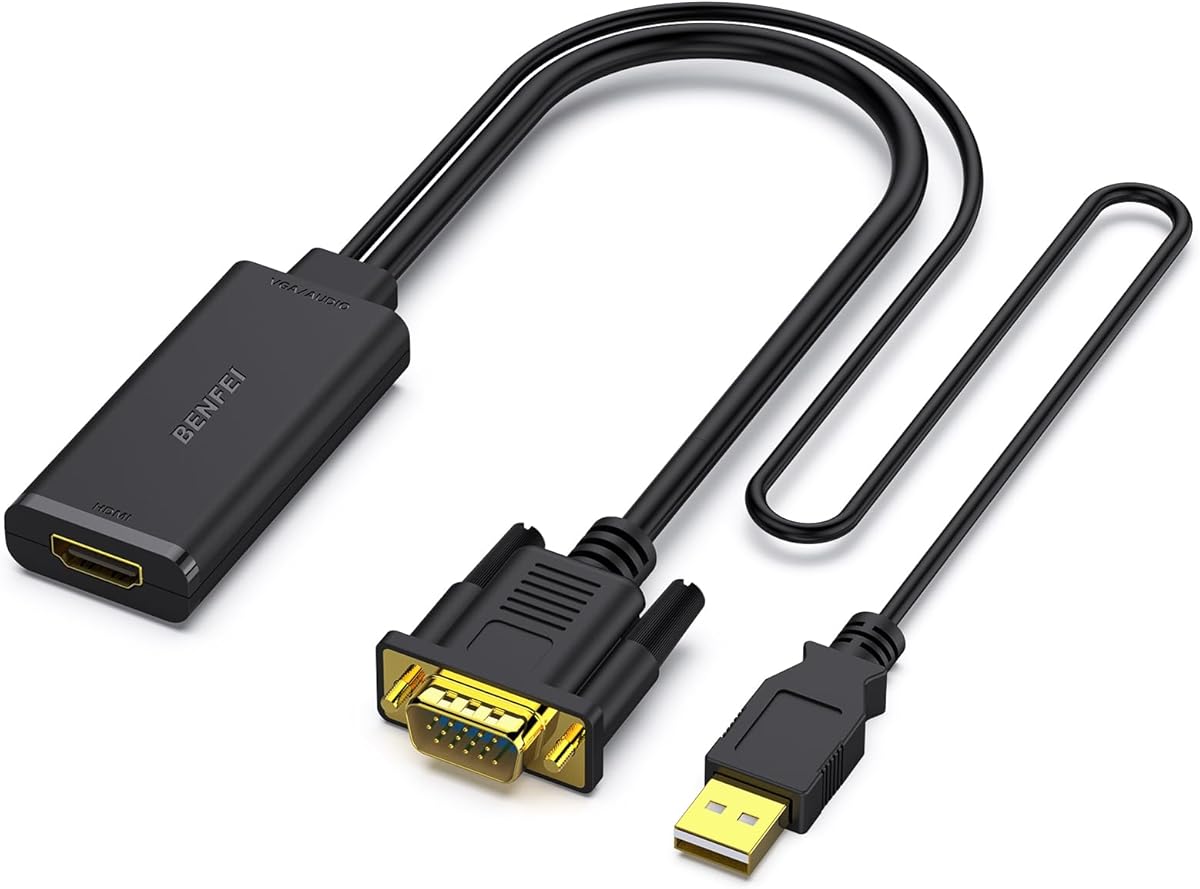
This BENFEI adapter is essential for connecting older laptops or desktops with VGA ports to modern HDMI displays. It converts the analog VGA signal to digital HDMI allowing you to extend your desktop screen to a TV.
We may earn a commission when you buy through this link, at no additional cost to you.
The built-in advanced IC chip converts VGA analog signal to HDMI digital signal ensuring clear video output. The integrated USB cable allows audio output to the connected display solving the common audio issue with VGA connections.
It is not a bi-directional converter so signals cannot go from HDMI to VGA. Users should ensure their VGA source device has enough power for the USB audio cable to function correctly during presentations.
Users with legacy hardware needing modern display connectivity will find this adapter very useful. It offers a straightforward solution to bridge old ports with new screens for business presentations or home use.
An integrated USB cable that embeds the audio along with the video over HDMI allows audio to be output to the connected display.
Built-in advanced IC chip converts VGA analog signal to HDMI digital signal without requiring additional drivers or software setup.
We may earn a commission when you buy through this link, at no additional cost to you.
This multiport adapter expands a single USB-C port into HDMI video USB-A data and power delivery charging. It is ideal for laptops that lack multiple ports and need connectivity for drives and external displays simultaneously.
We may earn a commission when you buy through this link, at no additional cost to you.
The aluminum body provides better heat dissipation during high load tasks. It supports data transfer speeds up to 5 Gbps allowing fast file transfers which is crucial for office work or large media files.
Note that the PD port does not support video output so it is strictly for charging. This design separates video and power for stable performance but limits the port usage to specific functions only.
Users who want a compact solution to connect drives displays and charge their device should consider this hub. It simplifies desk setups by reducing cable clutter and improving overall workflow efficiency.
The HDMI adapter can mirror or extend the screen to 4K Ultra HD or Full HD 1080p video directly to HDTVs.
The USB Type-C multiport adapter can charge your laptops with support for up to 100W input and 87W safe output power.
We may earn a commission when you buy through this link, at no additional cost to you.
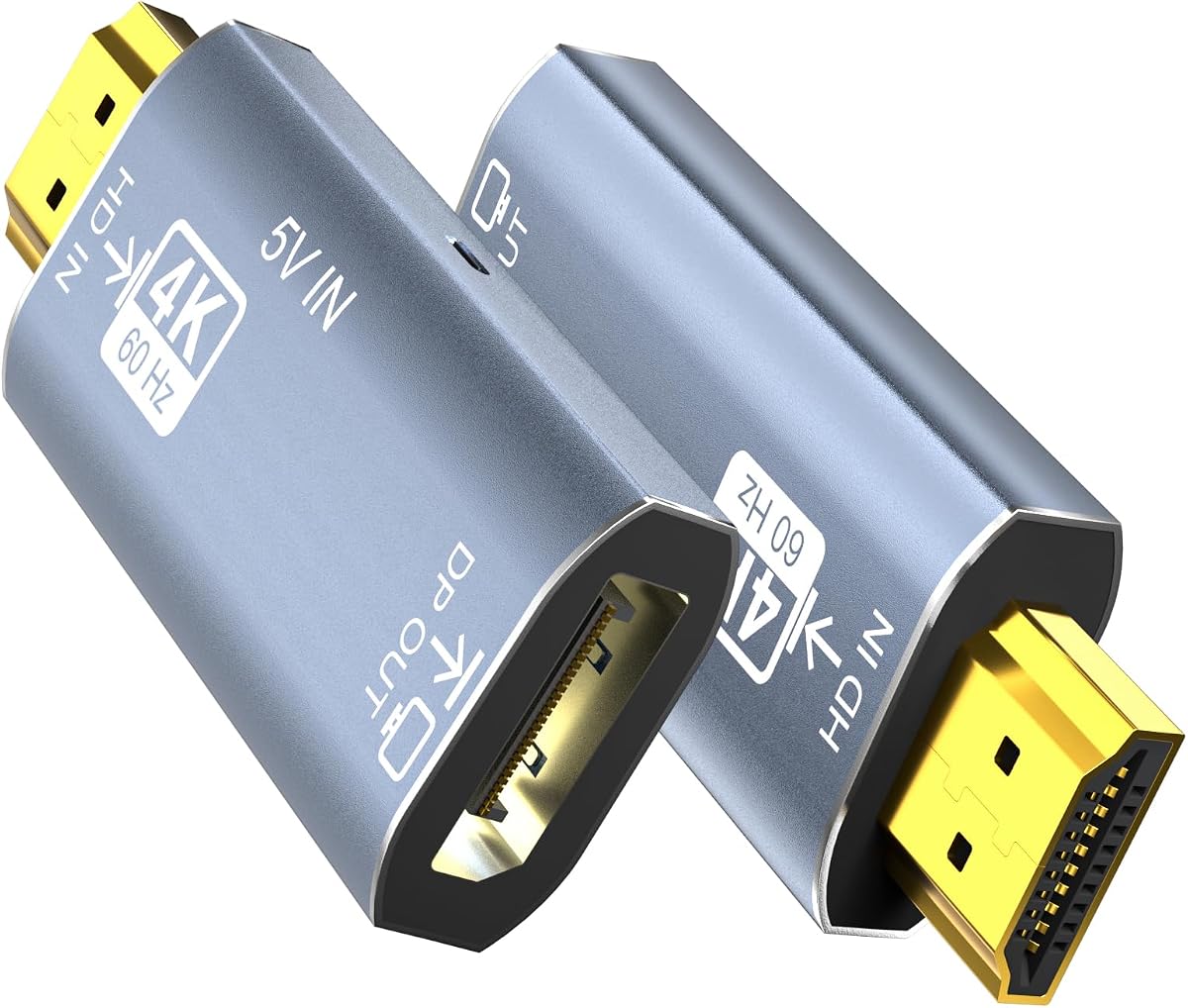
This adapter supports advanced HDMI 2.1 standards delivering stunning 8K at 60Hz and backward compatibility for 4K at 144Hz. It is ideal for users with devices like Raspberry Pi or DSLRs that use Mini HDMI ports.
We may earn a commission when you buy through this link, at no additional cost to you.
The 24K gold-plated connectors resist oxidation and corrosion ensuring nearly zero signal loss. The high-quality aluminum alloy housing enhances heat dissipation while providing electromagnetic interference shielding for clean transmission.
Note that this adapter requires a device with a Mini HDMI port specifically not Micro HDMI or Micro USB. This distinction is important to avoid compatibility issues with your laptop or camera setup.
Buyers needing high refresh rate support for gaming or premium video should consider this adapter. The two-pack offers value and durability with a five-year warranty ensuring reliable performance over long periods.
Adopts advanced HDMI 2.1 standards delivering stunning 8K@60Hz ultra-high definition resolution with backward compatibility for 4K@144Hz.
Features 24K gold-plated connectors that effectively resist oxidation and corrosion ensuring nearly zero signal loss for clean output.
We may earn a commission when you buy through this link, at no additional cost to you.
This BENFEI adapter connects devices like consoles or laptops with HDMI outputs to monitors with DisplayPort inputs. It converts HDMI 2.0b signals to DisplayPort 1.4 signals supporting resolutions up to 4K at 60Hz.
We may earn a commission when you buy through this link, at no additional cost to you.
The braided nylon cable offers extra durability while the premium aluminium alloy casing provides better heat insulation. External power is required for the conversion chip to function which ensures stable signal transfer without dropouts.
It is strictly uni-directional meaning it cannot convert DP to HDMI. Users should ensure their source device is HDMI to avoid confusion as this adapter is designed for specific directional connectivity only.
Buyers needing to connect an HDMI source to a DisplayPort monitor will find this solution effective. It supports high refresh rates and works well with gaming consoles and desktop graphics cards.
Fully compatible with HDMI 2.0b input and DisplayPort 1.4 output with resolutions up to 3840*2160@60Hz including 2K@144Hz.
Braided nylon cable for extra durability and user-friendly non-slip design for easier plug and unplug on your desk.
We may earn a commission when you buy through this link, at no additional cost to you.
This active adapter connects HDMI output sources like game consoles to DisplayPort input monitors. It delivers stable ultra HD video transmission at 4K 60Hz for immersive gaming experiences without lag.
We may earn a commission when you buy through this link, at no additional cost to you.
The premium aluminum alloy housing provides excellent heat dissipation during continuous operation. It is strictly unidirectional and offers driver-free plug and play operation across Windows macOS and Linux for easy setup.
Note that this adapter does not support HDR or VRR G-Sync features. Users seeking high-end HDR gaming may find this limiting but for standard definition monitors it provides clean non-flickering visual performance.
Console gamers and day traders expanding displays will find this adapter suitable for their needs. It simplifies connecting devices to a wide range of monitors efficiently for better productivity or play.
Supporting stable ultra HD video transmission this active HDMI 2.0 to dp 1.2 converter delivers crisp images at 4K 60Hz.
Designed for console gamers this active adapter provides zero lag video processing for an immersive gaming experience without delay.
We may earn a commission when you buy through this link, at no additional cost to you.
Selecting the right adapter depends on your specific ports and resolution needs. This guide breaks down the essential factors to consider before purchasing an HDMI output to input adapter for laptop setups.
Verify the output port on your laptop matches the adapter input. Common types include USB-C, DisplayPort, and Mini HDMI. Ensure your device supports video output through that port.
Check your laptop specs to confirm DisplayPort Alt Mode for USB-C or DP++ for DisplayPort to avoid compatibility issues.
Determine the resolution you need for your display. Some adapters support 4K at 60Hz while others support 30Hz. Match the adapter to your screen for smooth playback.
Higher refresh rates require adapters that support at least 60Hz for 1080p or higher resolutions.
Most adapters are uni-directional meaning they work only one way. HDMI to DisplayPort or DisplayPort to HDMI converters do not work both ways. Check the direction required for your setup.
Ensure the adapter direction matches your source and destination devices to prevent signal failure.
HDMI adapters typically carry audio with video but VGA to HDMI may need external audio cables. Verify if audio pass-thru is included for your specific converter type.
Look for integrated USB audio support if converting analog VGA to digital HDMI.
Active adapters for HDMI to DisplayPort conversion may need external power. Passive USB-C adapters often draw power from the laptop but may not support charging.
Check if an external USB cable is included to ensure the chip gets enough power.
Aluminum or braided nylon housings improve heat dissipation and durability. Gold-plated connectors resist corrosion for better signal transmission over time.
Prioritize adapters with reinforced strain relief to prevent cable damage at the connection points.
Look for warranties ranging from 18 months to 5 years. Reliable brands offer customer service to resolve connection or hardware issues quickly.
Extended warranties provide better protection for frequent use in professional environments.
Adapters vary in price based on features like 4K support or multiport hubs. Balance your budget with the technical requirements of your setup.
Consider multiport options if you need to charge and transfer data alongside video output.
Connect the adapter to your laptop port firmly before plugging in the HDMI cable. Ensure the latch is pressed if using DisplayPort to secure the connection.
If using an active adapter connect the USB power cable to a 5V source to activate the chip. Verify the display detects the signal before moving your laptop.
Store the adapter in a dry place and avoid bending the cable near the connector. Regularly clean gold-plated connectors to prevent dust buildup and ensure stable signals.
Not all USB-C adapters support Power Delivery. Check product details to see if it supports charging alongside video output.
Ensure your laptop supports video output through that port. Check DisplayPort Alt Mode or use a power source for active adapters.
No they are uni-directional. An HDMI to DisplayPort adapter cannot connect a DisplayPort laptop to an HDMI TV.
HDMI adapters support audio pass-thru. VGA to HDMI adapters may require a USB audio cable for sound output.
Most adapters support 4K at 60Hz. Ensure your HDMI cable also supports the required bandwidth for high resolution.
No drivers are required for most plug-and-play adapters. Simply connect and use your display settings to extend or mirror.
Use gold-plated connectors and high-quality cables. Ensure external adapters are powered to maintain stable signal transmission.
Yes if they support high refresh rates. Ensure the adapter supports 1080p at 120Hz or higher for smooth gameplay.
We reviewed ten top HDMI output to input adapter for laptop models offering choices for USB-C DisplayPort and Mini HDMI. The Anker and Moread adapters stand out for reliability and value.
Prioritize compatibility with your ports and resolution needs over price. Ensure you know the direction of conversion and power requirements before buying any adapter today.
Prices fluctuate often so verify current offers on Amazon before purchasing. Check the latest product details to ensure the adapter matches your specific laptop model perfectly.