
Cooler Master Q300L V1
4.5Editor score
Micro-ATX motherboard support
Transparent side panel design
Modular I/O panel options
This guide compares the top horizontal PC cases for home theater and office setups, evaluating airflow, hardware support, and design for optimal performance.
Horizontal PC cases offer a unique solution for building powerful systems that blend seamlessly into living rooms and office spaces. These enclosures prioritize low profile designs while maintaining robust support for modern hardware components like graphics cards and processors.
We evaluated ten top rated models based on airflow efficiency, component compatibility, and build quality. Our analysis focuses on how each case handles heat dissipation, dust protection, and ease of assembly for both novice and experienced builders seeking compact form factors.
Each pick highlights specific strengths such as wood finishes, mesh panels, or specialized rackmount options. Prices and availability fluctuate frequently so verify current listings before purchasing to ensure you get the best value for your specific building needs.
4.5Editor score

4.8Editor score

4.5Editor score
The following table provides a side-by-side comparison of all ten selected horizontal PC cases allowing you to quickly assess key specifications and design features to find the perfect fit for your setup.


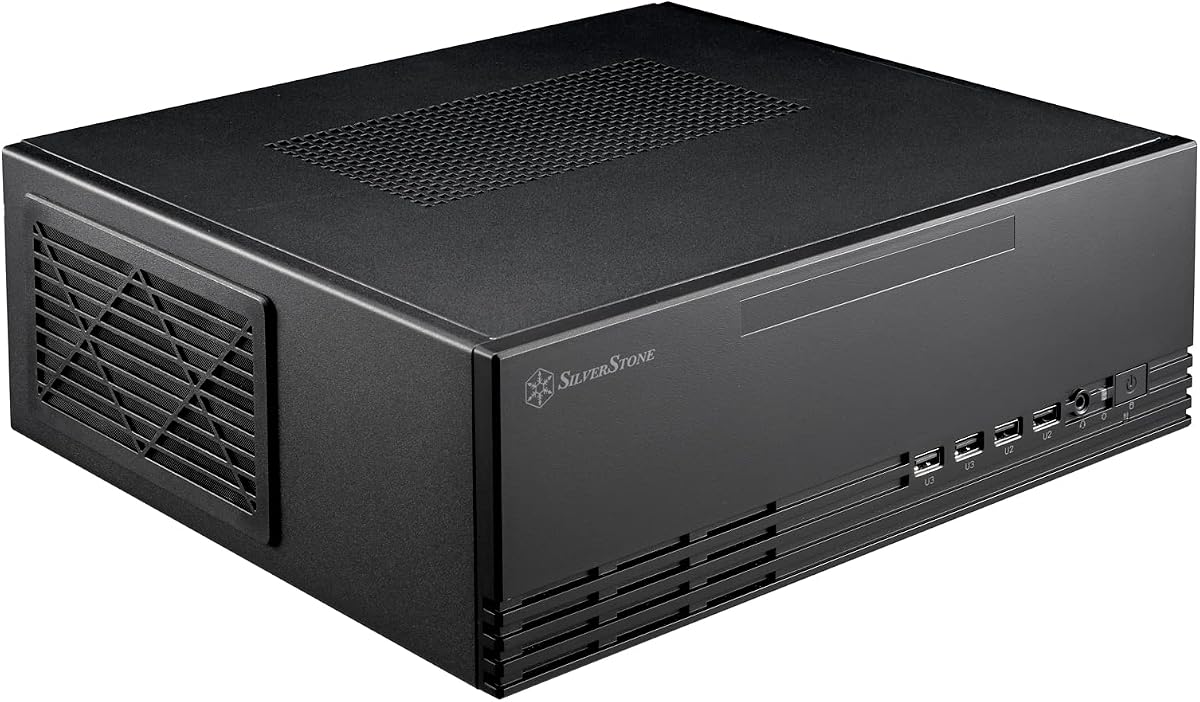
The Silverstone GD09 stands out as a premier choice for home theater PC builds with its faux aluminum design and robust support for standard motherboards. It holds a strong reputation among users for its ability to integrate seamlessly into AV racks while maintaining thermal efficiency.
We may earn a commission when you buy through this link, at no additional cost to you.
Its positive air pressure design ensures that dust is kept out while cooling remains effective without excessive noise. The depth of the case allows it to fit comfortably inside standard home theater cabinets without protruding awkwardly into the room.
While it lacks some modern connectivity options found in newer cases the build quality and thermal performance make up for these minor omissions. Users should note that it requires specific power supply units which may add to the overall cost of the build.
This case is ideal for anyone seeking a reliable and aesthetically pleasing enclosure for a living room setup. Its ability to support ATX and Micro-ATX boards gives builders flexibility without sacrificing the compact footprint required for HTPC applications.
The 358mm depth ensures the case slides into standard AV cabinets without obstruction maintaining a clean media center look.
Positive air pressure design keeps dust out while maintaining quiet operation essential for living room environments.
We may earn a commission when you buy through this link, at no additional cost to you.
The Cooler Master QUBE 540 offers exceptional flexibility with its design that allows seamless transition between horizontal and vertical orientations. This makes it a unique option for users who may need to adapt their setup to different environments or desk arrangements.
We may earn a commission when you buy through this link, at no additional cost to you.
Its massive GPU clearance supports high end graphics cards even when placed horizontally which is a rare feature in compact cases. The front mesh panel ensures that air flows freely through the chassis keeping components cool under heavy load.
While the tempered glass looks great it requires careful handling during installation and transport. The modular nature of the case means assembly can take longer than standard models but the result is a highly customizable and robust enclosure.
Builders looking for a case that grows with their hardware should consider this model. The support for E-ATX boards and large GPUs ensures that you wont outgrow the case quickly even as you upgrade your system components.
The reversible I/O and handles let you change orientation easily to fit any desk or media console layout.
Accommodates cards up to 415mm ensuring support for the latest high performance graphics hardware.
We may earn a commission when you buy through this link, at no additional cost to you.
The Silverstone Grandia 11 brings liquid cooling capabilities to the compact HTPC market with its support for 240mm radiators. This feature allows for quieter and more efficient thermal management which is critical for living room environments where noise is a concern.
We may earn a commission when you buy through this link, at no additional cost to you.
The stereo shaped chassis is designed to mimic the profile of audio equipment making it blend in seamlessly with other home theater gear. The fully meshed front panel provides a large surface area for air intake improving cooling performance without increasing noise.
While it offers excellent thermal options the interior space is somewhat limited for extensive expansion. Users should plan their build carefully to ensure all components fit within the compact footprint without compromising airflow or aesthetics.
This case is perfect for enthusiasts who want a quiet and stylish PC that hides in plain sight. The ability to use liquid cooling in a small form factor sets it apart from many other home theater specific enclosures on the market.
Support for 240mm radiators allows for quiet operation essential for media center environments.
The stereo shape ensures the PC blends naturally with existing audio video equipment.
We may earn a commission when you buy through this link, at no additional cost to you.
The Lian Li B4-mATX combines high performance with luxury aesthetics through its use of real wood finishes. This unique design choice makes it a standout for users who want their PC to look like a piece of furniture rather than a computer.
We may earn a commission when you buy through this link, at no additional cost to you.
Despite its stylish appearance it does not compromise on hardware support offering clearance for substantial GPUs and liquid cooling solutions. The inclusion of slim fans out of the box ensures that the case is ready for immediate use without extra purchases.
The wood finish requires care to maintain its look over time especially if placed in a high traffic area. Additionally the price reflects the premium materials used which may be a consideration for budget conscious builders.
This case is ideal for those who prioritize design and build quality in their home setup. The ability to position it vertically or horizontally adds flexibility making it suitable for various room configurations and desk arrangements.
Available in walnut or beech the wood front adds a sophisticated touch to any room.
Supports GPUs up to 358mm and 360mm radiators for high performance builds.
We may earn a commission when you buy through this link, at no additional cost to you.
The Cooler Master Q300L V1 delivers excellent value for builders seeking a compact horizontal case without breaking the bank. Its transparent side panel allows you to showcase your components while the open thermal design ensures effective heat dissipation.
We may earn a commission when you buy through this link, at no additional cost to you.
Modularity is a key strength here with the I/O panel able to move to different positions for better accessibility. The magnetic dust filters add a distinctive touch while protecting internal components from debris and buildup over time.
As a budget option the construction feels slightly simpler than premium models but it remains sturdy enough for daily use. The lack of extensive features is a trade-off for the affordable price point which fits many entry level builds well.
This case is perfect for students or casual users who want a neat and functional system. The ease of assembly and solid airflow performance make it a reliable choice for those starting their PC building journey.
Adjustable I/O positions let you customize the setup to match your desk or media center layout.
Edge to edge panel allows clear visibility of your custom build without obstruction.
We may earn a commission when you buy through this link, at no additional cost to you.
The Shiny Snake G300 is designed for gamers who need to move their rigs frequently without sacrificing performance. Its aluminum mesh chassis provides excellent protection while keeping the weight low enough for easy transport to LAN parties or dorms.
We may earn a commission when you buy through this link, at no additional cost to you.
Despite the small size it accommodates flagship graphics cards and powerful CPUs thanks to intelligent interior layout. The horizontal PSU placement reduces cable clutter and improves airflow which is critical for maintaining stability in a compact chassis.
Building in this case requires planning to fit all components correctly within the tight constraints. The removable PCI bracket simplifies swapping cards but the limited space means you might need to choose smaller form factor parts.
This case is the ultimate choice for portable gaming setups. The durable handle and vibration dampening base ensure your components stay safe during travel making it ready for any adventure.
Military grade handle and dampened base protect hardware during transport to tournaments or home.
Full mesh panels reduce dust and keep temperatures low even with powerful components.
We may earn a commission when you buy through this link, at no additional cost to you.
The Lian Li A3-mATX stands out for its ability to fit massive graphics cards and radiators into a compact 26.3L design. This level of support is rare in small form factors making it a top choice for performance focused builders.
We may earn a commission when you buy through this link, at no additional cost to you.
The steel mesh panels on the side and top ensure that cooling remains effective even with high TDP components. The walnut wood front panel adds a touch of elegance that complements any modern interior design scheme.
Installation can be complex due to the many options for PSU placement and fan configurations. However the flexibility allows you to tailor the case to your specific needs optimizing for cooling or aesthetics.
If you need a small case that does not compromise on performance this model is unmatched. The balance of style and function makes it a favorite among enthusiasts who want a premium looking system.
Accommodates GPUs up to 415mm allowing for the most powerful graphics cards available.
The modular walnut front adds a premium aesthetic touch to your home office.
We may earn a commission when you buy through this link, at no additional cost to you.
The Silverstone GD09B-C updates a classic HTPC design by adding a USB Type-C port to the front panel. This modern connectivity makes it easier to connect new devices without needing adapters or extra hubs.
We may earn a commission when you buy through this link, at no additional cost to you.
Its faux aluminum design and dust filters ensure that the case looks good and stays clean in a living room. The positive air pressure design keeps noise levels low which is essential for media consumption environments.
While it inherits some older design constraints the addition of USB-C makes it a practical choice for modern builds. Users should verify PSU compatibility before purchase to avoid any installation issues.
This case is perfect for those upgrading an existing media center PC. The balance of legacy compatibility and modern features ensures you can use it for years without needing to switch hardware.
Front USB Type-C port enables fast data transfer for modern external storage devices.
Quick access filters make it easy to maintain a clean interior for optimal airflow.
We may earn a commission when you buy through this link, at no additional cost to you.
The Silverstone GD09B is a proven option for home theater builds with its deep design that fits standard cabinets. It supports expansion cards up to 12.2 inches which is sufficient for many standard graphics cards.
We may earn a commission when you buy through this link, at no additional cost to you.
Its aluminum construction ensures durability while the quick access filters make maintenance simple. The negative pressure design keeps noise low making it a comfortable addition to any living room.
While it lacks modern features like USB-C it remains a solid performer for its intended purpose. The classic design may not appeal to those seeking the latest trends but it is reliable for steady use.
This case is best suited for users who want a traditional HTPC build. It offers a balance of utility and durability that has made it a popular choice for media centers.
The 358mm depth allows the case to disappear into AV cabinets completely.
Aluminum chassis provides durability and premium feel for home media setups.
We may earn a commission when you buy through this link, at no additional cost to you.
The Silverstone Milo 11 is one of the slimmest enclosures available making it perfect for tight desk spaces or specific office requirements. Its Micro-ATX support allows for decent performance in a very small footprint.
We may earn a commission when you buy through this link, at no additional cost to you.
It supports TFX power supplies which are smaller and more efficient for low power builds. The inclusion of a slim optical drive bay is a rare feature that helps with legacy media needs.
The need for a TFX PSU can increase the cost and limit compatibility with standard power units. Additionally GPU options are limited due to the slim design making it less suitable for gaming.
This case is ideal for business or media playback setups where space is at a premium. It prioritizes compactness over raw power which is a valid trade-off for specific use cases.
At 10.35L this case takes up minimal space on any desk or media shelf.
Built-in bay for slim optical drives adds versatility for specific legacy use cases.
We may earn a commission when you buy through this link, at no additional cost to you.
Choosing the right horizontal PC case involves balancing dimensions, cooling needs, and aesthetic preferences. This section breaks down the key factors to consider before making your final decision.
Ensure the case supports your chosen motherboard form factor such as ATX Micro-ATX or ITX. Most horizontal cases are optimized for Micro-ATX but some like the QUBE 540 support larger boards.
Always check the specific dimensions listed by the manufacturer to guarantee a perfect fit for your system.
Horizontal cases often have limited length for graphics cards. Verify the maximum GPU length supported by the case to avoid buying a card that does not fit.
For gaming builds prioritize models with at least 350mm clearance to accommodate modern graphics hardware.
Look for mesh panels and high airflow designs to manage heat in a compact chassis. Positive air pressure designs help reduce dust buildup which is common in horizontal setups.
Consider liquid cooling support if you plan to use high performance CPUs that generate significant heat.
Horizontal cases are often visible in living rooms so choose a design that matches your decor. Options include faux aluminum, wood finishes, or transparent panels.
A clean look helps the PC blend in with media equipment rather than standing out as a computer.
Check the front panel for USB ports especially USB Type-C if you need fast data transfer. Some older models lack modern ports which can be a limitation for daily use.
Modular I/O panels offer flexibility to place ports where they are most accessible for your setup.
Most horizontal cases require specific power supply form factors such as TFX or SFX. Standard ATX units often do not fit due to the slim profile of the case.
Factor in the cost of the PSU when budgeting for the build to avoid unexpected expenses.
Efficient cable routing is essential to maintain airflow and a clean look inside a horizontal case. Look for designs that offer space behind the motherboard tray.
Tool-free access panels can make installing and managing cables much easier.
Some cases include rackmount ears or VESA mounts for mounting to AV racks or desks. These features are great for permanent home theater installations.
Check if the case allows vertical orientation if you need to save floor space later.
Place the case on a stable surface with at least two inches of clearance around it to allow airflow. Avoid enclosed shelves unless they have ventilation holes at the back and top.
Clean the dust filters every month by vacuuming or washing them to maintain optimal cooling performance. This simple step prevents dust from clogging fans and heat sinks inside the case.
Ensure all cables are secured with ties to avoid airflow blockages. This is especially important in horizontal cases where cable length is limited.
Most horizontal cases require smaller form factor power supplies like TFX or SFX due to space constraints. Standard ATX units are usually too large to fit comfortably. Check the specific case specs before buying a PSU.
Horizontal cases can run slightly warmer if airflow is restricted. However modern designs use mesh panels and strategic fan placement to mitigate this. Proper placement and regular cleaning ensure temperatures stay within safe limits.
The Silverstone GD09 is highly recommended for home theater setups due to its low profile and cabinet-friendly depth. Its design ensures the PC fits neatly into AV racks without obstructing airflow or noise.
Yes many horizontal cases support high-end graphics cards and cooling solutions. Look for models with high GPU clearance like the A3-mATX to ensure you can install powerful gaming hardware.
Use VESA brackets or under-desk mounting kits compatible with your specific case model. Ensure the mounts are securely tightened to support the weight of the PC and any accessories.
Yes you can upgrade components but space may be limited compared to larger towers. Verify clearance for new GPUs or CPU coolers before purchasing to ensure they will fit inside the chassis.
The top picks for horizontal PC cases in November 2026 offer a range of options from budget friendly to premium designs. Whether you need a quiet HTPC or a portable gaming rig there is a case to suit your needs.
Prioritize cooling and GPU clearance when selecting a model to ensure your system runs smoothly. A well designed case will keep your components safe and efficient for years to come.
Remember to verify current availability and specific specifications before purchasing as models can update frequently. Choose the case that best aligns with your build goals and spatial requirements for the best results.