
Apple Magic Keyboard Folio
4.4Editor score
Built-in trackpad with gestures
Detachable two-piece design
No charging required
This guide compares the top ten iPad A16 Folio Case with Keyboard models to help you find the perfect accessory for productivity and protection.
Finding the right iPad A16 Folio Case with Keyboard transforms your tablet into a powerful productivity machine. These accessories offer protection, typing comfort, and trackpad navigation in one sleek package.
We compared ten real products based on compatibility, build quality, battery life, and user features. Each model supports the iPad A16 and 10th Generation with unique designs for different needs and budgets.
Every pick shows key specs, ratings, and standout features to simplify your choice. Prices and availability change frequently, so verify details before purchasing to ensure you get the best deal today.
4.4Editor score

4.6Editor score

4.6Editor score
This side-by-side comparison highlights key differences across all ten models to help you decide which fits your workflow and budget best.



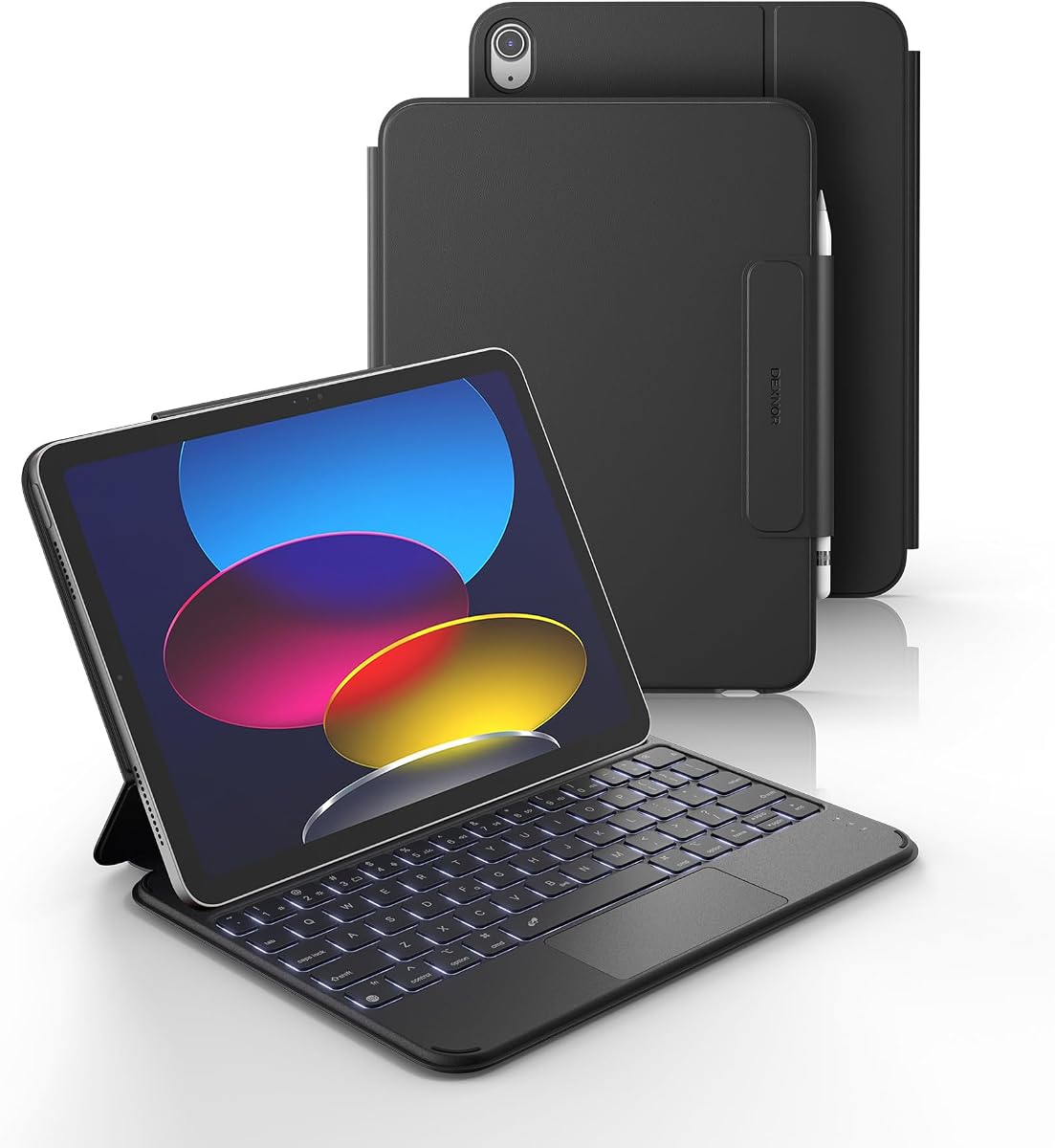

The typecase Folio iPad A16 ranks high for its balance of features and portability. It offers a lightweight folio design with a detachable keyboard and built-in pencil holder for everyday use.
We may earn a commission when you buy through this link, at no additional cost to you.
Its 7-color backlit keyboard allows comfortable typing in various lighting conditions. The slim profile keeps the iPad protected without adding bulk, while precise cutouts ensure easy access to ports.
Battery life is decent at 420mAh but may require frequent charging with heavy backlight use. The keyboard attaches magnetically but lacks a trackpad for cursor navigation.
Ideal for students or casual users seeking a budget-friendly case with typing and holding capabilities. It delivers solid protection and basic productivity tools at a competitive price.
The synthetic leather and TPU edges provide daily scratch protection while maintaining a slim profile for easy carrying.
Adjustable brightness and 7 colors ensure keys remain visible in dim environments without sacrificing comfort.
We may earn a commission when you buy through this link, at no additional cost to you.
The Harvopu case stands out with its 7 RGB backlight options and built-in high-sensitive trackpad. It supports gestures like swipe and scroll for enhanced navigation on your iPad.
We may earn a commission when you buy through this link, at no additional cost to you.
Its durable PU and organosilicon case offers anti-stain properties and honeycomb heat dissipation. The adjustable stand provides three viewing angles suitable for drawing or writing.
Bluetooth pairing requires a few steps but ensures stable connection once set. The 420mAh battery offers decent life but may charge slower than some rivals.
Great for users who want customizable lighting and a trackpad without the premium price. It balances comfort, protection, and features well for daily tasks.
Adjustable brightness and 7 pure colors let you personalize your typing setup to match your mood or environment.
High-sensitive trackpad supports multi-finger gestures for efficient scrolling and app switching during work.
We may earn a commission when you buy through this link, at no additional cost to you.
Apple's Magic Keyboard Folio delivers a premium two-piece design with a built-in trackpad and function row. It attaches magnetically without pairing or charging, offering instant setup.
We may earn a commission when you buy through this link, at no additional cost to you.
The large trackpad supports Multi-Touch gestures for precise cursor control. Its adjustable stand ensures smooth viewing angles while protecting the iPad front and back.
The lack of backlight may limit use in low-light settings compared to rivals. It is heavier and pricier but provides unmatched integration with iPadOS.
Perfect for professionals seeking seamless reliability and trackpad control. Its durability and ease of use justify the investment for daily productivity.
Simply attach and start typing with no Bluetooth pairing or charging required for immediate use.
A large click-anywhere trackpad enhances navigation and multitasking efficiency across all your apps.
We may earn a commission when you buy through this link, at no additional cost to you.
CHESONA offers a backlit wireless keyboard case with multi-touch trackpad and dual device pairing. Its 500mAh battery ensures long standby times for extended sessions.
We may earn a commission when you buy through this link, at no additional cost to you.
The built-in pencil holder and precise cutouts provide full access to ports and sensors. It turns your tablet into a laptop-like setup effortlessly.
It lacks a floating stand which may limit ergonomic flexibility. The trackpad works smoothly but requires Bluetooth setup which can take a moment.
Best for users managing multiple devices needing reliable connectivity. It balances features and protection effectively for daily tasks.
Pair up to two devices simultaneously and switch between them with a single click for seamless workflow.
Integrated multi-touch trackpad adapts to iOS gestures for comfortable scrolling and swiping.
We may earn a commission when you buy through this link, at no additional cost to you.
The typecase Edge features a floating magnetic stand that lifts your iPad above the keyboard for a laptop-like setup. It includes a 11-color backlit keyboard and multi-touch trackpad.
We may earn a commission when you buy through this link, at no additional cost to you.
Palm rejection helps reduce accidental cursor movement during typing. The case uses synthetic vegan leather with secure magnetic closure and Apple Pencil holder.
It is heavier and pricier than basic options but offers advanced ergonomic benefits. The support and warranty add confidence for long-term use.
Ideal for remote workers needing elevation and trackpad control. Its design supports focused typing and viewing without strain.
The magnetic stand holds your iPad above the keyboard for improved ergonomics and typing comfort.
Palm rejection minimizes accidental cursor movement for cleaner input during extended sessions.
We may earn a commission when you buy through this link, at no additional cost to you.
CC Store provides a budget-friendly folio with a large battery delivering 200 plus hours of use. It features an adjustable kickstand and pencil holder for convenience.
We may earn a commission when you buy through this link, at no additional cost to you.
The detachable magnetic keyboard can be stored when not needed. It defends against scratches with premium PU leather and minimal bulk.
While it lacks advanced features like trackpads, it offers reliable protection and typing. The long battery life reduces charging frequency significantly.
Best for users prioritizing battery and value. It is a simple yet effective solution for everyday protection and typing.
A large capacity battery delivers over 200 hours of working time after just a few hours charging.
Adjustable kickstand offers multiple angles for ideal typing or viewing in various settings.
We may earn a commission when you buy through this link, at no additional cost to you.
Logitech Rugged Folio offers military-grade drop protection and spill resistance. It uses Smart Connector tech for instant connection without Bluetooth pairing.
We may earn a commission when you buy through this link, at no additional cost to you.
Four use modes let you type, write, view, or read easily. A waterproof membrane allows cleaning after spills for durability.
The absence of a trackpad limits navigation speed. Its bulk and higher price may not suit light users but are ideal for rugged environments.
Perfect for field work or environments with spills. It provides unmatched durability and seamless connection for productivity.
Shock-absorbent technology exceeds military drop tests to protect your iPad from mishaps.
Magnetic Smart Connector provides instant power and connection without Bluetooth setup.
We may earn a commission when you buy through this link, at no additional cost to you.
The typecase Folio Duo adapts to both portrait and landscape modes with a detachable keyboard. It offers 7-color backlighting and a protective case with pencil holder.
We may earn a commission when you buy through this link, at no additional cost to you.
The design supports reading, watching, or drawing without removing the whole case. It is slim and precisely cut for easy access to ports.
While it lacks a trackpad, the lightweight feel enhances portability. The 12-month warranty adds security for your purchase.
Great for versatile users wanting flexibility in orientation. It balances protection with typing features effectively.
Enjoy comfortable viewing in portrait or landscape with a stable support system that holds position well.
Precise cutouts and slim profile keep your iPad easy to carry without unnecessary bulk.
We may earn a commission when you buy through this link, at no additional cost to you.
Dexnor weighs only 1.16 lbs making it ideal for commuters and students. It features a 650mAh battery offering up to 200 hours of typing.
We may earn a commission when you buy through this link, at no additional cost to you.
The multi-touch trackpad supports gestures for editing and browsing. Sleep mode saves power after inactivity for efficiency.
It is a flat design without screen elevation which may limit ergonomic options. Still, its portability and battery life are compelling.
Best for travelers seeking lightweight carry. It offers reliable control and long battery without bulk.
Weighing just 1.16 lbs it is perfect for commuting and business trips.
Auto sleep after 30 minutes conserves battery for extended use.
We may earn a commission when you buy through this link, at no additional cost to you.
ESR offers an extra-large trackpad for effortless navigation and scrolling. Its ultra-thin design is slim and easy to carry anywhere.
We may earn a commission when you buy through this link, at no additional cost to you.
Two viewing angles support 65 degrees for work and 20 for sketching. Air Guard corners provide reliable protection against drops.
The lack of backlight may hinder use in dark rooms. It is lightweight but offers basic functionality for navigation.
Ideal for users prioritizing trackpad size and thinness. It delivers smooth navigation without added weight.
A 65 percent larger touchpad enhances gesture control and navigation.
At just 6.9mm thick it fits easily in daily routines.
We may earn a commission when you buy through this link, at no additional cost to you.
Choose the right case by evaluating key factors that impact performance and protection for your workflow.
Ensure the case matches your iPad model number such as A3354 for the 11-inch A16. Mismatched sizes can lead to poor fit or blocked ports.
Verify model details on the back of your device before purchase to avoid returns.
Decide between Bluetooth detachable or Smart Connector options based on setup needs. Bluetooth offers flexibility while Smart Connector simplifies pairing.
Detachable keyboards allow pure tablet use which enhances versatility.
A built-in trackpad with multi-touch gestures improves navigation and multitasking efficiency. Look for palm rejection to prevent accidental cursor movement.
Trackpads turn your tablet into a laptop-like tool for productivity.
Backlit keys with adjustable brightness support typing in low-light environments. Check for color options if style matters to you.
Not all cases offer backlight so prioritize this if you work in dark spaces.
Battery capacity impacts how often you recharge. Look for models with 500mAh or more for extended use without interruptions.
Auto sleep modes conserve power for long standby times.
Materials like synthetic leather or rugged polymers safeguard against scratches and drops. Pencil holders and corner guards add convenience.
Rugged designs are better for field work while slim ones suit daily use.
Weight and slimness matter for commuters. Options under 1.5 lbs reduce carrying strain during travel.
Floating stands add height but may increase bulk.
Budget options offer value but may lack advanced features. Premium models include better build and support.
Check warranty terms for coverage against defects.
To begin attach the keyboard to your iPad using magnets or Smart Connector. Power on and enable Bluetooth in settings if needed to establish connection.
Customize settings like backlight brightness and sleep mode via the keyboard shortcut keys. This improves comfort and battery life during use.
Clean the case with a damp cloth and store it in a dry place. Avoid overcharging the battery by disconnecting it once fully charged.
Yes if you want seamless setup without pairing and a built-in trackpad. It offers reliability and integration that justify the cost for heavy users.
Most listed support A3354 A3355 and A3356 models. Always verify model numbers on the back of your iPad before purchasing.
Yes trackpads can be disabled via shortcuts if needed. Most models still function well for typing without them.
Battery life ranges from 100 to 200 hours depending on usage. Backlit modes consume more power so disable them when possible.
Only rugged models like Logitech offer spill-resistant membranes. Most others protect against scratches but not liquid damage.
Many include holders for the Pencil or stylus but do not support magnetic charging. Verify if a holder is included in specs.
Bluetooth models with multi-device support allow switching with one click. Check for dual device connectivity in product specs.
Floating stands elevate the screen reducing strain. They are beneficial for long typing sessions compared to flat designs.
These ten models offer a range of features from budget to premium options. Apple delivers reliability while brands like Harvopu and CC Store focus on value.
Prioritize features that match your workflow such as trackpad navigation battery life or portability. Consider how often you need to carry the device.
Always verify model compatibility and current prices before buying. Your ideal case enhances productivity and protects your iPad effectively.