
PXN 2113PRO PC Joystick
3.6Editor score
Vibration function included
12 programmable buttons
Ergonomic design
This guide compares the top joysticks for Windows 11 including flight sticks gaming controllers and simulation gear to help you choose the perfect gaming
Finding the right joystick for Windows 11 can transform your gaming experience whether you are flying virtual aircraft or commanding ground forces. Modern controllers offer precision and comfort that enhance immersion significantly across various titles.
We evaluated ten top models based on compatibility build quality feature sets and user feedback to ensure you get reliable performance. Each product was assessed for its ability to integrate seamlessly with your current setup without complex configuration steps.
Every pick highlights key strengths and ideal use cases so you can match a controller to your specific needs. Prices and availability fluctuate frequently so check current listings before making your final purchase decision.
3.6Editor score

4.4Editor score

4.0Editor score
The following comparison table provides a side-by-side view of all ten models to help you quickly identify key differences in features compatibility and design elements.




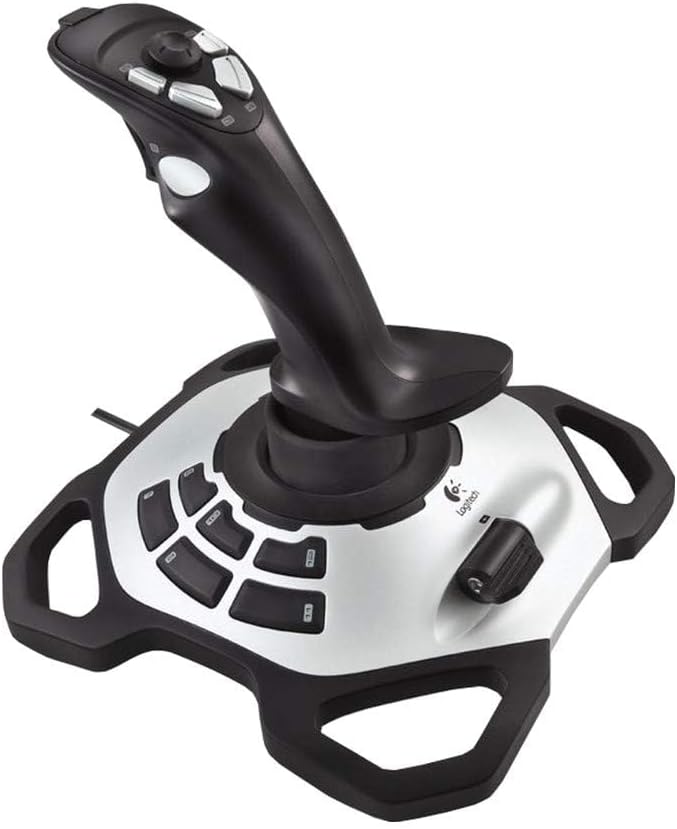


The PXN 2113PRO offers an accessible entry point for PC flight simulation enthusiasts looking for dedicated hardware. With a rating of 3.6 it balances cost and functionality for casual users who want more than a keyboard setup.
We may earn a commission when you buy through this link, at no additional cost to you.
This joystick includes vibration feedback and twelve programmable buttons that allow for custom mapping in supported flight and combat titles. The design features four suction cups to stabilize the unit during intense maneuvers.
While it lacks broad console compatibility and vibration intensity may vary depending on driver settings it remains a solid choice for budget constrained buyers. Users should ensure vibration strength is set correctly in the driver for best results.
Ideal for beginners wanting to explore flight sims without a large investment this controller delivers basic immersion. Check the manual for setup steps to maximize performance in games like Microsoft Flight Simulator or War Thunder.
This unit proves you do not need a high-end budget to start enjoying flight simulation on your PC.
Twelve programmable buttons let you map complex commands to suit your specific cockpit preferences easily.
We may earn a commission when you buy through this link, at no additional cost to you.
The Thrustmaster T-Flight Hotas One delivers a versatile HOTAS experience that works seamlessly across Xbox and Windows PC environments. Its 4.4 rating reflects strong user satisfaction regarding build quality and ease of use for flight enthusiasts.
We may earn a commission when you buy through this link, at no additional cost to you.
Featuring a detachable throttle and adjustable stick resistance this controller adapts to different play styles and desk setups. The plug and play USB connection ensures you can start flying immediately after connecting to your system.
Although it does not support every possible game title and the throttle is fixed to the main unit it excels in popular sim titles. The ergonomic design ensures comfort during long sessions without causing hand fatigue.
Recommend this for players seeking a reliable entry level HOTAS that grows with your skill set. It is perfect for casual flights and combat sims where quick access to controls matters most.
Use the same controller on Xbox and PC to maintain consistent muscle memory across all your devices.
Modify the stick resistance to match the aircraft you are flying for a more realistic control feel.
We may earn a commission when you buy through this link, at no additional cost to you.
The V-one Wired USB Gaming Controller stands out for its broad compatibility spanning PC Windows XP through 11 and Android devices. With a 4.2 rating it offers a practical solution for users who want one controller for multiple systems.
We may earn a commission when you buy through this link, at no additional cost to you.
It supports both Xinput and Dinput modes allowing flexibility across different game engines. The vibration feedback function enhances immersion when playing supported titles on both desktop and mobile platforms.
While it lacks support for Xbox 360 and Mac OS its focus on PC and Android covers a large user base. The plug and play nature means you can connect it to a TV box or tablet easily.
Ideal for casual gamers who switch between PC and mobile setups. Its budget friendly price and versatile functionality make it a practical addition to any household with mixed gaming devices.
Connect this controller to your Android TV box or tablet to enjoy console quality gaming anywhere.
Switch between Xinput and Dinput modes to ensure compatibility with legacy and modern games seamlessly.
We may earn a commission when you buy through this link, at no additional cost to you.
The Thrustmaster USB Joystick provides a straightforward entry point for users interested in flight simulation basics. With a 3.9 rating it offers essential controls without overwhelming new pilots with complex configurations.
We may earn a commission when you buy through this link, at no additional cost to you.
Its unique point of view button simplifies camera control during games allowing you to look around without breaking focus. The ergonomic handle with an enlarged rest ensures comfortable grip during extended gaming sessions.
While it offers only three axes and four buttons plus a trigger it remains effective for basic flight titles. Users needing more complex control schemes may find the limited button count restrictive.
Best suited for beginners exploring flight sims on a tight budget. It provides the essential feel of a flight stick while keeping costs low for casual users.
The dedicated point of view button lets you manage camera angles efficiently during intense flight scenarios.
The enlarged handle rest provides ergonomic support to reduce fatigue during long simulation sessions.
We may earn a commission when you buy through this link, at no additional cost to you.
The Microsoft Sidewinder Precision 2 Joystick is a classic option known for its robust build and practical design for flight simulation. With a 4.0 rating it continues to be appreciated by users who value tactile controls.
We may earn a commission when you buy through this link, at no additional cost to you.
Its rotating handle provides precise rudder control while the separate throttle lever allows for smooth speed adjustments during flight. You can save and download game specific controller profiles to tailor the experience to different titles.
While the design feels older than modern RGB options the functionality remains solid for simulation enthusiasts. The 146 degree throttle action offers a wide range of motion for nuanced control.
Recommended for users who prioritize mechanical precision over aesthetic features. It serves as a reliable tool for flight training and casual gaming alike without requiring complex setups.
The rotating handle allows for realistic rudder adjustments that mimic actual aircraft control surfaces.
Store multiple controller profiles to switch between different aircraft configurations instantly.
We may earn a commission when you buy through this link, at no additional cost to you.
The Logitech Extreme 3D Pro Precision Fightstick offers a high quality experience for those demanding accurate control inputs. With a 4.2 rating it is trusted for its durability and smooth mechanical movement during flights.
We may earn a commission when you buy through this link, at no additional cost to you.
Its ergonomic design supports long gaming sessions with minimal strain on your wrist and hand. The stick provides precise movement for complex maneuvers while the twist rudder adds a layer of realism.
While it does not include a separate throttle lever it integrates controls into a single unit for ease of use. The build quality ensures it withstands heavy use over time without losing calibration.
Ideal for users who want a reliable stick that performs well across various flight and combat titles. It strikes a balance between affordability and professional grade features.
Logitech ensures consistent performance with durable components that maintain accuracy over time.
Twisting the stick provides intuitive rudder control essential for realistic flight maneuvers.
We may earn a commission when you buy through this link, at no additional cost to you.
The VOYEE PC Controller delivers a practical wired solution for users seeking compatibility with Xbox 360 and Windows systems. With a 4.3 rating it is praised for its responsive buttons and reliable connection.
We may earn a commission when you buy through this link, at no additional cost to you.
Enhanced trigger buttons and sensitive joysticks ensure quick responses to player commands without delay. The long cord allows you to sit comfortably while playing even if your PC is far from your desk.
While it is designed primarily for controller style games rather than flight sticks it offers a comfortable grip for extended play. Rumble feedback adds an extra layer of immersion to supported titles.
Best for gamers who prefer wired reliability and comfort over wireless freedom. It is an excellent choice for fighting games and action titles requiring precise input.
The upgraded trigger buttons provide a tactile feel that improves your control during fast paced gameplay.
A 7.2ft cord ensures you can play from a comfortable distance without worrying about connectivity issues.
We may earn a commission when you buy through this link, at no additional cost to you.
The Thrustmaster SimTask FarmStick is a specialized joystick built for Farming Simulator 25 on Xbox and PC. Its 4.3 rating highlights its effectiveness in heavy machinery simulation where precise control is crucial.
We may earn a commission when you buy through this link, at no additional cost to you.
Featuring HALL Effect magnetic sensors it ensures accuracy without drift which is vital for construction equipment simulation. With up to 33 programmable inputs you can manage complex functions without relying on keyboard shortcuts.
While it is best paired with a racing wheel it works as a standalone unit for specific machinery tasks. The ambidextrous design allows for flexible setups depending on your preferred control layout.
Recommended for serious farming simulation enthusiasts looking to upgrade their cockpit. It brings a level of realism to agricultural tasks that standard controllers cannot match.
Built specifically for Farming Simulator 25 to offer a true plug-and-play experience.
Magnetic sensors ensure long term precision and reliable control during demanding gameplay.
We may earn a commission when you buy through this link, at no additional cost to you.
The Logitech G X56 H.O.T.A.S offers a high-end flight simulation experience with military-grade precision and extensive customization. With a 4.0 rating it appeals to users seeking professional quality controls for virtual cockpits.
We may earn a commission when you buy through this link, at no additional cost to you.
It includes over 189 programmable controls and twin throttles for complete aircraft management. RGB backlighting allows you to match the controller aesthetics to your rig while aiding visibility in dark rooms.
While the price is premium and it requires two USB ports the level of control it provides is unmatched. The adjustable stick force with four spring options ensures comfort and feedback tailored to your preference.
Ideal for serious simmers building a dedicated cockpit setup. It delivers the control and features needed for complex flight simulations requiring extensive mapping.
The 16-bit aileron and elevator axes provide the exact level of performance aspiring pilots demand.
Twin throttles with friction adjusters allow for precise engine management and locking when needed.
We may earn a commission when you buy through this link, at no additional cost to you.
The Thrustmaster T.16000M Fcs is our top pick for PC flight simulation due to its exceptional precision and durable design. With a 4.4 rating it stands out as a reliable choice for serious enthusiasts seeking long term performance.
We may earn a commission when you buy through this link, at no additional cost to you.
It utilizes H.E.A.R.T technology which ensures precision does not decrease over time. The fully ambidextrous design with removable components allows for a tailored fit for left or right-handed users.
While it is limited to PC environments its robust build and software support make it a superior option. The T.A.R.G.E.T software lets you create and load specific mapping profiles for each game you own.
Ideal for pilots and gamers who demand consistent performance and customization. It balances high-end features with a reasonable price point making it an excellent investment.
H.E.A.R.T technology ensures that your controller maintains its accuracy throughout its entire lifespan.
Removable components allow the joystick to be perfectly tailored for left or right handed use.
We may earn a commission when you buy through this link, at no additional cost to you.
Selecting the right joystick involves evaluating compatibility features and ergonomics to ensure a seamless experience on your system.
Ensure the device supports Windows 11 specifically to avoid driver conflicts. Check if it works with your preferred gaming platforms such as Steam or Xbox consoles.
Always verify the operating system compatibility list before purchasing to ensure smooth integration.
Look for sturdy materials and reinforced joints that can withstand repeated use without wear. High quality components ensure longevity and reliable performance during intense gaming sessions.
A solid build prevents breakage and maintains precise control over time.
Check how many buttons and axes are available for mapping. More programmable inputs allow for complex command structures essential for flight and vehicle simulation games.
Higher programmability gives you greater control over your in-game actions.
Consider the shape and grip comfort of the handle. A well designed ergonomic structure reduces hand fatigue during long gaming sessions and improves overall comfort.
Comfort is essential for extended play without physical strain.
Vibration adds immersion by providing tactile responses to in-game events. Ensure the controller supports this feature if you want a more engaging experience.
Vibration feedback enhances your connection to the game environment.
Decide between USB wired or wireless based on your setup needs. Wired connections offer stability while wireless provides freedom of movement.
Choose the connection type that best fits your gaming space and preferences.
Determine a budget that balances cost with desired features. Basic models suffice for casual players while premium options offer better precision and durability.
Set a budget to narrow down your choices effectively.
Check if the manufacturer provides software for driver updates and profile management. Good software support ensures the device remains compatible with future games and Windows updates.
Quality software support maintains long term usability and performance.
Start by connecting the device to a USB port and allowing Windows to install drivers automatically. If specific software is required download it from the official manufacturer site.
Once connected launch a game and navigate to the controls menu to map buttons to in-game actions. Test each button and axis to ensure proper response and adjust sensitivity settings.
Store the joystick in a dry place away from direct sunlight to prevent material degradation. Clean the surface occasionally with a soft cloth to remove dust and maintain grip.
Yes most models listed explicitly support Windows 11 alongside earlier versions like 10 and 8. Always verify the product page for specific compatibility details before purchase to avoid issues.
Most modern controllers support plug and play functionality so drivers install automatically upon connection. Some advanced features may require additional software for full customization of buttons and axes.
Only select models like the Thrustmaster T-Flight Hotas One support Xbox. Most flight sticks are designed specifically for PC and may not function on console systems without extra adapters.
H.E.A.R.T technology ensures that the joystick maintains high precision without drift over time. It uses magnetic sensors for consistent performance and longevity compared to traditional potentiometers.
Yes dedicated flight sticks are designed for titles like Microsoft Flight Simulator and War Thunder. They provide the precision and axes needed for accurate aircraft control and realistic immersion.
Vibration feedback enhances immersion by providing tactile responses to game events like engine rumble or explosions. It adds depth to gameplay and helps you react faster to in-game scenarios.
The number of buttons depends on the game complexity. Flight sims benefit from more than ten programmable buttons for managing systems while simpler games need fewer for basic movement.
Consider desk size and whether you need separate throttle modules. A modular design allows for flexible setups that fit your space while a single unit simplifies storage and portability.
We reviewed ten top models ranging from budget options to high end flight simulation gear to help you find the right fit. Each pick offers distinct strengths tailored to different gaming needs and budgets.
Prioritize compatibility and build quality when selecting a joystick to ensure it meets your long term gaming goals. Comfort and programmability also play key roles in delivering a smooth experience.
Prices and availability may change frequently so check current listings before making your final purchase decision. Investing in a reliable controller can significantly enhance your enjoyment of flight and combat games.