
HUANUO Under Desk Keyboard Tray
4.3Editor score
Fits flat and cross beam desks
Smooth metal roller track system
Flexible height and angle adjustments
Finding the right keyboard tray for standing desk setups can transform your daily workflow and comfort. Ergonomic trays help maintain proper posture while allowing seamless transitions between sitting and standing positions throughout your workday.
We evaluated ten top-rated models based on build quality, adjustability, and compatibility with various desk types. Our analysis covers clamp-on designs, sit-to-stand risers, and versatile platforms suitable for diverse office environments and user preferences.
Each pick highlights key features like load capacity, slide mechanisms, and installation requirements. Please note that product availability and pricing may change over time, so always verify current details before making your final purchasing decision today.
4.3Editor score
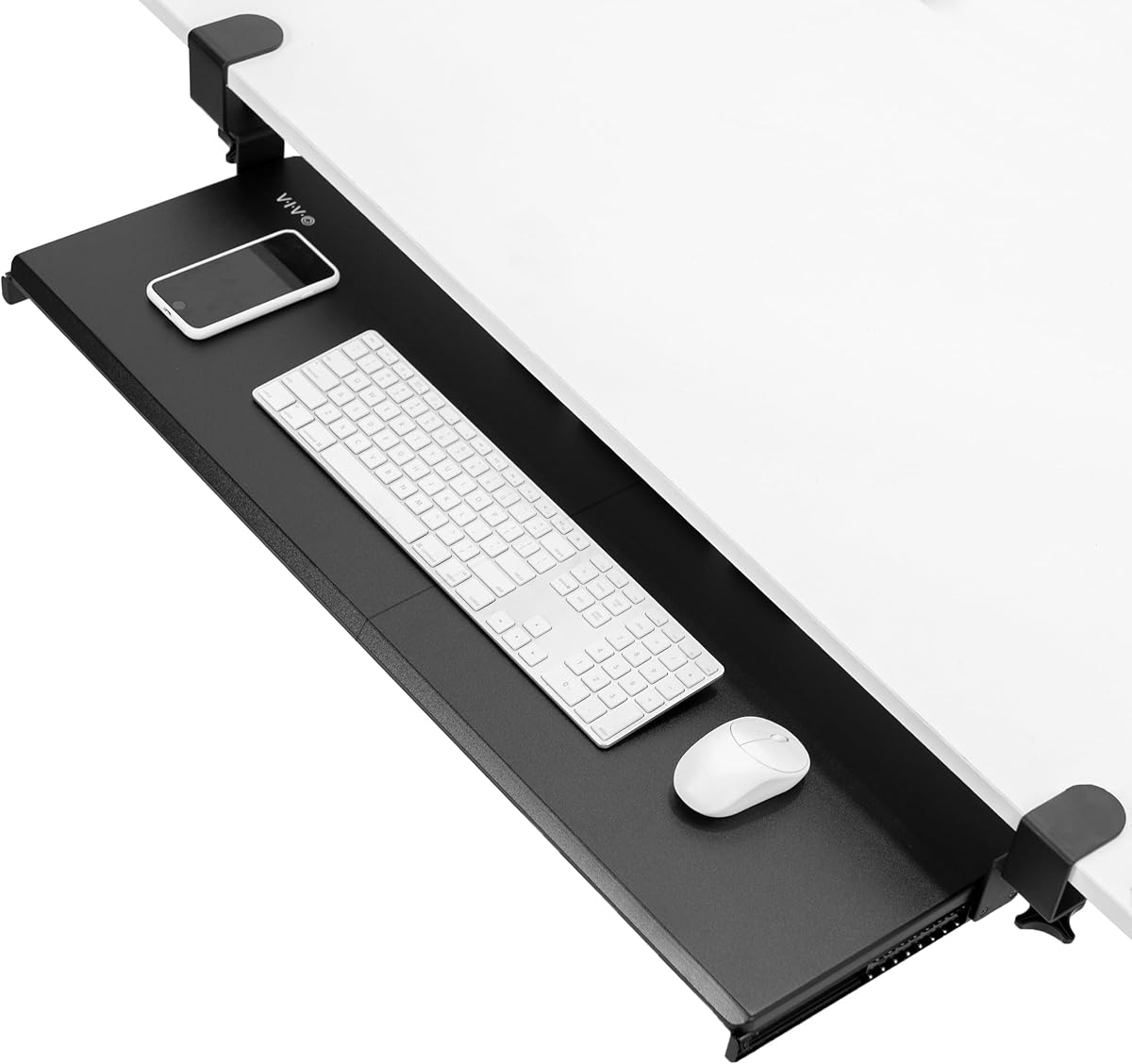
4.4Editor score

4.4Editor score
As an Amazon Associate we earn from qualifying purchases.
This side-by-side comparison highlights the key specifications and unique features of each keyboard tray model to help you identify the best fit for your standing desk configuration and ergonomic requirements.
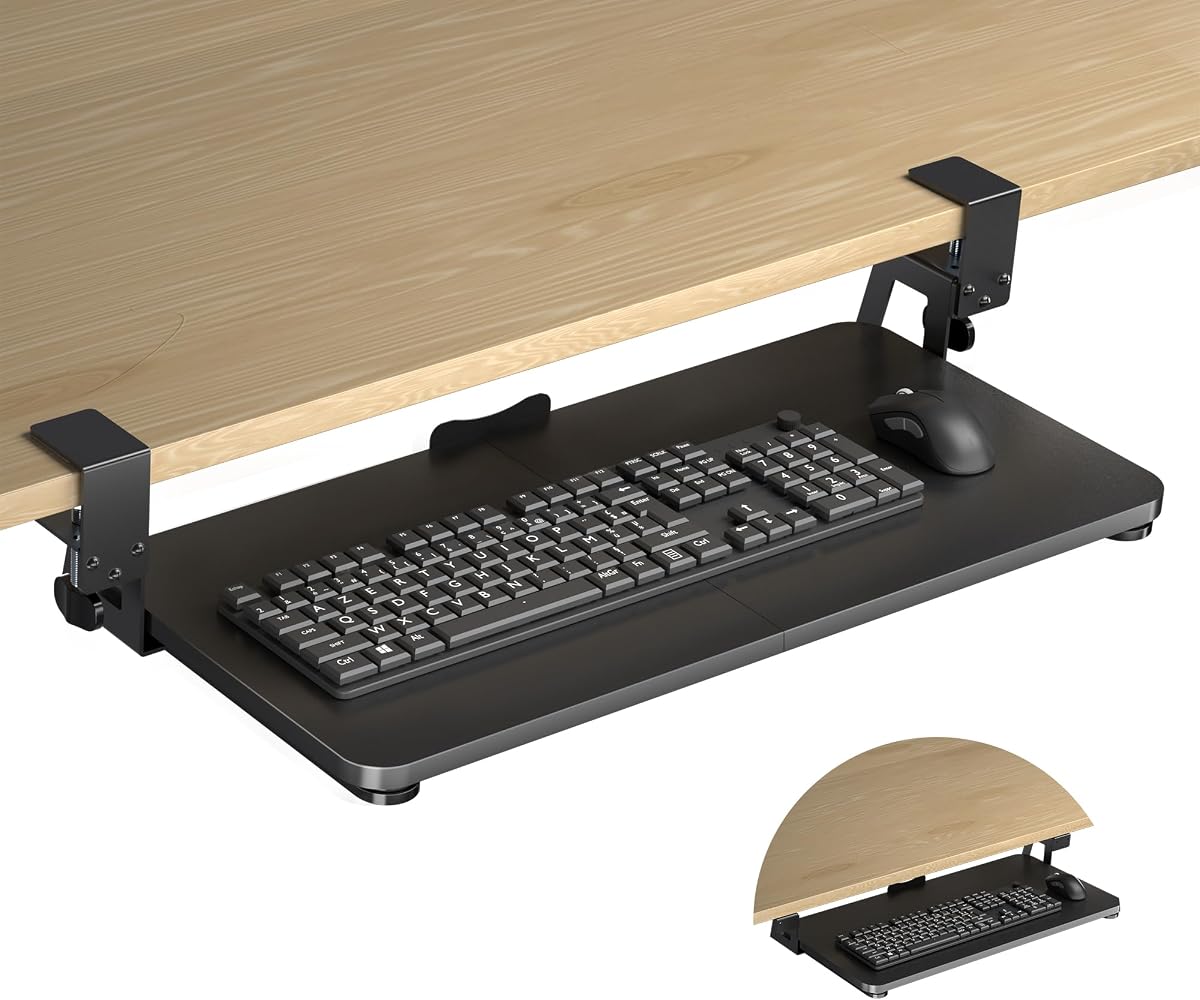


This VIVO keyboard tray stands out as a top choice for standing desk users seeking spacious ergonomic support. With a 4.4 rating and massive dimensions, it accommodates full setups effortlessly while maintaining stability during active typing sessions.
We may earn a commission when you buy through this link, at no additional cost to you.
Its extra long 33.9 inch surface provides ample room for keyboards, mice, and accessories below the desktop. The adjustable clamps secure firmly to desks up to 1.25 inches thick without damage, ensuring a reliable setup for daily productivity.
While highly rated, it requires careful measurement of desk width due to the 39.4 inch total clamp-to-clamp length. Users with narrower desks may find installation challenging, but the ergonomic benefits justify the space investment for most offices.
Ideal for professionals needing roomy typing zones, this tray optimizes comfort and workflow efficiency. Its patent-pending design and adjustable angles make it a solid long-term upgrade for anyone serious about ergonomic improvements.
The 34 by 11 inch platform ensures you have enough room for a full keyboard and mouse side by side with space for wrist rests or writing tools.
Solid C-clamps grip tightly to flat desk edges without drilling, preserving desk integrity while providing a stable base for heavy input devices.
We may earn a commission when you buy through this link, at no additional cost to you.
The HUANUO tray delivers exceptional value with versatile mounting options suited for modern electric standing desks featuring cross beams. Its 4.3 rating reflects smooth performance and solid build quality at a competitive price point for budget-conscious buyers.
We may earn a commission when you buy through this link, at no additional cost to you.
Designed with two installation options, it adapts to both flat bottoms and beams up to 2 inches high. The high-quality metal roller track ensures effortless sliding tested for 20,000 cycles, making it durable for frequent standing desk transitions.
Installation requires checking under-desk width and desktop thickness to avoid fitment issues. Compatibility is limited to wood or particle board materials, but the included clear instructions simplify setup for most standard office configurations.
Perfect for shared workspaces or home offices, this tray balances affordability with ergonomic features like tilt and swivel adjustments. It remains a top recommendation for those needing reliable performance without premium costs.
Specially designed brackets allow attachment to cross beams, solving a common challenge for users of electric standing desks that lack flat undersides.
The metal roller track system is engineered for long-term use, providing silent and consistent sliding action even under regular typing loads.
We may earn a commission when you buy through this link, at no additional cost to you.
This Mount-It! model offers unmatched sit-to-stand flexibility with a height range extending from 1.7 to 15.6 inches, accommodating both seated and standing typing heights comfortably. A 4.4 rating highlights its reliability and superior warranty coverage compared to other options.
We may earn a commission when you buy through this link, at no additional cost to you.
The scissor-lift mechanism ensures smooth adjustments without manual effort, locking securely in place throughout use. A wide, non-slip base keeps the platform steady even during aggressive typing, making it suitable for IT managers outfitting multiple desks.
Though the price is higher than average, the lifetime warranty and US-based support justify the investment for long-term office needs. It ships ready to use, eliminating assembly time and ensuring immediate ergonomic benefits upon arrival.
Best suited for offices prioritizing durability and user support, this tray excels in shared environments or single home offices. Its lightweight design allows easy repositioning, enhancing flexibility for evolving workspace configurations.
Unlike typical risers that only work when standing, this model goes low enough for seated typing, providing true all-day ergonomic comfort.
Backed by a lifetime warranty and US-based product support, it offers long-term reliability that standard keyboard trays simply do not provide.
We may earn a commission when you buy through this link, at no additional cost to you.
XINLEI offers a spacious 25.6 by 11.8 inch platform at a competitive price point, making it an attractive choice for users needing extra room without premium costs. Its 4.4 rating confirms solid construction and user-friendly installation options.
We may earn a commission when you buy through this link, at no additional cost to you.
The tray features both C-clamp and screw mounting methods, providing flexibility for thicker desktops that clamps alone cannot support. A unique back baffle design prevents keyboards from sliding off during vigorous typing, enhancing safety and usability.
While the total length of 30 inches requires adequate desk space, the smooth metal rails ensure silent operation and stable positioning. Users appreciate the ergonomic angles that reduce wrist strain during extended work or leisure sessions.
Ideal for home offices with standard desks, this tray balances functionality and affordability. The inclusion of installation hardware simplifies setup, making it a practical upgrade for anyone looking to reclaim desktop space.
Choose between clamps for quick setup or screws for thicker desktops, ensuring compatibility with a wider range of desk types and conditions.
The back baffle keeps your keyboard securely in place, reducing the risk of accidental slips or falls during intense typing periods.
We may earn a commission when you buy through this link, at no additional cost to you.
This VIVO model stands out for its wide adjustability, accommodating desks up to 3.4 inches thick—a feature rarely seen in competitors. A 4.3 rating reflects user satisfaction with its robust construction and comprehensive accessory package.
We may earn a commission when you buy through this link, at no additional cost to you.
The split design includes separate wrist and mouse pads along with dedicated spaces, optimizing comfort for various user preferences. Height and width adjustments allow precise customization, ensuring optimal ergonomics regardless of individual typing styles or desk layouts.
While installation may take more time due to multiple adjustment points, the flexibility justifies the effort for complex setups. The sturdy clamps hold firmly without damage, though users must avoid beveled edges to ensure proper fit.
Best for users with unconventional desk needs, this tray offers unmatched versatility in mounting and positioning. It effectively transforms standard desks into ergonomic workstations, enhancing comfort during long work sessions.
The extended clamp range supports desks up to 3.4 inches thick, overcoming limitations faced by standard trays that max out at much lower thicknesses.
Included wrist and mouse pads provide immediate comfort enhancements, eliminating the need for separate purchases upon installation.
We may earn a commission when you buy through this link, at no additional cost to you.
BONTEC delivers a no-drill solution that protects desk surfaces while maximizing available workspace above. A 4.4 rating underscores its effectiveness in creating tidy, ergonomic setups suitable for gaming or professional offices.
We may earn a commission when you buy through this link, at no additional cost to you.
The platform slides easily under the desk when not in use, freeing valuable space for documents or accessories. Sturdy C-clamps with protective pads ensure a secure fit on desks up to 1.97 inches thick, accommodating various materials.
Installation requires checking width and depth to ensure smooth operation, but the process is straightforward with provided hardware. Users report improved wrist posture and reduced clutter, making it a practical upgrade for home offices.
Perfect for renters or those avoiding permanent modifications, this tray balances ease of installation with functional design. It effectively supports standard keyboards and mice, enhancing comfort without compromising desk aesthetics.
Secure clamps attach without drilling, preserving desk integrity while maintaining stability during active use or frequent retraction.
Pulling the keyboard away from the desk surface clears room for monitors or documents, improving overall workspace organization.
We may earn a commission when you buy through this link, at no additional cost to you.
This VIVO model provides a straightforward solution for users seeking basic ergonomic improvements without complex mechanisms. A 4.2 rating indicates reliable performance for standard setups, especially those without significant structural constraints.
We may earn a commission when you buy through this link, at no additional cost to you.
The tray rotates fully from side to side, offering flexibility in positioning for different tasks. Supportive rubber padding and 5 inches of height adjustment enhance comfort, though users with crossbars may need a separate spacer bracket.
Mounting hardware is included for fast assembly, but compatibility checks are essential before purchase. It supports standard keyboards and mice well, making it a practical choice for those needing immediate ergonomic benefits.
Ideal for home users with simple desk structures, this tray offers a balance of function and simplicity. While not the most advanced option, it serves well for those prioritizing ease of installation and basic comfort.
Full side-to-side rotation allows users to adjust keyboard positioning easily, accommodating different seating angles and desk layouts.
Rubber padding and height adjustments provide immediate relief from wrist strain, making typing more comfortable during extended work periods.
We may earn a commission when you buy through this link, at no additional cost to you.
This HUANUO model emphasizes full-motion capability, allowing users to swivel and tilt for optimal positioning during varied tasks. A 4.3 rating highlights its utility in dynamic workspaces where frequent repositioning is beneficial.
We may earn a commission when you buy through this link, at no additional cost to you.
The platform offers 6.3 inches of height adjustment and significant tilt angles, accommodating both seated and standing positions. However, it demands careful clearance planning, particularly regarding under-desk width and obstacles during rotation.
When installed correctly, the tray saves substantial desktop space and improves comfort through its ergonomic features. Tightening the knob when typing ensures stability, making it a practical choice for users needing versatile positioning options.
Best suited for adaptable desks, this tray delivers flexibility unmatched by simpler models. While installation complexity may deter some, its motion features justify the effort for active users seeking customized ergonomic setups.
With 360-degree swivel and tilt options, the tray accommodates diverse working positions, ensuring comfort regardless of task requirements.
Height adjustment supports transitions between sitting and standing, making it ideal for owners of adjustable standing desk systems.
We may earn a commission when you buy through this link, at no additional cost to you.
Klearlook offers a unique all-in-one design combining above and under-desk functionality with built-in organizers. A 4.2 rating reflects satisfaction with its comprehensive features, though installation complexity may be a consideration for some users.
We may earn a commission when you buy through this link, at no additional cost to you.
Features like a storage drawer, phone slot, and headphone hanger help declutter workspaces efficiently. The 360-degree rotation and tilt support various typing positions, ensuring ergonomic comfort throughout the day for both work and gaming.
While the price is higher than basic trays, the dual-use flexibility and organization tools provide significant value. It adapts to different needs, making it versatile for users seeking a complete workspace solution in one product.
Ideal for creative professionals or gamers, this tray balances functionality with ergonomic support. Its design promotes productivity by keeping essentials organized and within easy reach while maintaining a tidy desk appearance.
Built-in storage and phone slots keep essential items organized, reducing desk clutter and improving workflow efficiency during busy work sessions.
The ability to install above or under the desk provides unmatched adaptability for users with changing workspace requirements or preferences.
We may earn a commission when you buy through this link, at no additional cost to you.
Mount-It! presents an extra-wide 30-inch tray with robust features like a lifetime warranty and thick-desk compatibility. A 3.9 rating suggests potential quality variability, but many users praise its durability and reversible installation options.
We may earn a commission when you buy through this link, at no additional cost to you.
The premium steel gliding rails ensure smooth, wobble-free operation even with heavy typing. Support for desks up to 1.77 inches thick surpasses many competitors, accommodating a broader range of furniture types and user needs.
Installation is damage-free with no-drill clamps, perfect for renters or those avoiding permanent desk modifications. While some reviews mention challenges with setup, the included video guide and US-based support help resolve issues quickly.
Best for users needing wide surfaces and thick-desk accommodation, this tray offers long-term value through its warranty. Despite mixed ratings, its build quality and support make it a solid consideration for dedicated ergonomic upgrades.
A 30-inch width provides ample room for large mechanical keyboards and full mouse movements, ensuring comfort during extended work or gaming sessions.
C-clamps secure without drilling, allowing for easy removal and leaving your desk intact for future users or design changes.
We may earn a commission when you buy through this link, at no additional cost to you.
Choosing the right keyboard tray involves considering compatibility, ergonomics, and durability to ensure it meets your standing desk setup needs effectively.
Ensure the tray fits your specific desk type by checking thickness, edge shape, and whether your desk has cross beams or flat undersides. Clamp-on models typically require flat edges and specific thickness ranges, while some units support beams up to 2 inches.
Measure your desk dimensions carefully before purchasing to avoid fitment issues or installation challenges.
Select a tray size that accommodates your keyboard, mouse, and any accessories comfortably. Most models range from 23 to 30 inches wide with load capacities around 11 pounds, ensuring stability for standard setups.
Larger surfaces offer more workspace but require sufficient under-desk clearance for full extension without obstruction.
Look for height, tilt, and swivel adjustments to optimize typing posture. Standing desk users benefit from vertical adjustability that supports both seated and standing positions to reduce strain on wrists and shoulders.
Adjustable features enhance long-term comfort and make the tray versatile for different tasks and user preferences.
Consider whether you prefer clamp-on, screw-in, or cross-beam mounting. Clamp options are quick and damage-free, while screw mounting may offer more stability for thicker or irregular surfaces.
The mounting method impacts installation time and desk preservation, so choose based on your willingness to modify the workspace.
Smooth roller tracks or gliding rails ensure effortless pull-out and push-in actions during work. Look for tested durability ratings or metal components that guarantee silent, wobble-free performance over time.
Reliable mechanisms prevent frustrating jams or instability during typing, contributing to a seamless user experience.
Extras like wrist rests, mouse pads, or storage drawers can enhance functionality and organization. Some models include phone slots or headphone hangers to streamline workspace management further.
While optional, these features add value by consolidating tools and improving overall ergonomics and tidiness.
Check for manufacturer warranties and support availability, especially for higher-end models. Lifetime warranties and US-based support indicate confidence in product durability and customer service quality.
Strong warranty coverage provides peace of mind and long-term protection against potential defects or damage.
Prices vary widely based on features and build quality, so determine a budget that aligns with your needs. Basic trays offer essential ergonomics at lower costs, while premium options include advanced adjustments and extended warranties.
Investing in a higher-quality tray can save money over time through improved durability and comfort benefits.
Install the tray according to manufacturer instructions, ensuring all clamps or screws are tightened securely. Position it at a comfortable height relative to your seated or standing posture to maximize ergonomic benefits.
Regularly clean the surface and sliding mechanisms with a damp cloth to prevent dust buildup. Lubricate metal tracks if necessary to maintain smooth movement over time and avoid sticking or noise during use.
Periodically check that mounting hardware remains tight to prevent instability during active typing. Adjust tilt or height settings as needed to accommodate changes in desk height or personal comfort preferences throughout the workday.
Yes, some models specifically accommodate cross beams up to 2 inches high using specialized brackets. Always verify your desk beam dimensions against product specs before purchasing to ensure proper fitment and stability during use.
The ideal height positions your wrists level with your elbows when typing, reducing strain. Models with adjustable ranges from 1.7 to 15.6 inches provide flexibility to match both seated and standing desk heights comfortably.
Quality clamps include protective pads to prevent scratches or marks on desk surfaces. Damage typically occurs only if the clamp is overtightened or applied to beveled edges incompatible with the mounting system.
Most trays require at least 12 to 16 inches of under-desk clearance for full extension. Measure your desk carefully to ensure there are no legs, drawers, or other obstacles blocking smooth pull-out movement.
No, each model has specific thickness limits ranging from 0.6 to 1.77 inches. Exceeding these limits may prevent clamps from securing properly or reduce available under-desk space for your typing setup.
Most standard clamp-on trays are incompatible with beveled or rounded edges. You may need screw mounting or a specialized model designed to accommodate non-flat desk surfaces for successful installation.
Some models include built-in wrist rests, while others offer them as separate accessories. Check product details before purchase to confirm if a wrist pad is included or needs to be bought separately.
Most users complete installation in 10 to 15 minutes with included hardware. Screw mounting may take slightly longer than clamp-on options, but clear instructions make the process straightforward for DIY users.
Our top three picks offer exceptional value and performance for various needs, from budget-friendly options to premium models with extended warranties. Each provides reliable ergonomic support to enhance comfort and productivity during daily work or gaming sessions.
Prioritize compatibility with your specific desk type and ensure sufficient clearance for smooth operation. Adjustable features and sturdy construction will deliver the best long-term results for both seated and standing desk setups.
Always verify current product availability and specifications before purchasing since features and stock may vary. Taking these steps ensures you select the perfect keyboard tray to transform your workspace into a more ergonomic environment.