
Adesso AKB-132HB Multimedia USB Keyboard
4.2Editor score
3 Built-In USB Ports
Multimedia Hotkeys Included
Quiet Membrane Switches
This guide compares the top ten keyboards with USB ports for productivity and convenience, covering budget, premium, and specialized options for every user
Finding a keyboard with a built-in USB port can transform your workspace by reducing cable clutter and simplifying device connections. These versatile peripherals allow you to plug in mice, flash drives, and other accessories directly through the keyboard, creating a streamlined setup for both home and office environments.
We have evaluated ten standout models based on build quality, connectivity options, typing comfort, and additional features like backlighting or multimedia controls. Our analysis focuses on how each keyboard integrates USB hubs into the design without compromising performance or reliability for daily tasks and extended use.
Each recommendation highlights unique strengths such as compact designs, premium mechanical switches, or broad compatibility across operating systems. Keep in mind that product availability and specifications may vary over time, so verify current details before making your final purchase decision for your specific needs.
4.2Editor score
4.4Editor score

4.3Editor score
The following table provides a side-by-side comparison of all ten featured keyboards, highlighting their core specifications, connectivity options, and unique design elements to help you quickly identify the model that aligns best with your workflow and hardware requirements.





The Adesso AKB-132HB stands out as an affordable solution for users needing integrated USB connectivity. With a solid 4.2 rating from verified buyers, it delivers reliable performance for daily office tasks and home computing needs without breaking the budget.
We may earn a commission when you buy through this link, at no additional cost to you.
Its primary strength lies in the three built-in USB ports located conveniently on the keyboard surface, allowing you to connect flash drives or mice without reaching behind your tower. The multimedia hotkeys provide quick access to media players and common Windows applications, enhancing workflow efficiency during long work sessions.
While the membrane switches offer a quiet and comfortable typing experience suitable for shared environments, they lack the tactile feedback of mechanical alternatives. The basic design also means no backlighting for low-light conditions, which may be a limitation for evening users who need visual key visibility.
This keyboard is ideal for budget-conscious professionals or students who prioritize functionality over premium features. Its straightforward plug-and-play setup ensures immediate usability across compatible systems, making it a practical choice for expanding connectivity in a cluttered workspace.
The three USB hubs eliminate the need for external dongles, streamlining device management directly at your fingertips.
Membrane switches minimize noise levels, making this keyboard suitable for quiet offices or home study environments.
We may earn a commission when you buy through this link, at no additional cost to you.
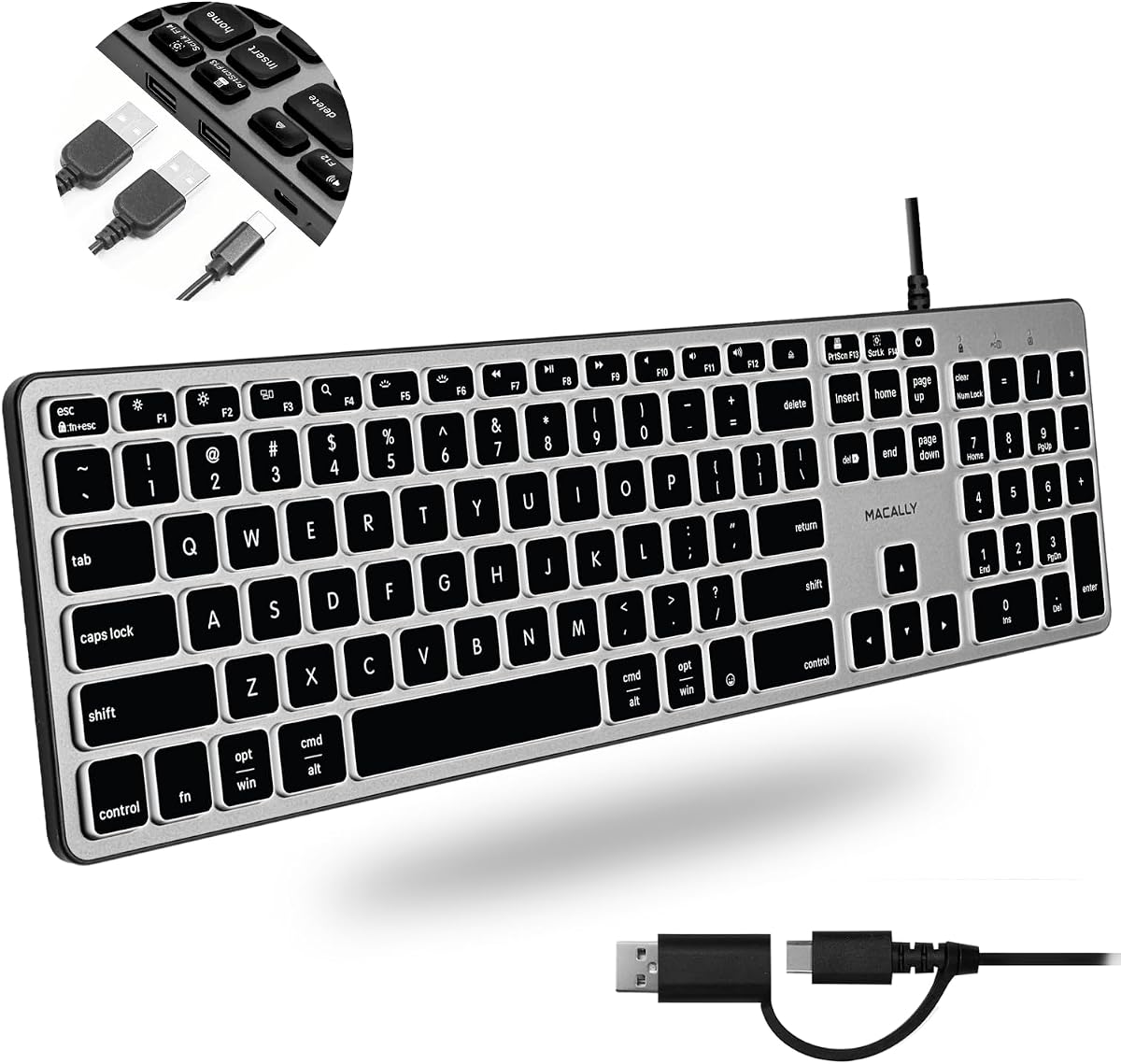
Macally's wired keyboard earns top honors for its exceptional versatility across multiple operating systems and device types. With a strong 4.4 rating, it satisfies both Mac and PC users who demand seamless connectivity options without sacrificing typing comfort or port availability.
We may earn a commission when you buy through this link, at no additional cost to you.
The inclusion of three USB ports including two USB-A and one USB-C allows for diverse peripheral connections. Auto OS detection ensures all 107 keys adapt instantly to your system, while the backlit keys offer three brightness levels for optimal visibility in varying lighting conditions throughout the day.
While the dual interface plug adds convenience, users must manage the cable carefully to avoid clutter on smaller desks. The price point reflects the premium features but remains competitive within the multi-platform keyboard market compared to branded alternatives offering similar functionality.
This keyboard is perfect for users who switch between Mac and Windows environments regularly. The comprehensive warranty and dedicated support provide peace of mind, ensuring long-term reliability for professionals who depend on consistent daily performance across different devices.
Auto detection technology removes the guesswork of switching key layouts between different operating systems effortlessly.
Adjustable white LED backlighting ensures you can type accurately even in dimly lit rooms or late-night sessions.
We may earn a commission when you buy through this link, at no additional cost to you.
Macally's premium USB C keyboard is tailored for users with newer devices that rely on Type-C connectivity. Rated 4.2 by customers, it combines elegant aesthetics with practical functionality, offering a reliable bridge between modern laptops and essential peripherals.
We may earn a commission when you buy through this link, at no additional cost to you.
The space gray finish complements Apple devices seamlessly, while the three ports allow concurrent connection of a mouse, webcam, and storage drive. Scissor switches deliver a low-profile, quiet typing experience that many users prefer for long hours of text editing or coding work.
The wired design ensures stable performance without battery concerns, but it requires a USB-C port on your host system for direct connection. While the price is higher than entry-level options, the build quality and included lifetime support justify the investment for professional environments.
Ideal for Mac and iPad users who want a dedicated full-size keyboard with modern connectivity, this model offers a seamless upgrade from standard laptop keyboards. The integrated typing angle and durable construction ensure comfort and longevity across daily work cycles.
Direct USB-C wiring ensures fast data transfer and stable power delivery for consistent performance during tasks.
The space gray color and slim profile match contemporary workstation setups for a cohesive visual experience.
We may earn a commission when you buy through this link, at no additional cost to you.
The Logitech K120 is a trusted staple for offices requiring reliable and spill-resistant input devices. With an impressive 4.6 rating, it is renowned for its sturdy construction and ergonomic design that supports all-day typing comfort without unnecessary features.
We may earn a commission when you buy through this link, at no additional cost to you.
While it does not include integrated USB hubs, its robust build and spill-resistant layout protect against accidental liquid damage common in busy workspaces. The deep-profile keys provide a tactile feel that reduces finger fatigue during extended data entry or document creation sessions.
Users may miss the USB hub functionality found in other models, but the K120 excels in reliability and cost-effectiveness for environments where simplicity and durability are paramount. The adjustable tilt legs allow for personalized angle adjustments to suit individual typing preferences.
This keyboard is best suited for workstations where physical durability matters more than connectivity convenience. Its eco-friendly composition and proven track record make it a responsible choice for companies prioritizing longevity and consistent performance across employee workspaces.
Spill-resistant design protects internal circuits from common accidents, extending the keyboard's operational lifespan significantly.
Deep profile keys mimic traditional typing feel to reduce strain during long periods of active computer use.
We may earn a commission when you buy through this link, at no additional cost to you.
The Perixx PERIBOARD-409H offers a smart compromise for users needing USB hubs without a full-size footprint. With a 4.4 rating, this compact keyboard saves valuable desk space while still providing two side-mounted USB ports for essential peripheral connections.
We may earn a commission when you buy through this link, at no additional cost to you.
Its design eliminates the numeric keypad to maximize room for mouse movement or other tools, making it ideal for smaller workstations. High-quality ABS key caps and UV coating ensure the keys remain clear and responsive over millions of keystrokes in high-traffic environments.
The membrane switches provide a comfortable and quiet typing experience, though some users might prefer tactile feedback for fast data entry. The long 5.9-foot cable ensures flexibility in positioning even if your computer tower is located under a desk far from the monitor.
This keyboard is a strong choice for users with limited desk real estate who still require extra connectivity options. Its plug-and-play nature simplifies setup, allowing you to start working immediately without installing drivers or configuration software on any Windows system.
Removing the number pad creates more room for ergonomic mouse use while maintaining full alphanumeric functionality.
The extended cable allows flexible placement options regardless of where your USB ports are physically located.
We may earn a commission when you buy through this link, at no additional cost to you.
The KOPJIPPOM Large Print Keyboard addresses visibility needs with fonts four times larger than standard layouts. Rated 4.5 by users who struggle with visual clarity, this full-size keyboard ensures keys are easy to find and press without strain or confusion.
We may earn a commission when you buy through this link, at no additional cost to you.
White LED backlighting adds another layer of visibility with adjustable brightness levels for dim environments. The ergonomic feet allow you to tilt the keyboard to a comfortable angle, reducing wrist fatigue during long typing sessions or gaming marathons.
While it lacks integrated USB hubs, its spill-proof design protects against liquid damage, adding longevity to the device. The compatibility spans many Windows versions and even Raspberry Pi systems, making it versatile for various technical setups or older machines.
This keyboard is essential for visually impaired users or older individuals who need clear visual cues while typing. Its sturdy build and intuitive layout make it a practical tool for schools, libraries, and home offices where clarity and reliability are top priorities.
Extra large font sizes significantly reduce eye strain and improve typing speed for those with vision limitations.
Adjustable LED backlighting ensures visibility in any lighting condition without needing external lamps or lights.
We may earn a commission when you buy through this link, at no additional cost to you.
Dell's KB216 is a classic office keyboard designed for consistent daily performance in business settings. With a 4.6 rating, it offers a clean layout and solid build quality that meets the demands of professional typing without unnecessary complexity or extra features.
We may earn a commission when you buy through this link, at no additional cost to you.
The chiclet key style provides a modern look and comfortable typing feel, while media buttons allow quick volume adjustments. The adjustable tilt legs help achieve an ergonomic position that suits different user heights and desk setups comfortably.
Although it does not include USB ports, its primary function as a reliable input device remains uncompromised. The durable construction ensures it withstands heavy use over years, making it a cost-effective choice for corporate procurement or home office setups.
Best for users prioritizing reliability and simplicity, this keyboard is ideal for environments where standard input is sufficient. Its straightforward design ensures minimal compatibility issues across various operating systems and Dell hardware configurations.
Built to withstand daily professional use, this keyboard maintains consistent performance over extended periods of time.
Integrated media keys allow quick control of volume and playback without switching away from your active window.
We may earn a commission when you buy through this link, at no additional cost to you.
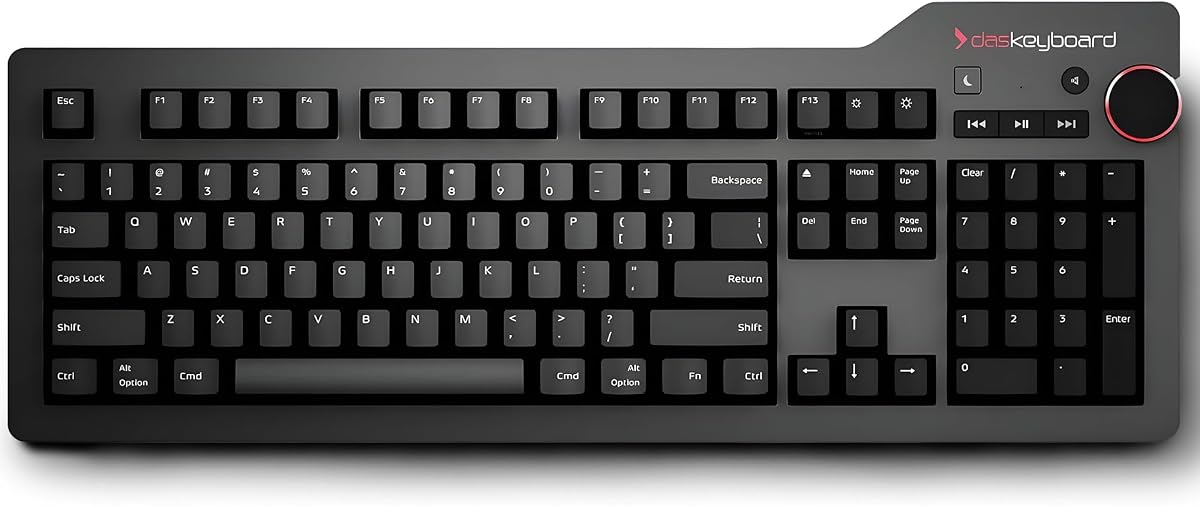
Das Keyboard 4 Professional for Mac delivers an unmatched mechanical typing experience tailored for professionals who value precision. With a 4.3 rating, it combines tactile feedback with high-speed connectivity, offering a premium peripheral that enhances workflow efficiency and typing satisfaction.
We may earn a commission when you buy through this link, at no additional cost to you.
The Cherry MX Blue switches provide audible feedback with every keystroke, ensuring accuracy during fast typing. The 2-port USB 3.0 hub allows rapid file transfers and device charging, while the dedicated volume knob offers tactile control over audio settings without software interaction.
While the clicky switches may be loud for shared office spaces, the aluminum top and durable construction justify the investment for dedicated workstations. The magnetic footbar and gold-plated switches add longevity and ergonomic support for long hours of active use.
This keyboard is ideal for Mac professionals, developers, or writers who want a superior typing feel and modern connectivity. Its focus on quality and durability makes it a worthwhile upgrade for users willing to pay for premium performance and design features.
Cherry MX Blue switches deliver distinct tactile feedback that improves typing speed and accuracy over time.
USB 3.0 support ensures data transfers are ten times faster than older USB 2.0 standards for better workflow.
We may earn a commission when you buy through this link, at no additional cost to you.
The Das Keyboard 4 Professional offers a refined mechanical experience suitable for high-performance computing environments. Rated 4.3 by enthusiasts and professionals, it delivers consistent reliability and tactile precision that enhances productivity during intensive typing sessions.
We may earn a commission when you buy through this link, at no additional cost to you.
Gold-plated switches increase longevity and contact reliability while ensuring smooth and responsive performance. The 2-port USB 3.0 hub supports high-speed peripheral connections and device charging simultaneously without requiring external adapters or hubs for basic needs.
The volume knob provides instant access to audio control, though its size and placement may take some adjustment for new users. The clicky switches make noise that some may find distracting in quiet spaces, but many prefer this feedback for typing accuracy.
Best for power users and writers seeking a premium mechanical keyboard with integrated USB capabilities, this model stands out for build quality and speed. Its durable construction ensures it remains a reliable tool for years of daily use across Windows or Linux systems.
Gold-plated contacts resist corrosion and rust, extending the usable life of the mechanical switches significantly.
USB 3.0 transfer speeds enable quick file movement between connected devices without lag or interruption.
We may earn a commission when you buy through this link, at no additional cost to you.
The Genuine Dell Multimedia USB Keyboard is a reliable replacement option for businesses maintaining Dell hardware fleets. With a 4.6 rating, it ensures compatibility with various Dell laptop and desktop models while offering essential connectivity through its integrated USB hub system.
We may earn a commission when you buy through this link, at no additional cost to you.
Fourteen hot keys allow quick access to common functions like volume, email, and web browsing, streamlining daily tasks. The removable palm rest adds ergonomic support and can be cleaned easily, maintaining hygiene in shared work environments where multiple users access the device.
While designed specifically for Dell systems, its spill-resistant construction protects against accidental liquid damage common in busy offices. The two USB hubs provide convenient access for connecting external drives or peripherals directly from the keyboard surface.
Ideal for IT departments or office managers needing exact replacements, this keyboard balances cost efficiency with practical features. Its straightforward design ensures easy deployment and maintenance across standardized hardware configurations in corporate settings.
Designed to work seamlessly with Dell business hardware, ensuring plug and play functionality without drivers.
Fourteen specialized keys speed up common tasks like launching email or managing system volume quickly.
We may earn a commission when you buy through this link, at no additional cost to you.
Selecting the right keyboard with integrated USB ports requires balancing connectivity needs with typing comfort and device compatibility to ensure a smooth workflow in your workspace.
Different models offer varying USB hub configurations ranging from two to three ports. Some feature only standard USB-A connectors while others include modern USB-C options for versatile connectivity. Check your peripheral requirements to choose a hub type that matches your mouse, drives, and webcams.
Verify the number and type of USB ports to ensure they meet your connection needs without requiring extra adapters.
Keyboards use either membrane or mechanical switches which affect typing feel and noise levels. Membrane switches are quieter and cheaper while mechanical switches offer tactile feedback and durability. Consider your office environment and typing volume when choosing the switch style.
Select switch types that match your noise tolerance and preference for tactile feedback during typing.
Ensure the keyboard supports your operating system fully without requiring complex driver installations. Some models feature auto OS detection to switch layouts between Windows and Mac automatically. This flexibility is crucial if you work across multiple platforms regularly.
Confirm OS compatibility to avoid layout mismatches or missing shortcut keys on your primary system.
Look for spill-resistant designs and high-quality materials like metal tops or reinforced ABS plastics for longevity. Some keyboards offer warranties and support for added peace of mind. A durable keyboard withstands daily wear and accidental accidents in busy workspaces.
Prioritize sturdy construction and warranty coverage to extend the usable life of your investment.
Full-size keyboards include number pads while compact models save desk space but omit them. Assess your workspace size and whether you use numeric keys frequently. Compact designs are ideal for smaller desks or mouse-heavy workflows.
Choose a layout that balances space efficiency with functional key availability for your tasks.
Extra features like backlighting, multimedia keys, and volume knobs enhance usability in various lighting and media scenarios. Backlit keys help in low-light conditions while multimedia controls simplify media management without opening apps.
Identify useful extras like lighting and media controls that improve your daily workflow experience.
Wired keyboards vary in cable length which determines placement flexibility relative to your computer's USB ports. Longer cables allow easier cable management and desk setups without stretching wires. Wireless options exist but may lack USB hubs depending on model.
Check cable length to ensure your keyboard fits comfortably on your desk without reaching limits.
Prices range significantly from basic models to premium mechanical keyboards with advanced hubs. Evaluate whether premium features justify the cost for your specific needs. Warranty support from reputable brands adds value by covering potential defects over time.
Balance price against features and warranty terms to find the best long-term value for your budget.
Connect the keyboard to an available USB port on your computer and wait for the system to recognize it automatically. Most keyboards are plug-and-play requiring no driver installation unless specified. Ensure the USB hub is active before plugging additional peripherals into the side ports.
Regularly clean the keyboard surface with a soft dry cloth to remove dust and debris. For deeper cleaning use compressed air to blow between keys without damaging internal components. Avoid spills and liquids as most models only offer basic resistance not full waterproofing.
Position the keyboard so your wrists remain straight while typing to reduce strain during long sessions. Adjust tilt legs if available to find a comfortable angle. Periodically check USB connections to ensure peripherals remain secure and functional for reliable operation.
Yes, most keyboards with USB hubs allow multiple devices to connect simultaneously. Ensure the total power draw does not exceed the hub's limit to avoid connectivity issues. You can connect a mouse, flash drive, and webcam together without problems.
Most keyboards use plug-and-play technology requiring no drivers on modern Windows and Mac systems. Some specialized models may offer extra features via optional software but basic functions work immediately. Check product specs if advanced customization is needed.
USB 3.0 hubs are fully backward compatible with USB 2.0 devices ensuring they work properly. The connection speed will adjust automatically based on the connected peripheral's capabilities. You can use older flash drives and mice without issues.
Many keyboards feature spill-resistant designs with internal barriers to protect electronics from minor spills. Immediate unplugging and drying can save the device from permanent damage. However full waterproofing is rare so clean spills carefully and promptly to avoid harm.
Yes, these keyboards work with laptops as long as you have available USB ports for connection. Using a keyboard expands your desk space while maintaining connectivity options for external peripherals. Ensure cable length allows comfortable placement near your laptop.
Mechanical keyboards typically have longer lifespans due to durable switches rated for tens of millions of keystrokes. Membrane keyboards may wear out faster but are quieter and more affordable. Both types can serve well depending on usage intensity.
We hope this guide helps you identify the right keyboard with USB ports for your specific needs and budget. Whether you prefer mechanical switches for typing satisfaction or compact designs for desk space, the top picks cover diverse workflows and technical requirements.
Prioritize features like USB hub capacity, build durability, and operating system compatibility when making your final selection. Balancing essential connectivity with ergonomic comfort ensures a productive and comfortable typing experience for daily tasks.
Always verify current product details and availability before purchase as specifications and stock may change over time. Checking verified buyer reviews can also provide real-world insights into performance and reliability specific to your use case.