
SABRENT USB 3.0 to 2.5in SATA Adapter Cable
4.7Editor score
UASP support for speed
Plug and play use
Lightweight cable design
Finding a reliable laptop hard drive adapter kit is essential for anyone needing to access data from old or external storage devices. These tools allow you to connect SATA and IDE drives to modern computers via USB, making data recovery and migration straightforward without opening your machine.
We evaluated ten top-rated kits based on compatibility, transfer speeds, power requirements, and build quality. Our analysis includes dual-drive options, single-drive readers, and enclosures to ensure you find the right solution for your specific hardware needs and technical expertise level.
Each pick highlights key features like USB-C support, power adapter inclusion, and hot-swap capabilities. Prices and availability change frequently, so verify current listings before purchasing to ensure you get the best value and latest version of these essential data access tools.
4.7Editor score

4.4Editor score
4.6Editor score
As an Amazon Associate we earn from qualifying purchases.
The following comparison table lists every reviewed adapter side by side with their core specifications to help you quickly identify which model fits your specific drive type and connection needs.


The Unitek USB 3.0 IDE/SATA Adapter stands out as a robust solution for users needing to access both modern and legacy storage devices. With a rating of 4.4 stars, it is praised for its dual-drive capability which allows simultaneous connection of one IDE and one SATA drive. This makes it ideal for data migration tasks where you need to copy files between different drive types without swapping cables.
We may earn a commission when you buy through this link, at no additional cost to you.
Its high-speed transfer capabilities rely on USB 3.0 and SATA III interfaces, delivering up to 6Gbps speeds when paired with compatible hardware. The included 12V/2A power adapter ensures stable operation, especially crucial when running two drives at once or working with power-hungry 3.5 inch models. The plug-and-play design means you can connect it to Windows Mac or Linux systems immediately without searching for drivers.
While the adapter offers great flexibility, it does require a dedicated power source which limits true portability compared to bus-powered cables. Additionally, it only supports USB A ports so users with newer laptops featuring only USB C will need an adapter. Despite these minor drawbacks the comprehensive connector support and reliable power delivery make it a top choice for recovery professionals.
This kit is best suited for IT enthusiasts or office workers who frequently deal with mixed drive environments. Whether you are retrieving old files from a 3.5 inch IDE drive or backing up a modern SSD the Unitek adapter provides the necessary ports and power to get the job done efficiently.
You can connect one IDE drive and one SATA drive at the same time for seamless data transfer workflows.
The included 12V adapter ensures consistent performance for 3.5 inch drives that require more power than USB alone provides.
We may earn a commission when you buy through this link, at no additional cost to you.
This Hard Drive Reader offers an affordable entry point for users needing basic data access without breaking the bank. With a 4.1 rating it is designed to support both 2.5 and 3.5 inch drives across IDE and SATA interfaces. The inclusion of a USB C adapter means it works with older USB A ports as well as modern laptop connections making it versatile for many users.
We may earn a commission when you buy through this link, at no additional cost to you.
It supports drives up to a massive 20TB capacity ensuring you can handle large storage needs. The transfer speeds are optimized for SATA at 5Gbps though IDE speeds are lower at 133Mbps due to legacy limitations. The plug and play design simplifies setup so you can start recovering data immediately after connecting the drive to your computer.
Budget options often come with trade-offs like slower transfer speeds for older drives and simpler construction materials. The power supply might not be included depending on the specific bundle so check what is in the box before buying. However for simple file transfers from smaller drives this kit offers excellent value for its low price point.
If you are a home user looking to recover documents from an old laptop drive or expand storage occasionally this reader is a practical choice. It balances cost and functionality well enough for occasional use without requiring professional tools or technical expertise to operate.
The kit includes an adapter to work with both older USB A ports and newer USB C connections on modern laptops.
It can handle drives up to 20TB allowing you to access large capacity drives without issues.
We may earn a commission when you buy through this link, at no additional cost to you.
The YINNCEEN External Hard Drive Recovery kit is designed to simplify the process of accessing old data from various drive types. It supports both SATA and IDE interfaces with transfer rates up to 5Gbps for SATA connections. The package includes a 12V 2A power adapter which is crucial for running 3.5 inch drives that cannot draw enough power from USB alone.
We may earn a commission when you buy through this link, at no additional cost to you.
Users appreciate the wide compatibility with 2.5 and 3.5 inch drives as well as optical drives like CD-ROM and DVD. The LED indicator provides clear visual feedback on power and activity status helping you know when data is being read or written. Plug and play functionality ensures you do not need to install additional software before starting your data recovery or backup tasks.
One area where this product might face challenges is with older IDE drives that require jumper settings to function correctly. The manual provides some guidance but may lack specific diagrams for all drive models. Additionally the power cable length and flexibility might be a constraint depending on where you place your computer and drive during transfer operations.
This kit is highly recommended for anyone needing a versatile all-in-one solution for occasional data recovery. Whether you are archiving old family photos from a legacy drive or cloning data to a new SSD the included power supply and broad compatibility make it a reliable tool for home and small office use.
The box includes a dedicated 12V power adapter ensuring 3.5 inch drives spin up reliably without external help.
It also supports optical drives like CD and DVD allowing you to access legacy media easily.
We may earn a commission when you buy through this link, at no additional cost to you.
Designed with modern connectivity in mind this Hard Drive Reader fits well with both legacy USB A and newer USB C laptops. It features an extended body design that makes it easier to access ports that might be recessed on newer computer chassis. The soft power cable reduces the risk of damaging your IDE ports during connection which is a common issue with rigid adapters.
We may earn a commission when you buy through this link, at no additional cost to you.
It supports a wide range of drives including 2.5 and 3.5 inch HDD and SSD units. The stable 12V 2A power supply ensures that larger drives operate without interruption during long transfer sessions. With a high rating of 4.6 it is trusted by data recovery pros and home users alike for its reliability and user friendly design features.
The inclusion of a 12 month after-sales support adds value by providing peace of mind if you encounter issues. However the price is slightly higher than basic models due to these enhanced design features. The requirement for external power means it is less portable than bus powered cables but offers superior stability for desktop environments.
If you are upgrading your computer or office workstation and need to archive old drives this reader is an excellent choice. The thoughtful design details like the softer cables and extended body show a focus on usability that makes data recovery tasks smoother and less frustrating for technical and non technical users.
The longer connector body makes it easier to plug into hard to reach ports on laptops or desktops.
Flexible cables reduce stress on your drive connectors lowering the risk of physical damage during use.
We may earn a commission when you buy through this link, at no additional cost to you.
The SABRENT USB 3.0 to SATA Hard Drive Docking Station is perfect for users who only need to work with SATA drives. It accepts both 2.5 and 3.5 inch drives without any tools making it incredibly easy to slide a drive in and start accessing data. The included 12V power adapter ensures stable operation especially for 3.5 inch desktop drives that need more power.
We may earn a commission when you buy through this link, at no additional cost to you.
This docking station features a flat bay design that lays drives flat for easy access and storage. UASP support can boost transfer speeds on compatible host systems making it faster than standard USB 3.0 connections. The LED indicator clearly shows when the drive is powered on and active giving you immediate visual confirmation of its status.
A key limitation is the lack of IDE support so if you have older legacy drives this model will not work for you. It also uses a USB A host cable meaning users with only USB C ports on their laptop will need a separate adapter. Despite these limitations it remains a favorite for its simplicity and reliability in daily data management tasks.
This docking station is ideal for tech support staff or power users who frequently swap drives to backup data or run diagnostics. The hot swap capability allows you to change drives without shutting down your computer which saves time and keeps your workflow uninterrupted during busy work sessions.
You can insert and remove drives without any screws or tools making it great for quick data checks.
UASP protocol support on compatible hosts provides faster data transfer speeds than standard SATA adapters.
We may earn a commission when you buy through this link, at no additional cost to you.
For users focused on 2.5 inch drives this adapter cable offers a lightweight and portable solution without the bulk of a docking station. It supports both SATA SSDs and laptop HDDs with UASP support for faster transfer rates. The USB bus power means you do not need a wall outlet to use it making it perfect for on the go data recovery.
We may earn a commission when you buy through this link, at no additional cost to you.
The plug and play design works seamlessly with Windows macOS and Linux systems. You simply plug the cable into the drive and computer and the system recognizes it instantly. The compact form factor fits easily in a laptop bag so you can carry it anywhere you need to access a drive quickly.
Since it is bus powered it may struggle with some high capacity older mechanical drives that draw more power than USB provides. Also it only supports 2.5 inch drives so 3.5 inch desktop drives are not compatible. The lack of M.2 support also means modern slim drives cannot be used with this specific adapter.
This cable is the perfect choice for travelers or IT professionals who need to access laptop drives regularly. Its simplicity and lack of external power requirements make it a reliable tool for quick file transfers or backups when you are away from a power source.
No wall adapter is required because it draws power directly from the USB port on your computer.
The small cable size fits in a pocket or laptop bag making it easy to carry with you.
We may earn a commission when you buy through this link, at no additional cost to you.
This enclosure converts a standard 2.5 inch SATA drive into a portable external USB drive quickly and easily. It supports both USB Type C and Type A connections so you can use it with modern laptops or older desktops. The tool free design means you can install your drive by simply pushing out the cover plugging in the drive and closing it up.
We may earn a commission when you buy through this link, at no additional cost to you.
The UASP protocol support optimizes data transfer speeds for SSDs ensuring you get the most out of your drive performance. It supports drives up to 6TB which is sufficient for most personal storage needs. The included LED indicator shows power and activity status making it easy to tell when the drive is accessing data.
This model is specifically optimized for SSDs which means mechanical drives might run slower than expected inside the enclosure. Also it only supports 2.5 inch drives so you cannot use it with larger desktop hard drives. The lack of included extra cables in some bundles might be a inconvenience depending on your computer ports.
This enclosure is excellent for turning a spare laptop SSD into a fast portable drive for backups or file sharing. If you value speed and portability and already have a 2.5 inch SATA drive this enclosure provides a cost effective way to keep that drive useful in a modern USB environment.
Supports both USB Type C and Type A so it works with almost any computer without extra adapters.
The UASP support ensures that SSDs reach their maximum potential speed when connected to the computer.
We may earn a commission when you buy through this link, at no additional cost to you.
This adapter kit allows you to connect both USB 3.0 and Type C interfaces providing flexibility for various computers. It supports 2.5 and 3.5 inch IDE and SATA drives with a capacity up to 6TB. The included 12V 2A power adapter is essential for powering larger drives and ensures stable operation during data recovery tasks.
We may earn a commission when you buy through this link, at no additional cost to you.
A unique feature is the ability to work with two HDDs simultaneously one IDE and one SATA though it cannot handle two IDE drives at once. This dual interface design makes it economical since you do not need separate cables for different laptop types. The LED indicator shows power and activity status so you know when data is being transferred.
Jumper settings may be required for older IDE drives which can be confusing for non technical users. You need to set the master and slave disks correctly to ensure the computer recognizes them. Additionally the power adapter adds bulk so it is not the most portable solution for travel use.
This kit is suitable for users who need a versatile adapter that bridges the gap between old and new hardware. Whether you are recovering data from an old desktop or cloning a drive to a new SSD the dual interface and power support provide the reliability needed for these critical tasks.
Both USB A and USB C ports are supported so you can use it with older and newer computers.
You can connect one IDE drive and one SATA drive at the same time for efficient data copying.
We may earn a commission when you buy through this link, at no additional cost to you.
This reader stands out by supporting optical drives like CD ROM and DVD RW which is rare for standard SATA IDE adapters. It supports both USB 3.0 and USB C interfaces ensuring compatibility with almost any modern computer. The 12V 2A power adapter ensures that all supported drives including 3.5 inch units run smoothly without power issues.
We may earn a commission when you buy through this link, at no additional cost to you.
Data transfer speeds reach up to 5Gbps for SATA connections which is fast enough for most backups and migrations. The 2 in 1 USB and USB C design allows you to swap adapters based on your laptop port easily. Hot swap functionality lets you disconnect drives without restarting your computer keeping your workflow efficient.
The included power adapter can be bulky and may require a specific outlet placement which limits portability. Some users find the manual complex regarding jumper settings for older IDE drives. However the comprehensive support for optical media makes it valuable for accessing legacy software or media stored on discs.
This kit is perfect for archivists or home users who need to access a wide variety of media formats including DVDs and CDs. If you want one device that can handle your old hard drives and optical discs this reader provides the necessary connectivity and power to do it all in one place.
Supports CD and DVD drives allowing you to access media data that other adapters miss.
Includes a USB C adapter so you can use it with modern laptops that lack USB A ports.
We may earn a commission when you buy through this link, at no additional cost to you.
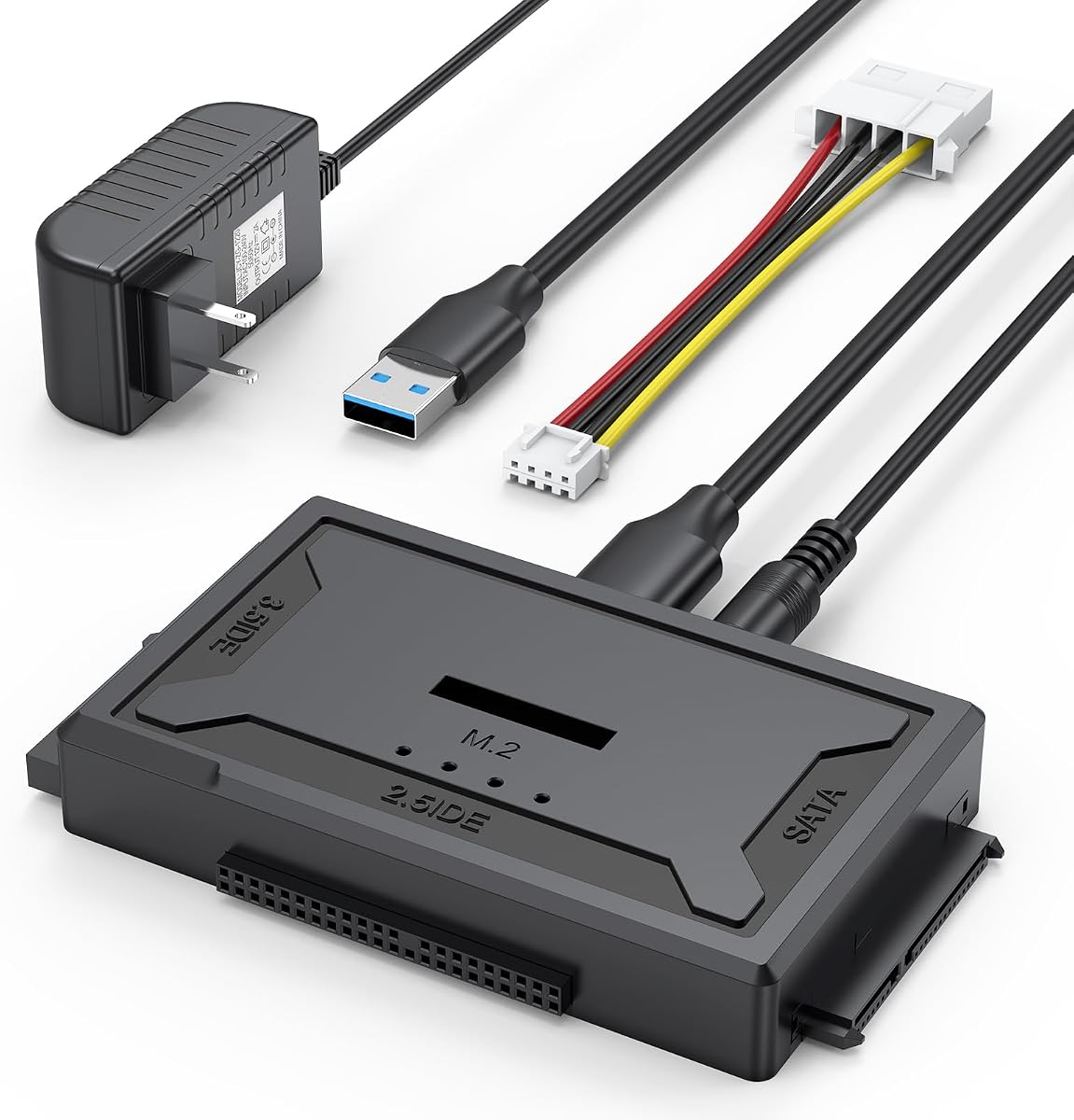
This premium dock is an upgrade that supports a wide range of drive types including M.2 NVMe SSDs alongside traditional SATA and IDE drives. It features transfer speeds up to 10Gbps for M.2 drives making it the fastest option on this list. The open design accommodates any size of M.2 drive which is useful for varying module lengths.
We may earn a commission when you buy through this link, at no additional cost to you.
The upgraded flexible power cable improves the experience with old IDE drives by reducing stress on the ports. It also includes a 12V power adapter to ensure all drives have enough juice to run properly. With professional technical support included you can rely on help if you encounter any compatibility issues during data retrieval.
The price is higher than basic adapters due to the expanded functionality and M.2 support. It also does not support B Key mSATA drives so you need to verify your drive type before purchase. However for users with mixed drive collections including modern NVMe SSDs this dock is the most comprehensive tool available.
This dock is ideal for IT professionals or power users who work with multiple drive generations. Whether you are upgrading from an old IDE system to a modern NVMe SSD this single device provides the connectivity you need to manage and transfer data across all your hardware efficiently.
Supports M Key and B+M Key M.2 drives allowing access to modern high speed storage.
The soft flexible power cable reduces stress on legacy IDE connectors during operation.
We may earn a commission when you buy through this link, at no additional cost to you.
Choosing the right adapter depends on your drive type connection ports and power needs. This guide helps you narrow down options based on essential factors.
Ensure the adapter matches your drive connector. Most modern drives use SATA but older ones use IDE. Some kits support both while others are SATA only. Verify if you need optical drive support as well.
Always check your drive type before buying to avoid compatibility issues.
Newer laptops often have USB C ports while older desktops use USB A. Look for kits with dual USB or USB C adapters included. Without an adapter you may not be able to connect to your device at all.
Select a kit that supports your computer's specific USB ports.
3.5 inch drives typically require external power while 2.5 inch drives can run on USB power. Always check if a 12V power adapter is included if you plan to use desktop drives.
External power ensures stable operation for larger drives.
USB 3.0 offers up to 5Gbps while USB 3.2 or higher can reach 10Gbps. Look for UASP support which accelerates transfers on compatible systems. Faster speeds mean less time waiting for large data migrations.
Prioritize kits with UASP support for better performance.
Durable cables and connectors prevent damage to your drives. Soft power cables are better for older drives with brittle pins. Check reviews for reports of breakage or loose connections over time.
Invest in a well-built kit to protect your valuable data.
Plug and play adapters require no drivers which simplifies setup. Hot swap capability allows changing drives without rebooting. Tool free designs make swapping drives in docking stations effortless.
Choose adapters that minimize setup steps and maintenance.
Professional support can help resolve driver or hardware issues. A warranty protects you if the adapter fails within the first year. Look for brands with dedicated customer support teams.
Good support ensures you can use the kit confidently.
Budget kits may lack power adapters or USB C support while premium ones offer broader compatibility. Balance cost with the features you actually need for your workflow.
Avoid overspending on unnecessary features but do not compromise on essentials.
First connect the adapter to a power outlet if required before plugging into your computer. Ensure the power supply is firmly seated to prevent intermittent connection issues during data transfers.
Second insert the hard drive into the adapter matching the SATA or IDE pins correctly. Do not force the connection and check the orientation to avoid damaging the pins on the drive.
Third wait for your computer to recognize the new drive and mount it automatically. Use the file explorer to access your data and transfer files as needed before safely ejecting the drive.
Many adapters support both sizes but check the product details carefully. Some kits require a separate power supply for 3.5 inch drives which may not be included in basic bundles.
Most modern adapters are plug and play and work with Windows Mac and Linux without drivers. Some older operating systems may require specific drivers but this is rare for USB 3.0 adapters.
SATA drives are thinner and faster while IDE drives are wider and older. Most modern laptops use SATA but older desktops may still use IDE requiring an adapter with IDE support.
Usually 2.5 inch SSDs do not need external power as they run on USB power alone. However 3.5 inch drives always require a dedicated power adapter regardless of whether they are HDDs or SSDs.
These kits are for data recovery and transfer rather than booting an operating system. Installing a boot drive typically requires internal mounting or a specialized enclosure not a standard adapter kit.
Transfer speeds vary based on your drive type and USB port. USB 3.0 can reach up to 5Gbps while USB 2.0 is slower at 480Mbps. The actual speed also depends on the drive's read write limits.
We found that kits like the Unitek USB 3.0 IDE/SATA Adapter offer the best balance of versatility and power for most users. Budget options like the SABRENT USB 3.0 to 2.5in SATA Adapter are great for simple tasks without extra cost.
When choosing prioritize compatibility with your drive type and connection ports. Always ensure you have the right power supply for 3.5 inch drives to avoid connection issues during critical data recovery.
Prices and availability change regularly so check current listings for the latest deals and models. Verify what is included in the package before buying to ensure you have everything needed for your specific drive setup.