
MokerLink 8 Port 10G Managed Ethernet Switch
4.3Editor score
8 x 10Gbps Ports
Web/CLI L3 Managed
Metal Desktop Rackmount
This guide compares the top Layer 3 Network Switch models for performance, routing, and scalability to help you choose the right managed solution for your
Selecting the right networking hardware is crucial for maintaining a reliable and efficient digital infrastructure. Layer 3 Network Switches provide intelligent routing capabilities that go beyond basic connectivity, allowing for better traffic management and segmentation across complex environments.
We evaluated ten top-rated models based on port speed, management features, power delivery options, and overall build quality. Our comparison focuses on how well each device handles inter-VLAN routing, security protocols, and scalability for both enterprise and advanced home lab setups.
Each pick highlights unique strengths such as PoE support, fiber connectivity, or silent operation. While pricing varies significantly across models, the features listed remain consistent with manufacturer specifications. Always verify current availability and support terms before finalizing your network investment decisions.
4.3Editor score

4.7Editor score
4.4Editor score
The following table provides a side-by-side overview of key specifications for all ten selected models to help you quickly identify which switch matches your specific connectivity and management requirements.




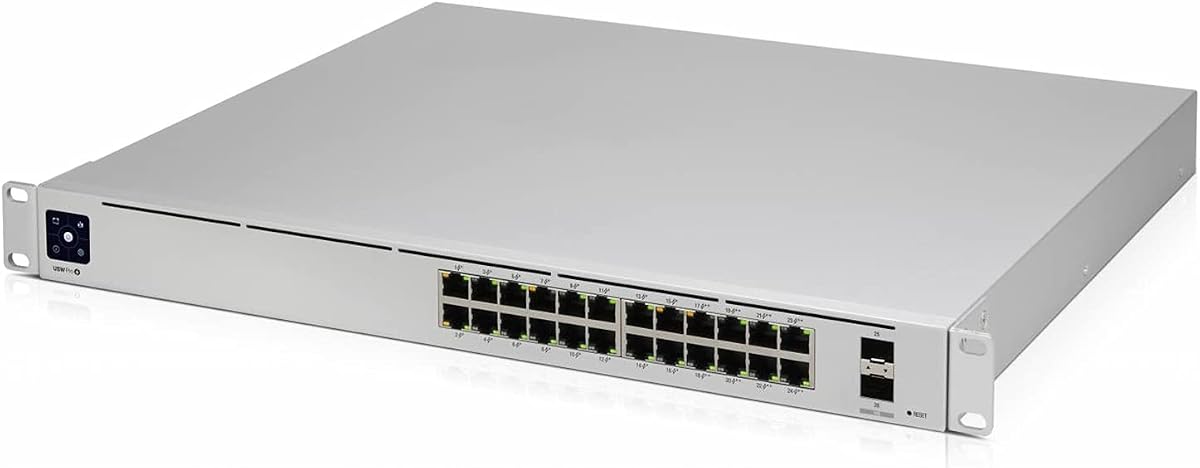
This Ubiquiti model stands out as a top choice for users needing robust Layer 3 routing with integrated power delivery. Its high rating reflects consistent performance in enterprise and prosumer environments where network segmentation is critical.
We may earn a commission when you buy through this link, at no additional cost to you.
The switch supports advanced routing protocols that allow efficient traffic flow between VLANs without burdening a central router. Included components provide a complete 24-port solution that simplifies cabling and device connections for growing networks.
While the cost is higher than basic switches, the investment pays off through reduced need for external routers and improved network security. Users should note that full feature access often requires the UniFi controller software for optimal configuration.
Buyers seeking a scalable, managed network solution with built-in power should strongly consider this unit. It delivers the reliability and feature set needed for modern office or advanced home infrastructure setups.
Combines PoE supply with Layer 3 switching to reduce hardware footprint and simplify network architecture.
Works seamlessly within the Ubiquiti UniFi ecosystem for unified monitoring and management.
We may earn a commission when you buy through this link, at no additional cost to you.
The MokerLink switch offers an accessible entry point into Layer 3 networking with 10G capabilities at a competitive price. Its rating indicates solid functionality for users needing faster speeds without enterprise-level costs.
We may earn a commission when you buy through this link, at no additional cost to you.
Features include auto-adaptive ports that adjust to 10G, 5G, 2.5G, or 1G speeds ensuring compatibility with various devices. Web and CLI interfaces provide flexible management options for both casual and technical administrators.
Security features like DHCP Snooping and port security protect against common network threats. The metal housing and fan cooling support reliable operation in demanding environments like small offices or media centers.
Ideal for users prioritizing speed and manageability on a budget, this switch delivers essential Layer 3 functions effectively. It is a practical choice for upgrading home labs or small business networks where 10G links are needed.
Auto-adaptive ports ensure seamless connectivity across different device capabilities without manual configuration.
Built-in protection against ARP attacks and unauthorized access safeguards sensitive network traffic.
We may earn a commission when you buy through this link, at no additional cost to you.
This model provides pure Layer 3 switching power without the overhead of power delivery, making it efficient for data-focused setups. Users appreciate the reliability and flexibility it brings to complex network topologies.
We may earn a commission when you buy through this link, at no additional cost to you.
The built-in power supply ensures stable voltage for all components while optical fiber support enables long-distance connections. With up to ten times faster connectivity than standard Ethernet, it handles high bandwidth tasks with ease.
Rack mounting features help organize cabling in professional installations while the lack of PoE reduces heat and complexity. It suits users who already have separate PoE injectors or prefer to segment power and data lines.
Recommended for environments prioritizing raw switching performance and fiber connectivity, this unit delivers consistent results. It remains a solid premium option for those who do not require integrated power over Ethernet.
Optical fiber media support allows for efficient and reliable connections over longer distances.
High-performance uplinks ensure fast data flow between segments and external networks.
We may earn a commission when you buy through this link, at no additional cost to you.
Designed for tech enthusiasts and power users, this switch combines 2.5G ports with 10G uplinks for high-speed data transfers. Its Layer 3 management capabilities allow precise control over network traffic and segmentation.
We may earn a commission when you buy through this link, at no additional cost to you.
Ports 1-4 support up to 90W PoE++ to power demanding devices like Wi-Fi 7 access points. With a 275W total PoE budget, it ensures reliable power delivery while features like PoE Watchdog reboot frozen devices automatically.
A physical console port alongside CLI and SSH access grants IT professionals granular control. The rugged metal case and cooling fan maintain optimal temperatures even under heavy full-load operations.
This unit is ideal for studios or home labs needing advanced routing and high power. It balances professional features with accessibility for users who demand performance without enterprise complexity.
IEEE 802.3bt PoE++ standards support power-hungry devices without separate power adapters.
Physical console and CLI access provide precise management for network traffic and security.
We may earn a commission when you buy through this link, at no additional cost to you.
This MikroTik switch offers a compact solution for 10G networking with Layer 3 capabilities. Its rating suggests satisfaction among users seeking reliable performance in a white 1U form factor.
We may earn a commission when you buy through this link, at no additional cost to you.
The device delivers optimal results for Ethernet connectivity with support for multiple speeds. Quality materials ensure durability while the design aims for ease of use in various installation scenarios.
While specific feature lists are limited in standard descriptions, MikroTik devices typically offer advanced routing options. Users should verify specific protocols like OSPF or static routing support before purchase.
Recommended for small offices needing a clean, high-speed L3 switch, it provides a professional look and function. It fits well in racks where space is limited but performance requirements remain high.
The 1U white casing fits easily in standard server racks for organized installations.
10G Ethernet ports enable fast data transfers for demanding network applications.
We may earn a commission when you buy through this link, at no additional cost to you.
Featuring sixteen SFP+ ports, this switch provides extensive fiber connectivity options for large networks. The managed L3 classification indicates advanced routing features suitable for segmented enterprise environments.
We may earn a commission when you buy through this link, at no additional cost to you.
Support for IEEE 802.1Q VLAN tagging helps organize traffic efficiently while the mounting grid simplifies rack installation. The grey finish offers a professional look that blends well in server rooms.
Users should note that fiber modules are typically sold separately which adds to the total cost. However, the flexibility of SFP+ interfaces allows customization based on distance and speed needs.
Ideal for data centers or large offices requiring many fiber uplinks, this unit delivers scalability. It serves technical users who need granular control over network traffic and physical layer connections.
16 SFP+ ports support diverse fiber optics for flexible and high-speed network links.
IEEE 802.1Q compliance allows effective traffic segmentation and management.
We may earn a commission when you buy through this link, at no additional cost to you.
This large-scale switch provides 48 gigabit ports plus four 10G SFP+ uplinks for high-density environments. The 1.3-inch touchscreen offers direct access to status and settings without external controllers.
We may earn a commission when you buy through this link, at no additional cost to you.
Layer 2 and 3 features enable advanced network segmentation while the UniFi SmartPower RPS ensures reliability. Users appreciate the physical interface for quick diagnostics and monitoring in professional setups.
However, some users report lower satisfaction possibly due to complexity or specific integration requirements. It is best suited for environments already invested in the UniFi ecosystem for full functionality.
Recommended for larger networks needing many ports and a local interface, it balances scale with usability. Consider existing infrastructure before purchasing to ensure compatibility with your management tools.
Built-in touchscreen allows direct monitoring and configuration without relying on a separate controller.
48 gigabit RJ45 ports support a large number of wired devices efficiently.
We may earn a commission when you buy through this link, at no additional cost to you.
Designed for noise-sensitive environments, this fanless switch delivers 10G speeds without disrupting quiet offices or studios. Its high rating reflects user satisfaction with performance and silent operation.
We may earn a commission when you buy through this link, at no additional cost to you.
With 160Gbps switching capacity, it handles heavy data transfers for 8K video editing or large file moves. Static routing and inter-VLAN routing reduce load on primary routers improving overall network efficiency.
Security features like ERPS ensure quick loop recovery while DAI/ACLs block spoofing attempts. Users must note that changing port modes affects all ports so compatibility checks are essential.
Ideal for home labs or creative spaces needing high speed and silence, it combines performance with comfort. A reliable choice for professionals prioritizing quiet operation alongside enterprise-grade routing.
Fanless construction with metal chassis ensures silent operation in sensitive noise environments.
Inter-VLAN routing capabilities lower router load and improve overall network speed.
We may earn a commission when you buy through this link, at no additional cost to you.
This Pro Max model delivers managed Layer 3 features across sixteen ports supporting 2.5G and 1G speeds. Its rating indicates strong performance within the Ubiquiti ecosystem for professional deployments.
We may earn a commission when you buy through this link, at no additional cost to you.
Users benefit from the Pro series build quality and management tools that simplify network administration. The switch integrates well with other Ubiquiti devices for a unified and scalable infrastructure.
As a managed device, it requires the UniFi controller for full feature access which adds setup steps. However, this integration allows for powerful automation and monitoring capabilities.
Recommended for growing networks needing reliable multi-speed ports and enterprise features, it fits professional needs. Consider controller compatibility and ecosystem integration before purchasing for best results.
Part of the Pro line ensuring high build quality and performance standards.
Supports 2.5G and 1G speeds to match diverse device capabilities.
We may earn a commission when you buy through this link, at no additional cost to you.
This advanced model combines Layer 3 switching with 180W PoE budget across sixteen ports. Etherlighting features provide visual indicators for port location and speed making physical troubleshooting easier.
We may earn a commission when you buy through this link, at no additional cost to you.
Four ports deliver 2.5 GbE PoE++ while twelve offer GbE PoE+ to balance power and connectivity. The silent fanless cooling system ensures quiet operation in offices or living spaces.
Versatile mounting options support desktop wall or rack installation to adapt to different physical constraints. Its high rating reflects user appreciation for smart lighting and robust power capabilities.
Ideal for users needing visible port status and strong PoE power in a quiet package, this switch stands out. It supports modern setups requiring both high-speed data and reliable power delivery.
Etherlighting ports illuminate to show location speed link status and native VLAN quickly.
Fanless cooling combined with 180W PoE ensures quiet and efficient power delivery.
We may earn a commission when you buy through this link, at no additional cost to you.
Choosing the right Layer 3 Network Switch requires understanding your performance needs budget and management requirements. The following factors help narrow down options to find a model that fits your infrastructure goals.
Evaluate how many devices you need to connect and their required bandwidth. Switches range from 8 to 48 ports with speeds including 1G 2.5G 5G and 10G. Ensure enough high-speed ports exist for servers or NAS devices to avoid bottlenecks.
Select a port count that allows for future growth without immediate hardware replacement.
Look for support of static routing OSPF and inter-VLAN routing to manage traffic efficiently. These features reduce load on your main router and improve network segmentation and security. Check protocol compatibility with existing infrastructure.
Prioritize switches offering the specific routing protocols your network design requires.
If you connect access points or cameras consider PoE budget and standards like PoE++. Switches may offer varying wattages per port such as 30W or 90W. Ensure the total budget meets your powered devices requirements.
Choose a model with enough PoE capacity to support current and future powered devices.
Management options include web UI CLI console and proprietary apps. Some models feature touchscreens or mobile apps for easier configuration. Consider your technical comfort and available staff expertise.
Select an interface that matches your team's expertise and daily workflow needs.
Metal cases provide durability while cooling methods vary from fans to fanless designs. Fanless units are quieter but may have thermal limits in hot environments. Ensure adequate airflow for continuous operation.
Opt for cooling that balances noise levels with thermal performance in your location.
Advanced security like DHCP Snooping and port security protects against threats. Check for ACLs and DoS protection to safeguard network traffic. These features are critical in shared or public networks.
Ensure the switch includes necessary security protocols to protect sensitive data.
Some switches integrate best with specific brand ecosystems like Ubiquiti. This can simplify monitoring and updates but may limit flexibility. Evaluate existing hardware before committing to a brand.
Consider existing infrastructure when choosing a switch to ensure seamless integration.
Uplink options like SFP+ allow connections to fiber or faster networks. Ensure the switch supports necessary uplink speeds to avoid bottlenecks. Plan for future network expansion needs when purchasing.
Select a switch with uplink ports that support your future network speed goals.
Start by connecting the switch to your router and primary servers using appropriate cables. Verify LED indicators show link status and speed before attaching additional devices.
Access the management interface via web or CLI to configure VLANs and routing settings. Save configuration files regularly to prevent data loss during resets or failures.
Keep the switch in a cool ventilated area to maintain optimal performance. Periodically check firmware updates to ensure security patches and feature improvements are applied.
A Layer 3 Network Switch enables inter-VLAN routing reducing reliance on a central router. This improves network performance by managing traffic locally and enhances security through segmentation of network segments.
Not necessarily as Layer 3 switches can handle routing tasks internally. However complex setups may still require a dedicated router for WAN connections and additional security policies.
Some models include PoE or PoE+ support to power access points and cameras. Always verify the specific wattage budget to ensure compatibility with your powered devices.
Static routing is configured via web interface or CLI. Define destination networks and next-hop IPs to direct traffic. This setup requires technical knowledge of IP addressing schemes.
Advanced home labs benefit from Layer 3 features. However basic home users may not need the complexity or cost. Consider simplified managed switches if full routing isn't required.
SFP ports typically support 1G speeds while SFP+ supports 10G. Both use fiber or copper modules but SFP+ provides faster data rates for demanding applications.
Enable port security VLAN filtering and DHCP Snooping. Update firmware regularly and restrict access to management interfaces. Strong passwords and limited admin access also help.
This guide reviewed ten top models offering a range of speeds PoE support and management tools. Each switch provides unique strengths suited for different environments from home labs to enterprise offices.
Prioritize features like port count routing protocols and power delivery based on your specific needs. Matching the switch to your infrastructure goals ensures long-term reliability and efficiency.
Prices and availability can change over time so always verify current details with retailers. Choosing the right Layer 3 Network Switch is a key step toward building a robust and scalable network.