
ASUS NUC 14 Pro
Intel Ultra 7 155H
Linux Mint Preinstalled
Thunderbolt 4 Connectivity
Explore the top Linux Mini Pcs for 2026. We compare performance, features, and value to help you find the ideal compact desktop for work or play.
Linux Mini Pcs offer a powerful alternative to traditional desktops, delivering efficient performance in a compact form factor. These devices are ideal for developers, home labs, and users seeking a lightweight operating system without sacrificing capability or versatility.
We evaluated ten top models based on processor power, memory capacity, storage options, and Linux compatibility. Our analysis focuses on real-world usability, thermal performance, and value to ensure you find a system that meets your specific computing needs effectively.
Each pick highlights unique strengths, from budget-friendly options to high-end workstations. Prices and availability fluctuate frequently, so verify current details before purchasing. This guide helps you navigate the diverse landscape of Linux-ready mini computers with confidence and clarity.


4.0Editor score
This table compares key specifications across all ten selected models. Use it to quickly identify the best fit for your budget and performance requirements.


The TK Node Mini PC stands out as a top choice for Linux enthusiasts seeking a reliable, preconfigured system. It ships with Zorin OS Core, offering a familiar interface for Windows migrants while maintaining the security and efficiency of Linux.
We may earn a commission when you buy through this link, at no additional cost to you.
Its hardware includes an AMD Ryzen R2314 processor with 8GB RAM and 512GB SSD storage. The dual NVMe slots allow storage expansion up to 4TB, and dual SO-DIMM slots support up to 64GB RAM, ensuring flexibility for evolving workloads.
Trade-offs include modest integrated graphics suitable for general tasks rather than heavy gaming. However, the triple 4K display support via HDMI, DisplayPort, and USB-C makes it ideal for multi-monitor productivity setups in offices or labs.
Ideal for professionals needing a compact Linux workstation with strong build quality and warranty support. Its US-based assembly and 2-year limited warranty provide peace of mind for long-term deployments.
Zorin OS Core provides a seamless experience with essential apps and tools preinstalled, reducing setup time.
Gigabit Ethernet, WiFi, and Bluetooth ensure reliable connections for diverse network environments.
We may earn a commission when you buy through this link, at no additional cost to you.
The Beelink SER3 delivers solid performance for everyday tasks with its AMD Ryzen 3 3200U processor and generous 16GB DDR4 RAM. This configuration ensures smooth multitasking for office work, web browsing, and media consumption.
We may earn a commission when you buy through this link, at no additional cost to you.
Its Radeon Vega 3 graphics support dual 4K@60Hz displays, making it suitable for light creative work or dual-screen setups. The 500GB M.2 PCIe SSD provides fast boot times and responsive application loading for daily workflows.
While the processor is older, its efficiency and adequate power make it a cost-effective choice. The main limitation is fewer upgrade paths compared to newer models, but it remains a capable unit for standard computing needs.
Recommend for users seeking an affordable mini PC with ample memory and reliable support. Its compact design and comprehensive ports make it a versatile addition to any desk or home office.
With 16GB RAM, the system handles multiple applications simultaneously without noticeable slowdown.
Dual HDMI ports enable productive multi-monitor configurations for enhanced workflow efficiency.
We may earn a commission when you buy through this link, at no additional cost to you.
The ASUS NUC 14 Pro is a powerhouse designed for professionals and developers who demand top-tier performance. With the Intel Ultra 7 155H processor and 64GB DDR5 RAM, it handles complex workloads like AI development and virtualization effortlessly.
We may earn a commission when you buy through this link, at no additional cost to you.
Linux Mint comes preinstalled, offering a stable and developer-friendly environment. The 2TB PCIe SSD provides ample space for large datasets and fast access to critical files, while Thunderbolt 4 enables rapid data transfer and daisy-chaining.
Its advanced cooling ensures silent 24/7 operation, ideal for continuous server or lab use. While expensive, the performance, expandability, and premium build justify the investment for serious users needing reliable high-end hardware.
Best suited for power users, AI researchers, or businesses requiring robust Linux desktops. The included wireless keyboard and mouse bundle add immediate value to the overall package and setup experience.
Intel Arc GPU accelerates AI tasks and supports demanding development environments seamlessly.
With up to 96GB RAM expansion and multiple SSD options, this unit grows with your needs.
We may earn a commission when you buy through this link, at no additional cost to you.
The Beelink Mini S12 Pro excels in efficiency with its Intel N100 processor, consuming just 6W TDP while delivering reliable performance. It comes with 16GB DDR4 RAM and a 500GB SSD, ensuring smooth operation for daily computing tasks.
We may earn a commission when you buy through this link, at no additional cost to you.
Its Intel UHD Graphics supports dual 4K@60Hz displays and AV1 decoding, making it great for media streaming and light office work. The upgraded cooling system with copper heat sink keeps noise levels low even under load.
Limitations include a single RAM slot and lack of high-end gaming capability. However, its low power draw and rich I/O make it perfect for lightweight servers, home labs, or energy-conscious users seeking value.
Recommended for users prioritizing energy efficiency and quiet operation. The support for Wake on LAN and auto power-on adds versatility for remote management and automation scenarios.
With 6W TDP, it reduces electricity costs while maintaining reliable daily performance.
AV1 decoding ensures smooth playback of modern high-resolution video content effortlessly.
We may earn a commission when you buy through this link, at no additional cost to you.
The KAMRUI Pinova P2 offers exceptional display flexibility with triple 4K@60Hz output via HDMI, DP, and USB-C. Powered by the AMD Ryzen 7 3300U and 16GB LPDDR4X RAM, it ensures fluid multitasking across multiple screens.
We may earn a commission when you buy through this link, at no additional cost to you.
Its 7nm Zen3 architecture delivers improved efficiency and performance over older generations. Two storage expansion slots allow up to 4TB total, accommodating large media libraries or project files without internal bottlenecks.
While RAM is not user-upgradeable, the 16GB base is sufficient for most workloads. The compact silver chassis and silent cooling make it a stylish and functional choice for home offices or retail digital signage.
Ideal for professionals needing multi-screen productivity in a small footprint. The included VESA mount simplifies installation behind monitors for a clean, space-saving setup.
Triple 4K support enables side-by-side workflows for data analysis or content creation.
USB 3.2 Gen2 Type-C ports deliver 10Gbps speeds for quick external device access.
We may earn a commission when you buy through this link, at no additional cost to you.
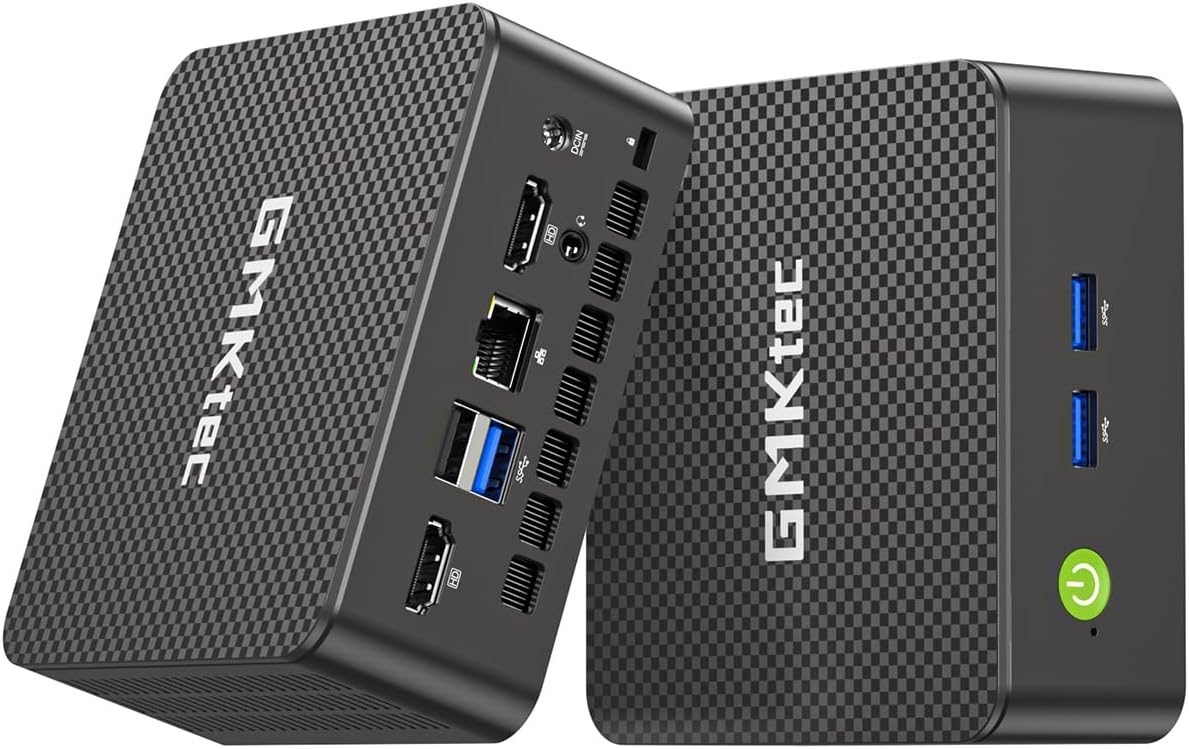
The GMKtec G11 is purpose-built for networking enthusiasts and home lab users. Featuring dual 2.5GbE Ethernet ports, it excels as a firewall, router, or NAS server using software like pfSense or Proxmox.
We may earn a commission when you buy through this link, at no additional cost to you.
Its AMD R2514 processor with dual-channel 16GB RAM delivers smooth multitasking and triple 4K display support. The enhanced GPU performance ensures responsive graphics for light gaming or media tasks alongside server duties.
While it does not ship with an OS, its hardware is optimized for Linux distributions like Debian or Ubuntu Server. The design supports 24/7 continuous operation with reliable thermal management for always-on environments.
Best for advanced users needing high-speed connectivity and virtualization capabilities. The compact form factor allows discreet placement in racks or home offices while handling demanding network workloads.
Dual Ethernet ports enable routing, VLANs, and isolated networks for enhanced security.
Dual-channel memory improves bandwidth for graphics and data-intensive applications.
We may earn a commission when you buy through this link, at no additional cost to you.
The CyberGeek Mini PC packs an Intel Core i9-11900H processor with 32GB DDR4 RAM and 1TB SSD, delivering desktop-class performance in a compact case. It ships with Ubuntu Linux, making it ready for development and creative tasks.
We may earn a commission when you buy through this link, at no additional cost to you.
With support for triple 4K displays and advanced cooling, it handles graphics workloads and multitasking smoothly. Six USB ports and dual LAN connections ensure versatile peripheral and network integration for complex setups.
Trade-offs include higher heat output and cost compared to lower-end models. However, the raw processing power and Linux readiness make it a top choice for professionals and developers needing high-end mini PC capabilities.
Ideal for coding, data analysis, or media production where performance is critical. The compact design and powerful specs offer a practical alternative to traditional tower desktops for serious users.
Intel UHD Graphics handle light gaming and professional applications efficiently.
Ubuntu Linux provides flexibility to tailor the system to specific workflows and tools.
We may earn a commission when you buy through this link, at no additional cost to you.
The BOSGAME E5 combines AMD Ryzen 3 5300U efficiency with dual 2.5GbE LAN ports, making it perfect for advanced networking and daily productivity. It includes 16GB DDR4 RAM and a fast 512GB NVMe SSD for responsive performance.
We may earn a commission when you buy through this link, at no additional cost to you.
Its AMD Radeon Graphics support triple 4K@60Hz output via HDMI, DisplayPort, and USB-C. The full-function Type-C port adds versatility for data transfer and power delivery, streamlining workspace connections.
While graphics are modest, the system excels in office tasks and virtualization. The quiet cooling and compact footprint make it suitable for environments where noise and space are concerns.
Recommended for users needing reliable networking features and multi-monitor support. Its expandability and clean design ensure long-term usability for business or home office setups.
Dual 2.5GbE LAN ensures fast and stable connections for home servers or routers.
USB-C supports data, video, and charging for simplified peripheral connectivity.
We may earn a commission when you buy through this link, at no additional cost to you.
The BOSGAME E4 Air offers excellent value with its AMD Ryzen 5 3500U processor and support for triple 4K displays. It is a budget-friendly option for users needing basic Linux compatibility and multi-monitor productivity.
We may earn a commission when you buy through this link, at no additional cost to you.
With 8GB DDR4 RAM and a 256GB SATA SSD, it handles daily tasks like browsing and document editing smoothly. Dual Gigabit Ethernet ports provide reliable network connections for stable performance.
While RAM is not expandable beyond 8GB in this model, it suffices for light workloads. The compact design and quiet operation make it a practical choice for home offices or media centers.
Best for those seeking affordable multi-display capabilities without heavy performance needs. Its warranty and reliable build ensure dependable service for everyday computing tasks.
Ryzen 5 3500U provides efficient performance for light productivity and streaming.
Triple 4K support allows versatile screen setups for improved workflow efficiency.
We may earn a commission when you buy through this link, at no additional cost to you.
The GMKtec G3S is an affordable entry-level mini PC powered by the Intel N95 processor. With 8GB DDR4 RAM and 256GB M.2 SSD, it provides adequate performance for basic tasks and media streaming.
We may earn a commission when you buy through this link, at no additional cost to you.
It supports dual 4K@60Hz displays via HDMI, making it suitable for light multi-monitor use. The inclusion of USB 3.2 ports and WiFi 5 ensures convenient connectivity for peripherals and wireless networks.
While not designed for heavy workloads, its efficient design keeps power consumption low and noise minimal. It serves as a practical secondary computer or digital signage solution for modest needs.
Ideal for users on a strict budget needing essential computing features. Its small footprint and straightforward operation make it easy to deploy in various settings.
Intel N95 balances cost and performance for light office and media tasks.
Plug-and-play design with standard ports simplifies initial configuration and use.
We may earn a commission when you buy through this link, at no additional cost to you.
Selecting the right Linux Mini PC requires balancing hardware specs, compatibility, and your specific use case. Here are the key factors to evaluate.
Choose a CPU that matches your workload intensity. For daily office tasks, AMD Ryzen 3 or Intel N-series processors suffice. Developers or creative professionals should consider Ryzen 7 or Intel Core i5/i9 for faster compilation and multitasking.
Look for at least 4 cores to ensure smooth performance in modern Linux environments.
RAM is crucial for Linux systems running multiple apps or virtual machines. Aim for 16GB minimum for comfortable multitasking. If your workload includes heavy data processing or VMs, 32GB or more ensures headroom.
Check if RAM is soldered or upgradable to plan for future expansion needs.
NVMe SSDs offer significantly faster boot and load times compared to SATA SSDs. Ensure the model supports at least one M.2 slot with PCIe Gen3 or Gen4 speeds for responsive performance.
Consider units with multiple slots if you plan to store large datasets or media files locally.
Verify that the hardware supports popular Linux distributions like Ubuntu or Mint. Preinstalled systems save setup time and guarantee driver availability for WiFi, audio, and graphics.
Check community forums for specific compatibility notes regarding WiFi chips or graphics drivers.
Dual or triple display support enhances productivity for multitasking. Look for HDMI, DisplayPort, and USB-C with DP Alt Mode to connect multiple monitors simultaneously.
Ensure the GPU supports your target resolutions, ideally 4K@60Hz for crisp visuals.
Rich port selection including USB 3.2, Ethernet, and audio jacks simplifies peripheral connections. WiFi 6E and Bluetooth 5.2 ensure fast wireless connectivity for modern networks.
Consider models with multiple LAN ports if you plan to use the device for networking or routing.
Cooling is vital for compact PCs running 24/7. Active fans with copper heat pipes maintain performance under sustained loads without overheating.
Review thermal tests or user feedback to ensure the unit remains quiet and stable during use.
A solid warranty protects against hardware defects. Look for at least a 1-year limited warranty and accessible customer support channels.
US-based assembly or local support can speed up troubleshooting and replacements.
Set up your Mini PC by connecting it to a power source and monitor. Use the included HDMI cable for display output, then follow the on-screen Linux setup wizard to configure your system.
Keep the unit in a well-ventilated area to prevent overheating. Avoid covering vents and dust regularly using compressed air to maintain cooling efficiency.
Regularly update your Linux OS and drivers to ensure security and performance. Use system settings to manage power modes for optimal energy savings.
Many models come preinstalled with Ubuntu or other distributions like Zorin OS. Others ship with Windows but support Ubuntu after installation. Check specifications for preinstalled OS details before purchase.
It depends on the model. Some have soldered RAM while others include SO-DIMM slots for upgrades. Always check the manufacturer specs for memory expansion options.
Entry-level models handle light gaming but integrated graphics limit high-end performance. Gaming-capable units with Ryzen 7 or Intel Core i9 offer better frame rates for casual titles.
Most models support dual or triple 4K displays via HDMI, DisplayPort, and USB-C. Verify port types and maximum resolution limits to match your display setup.
Linux is ideal for developers and privacy-focused users due to lower resource usage and customization. Windows remains preferable for specific proprietary software compatibility.
Yes, their low power consumption and networking features make them excellent for NAS or home server tasks. Ensure adequate storage and RAM for your intended workload.
We reviewed ten leading Linux Mini Pcs ranging from budget to premium tiers. The TK Node Mini PC leads with Zorin OS and strong build quality while the ASUS NUC 14 Pro offers top-tier performance for professionals.
Prioritize RAM, storage type, and Linux compatibility based on your needs. Ensure the model supports your required display outputs and connectivity options for seamless integration into your workspace.
Prices fluctuate frequently so verify current availability and deals before purchasing. Use this guide to make an informed choice tailored to your workflow and budget.