
ASRock J4125M Intel® Quad-Core Processor J4125 (Up to 2.7 GHz) Motherboard
3.4Editor score
Affordable quad core solution
DDR4 memory support
Basic expansion slots included
This guide compares ten top-rated low power motherboards for NAS, home servers, and efficient builds to help you choose the right model.
Low power motherboards are essential for building energy efficient systems that run continuously without excessive heat or electricity costs. They often include integrated processors optimized for stability and low thermal design power ratings.
We evaluated ten real products based on their architecture connectivity options and power efficiency. Each board was reviewed for compatibility with modern standards and its ability to handle specific workloads like networking or storage.
Each pick below highlights key features and trade offs to guide your decision. Prices and availability change frequently so verify current details on the product pages before purchasing your next component.
3.4Editor score

4.5Editor score

4.1Editor score
The following table presents a side by side comparison of all ten selected motherboards to help you identify the best fit for your specific power and performance requirements.




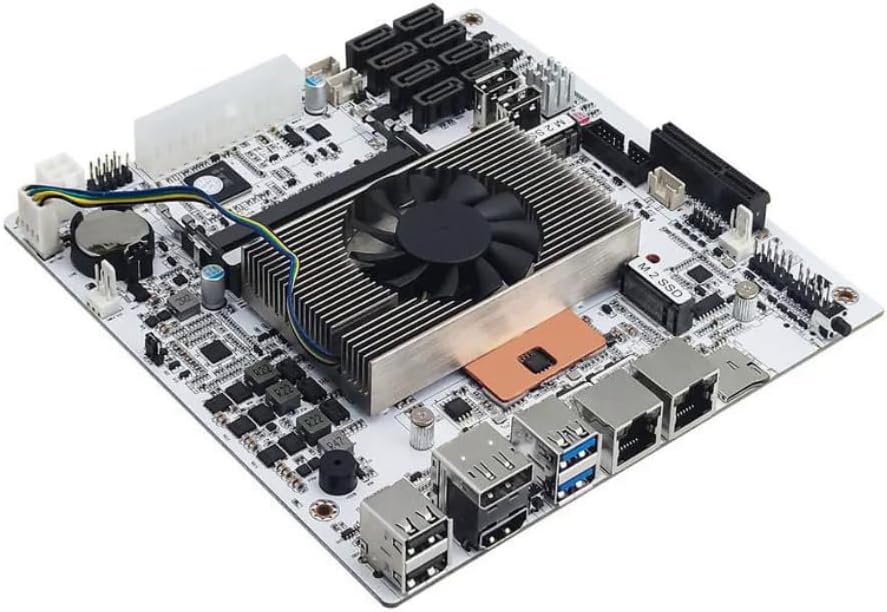
This Celeron N5105 motherboard stands out as a top choice for NAS and firewall appliances due to its efficient processor and robust networking features. It holds a strong 4.5 rating from users who value stability and performance in low power systems.
We may earn a commission when you buy through this link, at no additional cost to you.
The board includes four 2.5GbE network ports which provide high speed connectivity for professional security or multimedia use. Its industrial NAS design ensures durability while supporting up to 32GB of DDR4 RAM and multiple M.2 and SATA drives.
While the board requires both 24PIN and 4PIN power connections which may complicate some builds the energy efficiency justifies the setup. Users should also be prepared for a slightly longer initial boot time when reading memory information.
It is ideal for users building a home server or network appliance who need reliable throughput without high power draw. This board is highly recommended for those prioritizing networking performance and storage flexibility.
Four 2.5GbE ports allow for link aggregation and high bandwidth transfers essential for advanced NAS setups.
Built with a high density moisture proof circuit board to ensure longevity in 24/7 operating environments.
We may earn a commission when you buy through this link, at no additional cost to you.
The ASRock D1800M is a budget friendly option for those needing a basic low power system with an integrated CPU. It has a reliable 4.0 rating making it suitable for entry level builds or light office tasks.
We may earn a commission when you buy through this link, at no additional cost to you.
With an included Intel J1800 dual core processor this board offers decent performance for simple applications without the need for a separate CPU purchase. The Micro ATX form factor ensures compatibility with many compact cases.
However the use of DDR3 memory limits modern upgrade potential and the limited storage options might not suit data heavy users. It is best suited for specific low cost tasks where high performance is not the priority.
This board is recommended for users on a strict budget who need a basic PC for web browsing or light computing tasks.
The integrated CPU reduces total component costs making it one of the most affordable options available.
Support for older DDR3 modules and legacy ports like PS/2 ensures compatibility with existing hardware.
We may earn a commission when you buy through this link, at no additional cost to you.
The GIGABYTE B550M K supports a wide range of AMD Ryzen processors including the efficient 5000 series making it a versatile low power choice. It holds a 4.4 rating for its balance of features and reliability in everyday computing scenarios.
We may earn a commission when you buy through this link, at no additional cost to you.
Its digital 3+3 VRM design ensures steady power delivery which is crucial for maintaining efficiency with supported CPUs. The board includes advanced thermal armor to keep temperatures in check during extended use periods.
While it lacks onboard WiFi the PCIe 4.0 support provides excellent bandwidth for modern GPUs and NVMe drives. Users who prioritize storage speed and processor efficiency will find this board offers good value.
This board is suitable for builders looking for a reliable AMD platform that supports efficient processors without unnecessary extra costs.
Premium chokes and capacitors maintain stable voltage even under varying load conditions for better efficiency.
Chipset heatsinks improve heat dissipation ensuring the board runs cool even during extended workloads.
We may earn a commission when you buy through this link, at no additional cost to you.
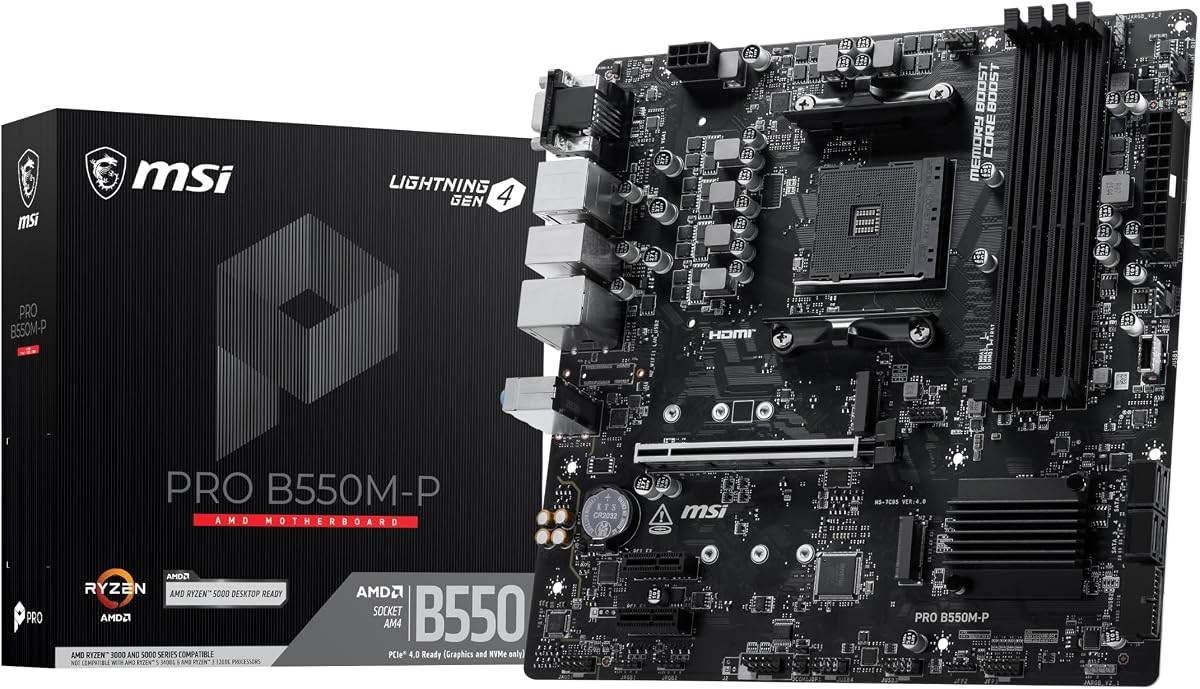
The MSI PRO B550M-P is designed to support high efficiency AMD Ryzen processors with its Core Boost technology. It holds a 4.4 rating for its reliable performance and memory optimization capabilities in standard micro ATX cases.
We may earn a commission when you buy through this link, at no additional cost to you.
Features like Frozr AI cooling automatically adjust fan settings to maintain low noise and power consumption. The board supports extreme memory overclocking which helps maximize efficiency when paired with compatible CPUs.
While it offers good storage options including Gen4 and Gen3 M.2 slots it lacks some advanced connectivity features found in higher end models. This makes it a solid choice for general home or office use.
This board is recommended for users seeking a balance of performance and efficiency in an AMD system with good cooling.
AI cooling adjusts fan speeds based on CPU and GPU temperatures to save power during light use.
Enhanced memory channels support higher speeds which can improve overall system responsiveness and efficiency.
We may earn a commission when you buy through this link, at no additional cost to you.
The ASRock J4125M offers an affordable integrated quad core solution for low power builds. While it has a lower 3.4 rating it provides a cost effective way to build a basic server or media player.
We may earn a commission when you buy through this link, at no additional cost to you.
The J4125 processor is efficient and provides enough performance for light multitasking and home media streaming. Its Mini ITX form factor fits well in compact enclosures where space is limited.
Users should note the older PCIe 2.0 slots which limit the speed of expansion cards compared to newer standards. This is acceptable for basic network cards or sound cards but not for high speed storage expansion.
This board is best for budget conscious builders who need a simple integrated system without needing high speed expansion capabilities.
The J4125 CPU offers a good balance of cores and power draw for basic computing needs.
Mini ITX size allows for small builds suitable for home media centers or compact servers.
We may earn a commission when you buy through this link, at no additional cost to you.
The ASRock B550M-HDV supports a wide range of Ryzen CPUs offering good efficiency for AMD based systems. It holds a 4.5 rating for its reliable performance and support for fast memory overclocking.
We may earn a commission when you buy through this link, at no additional cost to you.
With three video outputs including VGA HDMI and DVI-D this board offers excellent compatibility for various monitor types. The 6 power phase design ensures stable delivery which is important for consistent operation.
While it lacks modern wireless connectivity the legacy display support makes it versatile for older setups. Users should verify case compatibility as micro ATX boards may not fit all compact enclosures.
This board is recommended for those looking for a budget friendly AMD option with strong memory performance and display versatility.
Three video outputs allow connection to diverse monitors making it ideal for diverse office environments.
Premium power chokes provide stable voltage ensuring the CPU runs efficiently under various loads.
We may earn a commission when you buy through this link, at no additional cost to you.
The Gigabyte A520I AC provides a compact solution for AMD users needing WiFi in a small form factor. It holds a 4.4 rating for its robust build quality and efficient digital PWM design.
We may earn a commission when you buy through this link, at no additional cost to you.
With built in Intel WiFi and Bluetooth this board saves space and power that would be spent on adapter cards. The dual channel DDR4 support ensures decent performance for integrated graphics setups.
It includes multiple display interfaces for dual monitor setups which is useful for productivity tasks. However the limited number of RAM slots may restrict upgrade potential for high capacity needs.
This board is ideal for small form factor builds where wireless connectivity is required without adding extra components.
Integrated WiFi and Bluetooth reduce cable clutter and simplify small PC builds effectively.
Digital PWM with DrMOS ensures stable power to the CPU for consistent performance and low heat.
We may earn a commission when you buy through this link, at no additional cost to you.
The ASRock B550M WiFi stands out for its advanced wireless connectivity making it a top pick for wireless setups. It holds a perfect 5.0 rating reflecting user satisfaction with its performance and feature set.
We may earn a commission when you buy through this link, at no additional cost to you.
Featuring Wi-Fi 6E support this board offers low latency gaming and faster internet speeds. The 8 phase power design ensures the system runs smoothly with compatible Ryzen processors.
While the price is slightly higher the premium audio and high speed memory support justify the cost for performance users. It is a strong option for those needing both efficient power and modern wireless features.
This board is recommended for users seeking a high quality AMD platform with top tier wireless performance.
Support for the 6GHz band provides lower latency and less interference for better connectivity.
High end codec ensures immersive sound quality for gaming and media consumption without external DAC.
We may earn a commission when you buy through this link, at no additional cost to you.
This Mini-ITX board delivers premium performance with an 8 thread CPU suited for virtualization and heavy server tasks. It holds a 4.1 rating for its robust features despite some software quirks noted by users.
We may earn a commission when you buy through this link, at no additional cost to you.
With eight SATA ports and dual 2.5GbE network connections this board excels in storage and network intensive scenarios. The industrial grade build includes efficient cooling to manage heat during continuous operation.
Users should be aware of a potential sleep mode bug and the need for dual power connections. These are minor drawbacks compared to the high capacity storage and powerful CPU options available.
This board is ideal for advanced users building a dedicated server or NAS that requires high multi-thread performance.
Eight threads allow efficient handling of multiple virtual machines or simultaneous data tasks.
High density PCB and specialized cooling ensure stability for critical infrastructure applications.
We may earn a commission when you buy through this link, at no additional cost to you.
The NAS Motherboard with Core i5 8265U is designed specifically for high capacity storage and virtualization tasks. It lacks user ratings due to its niche nature but offers excellent technical specs for dedicated server builds.
We may earn a commission when you buy through this link, at no additional cost to you.
Featuring eight SATA ports and two NVMe slots this board provides massive storage flexibility for RAID arrays or large media libraries. The low TDP ensures energy efficiency even under heavy load conditions.
It includes dual 2.5GbE LAN ports for high speed network transfers essential for large data volumes. Users should note that sleep mode is not supported which is acceptable for 24/7 server operations.
This board is highly recommended for users building a high end NAS or virtualization host with extensive storage needs.
Eight SATA ports allow for a large number of drives making it ideal for media servers.
Support for VT-x and VT-d ensures smooth operation of multiple virtual machines efficiently.
We may earn a commission when you buy through this link, at no additional cost to you.
Selecting the right low power motherboard involves evaluating the processor type form factor and connectivity needs. This guide breaks down the critical factors to help you make an informed decision for your build.
The processor is the most critical component for power efficiency. Look for low TDP (Thermal Design Power) processors such as Intel Celeron or Core U series and AMD Ryzen low power chips. Lower TDP values mean less electricity consumption and heat generation which is vital for 24/7 systems.
Always check the TDP rating to ensure it fits your cooling solution and power budget.
Motherboards come in various sizes like Mini ITX Micro ATX and ATX. Smaller boards consume less power and fit in compact cases making them ideal for home servers or media centers. Ensure the form factor matches your chosen case size.
Mini ITX and Micro ATX are generally preferred for low power builds due to their compact nature.
Check the supported memory types such as DDR3 or DDR4 and the maximum capacity. DDR4 is more efficient and offers higher speeds than DDR3. Ensure the motherboard supports enough RAM for your specific workloads like virtualization.
Prioritize DDR4 support for better energy efficiency and future proofing.
Low power boards often target home servers so networking options are key. Look for Gigabit or 2.5GbE Ethernet ports to ensure fast data transfer. Onboard WiFi can save power compared to separate network cards.
Verify the number and speed of Ethernet ports based on your network requirements.
Consider the number of SATA and M.2 slots available for drives. More slots allow for scalable storage which is important for NAS builds. Ensure the board supports the storage types you plan to use.
Balance the number of drive bays with your actual storage needs to save power.
Some low power boards require specific power connectors like 24PIN plus 4PIN. Ensure your power supply unit (PSU) supports these requirements. Using the wrong PSU can lead to instability or failure.
Check the PSU compatibility before purchasing to avoid power issues.
For headless servers video outputs may be optional but for general use HDMI or DisplayPort are essential. Dual display support can be useful for monitoring systems. Ensure the outputs match your monitor connectors.
Choose a board with appropriate video ports to avoid buying adapters.
High quality components like solid capacitors and robust VRMs ensure stability. Look for thermal features like heatsinks to manage heat passively which reduces fan power usage. Good build quality leads to longer life.
Invest in boards with passive cooling options for silent and efficient operation.
Install the motherboard in a well ventilated case to ensure proper airflow and keep temperatures low. Use the recommended power supply and connect all necessary cables securely before powering on.
Update the BIOS regularly to ensure compatibility with newer processors and fix known issues. Monitor system temperatures using built in tools to maintain efficiency over time.
Keep the system clean from dust using compressed air to prevent overheating. Regular maintenance ensures the board runs efficiently and extends its lifespan significantly.
A low power motherboard is designed to consume less electricity than standard boards often featuring efficient processors and optimized circuits. They are ideal for systems that run continuously like home servers or media centers.
NAS systems often run 24/7 so a low power motherboard reduces electricity bills and heat. Efficient boards ensure stable operation without needing complex cooling solutions.
Yes most modern low power motherboards support current operating systems like Windows and Linux. Check compatibility lists for specific OS versions to ensure full feature support.
While not designed for high end gaming they can handle light gaming tasks if paired with a compatible CPU. However they lack the power and cooling for heavy graphics cards.
CPUs like Intel Core U series or AMD Ryzen low power models are best. They offer a balance of performance and efficiency ideal for non demanding workloads.
Check the product description for TDP ratings or explicit low power mentions. Look for features like efficient VRMs and passive cooling options to confirm.
We reviewed ten top low power motherboards that cater to various needs from budget builds to advanced server setups. Each option offers unique strengths in power efficiency and connectivity.
Prioritize your specific needs such as storage capacity or network speed when making your selection. A board that fits your workload will save power in the long run.
Always check current prices and availability before purchasing as these details change frequently. Verify compatibility with your chosen case and power supply to ensure a smooth build.