
HP Color LaserJet Pro MFP 3301sdw
3.7Editor score
Reliable HP brand quality
26 ppm print speed
250-sheet input tray
This guide compares the top 10 Color Laser Mfp for Office models based on speed, features, and reliability to help you choose the right machine.
Finding the right Color Laser Mfp for Office can transform your daily workflow and boost productivity significantly. Modern machines offer printing, scanning, copying, and faxing in one compact device. They save space while delivering professional quality documents for teams of all sizes.
We compared ten leading models based on speed, connectivity, security, and overall value. Each product was evaluated for its ability to handle high-volume tasks and maintain consistent output quality. Our analysis focuses on real-world performance metrics and user satisfaction ratings.
Each pick highlights key strengths and potential trade-offs to help you decide quickly. Prices and availability change frequently so check the links for the latest offers. These reviews provide a clear view of what each machine brings to your office environment.
3.7Editor score
4.4Editor score

4.2Editor score
This table provides a side-by-side look at the top ten models. It highlights key specifications to help you compare speed and features quickly.


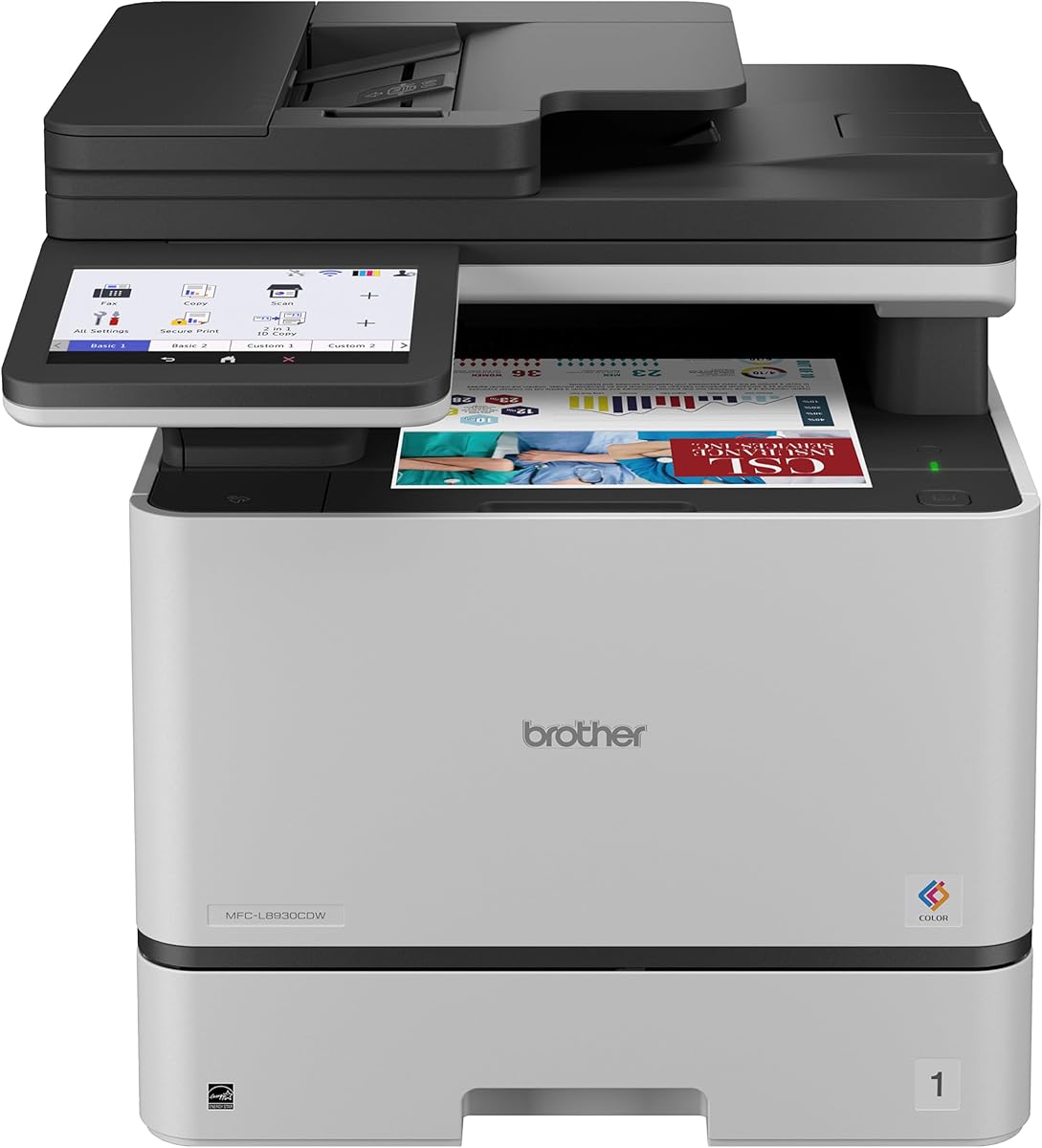
This Brother MFC-L8930CDW stands out as a top choice for busy offices needing speed and security. It received a strong rating for its reliable performance and feature-rich design. The machine handles high-volume tasks efficiently while maintaining sharp output quality.
We may earn a commission when you buy through this link, at no additional cost to you.
Its 33ppm speed helps boost productivity significantly. The two-sided scanning up to 104ipm ensures documents are digitized quickly. The 7-inch color touchscreen makes navigation easy. You can create shortcuts for frequent tasks to save time daily.
While the price is higher, the included toner and security features justify the cost. The compact design saves space compared to previous models. This makes it suitable for smaller offices that need enterprise-level capabilities.
Businesses prioritizing security and speed should consider this model. It offers a complete package for professional document handling. The investment pays off through reduced operational costs and enhanced productivity.
Triple Layer Security protects documents in transit. Dual-band wireless ensures stable network connections for all users.
Included standard yield toner lowers initial costs. High-yield options help maximize printing budgets long-term.
We may earn a commission when you buy through this link, at no additional cost to you.
The HP Color LaserJet Pro MFP 3301sdw offers essential features at an accessible price point. It is ideal for small teams needing basic document management. The machine delivers professional quality color reports and documents consistently.
We may earn a commission when you buy through this link, at no additional cost to you.
With speeds up to 26 ppm, it handles daily tasks without delay. The TerraJet toner ensures vivid colors for presentations. It includes a 250-sheet input tray for uninterrupted printing. The auto document feeder simplifies copying multi-page documents.
Some users may find the feature set basic compared to higher-end models. The input capacity is lower than enterprise machines. However, for smaller offices, these trade-offs are often acceptable for the price.
Teams looking for a reliable entry-level printer will appreciate this model. It balances cost and performance well. It is a solid choice for maintaining productivity without breaking the budget.
Next-generation TerraJet toner brings business documents to life. Auto duplex printing saves paper automatically.
Performance you can count on page after page. Always ready for the high demands of business.
We may earn a commission when you buy through this link, at no additional cost to you.
The Canon Color imageCLASS MF753Cdw II delivers premium performance for office environments. It combines print, scan, copy, and fax functions efficiently. The machine ensures professional color documents with sharp details every time.
We may earn a commission when you buy through this link, at no additional cost to you.
Its duplex printing capability saves paper and time. The wireless setup allows flexible placement within the office. Users benefit from seamless integration with various devices. The compact design fits well in smaller spaces.
While more expensive, the features justify the investment. The limited toner yield requires careful management. However, the quality and speed make it a strong contender for professional needs.
Organizations needing high-quality color output should consider this model. It offers reliability and performance. The convenience of wireless connectivity enhances daily workflow significantly.
Sharp color and black printing for reports. Professional results for client-facing documents.
Wireless setup allows flexible placement. Easy connection for mobile and desktop devices.
We may earn a commission when you buy through this link, at no additional cost to you.
This refurbished HP model offers high-end features at a lower cost. It supports up to 10 people efficiently. The machine includes security features to protect sensitive data. The 35 ppm speed keeps teams productive.
We may earn a commission when you buy through this link, at no additional cost to you.
The HP Wolf Pro Security ensures information remains safe. Intelligent Wi-Fi maintains a reliable connection constantly. The ADF speeds up copying and scanning tasks. Mobile printing works from any device easily.
Buying refurbished carries some risk regarding used parts. However, the warranty provides peace of mind. This option is great for teams needing performance without new equipment costs.
Teams looking for value should consider this model. It brings enterprise features to smaller budgets. The security and speed make it a reliable choice.
Up to 35 color pages per minute. HP Wolf Pro Security protects data.
Intelligent Wi-Fi stays connected online. Mobile printing from any device.
We may earn a commission when you buy through this link, at no additional cost to you.
This HP model excels at mobile printing for dynamic teams. It supports devices like Chromebooks and Android. The security suite protects sensitive documents effectively. Print speeds reach up to 35 ppm quickly.
We may earn a commission when you buy through this link, at no additional cost to you.
Bluetooth and Ethernet connections offer flexibility. You can print from tablets or phones easily. The starter cartridges get you started quickly. The duplex feature reduces paper usage automatically.
The higher price reflects its broad connectivity options. Starter cartridges have lower yields. However, the convenience of mobile printing makes it worthwhile for many.
Teams needing seamless mobile integration should choose this. It offers robust connectivity and speed. The security adds value for businesses handling sensitive data.
Works with Microsoft, Mac, AirPrint, Android. Bluetooth and Ethernet included for flexible connections.
Starter cartridges included. Replacement cartridges available with high yields.
We may earn a commission when you buy through this link, at no additional cost to you.
This HP model combines fax capabilities with color printing. It suits small teams needing document diversity. The 26 ppm speed is sufficient for daily tasks. The toner produces vivid colors consistently.
We may earn a commission when you buy through this link, at no additional cost to you.
Faxing is seamless alongside scanning and copying. The wireless setup allows easy network connection. The 250-sheet tray minimizes refills. Auto duplex printing saves paper effectively.
The interface is basic compared to larger screens. This might affect navigation ease. However, for essential tasks, it works well. It remains a reliable choice for fax needs.
Businesses needing fax support will find this useful. It balances functions efficiently. The TerraJet toner ensures professional document quality.
Professional-quality color and fax documents. Perfect for small teams with fax needs.
Up to 26 ppm black and color. TerraJet toner enhances productivity.
We may earn a commission when you buy through this link, at no additional cost to you.
This refurbished unit emphasizes sustainability and cost savings. It reduces carbon footprint with certified energy efficiency. The warranty provides confidence in its condition. It handles faxing and scanning reliably.
We may earn a commission when you buy through this link, at no additional cost to you.
Security tools protect against cyber threats effectively. You can print and scan via smartphone app. The 26 ppm speed meets daily needs. Recycle cartridges with HP Planet Partners easily.
The refurbished nature might deter some buyers. Yet, the warranty helps mitigate risk. This model suits eco-conscious teams. It offers standard features without premium costs.
Organizations valuing sustainability should consider this. It balances performance and environmental impact. The warranty ensures reliability despite being pre-owned.
Decrease carbon footprint with energy efficiency. Recycle toner cartridges with HP Planet Partners.
Built-in HP Wolf Pro Security protects networks. Helps keep devices secure against threats.
We may earn a commission when you buy through this link, at no additional cost to you.
This Canon model features a large touchscreen for control. The Application Library simplifies feature access. It offers a long warranty for peace of mind. Print speeds match most office needs.
We may earn a commission when you buy through this link, at no additional cost to you.
The 5-inch screen is intuitive to navigate. Setup is quick for wireless connection. High-capacity toner reduces replacements. You can print from mobile devices easily.
The ADF holds only 50 sheets. This limits large batch scanning. The paper capacity is standard for entry-level. These are acceptable trade-offs for the interface.
Teams wanting easy control should choose this. The warranty is a major benefit. It simplifies tasks for non-technical users.
5-inch color touchscreen for quick tasks. Application Library provides customized access.
3-Year limited warranty offers peace of mind. Chromebook compatible for diverse teams.
We may earn a commission when you buy through this link, at no additional cost to you.
This HP model delivers seamless cross-device experiences. The FutureSmart platform ensures consistent performance. It offers fast printing and strong security. Faxing and scanning are efficient.
We may earn a commission when you buy through this link, at no additional cost to you.
Reliable Wi-Fi automatically reconnects when needed. Security protects against next-gen cyber threats. The speed supports high-volume workflows. It is designed for small work teams.
As a newer model, it may be pricier. Features are advanced but may require training. It is suitable for future-proofing operations. The security is a strong selling point.
Teams prioritizing security and consistency should choose this. It ensures smooth workflow across devices. The speed keeps pace with busy demands.
Delivers simple, consistent user experience. Works seamlessly across devices effectively.
Quantum-resistant security protects against threats. Includes HP Wolf Pro Security tools.
We may earn a commission when you buy through this link, at no additional cost to you.
This enterprise model focuses on robust wired connections. It ensures consistent performance via HP FutureSmart. Speed is high for demanding workflows. Security is designed for complex networks.
We may earn a commission when you buy through this link, at no additional cost to you.
Ethernet and USB provide stability. This is ideal for secure environments. The ADF and fax support document handling. Security protects against next-gen threats well.
The price is higher for enterprise needs. Lack of Wi-Fi limits flexibility. However, wired reliability is crucial for some. It suits offices with strict security policies.
Organizations needing wired security should choose this. It balances speed and safety effectively. The platform supports future software updates.
Reliable Ethernet or Hi-Speed USB connection. Secure for strict network policies.
Up to 35 color pages per minute. HP FutureSmart delivers consistent experience.
We may earn a commission when you buy through this link, at no additional cost to you.
Selecting the right printer requires evaluating several key factors beyond just brand. These factors help ensure the device matches your office size and workflow.
Print speed measured in pages per minute (ppm) determines how fast documents are ready. Faster speeds are essential for busy offices to avoid bottlenecks during peak hours. Aiming for at least 20 ppm helps maintain efficiency. Look for both black and color speeds to ensure balanced performance.
Prioritize speed that matches your monthly volume.
A color laser MFP combines printing, scanning, copying, and faxing. This reduces the need for separate devices, saving space. Ensure the scanner quality and ADF capacity meet your needs. Faxing is still relevant for many industries.
Choose all-in-one models to streamline office workflows.
Connectivity determines how easily devices connect to the network. Wireless options like Wi-Fi are vital for mobile printing. Ethernet ensures stability for high-volume tasks. Look for Bluetooth and cloud support for flexibility. Consider mobile app compatibility for remote work.
Ensure your network supports the required protocols.
Paper capacity affects how often you need to refill trays. Standard trays hold 250 sheets, but higher volume offices may need more. Dual cassettes reduce downtime. Also check the input tray size for special media.
Match tray size to your monthly print volume.
Office printers are vulnerable to cyber threats. Look for built-in security like encrypted data and firmware updates. Advanced features include user authentication and intrusion detection. This protects sensitive documents and networks effectively. Ensure compliance with industry standards.
Prioritize security for businesses handling confidential data.
Toner costs impact the total cost of ownership. Check page yields and whether high-yield cartridges are available. Some models offer toner-level monitoring to prevent running out. Original manufacturer toners ensure quality but may cost more.
Calculate cost per page to find value.
A touchscreen interface simplifies navigation and task management. Large displays help with quick setup and scanning. Look for customizable shortcuts for frequent tasks. A user-friendly interface reduces training time for staff.
Choose intuitive controls for better adoption.
A warranty protects your investment against defects. Longer coverage periods offer peace of mind. Check the availability of local support or online resources. Some brands offer extended plans for office use.
Select a brand with strong support services.
Start by installing the printer drivers on your computers and mobile devices. Follow the on-screen instructions to connect to your network. Ensure the wireless settings match your router configuration. This step is essential for seamless printing.
Load paper into the tray and adjust the guides to prevent jams. Keep the machine clean by wiping dust from surfaces regularly. Use the provided cleaning sheets to maintain print quality. This prevents smudges and streaks on output.
Schedule regular firmware updates to ensure security and performance. Replace toner cartridges when levels run low to avoid empty prints. If you notice issues, try restarting the device first. Contact support if problems persist.
A Color Laser Mfp is a multifunction printer that uses laser technology to produce color documents. It typically combines printing, scanning, copying, and faxing into one device. This saves space and improves office efficiency significantly.
Laser printers are generally faster and more cost-effective for high-volume printing. They produce sharper text and are better for documents. Inkjets may be better for photos. Choose based on your specific office needs.
Most models support Wi-Fi, Ethernet, or USB connections. Use the printer's touchscreen or a web interface to set up wireless access. Download drivers from the manufacturer's website for computers. Mobile apps also facilitate easy printing.
Yes, most modern color laser MFPs support mobile printing. Use apps like AirPrint, Google Cloud Print, or manufacturer-specific apps. Ensure your phone and printer are on the same Wi-Fi network. Some models also support Bluetooth connectivity.
Toner replacement depends on print volume and cartridge yield. Standard cartridges might last 1,000 to 3,000 pages. High-yield versions last longer. Monitor levels using the printer's display to avoid running out unexpectedly.
Important security features include encryption for data in transit and user authentication. Look for built-in firewalls and regular firmware updates. Secure Print requires a code to release documents. This prevents unauthorized access to sensitive information.
We explored ten top models ranging from budget-friendly to premium enterprise options. Each offers distinct advantages in speed, security, and connectivity to suit different needs. The Brother MFC-L8930CDW leads in features while the HP 3301sdw offers value.
Prioritize speed and security if your office handles sensitive documents. For smaller teams, the HP 3301sdw or Canon MF665Cdw are solid choices. Evaluate your monthly volume to determine the right toner efficiency. Consider connectivity requirements for mobile workers.
Remember to check current prices before making a final decision. Technology and deals change frequently. Use the links provided to compare the latest offers. This ensures you get the best value for your office.